1. Bubuka
Welcome to the user manual for your Fujitsu FMV LIFEBOOK A574 laptop. This guide provides essential information to help you set up, operate, maintain, and troubleshoot your device. Please read this manual thoroughly to ensure proper use and to maximize the performance and longevity of your laptop.
2. Setélan
2.1 Unboxing sareng Inspeksi Awal
Carefully remove the laptop and all accessories from the packaging. Verify that all components are present: the Fujitsu FMV LIFEBOOK A574 laptop, AC adapter, and power cord. Inspect the laptop for any physical damage. If any damage is found or components are missing, contact your vendor immediately.
2.2 Nyambungkeun Daya
- Connect the AC adapter to the power input port on the side of the laptop.
- Plug the power cord into the AC adapter.
- Colokkeun tungtung kabel listrik anu sanés kana stop kontak listrik anu dibumikeun.
The laptop battery will begin charging automatically. It is recommended to fully charge the battery before initial use.
2.3 Boot Awal sareng Setelan Windows 10
Press the power button to turn on the laptop. The system will guide you through the initial setup process for Windows 10. Follow the on-screen instructions to configure language, region, user accounts, and privacy settings.
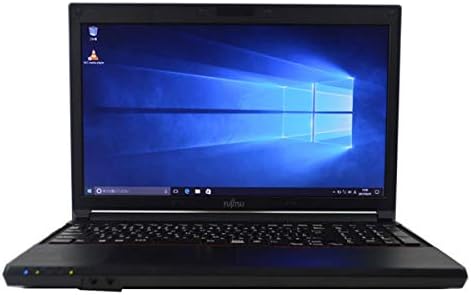
Figure 2.3.1: Fujitsu FMV LIFEBOOK A574 laptop powered on, displaying the Windows 10 desktop.
2.4 Nyambungkeun ka Wi-Fi
- After Windows 10 setup, click the Wi-Fi icon in the taskbar (usually in the bottom-right corner).
- Select your desired wireless network from the list of available networks.
- Pencét 'Sambungkeun' sareng lebetkeun konci kaamanan jaringan (sandi) upami dipenta.
- Sakali disambungkeun, ikon Wi-Fi bakal nunjukkeun sambungan aktip.
2.5 Nyapasangkeun Bluetooth
- Pindah ka Setélan > Paranti > Bluetooth & alat sejenna.
- Pastikeun Bluetooth dihurungkeun On.
- Pasang alat Bluetooth anjeun kana modél pasangan.
- Pencét Tambahkeun Bluetooth atawa alat sejen tur pilih Bluetooth.
- Pilih alat Anjeun tina daptar tur turutan sagala ajakan dina layar pikeun ngalengkepan papasangan.
3. Parentah Operasi
3.1 Kibor sareng Touchpad
The Fujitsu FMV LIFEBOOK A574 features a full-size keyboard with a dedicated numeric keypad for efficient data entry. The integrated touchpad allows for precise cursor control and supports multi-touch gestures.

Gambar 3.1.1: Detil view of the laptop's keyboard and touchpad area.
Fungsi keyboard:
- Tombol Fungsi (F1-F12): Often combined with the 'Fn' key for special functions like brightness control, volume adjustment, Wi-Fi toggle, etc.
- Papan tombol angka: Provides a convenient layout for number input, similar to a desktop keyboard.
Sapuan touchpad:
- Ketuk Tunggal: Kénca-klik.
- Ketok Dua Jari: Klik-katuhu.
- Gulung Dua Jari: Gulung ka luhur atanapi ka handap.
- Ciwit-pikeun-Zoom: Ngazum gede atawa leutik eusi.
3.2 Optical Drive (DVDROM)
Your laptop is equipped with a DVDROM drive, allowing you to read CDs and DVDs.

Figure 3.2.1: The optical drive tray extended from the side of the laptop.
Using the Optical Drive:
- Press the eject button on the drive or right-click the drive icon in 'This PC' and select 'Eject'.
- Carefully place a CD or DVD onto the tray with the label side facing up.
- Gently push the tray back into the laptop until it clicks into place.
- The disc content should automatically appear or can be accessed via 'This PC'.
3.3 USB Ports and Audio Output
The laptop includes multiple USB ports for connecting peripherals such as external hard drives, mice, and keyboards. A 3.5mm audio jack is provided for connecting headphones or external speakers.
3.4 Pre-installed Office Software
This laptop comes with office software pre-installed, enabling you to perform productivity tasks such as word processing, spreadsheets, and presentations immediately.
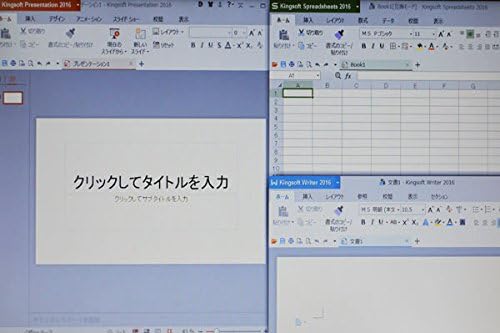
Figure 3.4.1: The laptop display showing multiple office applications running simultaneously.
4. Pangropéa
4.1 Parentah beberesih
- layar: Make kaen nu lemes, teu aya lint rada dampdikumbah ku cai atawa pembersih layar. Hindarkeun bahan kimia anu kasar.
- Keyboard jeung Casing: Paké lawon lemes, garing. Pikeun kokotor nekad, a rada damp lawon anu dieusi ku larutan sabun hampang tiasa dianggo, pikeun mastikeun teu aya cairan anu asup kana alat.
- Palabuhan: Anggo hawa anu dikomprés pikeun ngaleungitkeun lebu tina palabuhan.
4.2 Apdet parangkat lunak
Regularly update your Windows 10 operating system and drivers to ensure optimal performance, security, and compatibility. Go to Setélan > Update & Kaamanan > Windows Update pikeun mariksa tur masang apdet.
4.3 Perawatan Batré
- Hindarkeun sering-sering ngeusi batre.
- Simpen laptop dina tempat anu tiis sareng garing upami henteu dianggo kanggo waktos anu lami.
- Upami nyimpen kanggo waktos anu lami, pastikeun batréna dicas dugi ka sakitar 50-60%.
5. Cara ngungkulan
This section addresses common issues you might encounter with your Fujitsu FMV LIFEBOOK A574.
5.1 Taya Daya
- Pastikeun adaptor AC disambungkeun sacara aman ka laptop sareng stop kontak listrik anu tiasa dianggo.
- Pariksa naha stop kontak listrik berpungsi ku cara nyolokkeun alat sejen.
- Coba colokan listrik anu béda.
5.2 Wi-Fi Not Connecting
- Pariksa yén Wi-Fi diaktipkeun dina setélan Windows.
- Balikan deui router nirkabel sareng modem anjeun.
- Pastikeun anjeun ngasupkeun sandi Wi-Fi anu bener.
- Try connecting to a different Wi-Fi network if available.
5.3 Performance slow
- Tutup aplikasi anu teu perlu jalan di latar tukang.
- Pariksa sareng pasang apdet Windows anu ditangguhkeun.
- Jalankeun ngabersihan disk sareng defragmentasi (pikeun HDD).
- Pariksa malware atanapi virus nganggo parangkat lunak antivirus anu terhormat.
If you continue to experience issues, please refer to the official Fujitsu support websitus atanapi ngahubungan layanan palanggan maranéhna pikeun pitulung salajengna.
6. Spésifikasi
Below are the key technical specifications for the Fujitsu FMV LIFEBOOK A574 laptop:
| Fitur | Spésifikasi |
|---|---|
| merek | Fujitsu |
| Ngaran modél | A574 |
| Faktor Bentuk | Laptop |
| Sistem operasi | Windows 10 |
| Tipe CPU | Intel Core i3 4000M (4th Gen) |
| Kamampuh RAM | 8 GB DDR3 |
| Panyimpenan | 500 GB HDD |
| Ukuran tampilan | 15.6 inci |
| Resolusi | 1366 x 768 piksel |
| Prosesor Grafika | Intel Integrated Grafika |
| Girang optik | DVDROM |
| Konéktipitas Wireless | Wi-Fi, Bluetooth |
| Palabuhan | USB, Headphone Jack |
7. Garansi jeung Rojongan
Your Fujitsu FMV LIFEBOOK A574 laptop is covered by a manufacturer's warranty. Please refer to the warranty card included with your product for specific terms and conditions, including warranty duration and coverage details.
For technical support, driver downloads, or service inquiries, please visit the official Fujitsu support website or contact their customer service department. Keep your product's serial number handy when seeking support.
Rojongan Fujitsu Websitus: https://www.fujitsu.com/global/support/


