Bubuka
Hatur nuhun pikeun meuliasing the Trexonic Retro Record Player. This versatile audio system combines vintage aesthetics with modern functionality, allowing you to enjoy your favorite music from various sources including vinyl records, CDs, Bluetooth devices, AM/FM radio, and USB/SD cards. This manual provides detailed instructions for setup, operation, and maintenance to ensure optimal performance and longevity of your device.

Image: The Trexonic Retro Record Player, showcasing its classic design with the turntable lid open and a vinyl record in place.
Émbaran Kasalametan penting
Please read these safety instructions carefully before operating the unit. Keep this manual for future reference.
- Ulah ngalaan alat ieu ka hujan atawa beueus.
- Ulah meungpeuk sagala bukaan ventilasi. Pasang saluyu sareng parentah produsén.
- Entong dipasang di deukeut sumber panas sapertos radiator, register panas, kompor, atanapi aparat sanésna (kalebet ampLiifiers) anu ngahasilkeun panas.
- Nangtayungan kabel listrik tina leumpang atawa diciwit, utamana dina colokan, wadah merenah, jeung titik dimana aranjeunna kaluar tina aparat.
- Ngan anggo kantétan/aksésori anu ditunjuk ku produsén.
- Cabut colokan alat ieu nalika badai kilat atanapi nalika henteu dianggo kanggo waktos anu lami.
- Rujuk sadayana jasa ka tanaga jasa anu mumpuni. Diperlukeun ngalayanan nalika aparatur ruksak ku cara naon waé, sapertos kabel catu daya atanapi colokan rusak, cairan tumpah atanapi barang murag kana aparatur, aparatur parantos kakeunaan hujan atanapi lembab, henteu beroperasi normal. , atawa geus turun.
Fitur produk
The Trexonic Retro Record Player is equipped with a variety of features for a comprehensive audio experience:
- 3-Speed Belt-Driven Turntable: Plays 33 1/3, 45, and 78 RPM vinyl records.
- Diwangun-di Bluetooth: Ngalirkeun musik sacara nirkabel tina alat anu cocog.
- Pamuter CD: Supports standard audio CDs.
- Radio AM/FM: Integrated tuner with backlit display.
- USB/SD Input: For MP3 playback and recording vinyl to MP3.
- Input Bantu (3.5mm): Sambungkeun alat audio éksternal.
- Jack headphone: Pikeun déngékeun pribadi.
- Jalur Kaluar RCA: Connect to external speakers or audio systems.
- Alarm Clock with Timer: Programmable alarm and sleep timer functions.
- Speaker stéréo diwangun-di: For immediate audio playback.
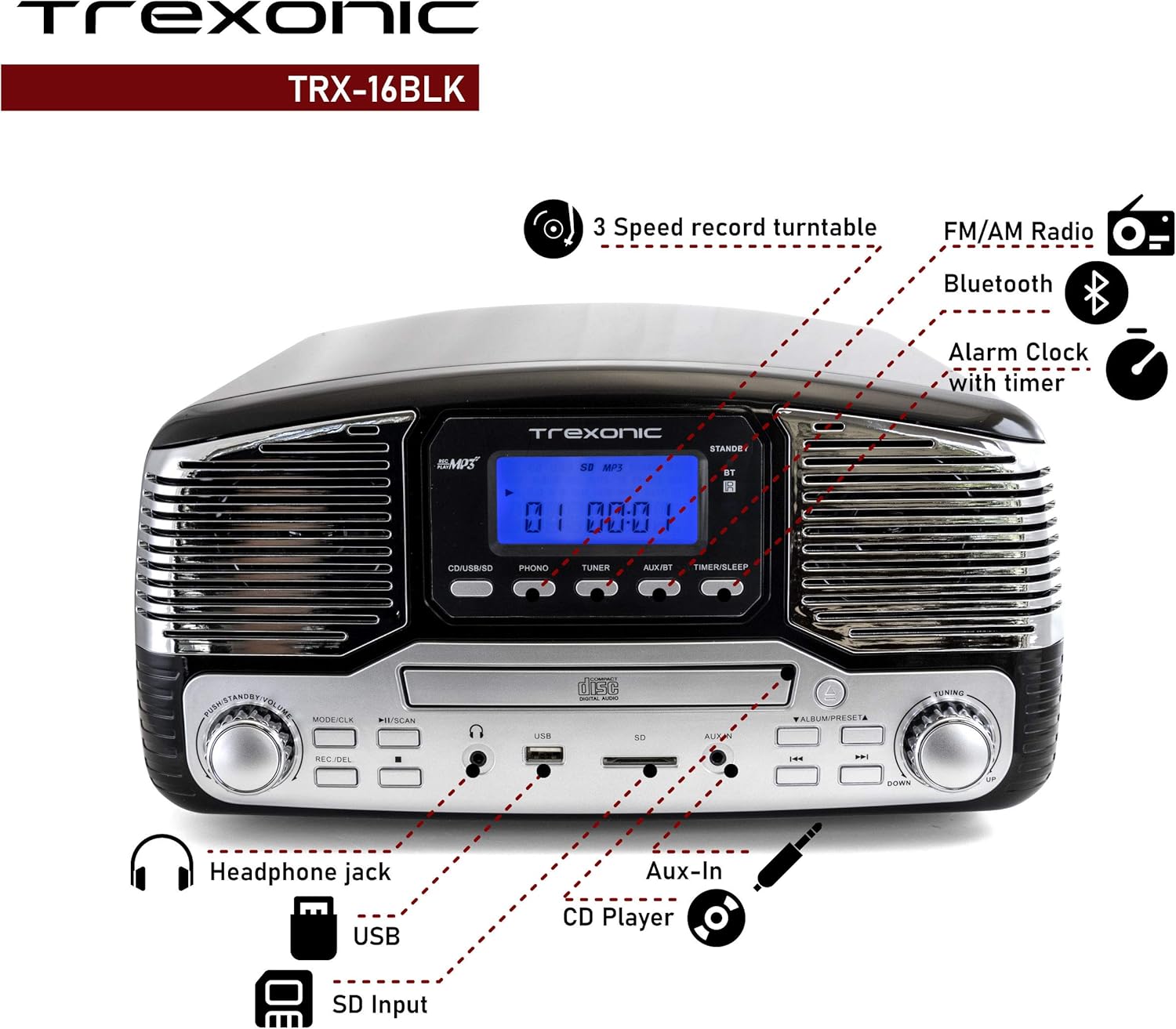
Image: A detailed diagram highlighting the key features and control locations on the Trexonic Retro Record Player.
Kontrol jeung Fungsi
Familiarize yourself with the various controls and ports on your Trexonic Retro Record Player:

Gambar: Deukeut view of the digital display and mode selection buttons (CD/USB/SD, PHONO, TUNER, AUX/BT, TIMER/SLEEP).
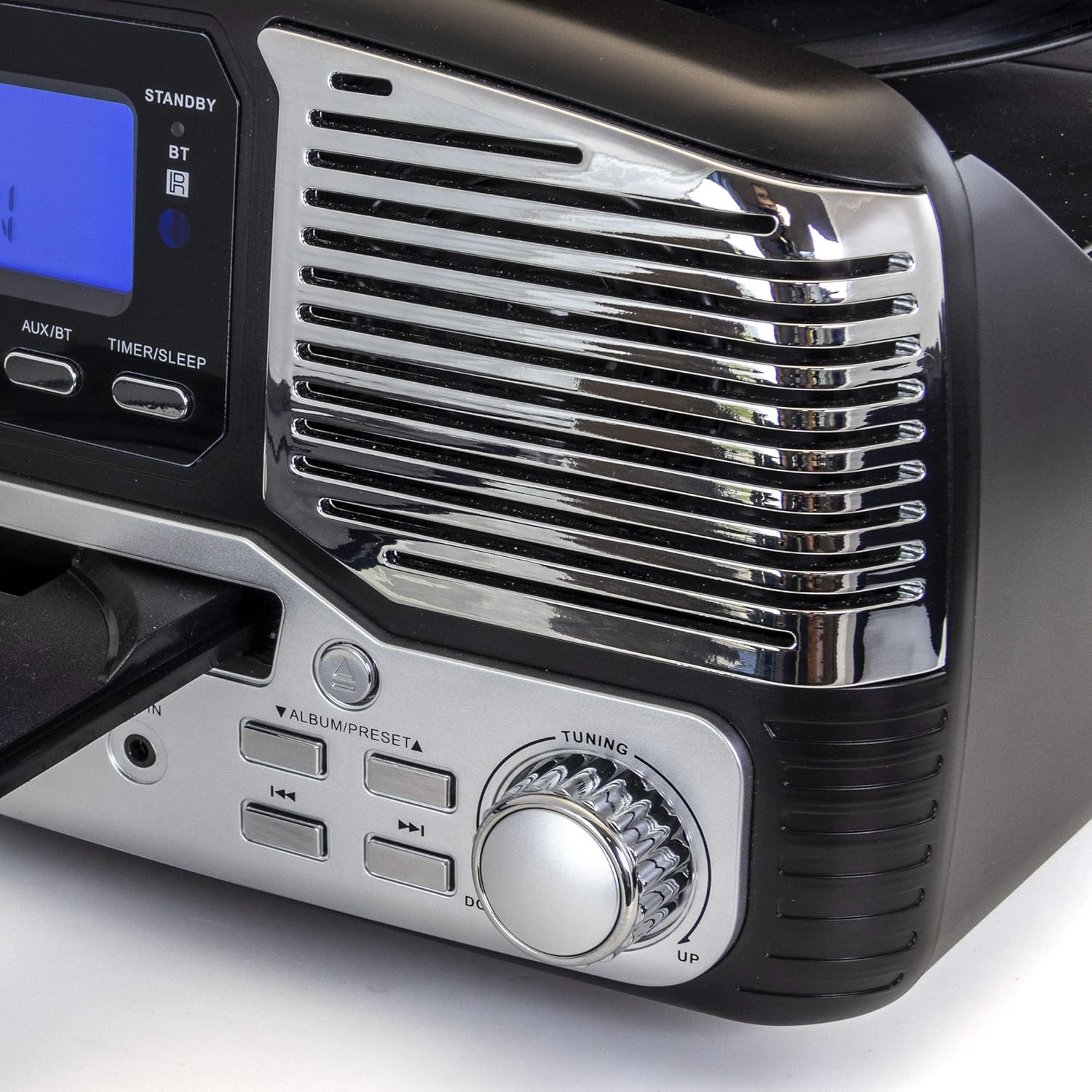
Gambar: Deukeut view of the tuning knob and track navigation buttons (SCAN, ALBUM/PRESET, UP, DOWN).
Key controls include:
- Kenop Daya/Volume: Ngahurungkeun/mareuman unit sareng nyaluyukeun volume.
- Mode/CLK Button: Selects audio source (CD/USB/SD, PHONO, TUNER, AUX/BT) and sets clock.
- REC/DEL Button: Initiates recording to USB/SD or deletes files.
- Play/Pause, Stop, Skip Buttons: Standard playback controls for CD/USB/SD.
- Kenop Tuning: For manual radio station selection.
- Timer/Sleep Button: Activates sleep timer or alarm settings.
- Jack headphone: Kaluaran 3.5mm pikeun headphone.
- Port USB: Pikeun USB flash drive.
- Slot Kartu SD: Pikeun kartu memori SD.
- AUX IN Jack: Input 3.5mm pikeun alat audio éksternal.
- RCA Line Out (Rear): Nyambung ka éksternal amplifiers atanapi spéker Powered.
- FM Antenna (Rear): Pikeun panarimaan radio FM.
Setup Awal
Follow these steps to set up your Trexonic Retro Record Player:
- Ngabongkar bungkusan: Sacara saksama piceun unit tina bungkusanna. Simpen bahan bungkusan pikeun transportasi atanapi neundeun ka hareup.
- panempatan: Simpen unit dina permukaan anu datar sareng stabil, jauh tina sinar panonpoé langsung, sumber panas, sareng lebu atanapi kalembaban anu kaleuleuwihi.
- Sambungan Daya: Connect the AC power adapter to the DC 12V IN (1000mA) jack on the rear of the unit, then plug the adapter into a standard wall outlet.
- Anteneu FM: Extend the FM wire antenna located at the back of the unit for optimal radio reception.
- Sambungan Éksternal (Opsional): Upami nyambungkeun kana spiker éksternal atanapi amplifier, use RCA cables to connect the LINE OUT jacks on the rear of the unit to the corresponding input jacks on your external audio equipment.

Image: The rear panel of the Trexonic Retro Record Player, illustrating the connection points for power, FM antenna, and RCA line-out.
Parentah Operasi
Maén Vinyl Records
This unit supports 33 1/3, 45, and 78 RPM records.
- Angkat panutup lebu.
- Tempatkeun piringan dina piringan turntable. Upami maénkeun single 45 RPM, tempatkeun adaptor 45 RPM anu kalebet dina spindle tengah.
- Set the speed selector switch to the appropriate speed (33, 45, or 78 RPM) for your record.
- Pencét éta MODÉ/CLK button repeatedly until "PHONO" is displayed.
- Gently lift the tone arm from its rest and move it over the record. The platter will begin to rotate.
- Carefully lower the tone arm onto the desired track of the record.
- Saluyukeun polumeu nganggo Kakuatan / Volume kenop.
- When the record finishes, the tone arm will automatically return to its rest (for most records). Lift the tone arm and return it to its rest manually if needed.

Gambar: A close-up view of the turntable in operation, showing the stylus tracking a vinyl record.
Playing Compact Discs (CD)
- Pencét éta MODÉ/CLK button repeatedly until "CD" is displayed.
- Pencét éta BUKA/TUTUP tombol pikeun muka baki CD.
- Teundeun CD kalawan sisi labél nyanghareup ka luhur kana baki.
- Pencét éta BUKA/TUTUP button again to close the tray. The unit will read the CD and begin playback automatically.
- Ngagunakeun éta MUTER / Reureuh, EUREUN, jeung LEWAT tombol pikeun ngadalikeun playback.

Image: The Trexonic Retro Record Player with its CD tray extended, ready for disc insertion or removal.
Nyambungkeun via Bluetooth
- Pencét éta MODÉ/CLK button repeatedly until "BT" (Bluetooth) is displayed. The unit will enter pairing mode, indicated by a flashing Bluetooth icon on the display.
- Aktipkeun Bluetooth dina alat éksternal anjeun (smartphone, tablet, jsb.) teras milarian alat anu sayogi.
- Select "Trexonic" or "TRX-16BLK" from the list of devices.
- Once paired, the Bluetooth icon will stop flashing and remain solid. You can now stream audio wirelessly to the unit.
Ngagunakeun Radio AM/FM
- Pencét éta MODÉ/CLK button repeatedly until "TUNER" is displayed.
- Puterkeun Tuning knob to manually select your desired AM or FM radio station.
- For better FM reception, adjust the position of the FM wire antenna on the rear of the unit.
USB/SD Card Functions (Playback & Recording)
The unit supports MP3 playback from USB flash drives and SD cards, and can record audio from vinyl to MP3 format.
- Playback: Insert a USB flash drive into the USB port or an SD card into the SD card slot. Press the MODÉ/CLK button until "USB" or "SD" is displayed. The unit will automatically detect and play MP3 files. Use playback controls to navigate.
- Recording (Vinyl to MP3):
- Pastikeun drive USB atanapi kartu SD parantos dipasang.
- Select "PHONO" mode.
- Start playing your vinyl record.
- Pencét éta REC / DEL tombol pikeun ngamimitian ngarékam. Tampilan bakal nunjukkeun status ngarékam.
- Pencét REC / DEL again to stop recording. The recorded MP3 file bakal disimpen kana drive USB atanapi kartu SD.
Connecting External Devices (AUX-In)
- Sambungkeun hiji tungtung kabel audio 3.5mm (teu kaasup) kana jack AUX IN di payun unit.
- Connect the other end of the cable to the headphone jack or audio output of your external device (e.g., MP3 player, smartphone).
- Pencét éta MODÉ/CLK pencét tombol éta sababaraha kali nepi ka muncul "AUX".
- Play audio from your external device. The sound will be routed through the Trexonic Retro Record Player's speakers.
Setting the Alarm and Sleep Timer
Detailed instructions for setting the alarm and sleep timer are typically found in the full product manual. Generally, these functions are accessed via the TIMER / SARE tombol sareng kontrol navigasi.
- Setélan jam: Pencét jeung tahan MODÉ/CLK to enter clock setting mode, then use navigation buttons to adjust time.
- Setélan Alarm: Pencét TIMER / SARE to cycle through alarm settings (e.g., alarm time, source).
- Timer Saré: Pencét TIMER / SARE repeatedly to set a countdown timer for the unit to automatically turn off.
Pangropéa
Proper care will ensure the longevity of your Trexonic Retro Record Player.
- Ngabersihan Unit: Ngusap bagian luar ku kaén anu lembut sareng garing. Ulah make cleaners abrasive atawa pangleyur.
- Ngabersihan Stylus: Use a soft brush (not included) to gently brush the stylus from back to front to remove dust. Do not touch the stylus with your fingers.
- Panutup lebu: Tetep panutup lebu ditutup nalika teu dipaké pikeun ngajaga turntable tina lebu jeung lebu.
- Perawatan rékaman: Keep your vinyl records clean and stored vertically in their sleeves to prevent warping and dust accumulation.
Pitunjuk Ngungkulan
If you encounter any issues, please refer to the following table before seeking professional service.
| Masalah | Mungkin Cukang lantaranana | Solusi |
|---|---|---|
| Taya kakuatan | Kabel listrik teu aman disambungkeun. | Pastikeun yén kabel listrik dicolok pageuh kana unit sareng stop kontak témbok. |
| Teu aya sora ti panyatur | Volume handap teuing atawa diredam. Modeu salah dipilih. | Naékkeun volume. Pencét MODÉ/CLK to select the correct audio source. |
| Meja putar teu muter atawa sorana robah | Speed setting incorrect. Stylus dirty or damaged. Tone arm not properly lowered. | Check the speed selector. Clean or replace stylus. Ensure tone arm is fully lowered onto the record. |
| CD teu diputer | CD inserted incorrectly or disc is scratched/dirty. Incorrect mode. | Ensure CD is inserted label-side up. Clean or try another CD. Select "CD" mode. |
| Masalah papasangan Bluetooth | Device too far. Bluetooth not enabled on external device. | Move devices closer. Ensure Bluetooth is enabled and "Trexonic" is selected. |
| panarimaan radio goréng | Antena FM teu dipanjangkeun atanapi diposisikeun kalayan leres. | Fully extend and adjust the FM wire antenna. Try repositioning the unit. |
Spésifikasi teknis
| Fitur | Spésifikasi |
|---|---|
| Nomer modél | TRX-16BLK |
| Input kakuatan | DC 12V, 1000mA (via AC adapter) |
| Speeds Turntable | 33 1/3, 45, 78 RPM |
| Konektipitas | Bluetooth, Wired (AUX-In, RCA Line-Out) |
| Rojongan Media | Vinyl Records, Audio CDs, USB (MP3), SD Card (MP3) |
| Frékuénsi Radio | AM/FM |
| Ukuran (Kira-kira.) | 13 x 12 x 6 inci (Pakét Dimensi) |
| Beurat (Kira-kira.) | 8 pon |
| Bahan | palastik |
Émbaran jaminan na Rojongan Palanggan
Trexonic products are designed and manufactured to the highest quality standards. For specific warranty details, please refer to the warranty card included with your purchase or visit the official Trexonic website. If you require technical assistance or have questions regarding your product, please contact Trexonic customer support through their official channels.
Punten tahan bukti pameseran anjeun pikeun klaim garansi.


