1. Bubuka
The Roccat Vulcan 122 is a high-performance mechanical gaming keyboard designed for precision and durability. It features Roccat's unique Titan switches, advanced AIMO RGB lighting, and a robust aluminum construction. This manual provides detailed instructions for setting up, operating, maintaining, and troubleshooting your keyboard.

Image: The Roccat Vulcan 122 keyboard shown with a Roccat mouse and headset, demonstrating its vivid, dynamic lighting synergy with AIMO.
Fitur konci:
- Unique design with lowered keycaps and reduced reaction time.
- RGB lighting with configurable LED effects and adjustable AIMO effects.
- High-quality and resistant design with robust materials and an anodized aluminum surface.
- Advanced anti-ghosting with N-Key Rollover (NKRO).
- Programmable macro keys and ROCCAT Easy-Shift[+].
2. Setélan
2.1 Nyambungkeun kibor
To connect your Roccat Vulcan 122 keyboard:
- Unpack the keyboard and its accessories.
- Colokkeun konektor USB tina kibor kana port USB anu sayogi dina komputer anjeun.
- Sistem operasi bakal otomatis ngadeteksi sareng masang panggerak anu diperyogikeun.
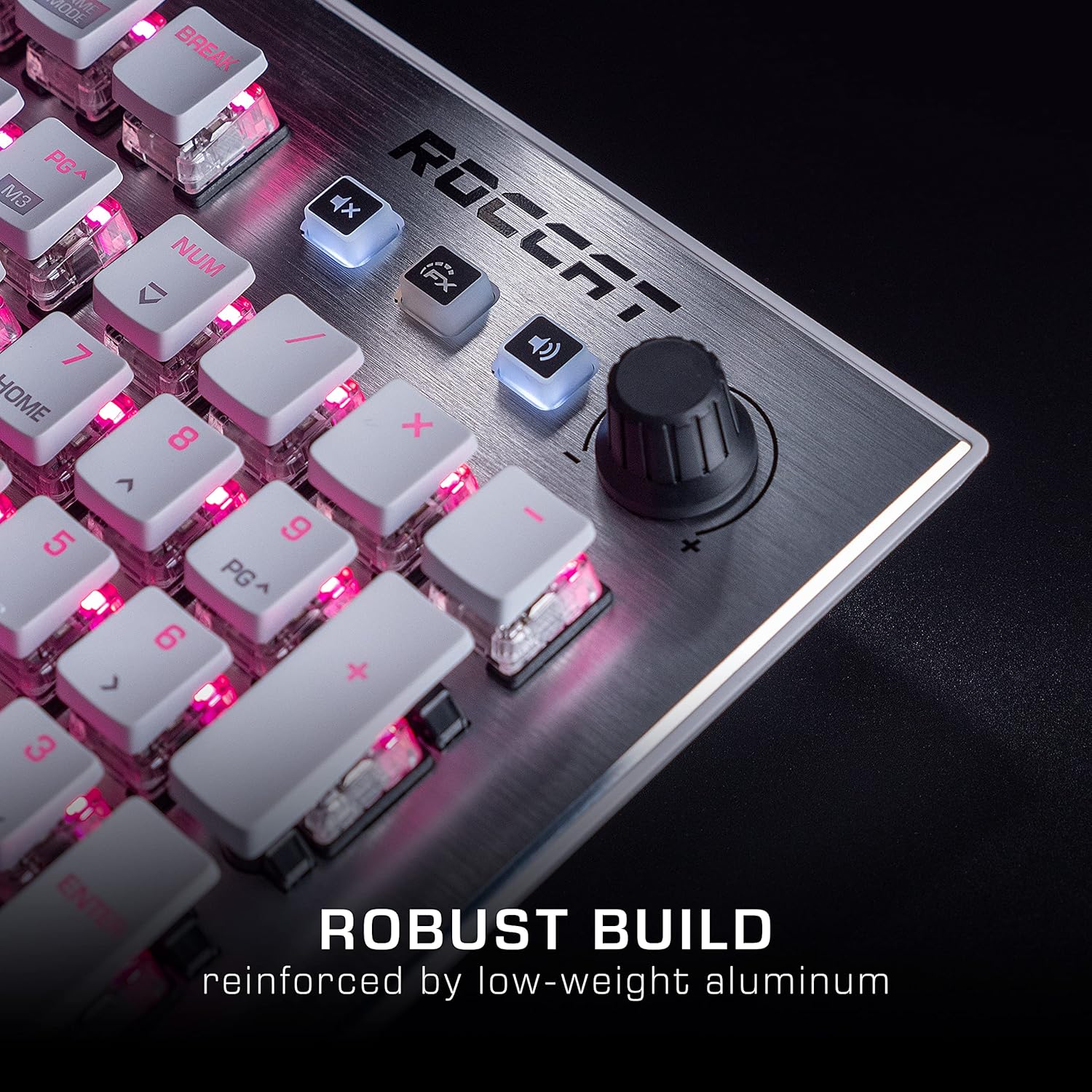
Image: The Roccat Vulcan 122 keyboard shown with its detachable wrist rest, ready for connection.
2.2 Software Installation (ROCCAT Swarm)
For full functionality and customization, install the ROCCAT Swarm software:
- Visit the official ROCCAT websitus (www.roccat.com) teras arahkeun ka bagian dukungan.
- Download the latest version of the ROCCAT Swarm software for your operating system.
- Jalankeun pamasang sareng turutan pitunjuk dina layar.
- After installation, launch ROCCAT Swarm to configure your keyboard settings, lighting, and macros.
3. Ngoperasikeun kibor
3.1 Fungsi Konci Standar
The Vulcan 122 functions as a standard QWERTY keyboard. All alphanumeric keys, function keys (F1-F12), navigation keys, and the numeric keypad operate as expected.
3.2 Kontrol Média
The keyboard features dedicated media controls for convenient audio management.
- Jilid Kenop: Located in the upper right corner, rotate to adjust system volume.
- Tombol Bisu: Press to mute/unmute audio.
- Tombol FX: Cycles through lighting effects or other programmable functions.

Gambar: A close-up view of the mixer-style media controls on the Roccat Vulcan 122, including the volume knob and dedicated function keys.
3.3 RGB Lighting Customization (AIMO)
The Vulcan 122 features advanced RGB lighting with Roccat's AIMO intelligent lighting system. Use the ROCCAT Swarm software to:
- Select from various pre-set lighting effects.
- Customize individual key illumination.
- Nyaluyukeun kacaangan sareng kecepatan épék.
- Synchronize lighting with other AIMO-compatible devices.
3.4 Programmable Macro Keys and Easy-Shift[+]
The keyboard includes programmable macro keys and the Easy-Shift[+] function, allowing you to assign secondary functions to keys.
- Use the ROCCAT Swarm software to record and assign macros to designated keys.
- Easy-Shift[+] allows you to double the number of assignable functions by holding down the Easy-Shift[+] key (usually Caps Lock by default, configurable in Swarm) and pressing another key.
3.5 Anti-Ghosting with NKRO
The Vulcan 122 features advanced anti-ghosting technology with N-Key Rollover (NKRO), ensuring that every key press is registered accurately, even when multiple keys are pressed simultaneously.

Image: A hand demonstrating typing on the Roccat Vulcan 122 keyboard, emphasizing the ergonomic design of the keys for comfortable use.
4. Pangropéa
4.1 Ngabersihan kibor
To ensure the longevity and optimal performance of your Vulcan 122 keyboard, regular cleaning is recommended.
- Pegatkeun sambungan keyboard tina komputer Anjeun sateuacan beberesih.
- Make kaen nu lemes, teu aya lint rada dampened with water or a mild cleaning solution to wipe the keycaps and surface. Avoid harsh chemicals.
- For dust and debris between keys, use compressed air. The raised keycap design makes cleaning easier.
- Pastikeun kiborna garing pisan sateuacan dipasang deui.

Image: A close-up of the Roccat Vulcan 122 keyboard keys, illustrating their design which facilitates easy cleaning and resistance to dust and liquids.
5. Cara ngungkulan
If you encounter issues with your Roccat Vulcan 122 keyboard, refer to the following common problems and solutions:
- Keyboard teu ngabales:
- Pastikeun kabel USB disambungkeun sacara aman ka kibor sareng komputer.
- Coba colokkeun keyboard kana port USB anu béda.
- Balikan deui komputer anjeun.
- Check if the keyboard is disabled in your operating system's device manager.
- Lampu RGB henteu jalan atanapi henteu leres:
- Ensure the ROCCAT Swarm software is installed and up to date.
- Pariksa setélan cahaya dina parangkat lunak Swarm.
- Perform a firmware update for the keyboard via Swarm.
- Konci henteu ngadaptar atanapi hantu:
- Ngabersihan kenop nu dimaksud sakumaha dijelaskeun dina bagian Pangropéa.
- Pastikeun firmware kibor parantos mutahir.
- Nguji keyboard dina komputer sejen pikeun ngaluarkeun masalah husus sistem.
- ROCCAT Swarm software not detecting keyboard:
- Pastikeun keyboard disambungkeun leres.
- Restart the Swarm software and your computer.
- Pasang deui parangkat lunak ROCCAT Swarm.
- Check for any conflicting software or drivers.
6. Spésifikasi
| Fitur | Rincian |
|---|---|
| merek | ROCCAT |
| Ngaran modél | vulcan 122 |
| Nomer modél | ROC-12-940-BN |
| Katerangan kibor | Mékanis |
| Pindah Tipe | Taktil |
| Bahan | alumunium |
| Fitur husus | Lampu tukang |
| Alat nu cocog | Laptop (PC) |
| Rojongan System Operasi | Windows 10, Windows 7, Windows 8 |
| Dimensi produk | 46.2 x 23.5 x 3.2 cm |
| Item Beurat | 1.15 kg |

Gambar: Hiji ngabeledug view diagram illustrating the components of a Roccat Titan Tactile mechanical switch, highlighting its design for swift and precise response.
7. Garansi jeung Rojongan
7.1 Émbaran jaminan
Your Roccat Vulcan 122 keyboard is covered by a manufacturer's warranty. The specific terms and duration of the warranty may vary by region and retailer. Please retain your proof of purchase for warranty claims. For detailed warranty information, refer to the warranty card included with your product or visit the official ROCCAT websitus.
7.2 Rojongan Téknis
For technical assistance, driver updates, or further inquiries, please visit the official ROCCAT support page:
Anjeun tiasa mendakan FAQ, pituduh ngungkulan masalah, sareng inpormasi kontak pikeun layanan palanggan dina situs wébna. websitus.


