Bubuka
Hatur nuhun pikeun meuliasing the Tangkula Wall Mounted Fold-Out Desk. This versatile and space-saving desk is designed to provide a functional workspace and storage solution for various rooms, including home offices, living rooms, bedrooms, and kitchens. When not in use, it conveniently folds up, revealing a chalkboard surface. This manual provides essential information for safe assembly, operation, and maintenance of your new desk.
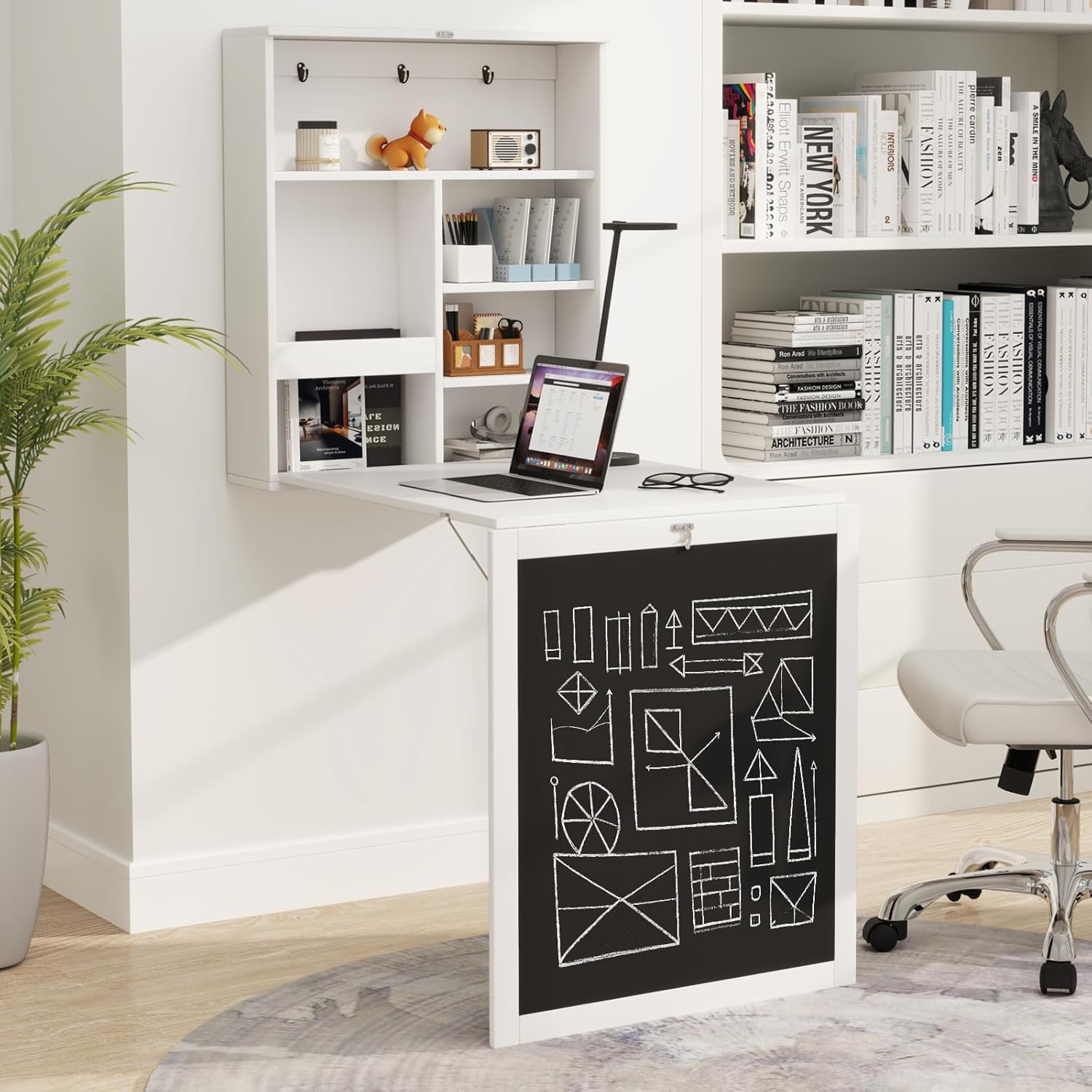
Figure 1: Tangkula Wall Mounted Fold-Out Desk in open configuration.
Émbaran Kasalametan
Mangga baca tur ngartos sagala parentah saméméh assembly sarta pamakéan. Paranti nuturkeun parentah ieu bisa ngakibatkeun tatu atawa ruksakna produk.
- Pamasangan témbok: This desk must be securely mounted to a wall stud or appropriate wall anchors suitable for the weight of the desk and its contents. Consult a professional if unsure about wall type or mounting methods.
- Kapasitas beurat: Do not exceed the maximum weight capacity of 44 lbs (19.96 kg) for the unfolded desk top and 4.4 lbs for each storage cube. Overloading can cause the desk to detach from the wall or collapse.
- Barudak: Keep children away from the assembly area. Do not allow children to hang on the desk when it is open or closed.
- Hardware: Use only the provided hardware or suitable replacements as recommended in this manual. Inferior hardware may compromise stability.
- Stabilitas: Regularly check all screws and connections to ensure they remain tight. Loose connections can lead to instability.
Eusi pakét
Pariksa heula sadaya komponén parantos aya sateuacan ngamimitian perakitan. Upami aya bagian anu leungit atanapi ruksak, hubungi dukungan palanggan Tangkula.
- Wall Mount Desk Unit (Main Cabinet)
- Fold-Out Desk Flap with Chalkboard
- Assembly Hardware (screws, anchors, hinges, buckle)
- Pitunjuk pangguna (dokumén ieu)
spésifikasi
| Fitur | Spésifikasi |
|---|---|
| merek | Tangkula |
| Nomer modél | AM2567HM |
| Bahan | P2 Standard MDF, Wood |
| Warna | Bodas |
| Overall Dimensions (Open) | 24 x 34 x 57.5 Inches (L x W x H) / 61D x 86.4W x 146.1H Centimeters |
| Dimensi dilipat | 24 x 6.5 x 29.5 Inches (L x W x H) |
| Desk Top Weight Capacity | 44 lbs (19.96 kg) |
| Each Cube Weight Capacity | 4.4 pon |
| Beurat bersih | 32.4 lbs (14.7 kg) |
| Majelis Diperlukeun | Sumuhun |
| Tipe Pamasangan | Tembok Gunung |

Gambar 2: Dimensi Produk.
Setup sareng Majelis
Assembly requires basic tools (screwdriver, drill, level, measuring tape). It is recommended to have two people for wall mounting.
- Buka bungkus sareng Identipikasi Bagian: Carefully remove all components from the packaging. Lay them out on a clean, soft surface to prevent scratches. Refer to the included hardware list to ensure all parts are present.
- Assemble the Main Cabinet: Follow the step-by-step instructions in the separate assembly manual for constructing the main wall-mounted cabinet unit, including shelves and internal compartments. Ensure all screws are tightened securely.
- Attach the Fold-Out Desk Flap:
- Position the fold-out desk flap to the main cabinet, aligning the hinge points.
- Secure the metal hinges (Figure 3) to both the cabinet and the desk flap using the provided screws. Ensure the hinges are oriented correctly for smooth folding.
- Attach the lockable buckle mechanism (Figure 3) to the top of the desk flap and the corresponding point on the cabinet. Test the buckle to ensure it securely holds the desk in the closed position.
- Catetan penting: Some users have found it easier to assemble the desktop and its support leg before attaching it to the main cabinet. Ensure the hardware for the cabinet swing hinge is installed in the correct direction.
- Mount to the Wall:
- Choose a suitable location on your wall. Use a stud finder to locate wall studs for optimal support. If mounting into drywall without studs, use heavy-duty wall anchors appropriate for the desk's weight.
- Hold the assembled desk unit against the wall at the desired height. Use a level to ensure it is perfectly horizontal.
- Mark the drilling points through the pre-drilled holes on the back of the cabinet onto the wall.
- Drill pilot holes at the marked locations. If using wall anchors, insert them according to their instructions.
- Carefully lift the desk unit and align the holes with the drilled holes/anchors. Secure the desk to the wall using the appropriate screws. Rekomendasi: Consider using stronger metal screws and spreading anchors (e.g., toggle bolts) for enhanced security, as some provided anchors may not be sufficient for long-term stability.
- Once mounted, gently pull down the desk flap to ensure it opens smoothly and the support mechanism engages correctly.

Figure 3: Wall-Mounted Structure Details (Lockable Buckle, Metal Hinges, Triangle Frames).
Parentah Operasi
The Tangkula Wall Mounted Fold-Out Desk is designed for ease of use and versatility.
- Opening the Desk: To open the desk, unlatch the metal buckle located at the top of the folded desk flap. Gently pull the flap downwards until it is fully extended and the internal support mechanism is engaged, forming a stable desk surface.
- Ngagunakeun Kompartemen Panyimpenan: When the desk is open, the internal cabinet shelves and compartments are accessible. These are suitable for storing books, stationery, small electronics, and other office supplies. The baffle design on the left side helps prevent items from falling.
- Closing the Desk: To close the desk, remove all items from the desk surface. Gently lift the desk flap upwards until it is flush with the main cabinet. Secure the metal buckle to hold the desk in the closed position.
- Using the Chalkboard: When the desk is in the closed position, the exterior surface functions as a chalkboard. Use standard chalk to write notes, to-do lists, or for creative drawing.
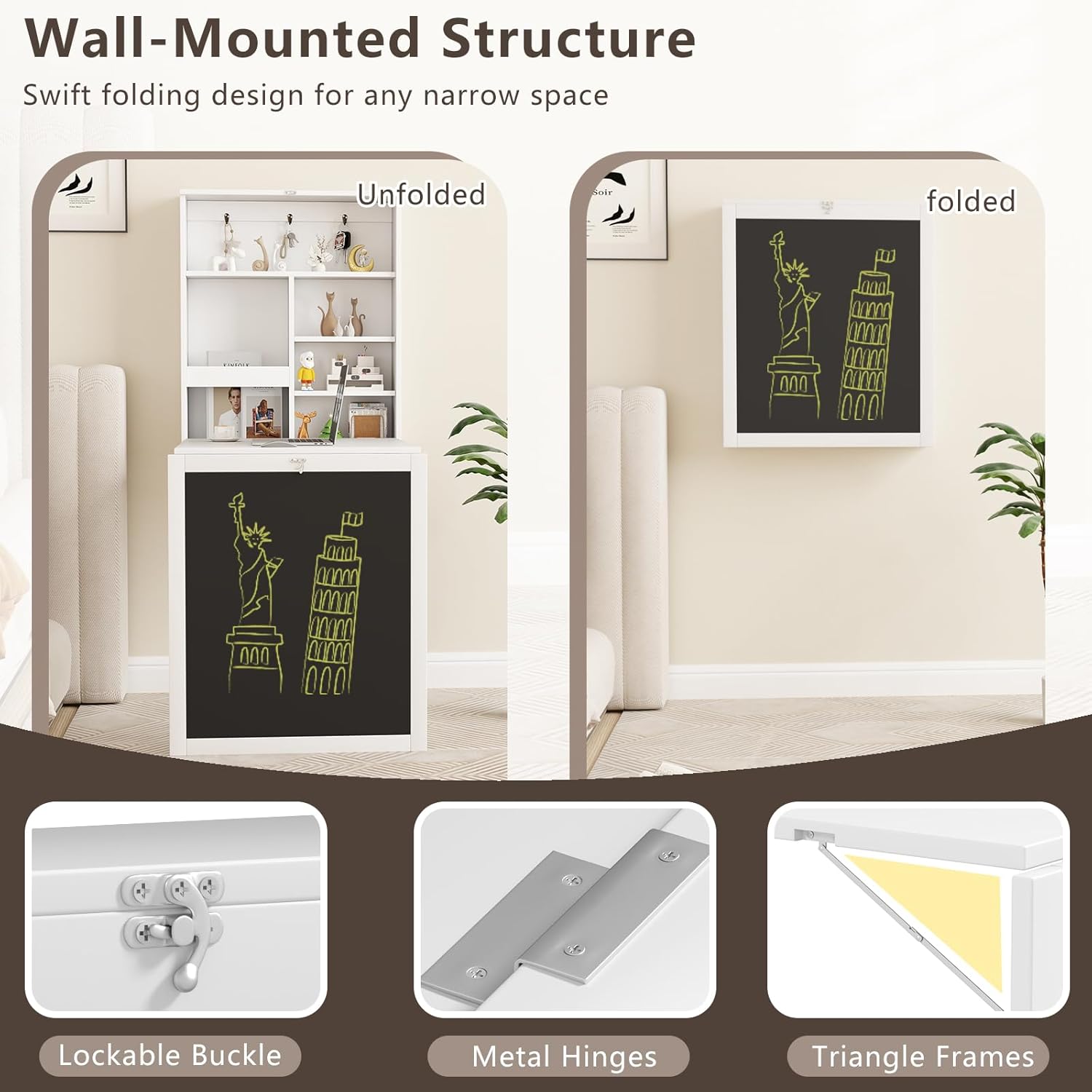
Figure 4: Hidden Storage Space and Spacious Tabletop.

Figure 5: Writing Chalkboard Functionality.
Pangropéa
Perawatan anu leres bakal manjangkeun umur sareng penampilan méja anjeun.
- beberesih: Ngusap permukaan méja kalayan lemes, damp lawon. Pikeun tanda anu bandel, larutan sabun anu hampang tiasa dianggo, dituturkeun ku ngusap ku lawon anu bersih sareng garing. Hindarkeun pembersih anu abrasif atanapi bahan kimia anu keras.
- Chalkboard Care: Use standard chalk. Clean the chalkboard surface with a damp cloth or a chalkboard eraser.
- Pariksa Hardware: Periodically inspect all screws, hinges, and the wall mounting points. Tighten any loose fasteners to maintain stability and safety.
- Hindarkeun Uap: Do not expose the desk to excessive moisture or direct sunlight for prolonged periods, as this can cause warping or discoloration.
Pamérésan masalah
If you encounter issues with your Tangkula Wall Mounted Fold-Out Desk, refer to the following common problems and solutions:
- Desk feels wobbly after mounting:
- Ensure all wall mounting screws are securely tightened.
- Verify that the desk is mounted into wall studs or using appropriate heavy-duty anchors for your wall type.
- Check that the internal support mechanism for the desk flap is fully engaged when open.
- Desk flap does not close securely:
- Ensure the metal buckle is properly aligned and latched.
- Check for any obstructions preventing the flap from closing flush with the cabinet.
- Hinges are stiff or noisy:
- Apply a small amount of silicone-based lubricant to the hinge points.
- Ensure hinge screws are not overtightened, which can restrict movement.
- Chalkboard surface is difficult to clean:
- Ngagunakeun rada damp cloth for cleaning. For ghosting, a mild chalkboard cleaner can be used.
- Avoid using permanent markers or oil-based crayons on the chalkboard.
Garansi sareng Rojongan
Tangkula products are manufactured with quality and customer satisfaction in mind. For specific warranty information, please refer to the documentation included with your purchase or visit the official Tangkula websitus.
If you require further assistance, have questions about assembly, or need to report missing/damaged parts, please contact Tangkula customer support through the retailer where the product was purchased or via the contact information provided on the Tangkula websitus.


