1. Parentah Kasalametan penting
Please read all instructions carefully before using the ProfiCare PC-BSR 3043 Robot Vacuum Cleaner. Keep this manual for future reference.
- Perkakas ieu dimaksudkeun pikeun pamakéan rumah tangga wungkul.
- Do not immerse the robot, charging station, or power adapter in water or other liquids.
- Jauhkeun robot tina seuneu anu muka sareng sumber panas.
- Pastikeun vol kakuatantage matches the rating label on the charging adapter.
- Do not use the robot on wet surfaces or in areas with standing water.
- Ngawaskeun barudak pikeun mastikeun aranjeunna henteu maén sareng alat.
- Only use original accessories and spare parts provided or approved by ProfiCare.
- The robot contains a lithium-ion battery. Do not expose it to high temperatures or direct sunlight.
- Upami kabel listrik ruksak, éta kedah digentos ku produsén, agén jasa, atanapi jalma anu mumpuni anu sami pikeun nyegah bahaya.
2. Eusi Paket
Pastikeun yén sadaya komponén aya sareng dina kaayaan anu saé nalika ngabongkar:
- ProfiCare PC-BSR 3043 Robot Vacuum Cleaner
- Tempat ngecas
- Power Adapter for Charging Station
- Kadali jauh
- 2 x Side Brushes (one pair)
- 1 x HEPA Filter (pre-installed or spare)
- Manual Pitunjuk (dokumén ieu)

Image: The ProfiCare PC-BSR 3043 robot vacuum cleaner, showcasing its sleek design, along with its remote control and a smartphone displaying the companion app interface.
3. Produk Langkungview
The ProfiCare PC-BSR 3043 is a high-quality robot vacuum cleaner designed for efficient and autonomous floor cleaning. It features rotating floor and side brushes to effectively remove dirt, dust, crumbs, and pet hair from various surfaces.
- Pembersih serbaguna: Suitable for all hard floors and short-pile carpets.
- Napigasi pinter: Utilizes gyroscope technology for systematic and efficient cleaning paths.
- Desain kompak: Extra-flat dimensions (only 7.5 cm high) allow cleaning under furniture.
- Filtrasi canggih: Equipped with a HEPA filter for high-efficiency particle air filtration.
- Automated Functions: Automatic return to charging station, stair and obstacle detection.
- Sababaraha Pilihan Kontrol: Sensor touch display, multi-function remote control, and Wi-Fi app control.

Gambar: Sisi view of the ProfiCare PC-BSR 3043 robot vacuum cleaner, highlighting its compact height of 75 mm and a diameter of 300 mm, ideal for cleaning under furniture.
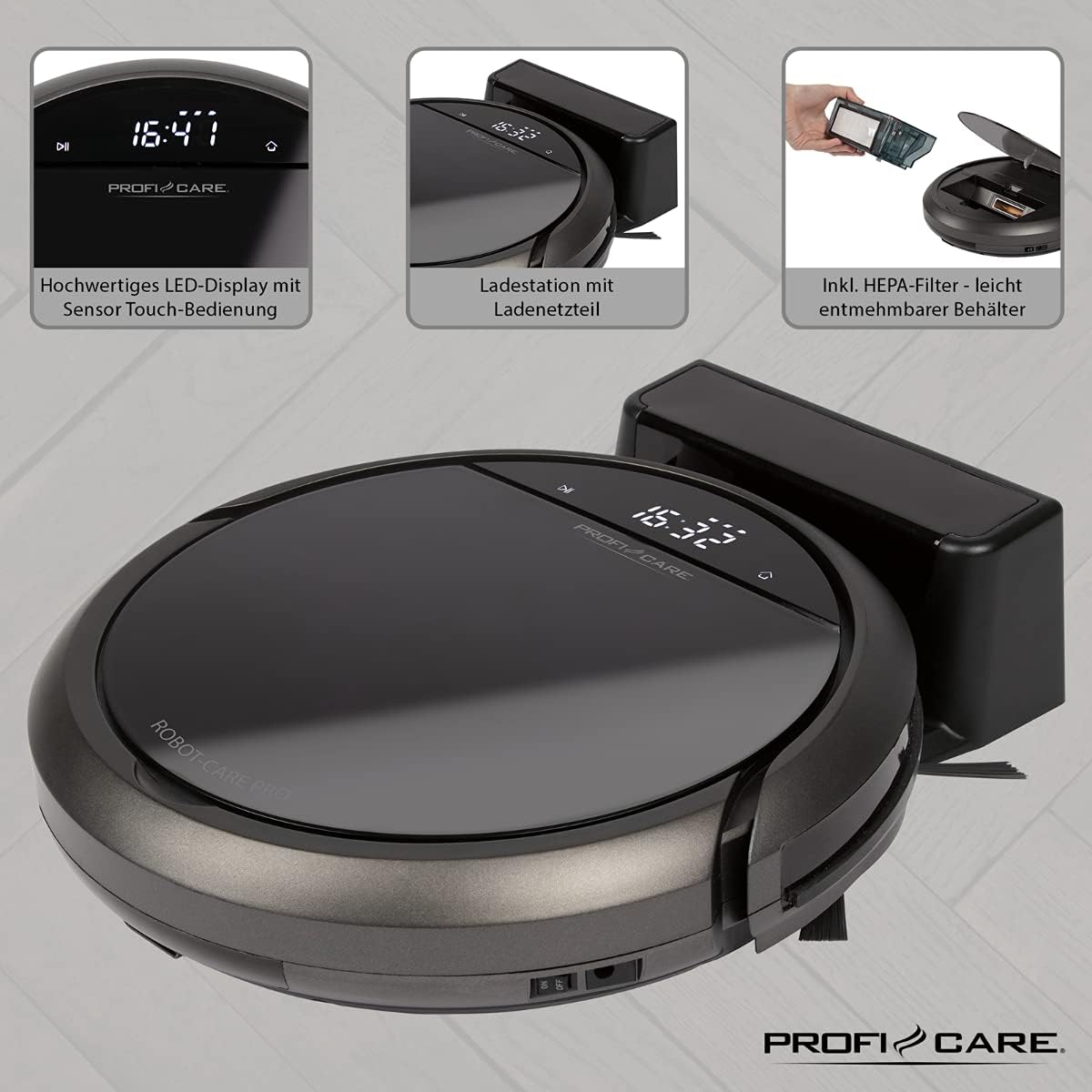
Gambar: Top view of the ProfiCare PC-BSR 3043 robot vacuum cleaner with key features labeled, including LED display, sensor touch operation, Wi-Fi app control, auto-return function, 2600 mAh / 14.8 V Lithium-ion battery, and 120 minutes runtime.
4. Setélan
4.1 Ngecas Robot
- Tempatkeun stasiun ngecas kana témbok di tempat anu kabuka, pastikeun teu aya halangan dina jarak 1 méter ka sisi sareng 2 méter di payun.
- Connect the power adapter to the charging station and plug it into a power outlet. The indicator light on the charging station will illuminate.
- Place the robot vacuum onto the charging station. Ensure the charging contacts on the robot align with those on the station. The robot will emit a sound and the display will show charging status.
- Allow the robot to fully charge before first use (approximately 3 hours).

Image: The ProfiCare PC-BSR 3043 robot vacuum cleaner docked on its charging station, illustrating the automatic return and charging capability.
4.2 Masang Sikat Sikat
Gently push the side brushes onto the square posts on the underside of the robot until they click into place.
4.3 Wi-Fi sareng Setelan Aplikasi
- Download the ProfiCare app from the Google Play Store (for Android 4.4 or higher) or Apple App Store (for iOS 9.0 or higher).
- Open the app and follow the on-screen instructions to register an account and add your PC-BSR 3043 robot.
- Ensure your Wi-Fi network is 2.4 GHz, as 5 GHz is not supported.
5. Ngoperasikeun Robot Vakum
5.1 Powering on / Pareum
Press and hold the power button on the robot's display or the remote control to turn the robot on or off.
5.2 Modeu beberesih
The robot offers four distinct cleaning programs:
- Modeu Otomatis: The robot cleans systematically, covering the entire area.
- Modeu titik: The robot cleans a concentrated area in a spiral pattern, ideal for heavily soiled spots.
- Corners Mode: The robot focuses on cleaning along walls and in corners.
- Systematic Mode (Gyroscope Controlled): Ensures independent orientation for faster and more efficient cleaning results.
5.3 Pilihan Kontrol
- Sensor Touch Display: Use the integrated LED display with touch controls for basic operations.
- Kadali jauh: The multi-function remote allows for timer settings, individual control, and recalling the robot to the charging station.
- Kontrol Aplikasi: The smartphone app provides advanced features like 2D map function, live tracking, remote control functions, cleaning plan creation (day, time, frequency), cleaning program selection, and battery status display.
- Kontrol sora: The robot supports voice control for convenient operation.
5.4 Fungsi Otomatis
- Pangbalikan Otomatis: The robot automatically returns to the charging station after completing a program or when the battery level is low.
- Deteksi halangan: Infrared sensors detect obstacles, allowing the robot to navigate around furniture and other items. Mechanical soft protection is also included for sensitive furniture.
- Stair Detection: Infrared sensors prevent the robot from falling down stairs.
- Reset Otomatis: After recharging, the robot continues cleaning from the last cleaned position.

Image: The ProfiCare PC-BSR 3043 robot vacuum cleaner actively cleaning a wooden floor in a home environment, demonstrating its ability to navigate and clean open spaces.
6. Pangropéa
Pangropéa rutin ngajamin kinerja optimal sareng manjangkeun umur robot vacuum cleaner anjeun.
6.1 Ngosongkeun tong sampah
- Press the dustbin release button and pull out the 400 ml dirt tank.
- Buka tutup tong sampah sareng kosongkeun eusina kana tong sampah.
- Close the dustbin lid and reinsert it into the robot until it clicks into place.
6.2 Ngabersihan Filter HEPA
The HEPA filter should be cleaned regularly and replaced periodically (e.g., every 3-6 months, depending on usage).
- Cabut tong sampah sapertos anu dijelaskeun di luhur.
- Kaluarkeun saringan HEPA tina tempat sampah kalayan ati-ati.
- Tap the filter gently over a trash can to remove loose dust. Do not wash the HEPA filter with water.
- Brush off any remaining debris with a soft brush.
- Reinsert the clean filter and dustbin.
6.3 Ngabersihan Sikat Sisi sareng Sikat Utama
Regularly check the side brushes and main brush for tangled hair or debris. Use scissors to cut away any tangled hair and pull out debris.
6.4 Ngabersihan Sénsor sareng Ngecas Kontak
Wipe the infrared sensors (located around the robot's bumper and underside) and the charging contacts on both the robot and the charging station with a clean, dry cloth to ensure proper function.
7. Cara ngungkulan
If you encounter issues with your ProfiCare PC-BSR 3043, refer to the following common problems and solutions:
| Masalah | Mungkin Cukang lantaranana | Solusi |
|---|---|---|
| Robot teu hurung. | Batré lemah atawa béak. | Place the robot on the charging station and allow it to fully charge. |
| Robot teu ngecas. | Ngeusi batre kontak kotor atawa misaligned. | Clean the charging contacts on both the robot and the station. Ensure proper alignment. |
| Robot sering macét. | Seueur teuing halangan atanapi kabel anu kusut. | Clear the cleaning area of excessive clutter, cables, and small objects. |
| Kinerja beberesih goréng. | Dustbin is full, filter is clogged, or brushes are tangled. | Empty the dustbin, clean or replace the HEPA filter, and clean the side and main brushes. |
| Robot teu nyambung ka Wi-Fi. | Incorrect Wi-Fi band (5 GHz not supported) or incorrect password. | Ensure your Wi-Fi network is 2.4 GHz. Re-enter Wi-Fi password carefully. Restart router and robot. |
| Robot murag tina tangga. | Stair sensors are dirty or obstructed. | Clean the stair sensors on the underside of the robot. |
For issues not listed here, or if problems persist, please contact ProfiCare customer support.
8. Spésifikasi Téknis
| Fitur | Spésifikasi |
|---|---|
| Nomer modél | PC-BSR 3043 |
| merek | ProfiCare |
| Ukuran (L x W x H) | 33 x 33 x 7 cm (kira-kira 31 x 22 x 13 cm dina bungkusna) |
| Beurat | 2.5 kg |
| Jenis Batré | Litium-ion |
| Kapasitas batré | 14.8 V, 2600 mAh |
| Waktos Operasi | Kira-kira. 120 menit |
| Waktu Ngecas | Kira-kira. 3 jam |
| Kapasitas tong sampah | 400 ml |
| Jenis Filter | Saringan HEPA |
| Tingkat Noise | Kira-kira. 61 dB |
| Konektipitas | Wi-Fi 2.4 GHz (5 GHz not supported) |
| Tipe Kontrol | App Control, Remote Control, Sensor Touch |
| Surface Rekomendasi | Tiles, Hard Floors, Short-Pile Carpets |
9. Garansi jeung Rojongan
ProfiCare products are manufactured with high quality standards. For information regarding warranty terms and conditions, please refer to the warranty card included with your product or visit the official ProfiCare websitus.
If you require technical assistance, have questions about product operation, or need to order spare parts, please contact ProfiCare customer support. Contact details can typically be found on the product packaging, the official websitus, atawa ngaliwatan pangecér Anjeun.
Please note that information regarding the availability of spare parts for this specific model is currently unavailable through standard channels. It is recommended to contact ProfiCare directly for any spare part inquiries.


