Bubuka
This manual provides detailed instructions for the setup, operation, and maintenance of your LIGE BW0223 Smart Watch. Please read this guide thoroughly to ensure proper use and to maximize the features of your device. The LIGE BW0223 Smart Watch is designed to assist with fitness tracking, health monitoring, and smart notifications, compatible with both iOS and Android devices.
1. Setélan
1.1 Ngecas Alat
Before initial use, fully charge your LIGE BW0223 Smart Watch. Connect the magnetic charging cable to the charging contacts on the back of the watch and plug the USB end into a standard USB power adapter (5V/1A recommended). The watch display will indicate charging status. A full charge typically takes approximately 2 hours.

The back of the LIGE Smart Watch features a magnetic charging interface and advanced optical sensors for continuous monitoring of heart rate, blood pressure, and blood oxygen levels.
1.2 Pamasangan Aplikasi sareng Papasangan
- Unduh Aplikasi Companion: Scan the QR code provided in the watch packaging or search for the designated companion app (e.g., 'FitPro' or 'LIGE Smart') in your smartphone's app store (App Store for iOS, Google Play Store for Android).
- Aktipkeun Bluetooth: Pastikeun Bluetooth diaktipkeun dina smartphone Anjeun.
- Buka Aplikasi: Jalankeun aplikasi anu dipasang sareng turutan pitunjuk dina layar pikeun nyieun akun atanapi log in.
- Pasangkeun arloji: Within the app, navigate to the device management section (often labeled 'Device', 'My Device', or 'Add Device'). The app will search for available Bluetooth devices. Select 'BW0223' or 'LIGE Smart Watch' from the list to initiate pairing. Confirm the pairing request on both your phone and the watch if prompted.
1.3 Setélan awal
Saatos pasangan anu suksés, lengkepan pro pribadi anjeunfile within the app, including gender, age, height, and weight. This information helps improve the accuracy of fitness and health data. You can also set preferences for units of measurement (metric/imperial) and time format (12/24-hour).
2. Parentah Operasi
2.1 Pintonan sareng Napigasi
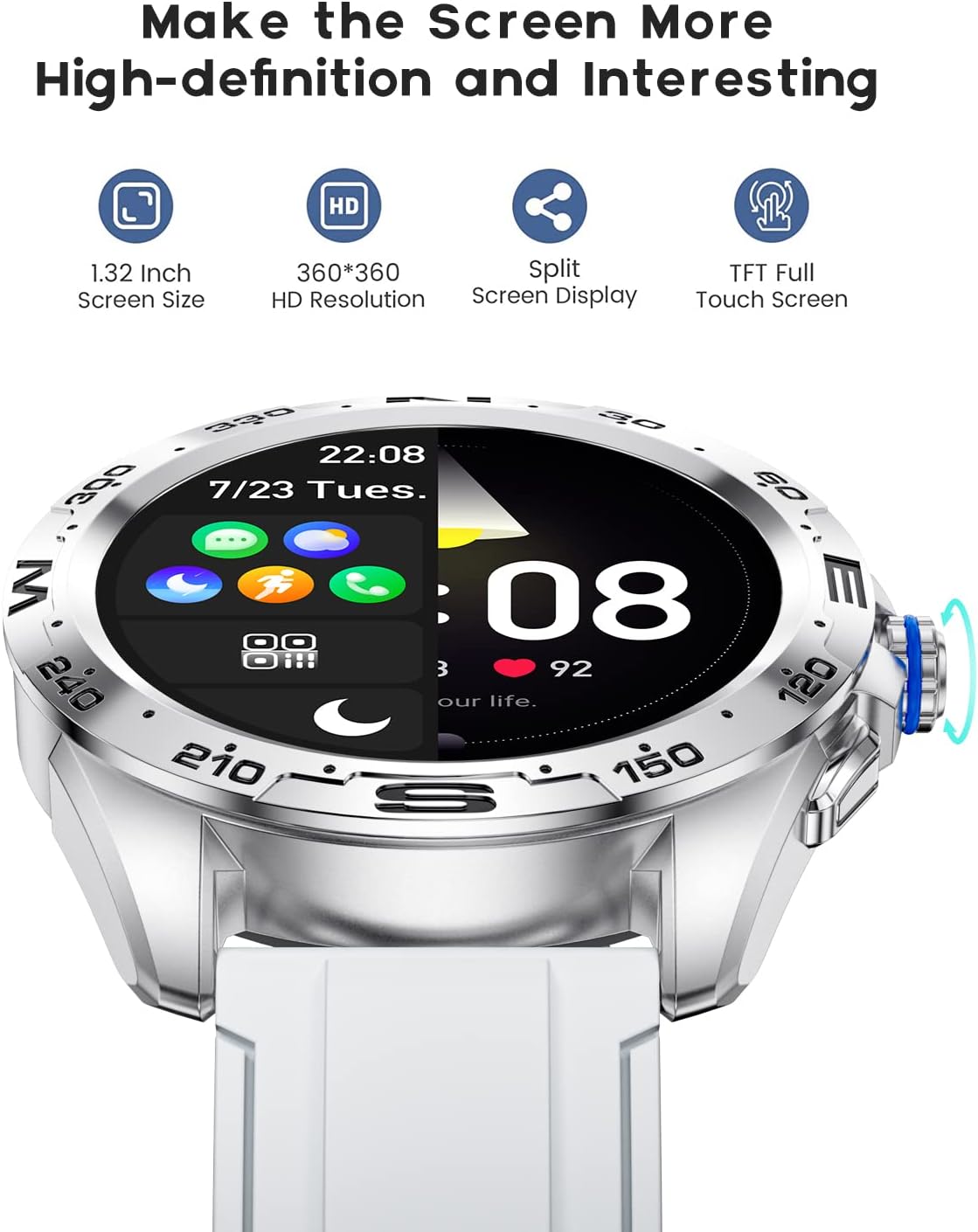
The LIGE BW0223 Smart Watch features a 1.28-inch full touch screen with 360x360 HD resolution. Navigate the watch interface using touch gestures:
- Gesek ka luhur/handap: Gulung ka ménu atanapi béwara.
- Gesek Kénca/Katuhu: Aksés pungsi gancang atanapi layar data anu béda.
- Ketok: Pilih hiji item atawa mastikeun hiji aksi.
- Pencét Tombol Sisi: Return to the home screen or power on/off the device.

The LIGE Smart Watch features a 1.28-inch full touch screen with 360x360 HD resolution, offering clear visuals and responsive interaction. It supports a split-screen display for quick access to functions.
2.2 Modeu Olahraga
The watch supports 7 sports modes, including walking, running, cycling, and climbing. To access:
- Swipe on the watch face to find the 'Sports' or 'Workout' icon.
- Tap to select your desired activity.
- Tap 'Start' to begin tracking. The watch will record duration, steps, calories burned, and distance.
- Pikeun mungkas latihan, geser ka katuhu atanapi pencét tombol sisi, teras pilih 'Réngsé' atanapi 'Pause'.
2.3 Pangimeutan Kaséhatan
The LIGE BW0223 Smart Watch provides 24/7 heart rate tracking, blood pressure, and blood oxygen monitoring. These measurements are for reference only and should not be used for medical diagnosis.
- Laju Jantung: Swipe to the heart rate interface to view your current heart rate. The watch continuously monitors your heart rate throughout the day.
- Blood Pressure/Blood Oxygen: Swipe to the respective interfaces and tap to initiate a measurement. Ensure the watch is snug on your wrist for accurate readings.
- Pangimeutan Saré: Wear the watch to bed, and it will automatically track your sleep patterns, including deep sleep, light sleep, and wake-up times. View data sare lengkep dina aplikasi pendamping.
2.4 Telepon Bluetooth
After pairing your watch with the app and enabling the Bluetooth call function (usually a separate Bluetooth connection in your phone's settings, e.g., 'BW0223_CALL'), you can make and receive calls directly from your watch.
- Nelepon: Access the 'Dialer' or 'Contacts' function on your watch to dial a number or select a contact.
- Narima Telepon: Nalika telepon asup, jam tangan bakal ningalikeun ID panelepon. Ketok ikon héjo pikeun ngajawab atawa ikon beureum pikeun nolak.
- The watch features a built-in microphone and speaker for hands-free communication.

With the LIGE Smart Watch, you can make and receive Bluetooth calls directly from your wrist. It includes a built-in microphone and speaker for convenient communication.
2.5 Pesen Bewara
Enable message notifications through the companion app to receive alerts for SMS, calls, and various social media applications (e.g., Facebook, Twitter, WhatsApp, LinkedIn, Instagram) langsung dina jam tangan anjeun.
- Ensure the app has necessary permissions to access notifications on your smartphone.
- Configure which apps send notifications to your watch within the companion app settings.
- Gesek ka handap dina beungeut arloji pikeun view bewara panganyarna.

The LIGE Smart Watch provides call and message reminders, displaying notifications from SMS, Facebook, Twitter, WhatsApp, LinkedIn, and Instaglangsung nancebkeun kana pigeulang anjeun.
2.6 Kustomisasi
Personalize your watch by changing watch faces. Many options are available directly on the watch or through the companion app.
- Dina Lalajo: Long-press the watch face, then swipe left or right to browse available faces. Tap to select.
- Via Aplikasi: Open the companion app, navigate to 'Dial Market' or 'Watch Faces' to explore and download additional designs.
Personalize your LIGE Smart Watch with a variety of customizable watch faces and a rich user interface. Choose from different styles to match your preference and occasion.
3. Pangropéa
3.1 Ngabersihkeun Arloji
Regularly clean your watch to ensure optimal performance and hygiene. Use a soft, lint-free cloth to wipe the screen and watch body. For stubborn dirt, slightly dampen the cloth with water. Avoid using harsh chemicals, abrasive materials, or strong detergents.
3.2 Tahan Cai (IP68)
The LIGE BW0223 Smart Watch is IP68 waterproof, meaning it is resistant to dust and can withstand immersion in water up to 1.5 meters for 30 minutes. It is suitable for daily use, such as hand washing, rain, and splashes.
Watesan penting:
- Do not wear the watch in hot showers, saunas, or steam rooms, as steam and hot water can compromise the seals.
- Avoid diving or high-pressure water activities.
- Do not operate buttons or the touchscreen underwater.
- If the watch gets wet, dry it thoroughly before charging or operating.
3.3 Perawatan Batré
Pikeun manjangkeun umur batre:
- Hindarkeun suhu anu ekstrim.
- Cas jam tangan sacara rutin, tapi ulah ngantepkeun jam tangan dina kaayaan pinuh nalika dicas salami waktos anu lami.
- Reduce screen brightness and disable unnecessary notifications or features if battery life is a concern.
4. Cara ngungkulan
4.1 Lalajo Henteu Hurungkeun atanapi Ngecas
- Pastikeun kabel ngecas disambungkeun kalayan aman ka arloji sareng sumber listrik.
- Verify the power adapter and USB port are functional.
- Clean the charging contacts on the watch and cable to remove any dust or debris.
- Allow the watch to charge for at least 30 minutes before attempting to power it on.
4.2 Masalah Sambungan Bluetooth
- Pastikeun Bluetooth diaktipkeun dina smartphone sareng jam tangan anjeun.
- Keep the watch within the Bluetooth range of your smartphone (typically 10 meters).
- Balikan deui smartphone sareng jam tangan anjeun.
- Unpair the watch from your phone's Bluetooth settings and re-pair it through the companion app.
- Pastikeun aplikasi pendamping jalan di latar tukang sareng gaduh idin anu diperyogikeun.
4.3 Notifications Not Working
- Verify the watch is successfully paired with the companion app.
- Check notification settings within the companion app to ensure desired apps are enabled.
- Ensure your smartphone's notification access is granted to the companion app (check phone settings: Apps & notifications > Special app access > Notification access).
- Nonaktipkeun modeu 'Ulah Ganggu' dina telepon sareng jam tangan anjeun.
4.4 Bacaan Kaséhatan Anu Teu Akurat
- Ensure the watch is worn snugly on your wrist, about one finger's width from the wrist bone.
- Keep the sensor clean and free from sweat or dirt.
- Tetep cicing nalika ngukur pikeun akurasi anu pangsaéna.
- Remember that health data from smartwatches is for reference and not intended for medical use.
5. Spésifikasi
| Nomer modél | BW0223 |
| merek | LIGE |
| Ukuran layar | 1.28 inci |
| Input Antarmuka Manusa | Layar cabak |
| Téhnologi konektipitas | Bluetooth |
| Peunteun Résistansi Cai | IP68 |
| Jenis Batré | Litium Polimér |
| Wangun | Buleud |
| Item Beurat | 7 ons |
6. Émbaran jaminan
The LIGE BW0223 Smart Watch comes with a standard limited warranty against manufacturing defects. The warranty period typically covers 12 months from the date of purchase. This warranty does not cover damage caused by misuse, accidents, unauthorized modifications, or failure to follow the instructions in this manual. Please retain your proof of purchase for warranty claims.
7. Rojongan Palanggan
If you encounter any issues or have questions not covered in this manual, please contact LIGE customer support. Refer to the contact information provided with your product packaging or visit the official LIGE websitus pikeun pitulung.


