Bubuka
The Divoom Ditoo Pro is a versatile mini Bluetooth speaker featuring a 16x16 LED app-controlled pixel art screen. It functions as a portable speaker, a customizable display for pixel art, a clock, and a mood light. This device is designed to enhance your desk or bedside environment with both audio and visual functionality.
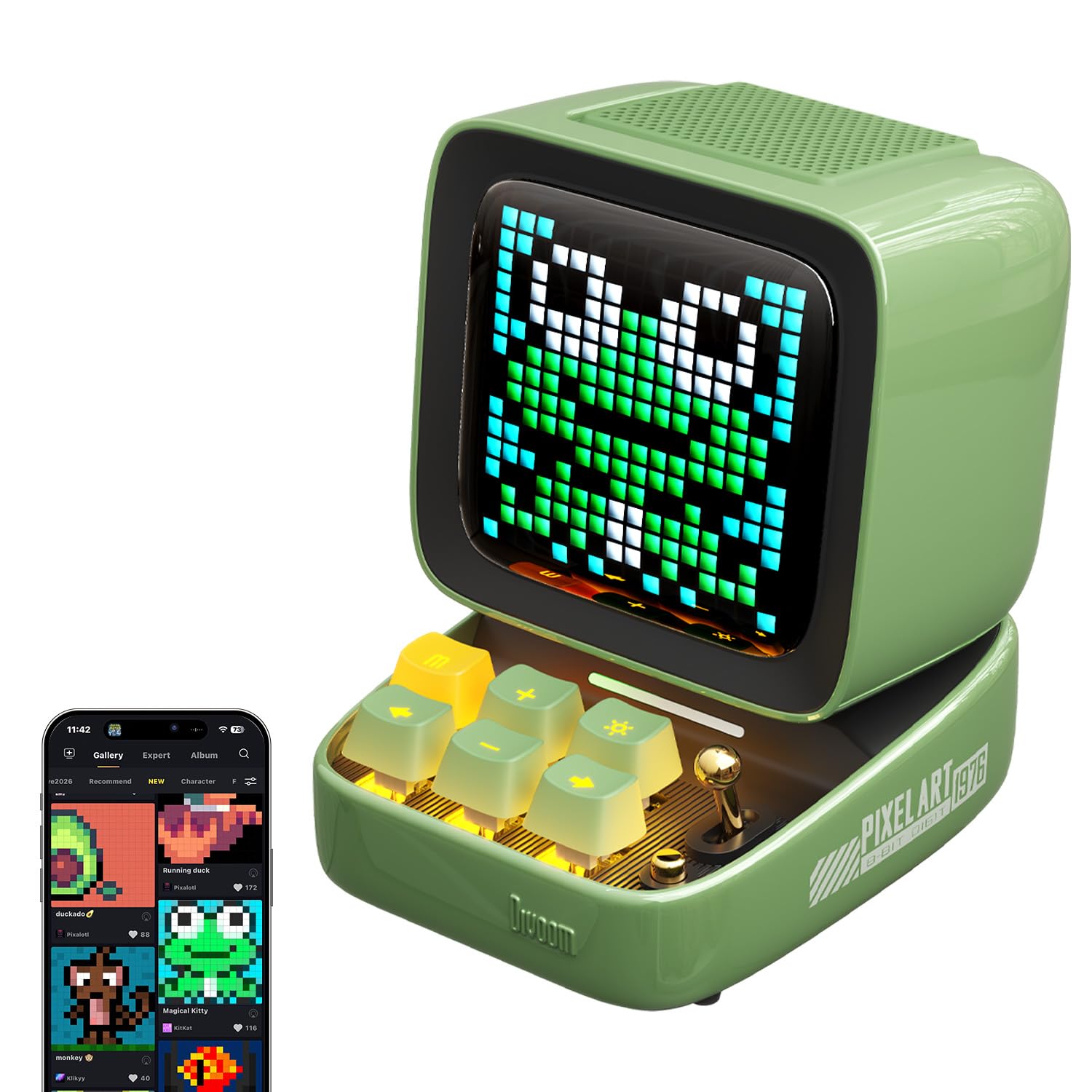
Image: The Divoom Ditoo Pro speaker in green, showcasing its retro computer design with a pixel art display.
Naon dina Box
Pastikeun sadaya item aya nalika unboxing:
- Divoom Ditoo Pro Speaker
- Kabel Ngecas USB-C
- Manual pamaké
- Mikropon Wireless Mini
Disetél
1. Ngahurungkeun
To power on the Ditoo Pro, press and hold the power button located on the device until the screen illuminates.
2. Papasangan Bluetooth
- Aktipkeun Bluetooth dina alat sélulér Anjeun.
- Milarian pikeun 'Ditoo Pro' in the list of available Bluetooth devices and select it to pair.
- Download and install the official Divoom app from your device's app store.
- Open the Divoom app and follow the on-screen instructions to connect to your Ditoo Pro speaker. This step is crucial for accessing all smart features and customization options.
Video: An official Divoom video demonstrating the product's functions and app connectivity.
Parentah Operasi
1. Pixel Art Customization
Utilize the Divoom app to create and display custom pixel art. You can draw your own designs, send personalized messages, or select from a vast online gallery of community-created pixel art and seasonal themes.

Image: A user interacting with the Divoom app on a smartphone to customize pixel art displayed on the Ditoo Pro speaker.

Image: The Divoom Ditoo Pro displaying a pixel art frog, illustrating the vibrant community designs available through the app.
2. Puterkeun Audio
Connect your device via Bluetooth to stream music. The Ditoo Pro delivers rich, clear audio suitable for various listening environments. It also supports music playback via TF card and USB-C audio input.

Image: An internal diagram of the Divoom Ditoo Pro, highlighting its 15W driver and passive radiators for enhanced sound quality.
3. Fungsi Smart
The Divoom app unlocks several smart features:
- Jam alarem: Set gentle alarms with customizable sounds.
- Noise bodas: Access built-in white noise options for relaxation or sleep.
- Timer Pomodoro: Utilize the Pomodoro-style focus timer for productivity.
- Panginget: Set hydration or break reminders.
- Stopwatch: A built-in stopwatch function is available.
- Kaulinan Mini: Play retro pixel games directly on the screen.

Image: The Divoom Ditoo Pro showcasing its multi-functional capabilities with icons for games, notifications, alarms, voice memos, white noise, time planner, and RGB lighting.
4. Kontrol Fisik
The device features mechanical-style keys and a joystick for direct interaction. These controls allow for navigation through menus, adjusting volume, changing display modes, and playing games without needing the app.
Pangropéa
- beberesih: Anggo lawon anu lemes sareng garing pikeun ngabersihkeun alat. Hindarkeun pembersih atanapi pangleyur anu abrasif.
- Panyimpenan: Store the Ditoo Pro in a cool, dry place when not in use.
- Perawatan batré: For optimal battery life, avoid fully discharging the device frequently. Recharge with the provided USB-C cable.
Pamérésan masalah
- Alat Teu Dihurungkeun: Pastikeun alat parantos dicas. Sambungkeun ka sumber daya nganggo kabel USB-C.
- Masalah Nyapasangkeun Bluetooth: Make sure Bluetooth is enabled on your mobile device and the Ditoo Pro is within range. Try restarting both devices.
- Henteu aya sora: Check the volume levels on both the Ditoo Pro and your connected device. Ensure the speaker is not muted.
- Masalah Konektipitas Aplikasi: Verify that the Divoom app is updated to the latest version. Restart the app and the Ditoo Pro.
spésifikasi
| merek | Divoom |
| Ngaran modél | Ditoo Pro |
| Tipe Speaker | Subwoofer |
| Téhnologi konektipitas | Bluetooth |
| Téknologi Komunikasi Nirkabel | Bluetooth |
| Fitur husus | Display, Smart APP Control |
| Sumber Daya | Batré Powered |
| Kapasitas batré | 5000 Miliamp Jam-jaman |
| Waktu Ngecas | 4 Jam |
| Speaker Maksimum Kaluaran Power | 15 Watt |
| Réspon Frékuénsi | 30 Hz |
| Rasio Signal-to-Noise | 80 dB |
| Rentang Bluetooth | 10 méter |
| Dimensi produk | 4.49 "D x 3.54" W x 4.76" H |
| Item Beurat | 1.18 pon (533 gram) |
| Bahan | palastik |
| Warna | Héjo |

Image: The Divoom Ditoo Pro speaker with its key dimensions indicated.
Garansi & Rojongan
The Divoom Ditoo Pro comes with a limited warranty. For detailed warranty information, product support, or service inquiries, please refer to the official Divoom website or contact their customer service directly. Our support team is available to assist with any questions or issues you may encounter.