1. Bubuka
Welcome to the user manual for your Commax CDV-35H Indoor Monitor and DRC-40K Outdoor Camera Intercom System. This manual provides essential information for the proper installation, operation, and maintenance of your new intercom system. Please read this manual thoroughly before installation and use to ensure optimal performance and safety.
2. Produk Langkungview
The Commax CDV-35H / DRC-40K system is a video intercom solution designed for home security and communication. It consists of an indoor monitor unit (CDV-35H) and an outdoor door camera unit (DRC-40K).
2.1 Fitur konci
- CDV-35H Indoor Monitor: 3.5-inch Color TFT LCD display for clear video.
- Komunikasi Hand-Free: Convenient operation without needing to pick up a handset.
- DRC-40K Outdoor Camera: 1/3-inch Color CCD camera for reliable outdoor surveillance.
- Konstruksi awét: Outdoor camera features a robust metal case.
- Sistem anu tiasa dilegakeun: Connectable with up to 2 cameras, 2 additional monitors, and 2 handsets for comprehensive coverage.
2.2 Komponén Sistim
The complete system typically includes:
- Commax CDV-35H Indoor Monitor Unit
- Commax DRC-40K Outdoor Camera Unit
- Pamasangan kurung jeung screws
- Power Adapter for Indoor Monitor
- Manual pangguna (dokumén ieu)
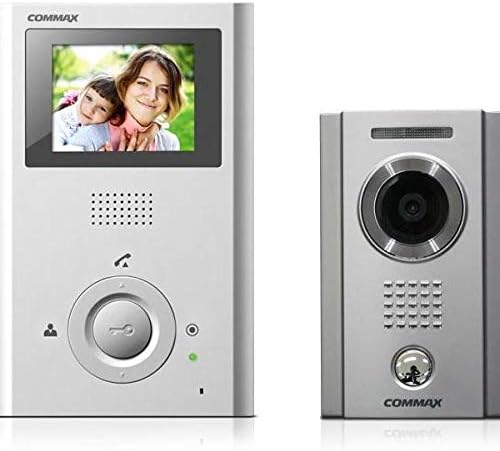
Image 1: Commax CDV-35H indoor monitor (left) and DRC-40K outdoor camera unit (right).
3. Instalasi jeung Setup
3.1 Pancegahan Kasalametan
- Always disconnect power before performing any wiring or installation.
- Taroskeun ka tukang listrik anu mumpuni upami anjeun henteu yakin ngeunaan kabel listrik.
- Do not expose the units to excessive moisture or extreme temperatures.
- Ensure all connections are secure to prevent short circuits.
3.2 Idéntifikasi komponén
Familiarize yourself with the ports and buttons on both the indoor monitor and outdoor camera before installation.
- CDV-35H Monitor: Screen, speaker, microphone, call button, door release button, menu/settings buttons, power input, camera input ports.
- DRC-40K Camera: Camera lens, speaker, microphone, call button, illumination LEDs.
3.3 Diagram Wiring
A typical wiring setup involves connecting the outdoor camera to the indoor monitor using a multi-core cable. The indoor monitor requires a power supply. For detailed wiring instructions, refer to the specific diagram provided in your product packaging, as configurations may vary based on the number of cameras and monitors connected.
Léngkah-léngkah Umum Kabel:
- Connect the appropriate wires from the DRC-40K outdoor camera to the designated camera input ports on the CDV-35H indoor monitor. These typically include video, audio, power, and ground lines.
- Connect the power adapter to the CDV-35H indoor monitor and then to a power outlet.
- If connecting additional monitors or handsets, follow the specific wiring instructions for those units to the main CDV-35H monitor.
3.4 Pamasangan Parentah
Indoor Monitor (CDV-35H):
- Choose a suitable indoor location, typically near the main entrance, at eye level.
- Ngamankeun bracket ningkatna kana témbok ngagunakeun screws disadiakeun.
- Route the necessary wiring through the wall opening to connect to the monitor.
- Attach the CDV-35H monitor to the mounting bracket.
Outdoor Camera (DRC-40K):
- Select an outdoor location near your door, ensuring a clear view of visitors and protection from direct rain if possible.
- Mount the camera unit at an appropriate height (e.g., 1.4-1.6 meters from the ground) for optimal viewing.
- Secure the DRC-40K unit to the wall using the provided screws and ensure all wiring is properly sealed to prevent water ingress.
4. Operasi
4.1 Ngajawab Telepon
When a visitor presses the call button on the DRC-40K outdoor camera, the CDV-35H indoor monitor will ring and display the visitor's image. To answer the call, press the 'Answer' button (often depicted as a phone icon) on the indoor monitor.
4.2 Monitoring the Outdoor Camera
Ka view the outdoor camera feed at any time without a visitor pressing the call button, press the 'Monitor' button (often depicted as a camera icon) on the CDV-35H indoor monitor. This allows you to check your entrance area proactively.
4.3 Door Release Function
If your system is connected to an electronic door lock, you can unlock the door directly from the CDV-35H indoor monitor. Press the 'Door Release' button (often depicted as a key or unlock icon) during a call or while monitoring the outdoor camera to open the door.
4.4 Nyaluyukeun Setélan
The CDV-35H monitor typically includes buttons or an on-screen menu for adjusting settings such as:
- Volume: Atur nada dering sareng volume komunikasi.
- Caang/Kontras: Optimize the display quality of the video feed.
- Nada dering: Select different ringtones.
5. Pangropéa
Pangropéa rutin ngajamin umur panjang sareng kinerja optimal tina sistem interkom anjeun.
- beberesih: Use a soft, dry cloth to clean the indoor monitor screen and casing. For the outdoor camera, gently wipe the lens and casing jeung iklanamp lawon. Hindarkeun pembersih abrasive atanapi pangleyur.
- Perlindungan Lingkungan: Ensure the outdoor camera remains protected from extreme weather conditions where possible. Regularly check for any signs of water ingress or damage to the casing.
- Pamariksaan kabel: Periodically inspect all visible cables for wear, damage, or loose connections.
6. Cara ngungkulan
If you encounter issues with your Commax intercom system, refer to the following table for common problems and solutions.
| Masalah | Mungkin Cukang lantaranana | Solusi |
|---|---|---|
| Teu aya gambar dina monitor jero ruangan. | Loose video cable connection; power issue; camera malfunction. | Check all video cable connections. Ensure the monitor is powered on. Verify the outdoor camera is receiving power. |
| Henteu aya audio nalika komunikasi. | Loose audio cable connection; volume too low; microphone/speaker malfunction. | Check audio cable connections. Adjust volume settings on the monitor. |
| Monitor does not ring when call button is pressed. | Loose call button wiring; monitor in silent mode; power issue. | Check wiring from outdoor camera call button to monitor. Ensure monitor is not muted. Verify power to both units. |
| Pameunteu panto teu tiasa dianggo. | Incorrect wiring to door lock; faulty door lock; system not configured for door release. | Verify door release wiring according to the diagram. Test the electronic door lock independently. Consult installation guide for door release configuration. |
7. Spésifikasi Téknis
- merek: Komax
- Indoor Monitor Model: CDV-35H
- Outdoor Camera Model: DRC-40K
- Tampilan Monitor: 3.5 inci Warna TFT LCD
- Jenis Komunikasi: Leungeun-Free
- Outdoor Camera Sensor: 1/3-inch Color CCD
- Outdoor Camera Casing: logam
- Ékspansi Sistem: Supports up to 2 cameras, 2 monitors, and 2 handsets.
- Sumber Daya: AC 100-240V, 50/60Hz (via adapter for indoor monitor)
- Suhu operasi: (Refer to product packaging for specific range)
8. Garansi jeung Rojongan
For warranty information, please refer to the warranty card included with your product or the purchase documentation. Commax products typically come with a limited warranty covering manufacturing defects.
For technical support or service inquiries, please contact your local Commax distributor or the retailer from whom you purchased the product. Ensure you have your product model number (CDV-35H / DRC-40K) and proof of purchase available when seeking support.


