Bubuka
This manual provides detailed instructions for the setup, operation, and maintenance of your Vanguard VEO3+263AB Aluminum Tripod. Please read this manual thoroughly before using the product to ensure proper and safe operation. Keep this manual for future reference.

Figure 1: The Vanguard VEO3+263AB Aluminum Tripod in its standard configuration.
Produk Leuwihview jeung Fitur Key
The Vanguard VEO3+263AB is a versatile aluminum tripod designed for various photography needs, featuring a multi-angle center column and a robust ball head. Key features include:
- Multi-Angle Center Column (MACC): The MACC can rotate almost 360° in any direction, allowing for diverse shooting angles, including overhead and macro shots. It can also be used as a multi-mount with the included VEO+ MA1 Adaptor.
- Adjustable Height and Load Capacity: Extends up to 68 inches and supports a maximum load of 33 pounds.
- Easy-Set Twist Locks: Solid and easy-to-clean twist locks for quick leg adjustments.
- Three Leg Angles: Features three easy-set leg angles (23°, 50°, and 80°) with an innovative push-button lock for stability on uneven terrain.
- Convertible Monopod: One tripod leg can be detached and converted into a monopod for increased portability and flexibility.
- Arca-Compatible Ball Head: Includes the VEO BH-160 Ball Head with a QS-60 V2 quick release plate for secure camera attachment.
- Kaki anu tiasa ditukeurkeun: Comes with rubber feet and includes spiked feet for enhanced grip on various surfaces.
- Stabilitas Tambahan: A removable hook allows for hanging weight to increase stability.
Setup sareng Majelis
1. Ngabongkar sareng Inspeksi Awal
Carefully remove all components from the packaging. Verify that all items listed in the product contents are present: tripod with ball head, VEO+MA1 Adaptor, deluxe tripod bag, and spiked feet. Inspect for any signs of damage during transit.
2. Ngalegaan Suku Tripod
- Loosen the twist locks on each leg section by rotating them counter-clockwise.
- Manjangkeun bagian leg ka jangkungna dipikahoyong.
- Tighten the twist locks by rotating them clockwise until secure. Do not overtighten.
3. Nyaluyukeun Sudut Suku
The tripod offers three leg angle positions (23°, 50°, and 80°) for stability and versatility:
- Press the push-button lock located at the top of each leg near the tripod collar.
- Adjust the leg to one of the three predefined angles until it clicks into place.
- Ensure all three legs are set to the same angle for optimal stability, unless intentionally setting up on uneven ground.

Figure 2: Tripod legs adjusted for a low-angle shot, demonstrating leg angle versatility.
4. Attaching the Ball Head and Camera
The VEO BH-160 Ball Head is typically pre-attached. To attach your camera:
- Ensure the quick release plate (QS-60 V2) is securely attached to the bottom of your camera.
- Buka clamp on the ball head by turning the locking knob.
- Slide the quick release plate with your camera into the clamp.
- Tighten the locking knob firmly to secure the camera.
5. Konvérsi Monopod
One of the tripod legs can be converted into a monopod:
- Identify the leg with the foam grip and the monopod icon.
- Unscrew this leg from the tripod chassis by rotating it counter-clockwise.
- Remove the ball head from the center column and attach it to the top of the detached leg.
- Extend the monopod sections and secure with twist locks as needed.
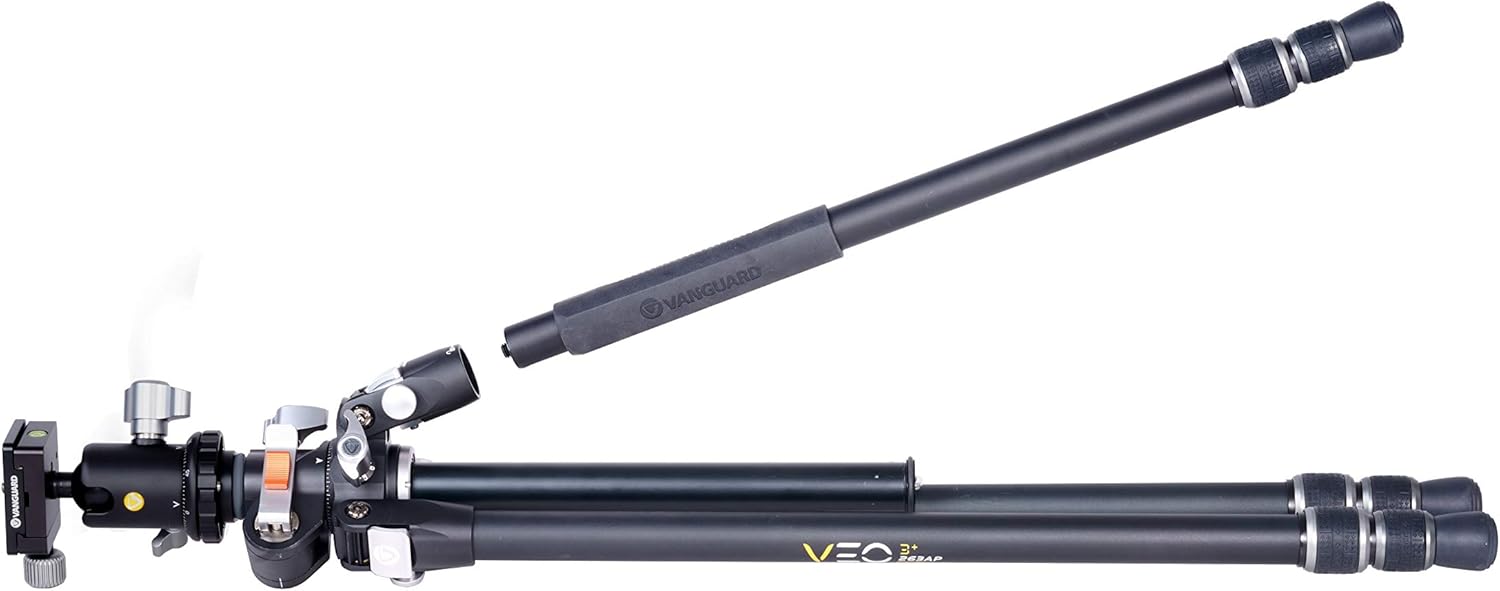
Figure 3: Detaching a tripod leg for monopod use.
Operating the Multi-Angle Center Column (MACC)
The MACC is a core feature of the VEO3+263AB, offering unparalleled flexibility for various shooting scenarios, including overhead, flat lay, and extreme macro photography.
1. Adjusting MACC Angle and Position
- Loosen the MACC locking knob located at the base of the center column.
- Press the orange flip lock to release the MACC from its vertical position.
- Pivot the MACC to your desired angle (e.g., horizontal for overhead shots, angled for macro).
- Once the desired angle is achieved, release the orange flip lock and tighten the MACC locking knob to secure it.
- The MACC can also be rotated 360° while in a horizontal or angled position by loosening the rotation lock.

Figure 4: Multi-Angle Center Column extended horizontally for overhead shots.

Figure 5: Multi-Angle Center Column angled downwards for macro photography.
2. Using the VEO+ MA1 Adaptor
The included VEO+ MA1 Adaptor allows you to mount additional accessories or a second camera onto the MACC, enhancing your creative possibilities.
- Slide the VEO+ MA1 Adaptor onto the MACC.
- Secure it in place by tightening its locking knob.
- Attach your desired accessory or camera to the adaptor.

Figure 6: Two cameras mounted on the MACC using the VEO+ MA1 Adaptor.
3. Video Demonstration: MACC Functionality
Video 1: This video demonstrates the various features and setup options of the Vanguard VEO3+ Tripod, including the multi-angle center column adjustments and monopod conversion.
Pangropéa
Pangropéa anu leres mastikeun umur panjang sareng kinerja tripod anjeun anu optimal.
- beberesih: Saatos dianggo, khususna di lingkungan anu berdebu, keusik, atanapi baseuh, usap tripod kalayan lemes, damp cloth. Ensure all twist locks and moving parts are free of debris. Do not use harsh chemicals or abrasive materials.
- Lubrication: Moving parts, such as the ball head and center column, may benefit from occasional light lubrication with a silicone-based lubricant. Avoid over-lubricating.
- Panyimpenan: Store the tripod in its deluxe padded bag in a dry, cool place away from direct sunlight and extreme temperatures.
- Panggantian Suku: The rubber feet can be replaced with the included spiked feet for better grip on soft or slippery surfaces. To replace, simply unscrew the current feet and screw on the desired ones.
Pamérésan masalah
If you encounter issues with your tripod, consider the following common solutions:
- Ketidakstabilan tripod: Ensure all leg sections are fully extended and twist locks are securely tightened. Verify that leg angles are properly engaged. Check if the quick release plate is firmly attached to both the camera and the ball head.
- Stiff Twist Locks/Moving Parts: Clean any dirt or grit from the twist locks and leg sections. A small amount of silicone lubricant can be applied to improve smoothness.
- Ball Head Movement: Ensure all locking knobs on the ball head are tightened. If the camera still sags, check the weight limit of the ball head and tripod against your camera and lens setup.
- MACC Not Holding Position: Confirm that the MACC locking knob and the orange flip lock are fully engaged and tightened after adjustment.
For further assistance, please contact Vanguard customer support.
spésifikasi
| Fitur | Spésifikasi |
|---|---|
| Dimensi produk | 31 x 6 x 6 inci |
| Item Beurat | 5.4 pon |
| Nomer Modél Item | VEO3+263AB |
| merek | VANGUARD |
| Warna | Hideung |
| Alat nu cocog | Kaméra |
| Fitur husus | Multi-angle center column |
| Bahan | alumunium |
| Batesan Beurat | 33 pon |
| Jangkungna maksimum | 68 inci |
| Tipe Kepala Tripod | Bal Huluna |
Garansi sareng Rojongan
Vanguard products are manufactured to high-quality standards and are backed by a limited warranty. For specific warranty details, product registration, or technical support, please visit the official Vanguard websitus atanapi ngahubungan departemén layanan palanggan maranéhna.
Anjeun tiasa mendakan langkung seueur inpormasi sareng dukungan dina VANGUARD Store on Amazon.