Bubuka
This manual provides essential information for the installation, operation, maintenance, and troubleshooting of the Red Lion DA10D Data Acquisition Protocol Converter. The DA10D is designed to facilitate data exchange between various industrial devices using RS232 and RS485 communication protocols.
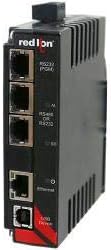
Gambar 1: Red Lion DA10D Data Acquisition Protocol Converter. The device features multiple RJ45 ports for RS232, RS485/RS232, and Ethernet connectivity, along with status indicator LEDs.
Émbaran Kasalametan
Always observe standard safety precautions during installation and operation. Ensure power is disconnected before making any connections. Refer to local electrical codes and regulations.
Setup sareng Instalasi
1. Pamasangan
The DA10D is designed for DIN rail mounting. Ensure a secure and stable mounting location with adequate ventilation.
2. Sambungan Daya
Connect the device to a suitable power supply according to the specifications. Verify correct polarity before applying power.
3. Communication Port Connections
- Port RS232: Connect your RS232 compatible device to the designated RS232 port using an appropriate cable.
- RS232/RS485 Port: This port can be configured for either RS232 or RS485 communication. Connect your device based on the required protocol.
- Port Ethernet: Connect to your network for configuration and data access.
Refer to the wiring diagrams in the full product documentation for detailed pin assignments.
Parentah Operasi
1. Mimiti Power-Up
Once all connections are secure, apply power. Observe the status indicator LEDs for proper boot-up sequence.
2. Konfigurasi
The DA10D is configured via a web interface or specialized software. Access the device's IP address through a web browser to set up communication parameters, data mapping, and protocol conversions.
- Set baud rates, data bits, parity, and stop bits for serial ports.
- Configure IP settings for the Ethernet port.
- Nangtukeun data tags and protocol translation rules.
3. Ngumpulkeun Data
Once configured, the DA10D will begin acquiring data from connected devices and converting it according to the defined rules. Monitor data flow through the web interface or connected HMI/SCADA systems.
Pangropéa
The Red Lion DA10D is designed for minimal maintenance. Regular checks include:
- Inspeksi Visual: Periodically inspect the device for any physical damage, loose connections, or signs of overheating.
- Pembaruan firmware: Check the Red Lion website for available firmware updates to ensure optimal performance and security. Follow update instructions carefully.
- beberesih: Jaga alat ieu bébas tina lebu sareng kokotor. Anggo lawon anu lemes sareng garing pikeun ngabersihkeun. Entong nganggo pembersih cair.
Pamérésan masalah
| Masalah | Mungkin Cukang lantaranana | Solusi |
|---|---|---|
| Alat teu hurung | No power supply, incorrect wiring, faulty power supply | Verify power connections and supply voltage. Check wiring for correct polarity. |
| No communication via serial port | Incorrect wiring, wrong protocol settings, faulty cable, device not configured | Check serial port wiring. Verify baud rate, data bits, parity, and stop bits. Test cable. Ensure device is properly configured in the web panganteur. |
| Teu bisa ngakses web panganteur | Incorrect IP address, network issue, device not powered, firewall blocking access | Confirm device IP address. Check network connectivity. Temporarily disable firewall. Ensure device is powered on. |
For further assistance, contact Red Lion technical support.
spésifikasi
| Fitur | Rincian |
|---|---|
| Modél | DA10D0C000000000 |
| merek | Red Lion |
| Tipe | Data Acquisition Protocol Converter |
| Palabuhan Serial | (1) RS232, (1) RS232 or RS485 |
| palabuhan Ethernet | 1 (for configuration and data access) |
| Jumlah Saluran | 2 |
| Jumlah Pin | 14 |
| UPC | 723707437121 |
| Pamasangan | DIN Rel |
Garansi sareng Rojongan
For warranty information and technical support, please refer to the official Red Lion Controls websitus atanapi hubungi distributor resmi anjeun. Simpen resi pameseran anjeun kanggo klaim garansi.


