1. Bubuka jeung Leuwihview
The OSD Audio MX1680 GEN2 is a high-performance, multi-channel amplifier designed for distributed audio systems. This Class D amplifier provides 16 channels across 8 independent zones, delivering 80 Watts per channel into 4 Ohms or 50 Watts per channel into 8 Ohms. It is suitable for both residential and commercial audio installations, serving as a main amplifier for multi-room audio or integrating into home theater systems.
Key features include front-panel on/off buttons for each zone, efficient Class D amplification for low distortion, and built-in protection circuitry against thermal overload and short circuits. Its slim, 2U rack-mountable design (hardware included) allows for flexible installation.

Gambar 1.1: Hareup jeung tukang view of the OSD Audio MX1680 GEN2 Multi-Zone Digital Amppangagung.
2. Émbaran Kasalametan
Mangga baca sareng pahami sadaya pitunjuk kaamanan sateuacan ngoperasikeun alat ieu. Simpen manual ieu kanggo rujukan ka hareup.
- Sumber Daya: Nyambungkeun amplifier only to the type of power source indicated on the unit. Ensure the voltage is correct for your region.
- Ventilasi: Ulah meungpeuk sagala bukaan ventilasi. Pasang saluyu sareng parentah produsén. Mertahankeun spasi nyukupan sabudeureun unit pikeun aliran hawa ditangtoskeun.
- Cai sareng Uap: Ulah ngalaan alat ieu ka hujan atawa beueus. Ulah nempatkeun objék dieusian ku cairan, kayaning vases, dina alat.
- Panas: Entong dipasang di deukeut sumber panas sapertos radiator, register panas, kompor, atanapi aparat sanésna (kalebet ampLiifiers) anu ngahasilkeun panas.
- Grounding: This appliance must be grounded. Ensure the power cord is connected to a properly grounded outlet.
- Palayanan: Entong nyobian ngalayanan produk ieu nyalira. Rujuk sadayana ngalayanan ka tanaga jasa anu mumpuni.
- beberesih: Cabut colokan unit tina stop kontak sateuacan dibersihkeun. Anggo lawon garing pikeun ngabersihkeun.
3. Setup jeung Instalasi
3.1 Ngabongkar bungkusan
Ati-ati ngaleupaskeun amplifier from its packaging. Verify that all components listed in the 'What's in the Box' section are present. This includes the MX1680 GEN2 amplifier and the Quick Start Guide.
3.2 Nempatkeun
The MX1680 GEN2 is designed for rack mounting (2U height) or placement on a flat, stable surface. Ensure adequate ventilation around the unit to prevent overheating. Avoid placing it near other heat-generating equipment.
3.3 Sambungan
Refer to the rear panel diagram for all input and output connections.
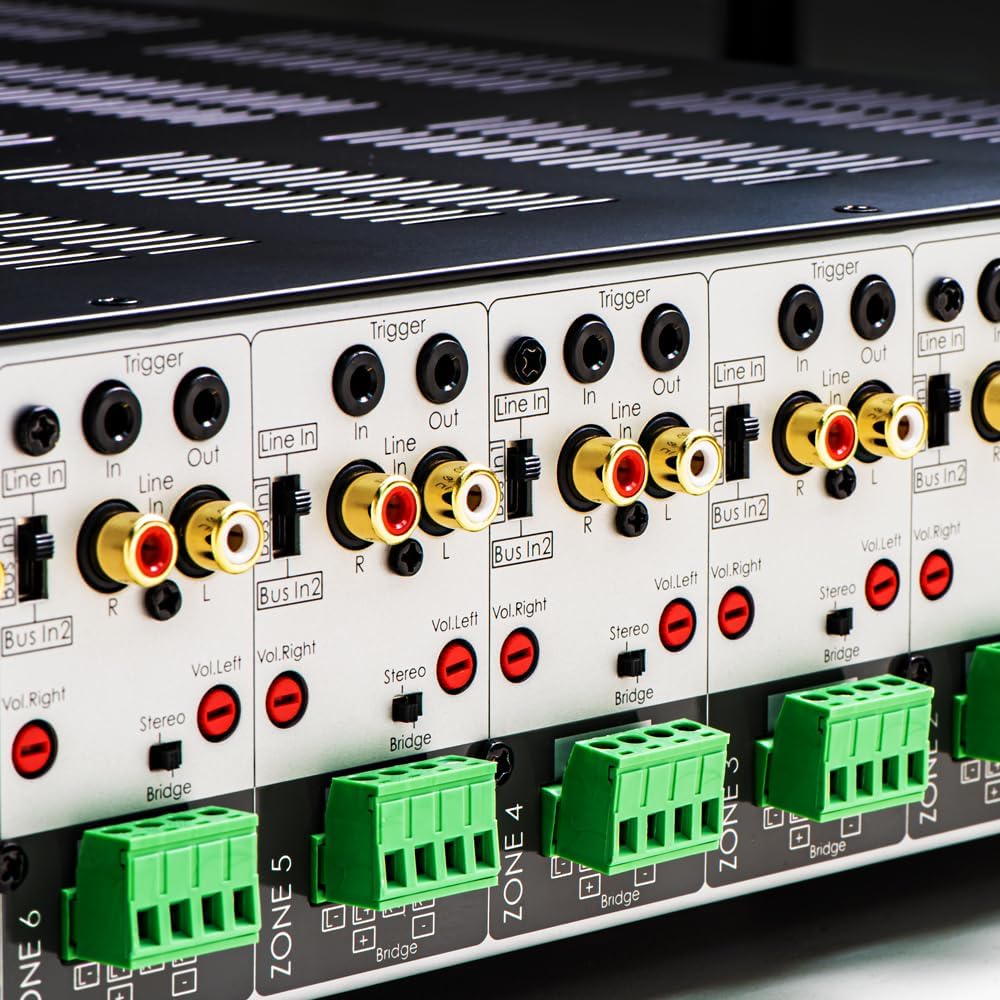
Gambar 3.1: Detil view of the rear panel input and output connections.
- Kaluaran Speaker: Connect your speakers to the corresponding zone terminals. Ensure correct polarity (+ to + and - to -). The amplifier supports both 4-ohm and 8-ohm speakers. For bridged mode operation, refer to section 4.3.
- Line Inputs (RCA): Each zone has a dedicated stereo RCA Line In. Connect your audio sources (e.g., pre-amplifier, media player) to these inputs.
- Bus Inputs (RCA): The amplifier features two stereo Bus Inputs (Bus In 1, Bus In 2). These allow a single audio source to be distributed to multiple zones.
- Kaluaran Jalur (RCA): Each zone also has a stereo RCA Line Out, allowing the audio signal from that zone to be passed to another amplifier atawa alat audio.
- Pemicu In/Out: The 12V Trigger In allows the amplifier to be turned on/off by an external device. The 12V Trigger Out can be used to control other devices.
- Input Daya AC: Connect the supplied power cord to the AC IN receptacle and then to a suitable wall outlet.

Gambar 3.2: Detil view of Bus inputs and Trigger connections on the rear panel.
4. Parentah Operasi
4.1 Daya Hurung/Pareuman
Press the main power button on the front panel to turn the amplifier on or off. A red LED indicator will illuminate when the unit is powered on.

Image 4.1: Front panel power button.
4.2 Kontrol Zona
Each of the 8 zones has a dedicated button on the front panel. Pressing a zone button will activate or deactivate that specific audio zone. The corresponding LED will indicate the zone's status.

Image 4.2: Front panel zone selection buttons.
4.3 Input Selection and Volume Adjustment
On the rear panel, each zone features switches for input selection and rotary controls for volume adjustment:
- Pamilih Input: A slide switch allows you to select the audio input for each zone: Baris Dina (dedicated input for that zone), Bus In 1, atawa Bus In 2.
- Kontrol Volume: Separate rotary controls for Left and Right channels (Vol. Left, Vol. Right) allow for precise volume balancing within each zone.
- Stereo/Bridge Switch: A switch allows you to configure the zone for stereo operation or bridged mono operation. In bridged mode, two amplifier channels combine to deliver higher power to a single speaker. Ensure the speaker impedance is appropriate for bridged mode (typically 8 ohms minimum).
4.4 Audio Sensing
The amplifier incorporates an audio sense feature that automatically activates a zone when an input signal is detected and turns it off after a period of no signal. This helps conserve power and prolong the unit's lifespan.

Gambar 4.3: Example of multi-zone audio distribution with the amppangagung.
5. Pangropéa
The OSD Audio MX1680 GEN2 amplifier requires minimal maintenance. Follow these guidelines to ensure optimal performance and longevity:
- beberesih: Periodically wipe the exterior surfaces with a soft, dry cloth. Do not use liquid cleaners or aerosol sprays, as they may damage the finish or internal components.
- Ventilasi: Ensure that the ventilation openings on the top and sides of the unit remain clear of dust and obstructions. Dust accumulation can impede airflow and lead to overheating.
- Sambungan: Occasionally check all cable connections to ensure they are secure and free from corrosion. Loose connections can lead to signal loss or degradation.
- Panyimpenan: Lamun nyimpen éta amplifier for an extended period, disconnect it from power and store it in a cool, dry place, away from direct sunlight and extreme temperatures.
6. Cara ngungkulan
If you experience issues with your MX1680 GEN2 amplifier, consult the following troubleshooting guide. For problems not resolved here, please contact OSD Audio support.
| Masalah | Mungkin Cukang lantaranana | Solusi |
|---|---|---|
| Taya kakuatan | Power cord disconnected; Power outlet faulty; AmpSekring lifer peupeus | Check power cord connection; Test outlet with another device; Contact service for fuse replacement. |
| No sound from a zone | Zone not activated; Incorrect input selected; Source device off/muted; Speaker wires loose/incorrectly connected; Volume too low | Press the zone button on the front panel; Verify input selector switch position; Check source device; Inspect speaker connections; Adjust zone volume controls. |
| Sora distort | Input signal too high; Speaker impedance mismatch; Faulty speaker cable; Ampoverheating lifier | Reduce source device output level; Ensure correct speaker impedance (4 or 8 ohms, or 8 ohms for bridged); Check speaker cables; Ensure proper ventilation. |
| Amplifier shuts off unexpectedly | Overheating; Short circuit in speaker wiring; Protection circuit activated | Ensure proper ventilation; Check all speaker wiring for shorts; Allow unit to cool down before restarting. |
7. Spésifikasi
| Fitur | Spésifikasi |
|---|---|
| Nomer modél | MX1680-GEN2 |
| Saluran | 16 Channels (8 Zones) |
| Kaluaran Daya (4 Ohm) | 80 Watts per channel (1KHz) |
| Kaluaran Daya (8 Ohm) | 50 Watts per channel (1KHz) |
| Amplifier Kelas | Kelas D |
| Ukuran produk (L x W x H) | 16.81 x 16.14 x 3.46 inci |
| Item Beurat | 23 pon |
| Rak tiasa dipasang | Yes (2U, hardware included) |
| Produsén | Audio OSD |
| Tanggal Kahiji Sadia | 31 Januari 2020 |
8. Émbaran jaminan
Warranty information for the OSD Audio MX1680 GEN2 amplifier is typically provided with your purchase documentation or can be found on the official OSD Audio websitus. Mangga tingal sumber daya ieu kanggo detil ngeunaan panutup garansi, syarat, sareng kaayaan.
9. Rojongan
For technical assistance, product inquiries, or service requests, please contact OSD Audio customer support. You can typically find contact information, including phone numbers and email addresses, on the official OSD Audio websitus:
Please have your model number (MX1680-GEN2) and purchase details ready when contacting support.