1. Bubuka
Hatur nuhun pikeun meuliasing the EuropAce ETF 1129 Slim Tower Fan. This manual provides important information regarding the safe operation, installation, maintenance, and troubleshooting of your new appliance. Please read this manual thoroughly before use and retain it for future reference.
2. Émbaran Kasalametan
To reduce the risk of fire, electric shock, or injury, always observe the following basic safety precautions:
- Baca sadaya parentah sateuacan nganggo alat ieu.
- Pastikeun catu daya voltage cocog sareng labél rating dina kipas.
- Ulah neuleumkeun kipas, colokan, atawa ari dina cai atawa cairan séjén.
- Unplug the fan from the power outlet when not in use, when moving it, and before cleaning.
- Ulah ngoperasikeun kipas upami kabel atanapi colokanna rusak, atanapi saatos kipasna teu jalan fungsina atanapi murag atanapi ruksak ku cara naon waé.
- Jauhkeun kipas tina jangkauan barudak sareng piaraan.
- Ulah selapkeun ramo atawa objék naon wae kana grille lamun kipas keur beroperasi.
- Teundeun kipas dina tempat anu datar sareng stabil pikeun nyegahna tibalik.
- Ulah nganggo kipas di tempat anu kalembabanna luhur, sapertos kamar mandi, atanapi caket sumber cai.
- Ensure adequate ventilation around the fan. Do not cover the fan.
3. Produk Langkungview
3.1 Komponén
The EuropAce ETF 1129 is a slim tower fan designed for efficient air circulation. It features a sleek black finish and a stable base.
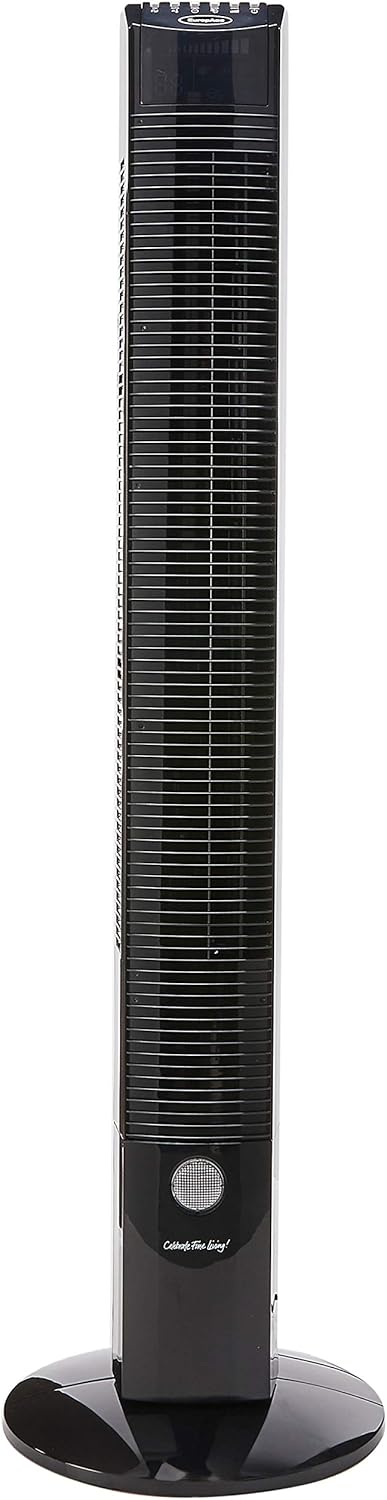
Gambar 1: Hareupeun view of the EuropAce ETF 1129 Slim Tower Fan, showcasing its tall, slender design and integrated base.
3.2 Fitur konci
- Énergi Éfisién: Equipped with a 55W motor for optimized performance and energy saving.
- Cakupan hawa lega: Features 70-degree oscillation for broad area cooling.
- Témbongkeun calakan: Large LED display shows ambient room temperature.
- Multiple Speed Selection: 3 fan speed settings (Low, Medium, High).
- Modeu Operasi: Normal, Natural, and Sleep modes for varied comfort.
- Fungsi Timer: Up to 8 hours timer for automatic shut-off.
- Fungsi Ionizer: Ngabantosan ngabersihkeun hawa.
- Kontrol Lampu Peuting: Fitur lampu wengi terpadu.
- No Blade Design: Safe and easy to clean.
4. Setélan
The EuropAce ETF 1129 Tower Fan requires minimal assembly. Follow these steps to prepare your fan for use:
- Ngabongkar: Sacara saksama miceun sadaya komponén tina bungkusan.
- Majelis Dasar: The fan base typically comes in two parts. Align these two parts and secure them together. Then, attach the assembled base to the bottom of the tower fan using the provided screws. Ensure the base is firmly attached and stable.
- panempatan: Place the fan on a firm, level surface, ensuring there is adequate space around it for optimal airflow and oscillation.
- Sambungan Daya: Selapkeun colokan listrik kana stop kontak listrik anu cocog.
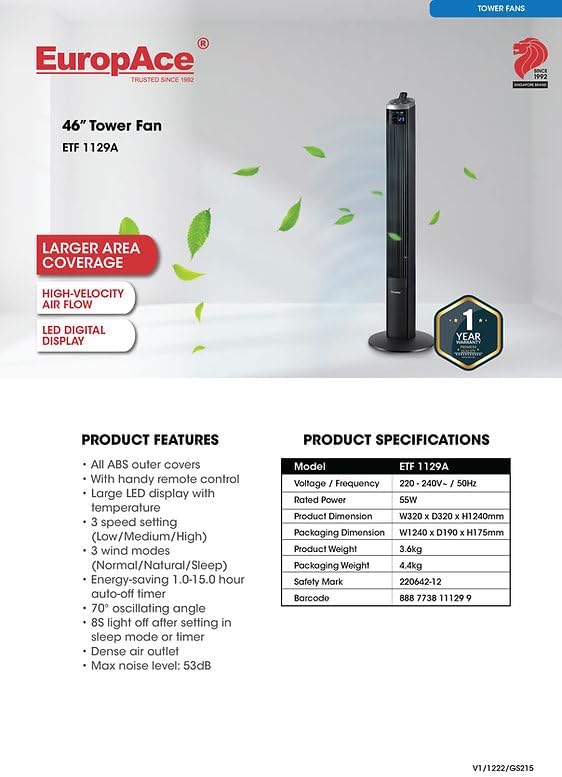
Figure 2: The tower fan fully assembled and ready for operation.
5. Parentah Operasi
Your EuropAce ETF 1129 Tower Fan can be operated using the control panel on top of the unit or the included remote control.
5.1 Panel kontrol
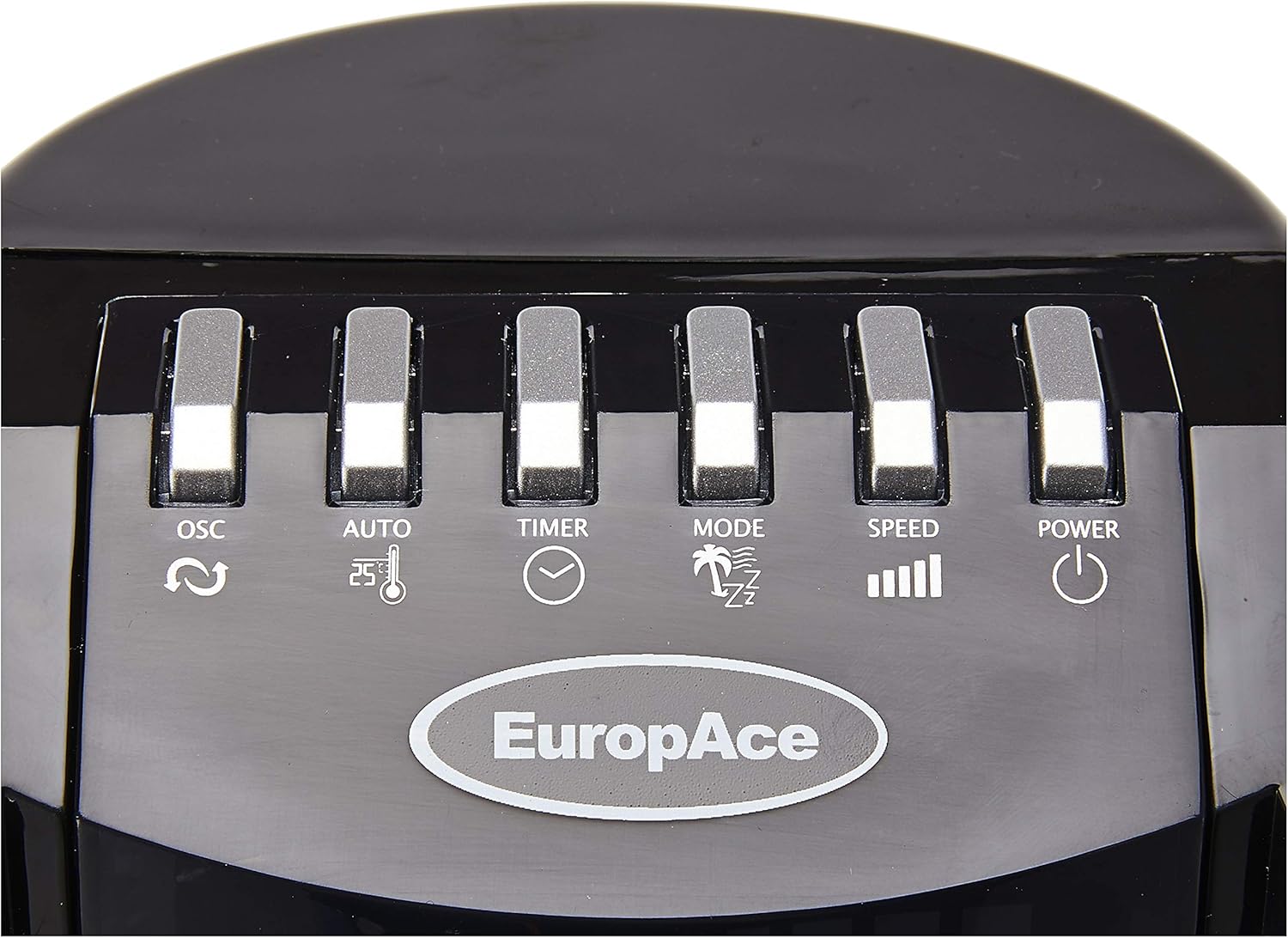
Figure 3: Control panel with buttons for Oscillation, Auto, Timer, Mode, Speed, and Power.
- POWER (⏻): Hurungkeun atawa Pareum kipas.
- SPEED (▁▂▃▄): Saluyukeun laju kipas (Rendah, Sedeng, Luhur).
- MODE (🌴⏰⏰): Cycles through Normal, Natural, and Sleep modes.
- TIMER (⏱): Sets the operating time from 1 to 8 hours.
- AUTO (⏰🌡): Activates the auto mode, which may adjust speed based on ambient temperature.
- OSC (↻): Turns the oscillation function On or Off.
5.2 Jauh Jauh

Figure 4: Remote control with buttons for Power/Speed, Auto, Oscillation, Timer, Mode, Ion, and Light.
- POWER/SPEED (Green button with power symbol and bars): Turns the fan On/Off and cycles through speed settings.
- AUTO (⏰🌡): Activates the auto mode.
- OSC (↻): Turns oscillation On/Off.
- TIMER (⏱): Nyetél waktos operasi.
- MODE (🌴⏰⏰): Cycles through Normal, Natural, and Sleep modes.
- ION (⚡): Ngaktipkeun atanapi nganonaktipkeun fungsi ionizer.
- LIGHT (💡): Controls the night light feature.
5.3 Functions Explained
- Pilihan Speed: Press the SPEED button to cycle between Low, Medium, and High fan speeds.
- Osilasi: Press the OSC button to start or stop the fan's 70-degree oscillation, distributing air across a wider area.
- Timer: Press the TIMER button repeatedly to set the desired operating duration from 1 to 8 hours. The fan will automatically turn off after the set time.
- Modeu Operasi:
- Modeu Normal: Nyadiakeun aliran hawa konstan dina laju nu dipilih.
- Mode alam: Simulates angin alam ku varying speed kipas intermittently.
- Modeu Bobo: Operates silently with reduced fan speed and automatically turns off the LED display after 8 seconds for a peaceful night's rest.
- Ionizer: The ION button (on remote) activates the ionizer, which releases negative ions to help purify the air.
- Lampu Peuting: The LIGHT button (on remote) controls the integrated night light.
6. Pangropéa jeung beberesih
Pembersih sareng pangropéa teratur bakal mastikeun umur panjang sareng kinerja optimal kipas anjeun.
- Sok cabut kipas angin ti stop kontak listrik saméméh beberesih.
- Bersihan Luar: Ngusap permukaan luar kipas kalayan lemes, damp cloth. Do not use abrasive cleaners, waxes, or polishes as they may damage the finish.
- Ngaleungitkeun lebu: Anggo panyedot debu anu nganggo sikat pikeun miceun lebu tina kisi-kisi asupan sareng outlet hawa.
- Panyimpenan: Upami nyimpen kipas kanggo waktos anu lami, tutupna supados ngajaga tina lebu sareng simpen di tempat anu tiis sareng garing.
- Ulah nyobian muka kipas casing or modify the appliance. Refer all servicing to qualified personnel.
7. Cara ngungkulan
If you encounter issues with your fan, please consult the following table before contacting customer support.
| Masalah | Mungkin Cukang lantaranana | Solusi |
|---|---|---|
| Kipas angin teu hurung. | Taya catu daya. Tombol daya teu dipencet. | Pastikeun kipas dicolokkeun kana stop kontak anu tiasa dianggo. Pencét tombol POWER dina panel kontrol atanapi remot. |
| Lemah atanapi henteu aya aliran hawa. | Laju kipas disetel handap teuing. Inlet / outlet hawa diblokir. | Ningkatkeun kagancangan kipas. Pariksa jeung cabut sagala halangan tina grilles. |
| Osilasi teu jalan. | Pungsi osilasi pareum. | Pencét tombol OSC pikeun ngaktipkeun osilasi. |
| Kadali jauh teu jalan. | Batré pareum atawa salah dipasang. Halangan antara remote jeung kipas. | Ganti batré ku nu anyar, mastikeun polaritasna bener. Cabut objék anu ngahalangan jalur sinyal. |
| Fan is unstable. | Base not properly assembled or secured. Fan placed on an uneven surface. | Ensure the base is correctly assembled and all screws are tightened. Teundeun kipas dina datar, permukaan stabil. |
8. Spésifikasi
Detailed technical specifications for the EuropAce ETF 1129 Slim Tower Fan:
| Fitur | Spésifikasi |
|---|---|
| Modél | ETF 1129 |
| merek | EuropAce |
| Konsumsi Daya | 55W |
| Item Beurat | 3.6 kg |
| Ukuran produk (D x W x H) | 4.4D x 7.5W x 7.6H séntiméter |
| Warna | Hideung |
| Desain kipas listrik | Kipas Lantai |
| Sumber Daya | Kabel Listrik |
| Fitur husus | Oscillating, Ionizer, Night Light, LED Display, Timer |
| Komponén Kaasup | 1 x kipas munara |
| Majelis Diperlukeun | No (minimal base assembly may be required) |
| Jenis Jaminan | Garansi 1 Taun |
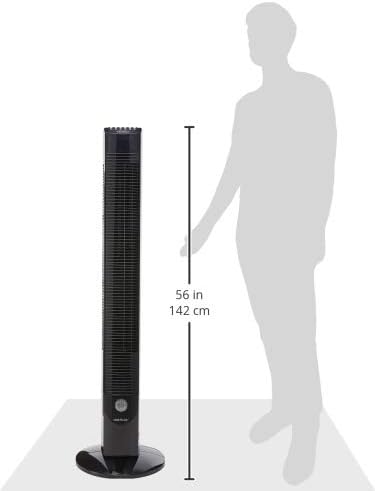
Figure 5: Approximate dimensions of the tower fan, showing a height of 142 cm (56 inches).
9. Garansi jeung Rojongan
9.1 Émbaran jaminan
The EuropAce ETF 1129 Slim Tower Fan comes with a Garansi 1 Taun ti tanggal beuli. Garansi ieu nyertakeun cacad manufaktur dina panggunaan normal. Punten tahan bukti pameseran anjeun pikeun klaim garansi.

Figure 6: EuropAce product information, confirming a 1-year warranty.
9.2 Rojongan Palanggan
For technical assistance, warranty claims, or any inquiries regarding your EuropAce product, please contact EuropAce customer service through their official website or authorized service centers. Refer to your product packaging or the official EuropAce websitus pikeun inpo kontak panganyarna.


