1. Bubuka
The Celly Pantone PTBS001L is a portable Bluetooth speaker designed for an optimal audio experience both indoors and outdoors. Featuring an elegant fabric-covered body and a 5W output, it delivers clear sound. This manual provides detailed instructions for setting up, operating, and maintaining your speaker.
fitur konci ngawengku:
- Kahirupan Batré 8 Jam: Enjoy extended playback on a single charge.
- Kaluaran Audio 5W: Provides maximum sound for various environments.
- Konektipitas Ganda: Connect via Bluetooth 5.0 or the included 3.5mm auxiliary cable.
- Desain portabel: Compact and stylish, making it easy to carry.
2. Émbaran Kasalametan
Mangga baca sadaya pitunjuk kaamanan sateuacan nganggo produk ieu. Upami henteu nuturkeun pitunjuk ieu tiasa nyababkeun sengatan listrik, kahuruan, atanapi bahaya sanésna.
- Ulah ngalaan speaker ka suhu ekstrim, sinar panonpoé langsung, atawa kalembaban luhur.
- Ulah ngalelepkeun speaker kana cai atanapi cairan anu sanés.
- Hindarkeun lungsur atanapi nahan panyatur kana tabrakan anu kuat.
- Ulah nyobian ngabongkar, ngalereskeun, atanapi ngarobih speaker. Ieu bakal ngabatalkeun garansi.
- Anggo ukur kabel ngecas anu disayogikeun atanapi anu sarimbag anu disertipikasi.
- Jauhkeun tina jangkauan barudak.
- Buang produk sacara tanggung jawab nurutkeun peraturan lokal.
3. Eusi Paket
Pastikeun sadaya item aya dina bungkusan:
- Celly Pantone PTBS001L Bluetooth Speaker
- Kabel Ngecas USB
- 3.5mm Auxiliary (AUX) Cable
- Manual pangguna (dokumén ieu)
4. Produk Langkungview
The Celly Pantone PTBS001L speaker features a minimalist design with intuitive controls. Familiarize yourself with the speaker's components and controls before use.

Gambar 1: Hareupeun view of the Celly Pantone PTBS001L Bluetooth Speaker. The speaker has a cylindrical shape, covered in a cyan fabric, with a white base featuring the 'PANTONE' logo. The top cap is also cyan.
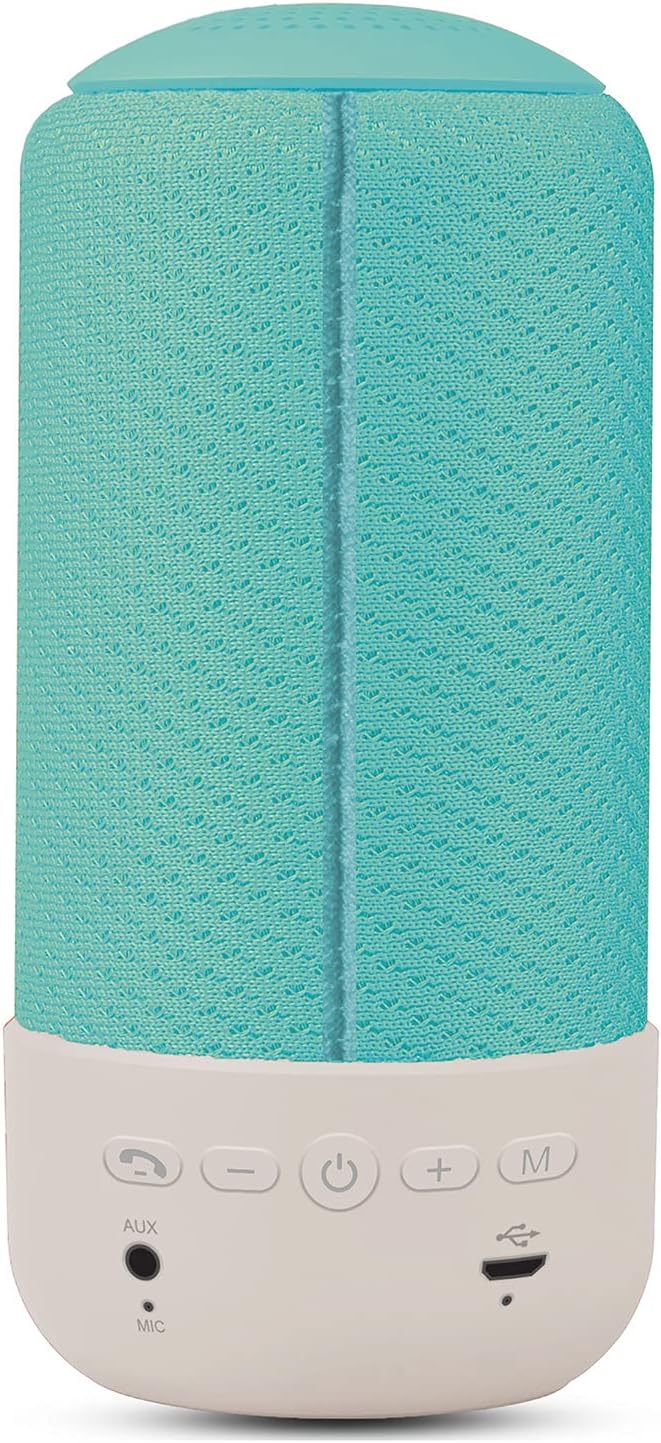
Gambar 2: Tukangeun view of the Celly Pantone PTBS001L Bluetooth Speaker. This image highlights the control panel located on the white base. From left to right, the buttons are: Call/Play/Pause, Volume Down (-), Power On/Off, Volume Up (+), and Mode (M). Below these buttons are the AUX input, Microphone (MIC), and Micro USB charging port.
Kontrol sareng palabuhan:
- Call / Play / Pause Button: Answer/end calls, play/pause music.
- Tombol Volume Turun (-): Ngurangan volume. Pencét jeung tahan pikeun lagu saméméhna.
- Tombol Daya (⏻): Power on/off the speaker.
- Tombol Volume Up (+): Ningkatkeun volume. Pencét jeung tahan pikeun lagu salajengna.
- Tombol Mode (M): Ganti antara modeu Bluetooth sareng AUX.
- Input AUX: Jack 3.5mm pikeun sambungan audio kabel.
- MIC: Mikropon internal pikeun telepon handsfree.
- Port Mikro USB Ngecas: Pikeun ngecas batré internal speaker.
5. Setélan
5.1 Ngecas Awal
Before first use, fully charge the speaker. Connect the Micro USB charging cable to the speaker's charging port and the other end to a USB power adapter (not included) or a computer's USB port. The charging indicator light will illuminate during charging and turn off once fully charged. A full charge takes approximately 2 hours.
5.2 Powering on / Pareum
- Pikeun Ngahurungkeun: Press and hold the Power button (⏻) for a few seconds until you hear an audible prompt or see an indicator light.
- Pikeun mareuman: Press and hold the Power button (⏻) for a few seconds until you hear an audible prompt or the indicator light turns off.
5.3 Nyapasangkeun Bluetooth
After powering on, the speaker will automatically enter Bluetooth pairing mode if no device is connected. An indicator light will flash, and you may hear an audible prompt.
- Ensure the speaker is powered on and in Bluetooth pairing mode.
- Dina alat sélulér anjeun (smartphone, tablet, jsb.), aktipkeun Bluetooth.
- Milarian pikeun available Bluetooth devices. The speaker will appear as "PTBS001L" atawa sarupa.
- Select the speaker from the list to connect. Once connected, you will hear a confirmation sound, and the indicator light will stop flashing.
- Upami dipenta pikeun kecap akses, lebetkeun "0000".
Spéker bakal otomatis nyobian nyambungkeun deui ka alat anu dipasangkeun terakhir nalika diaktipkeun, upami alat éta aya dina jangkauan sareng gaduh Bluetooth diaktipkeun.
6. Parentah Operasi
6.1 Playback Bluetooth
- Once paired, open your music application on your device and start playback.
- Puter / Reureuh: Press the Call/Play/Pause button once.
- Lagu salajengna: Pencét jeung tahan tombol Volume Up (+).
- Lagu Sateuacanna: Pencét jeung tahan tombol Jilid Turun (-).
6.2 AUX Mode Playback
For devices without Bluetooth, or if you prefer a wired connection:
- Connect one end of the 3.5mm AUX cable to the AUX input port on the speaker.
- Connect the other end of the AUX cable to the headphone jack of your audio device.
- Pencét éta Modeu (M) button on the speaker to switch to AUX mode. You will hear an audible prompt.
- Start playback from your audio device. Volume can be controlled via the speaker or your device. Track control buttons on the speaker may not function in AUX mode.
6.3 Fungsi Telepon
When connected via Bluetooth, the speaker supports hands-free calling.
- Ngajawab Telepon: Press the Call/Play/Pause button once when an incoming call rings.
- Tungtung Telepon: Press the Call/Play/Pause button once during a call.
- Nolak Telepon: Press and hold the Call/Play/Pause button for 2 seconds when an incoming call rings.
- Telepon deui Nomer Panungtungan: Double-press the Call/Play/Pause button.
6.4 Volume Control
- Ningkatkeun Jilid: Pencét tombol Volume Up (+).
- Turunkeun Jilid: Pencét tombol Jilid Turun (-).
7. Ngecas Speaker
The speaker is powered by an internal rechargeable battery. When the battery is low, you may hear an audible warning, and the indicator light may flash.
- Sambungkeun kabel ngecas Micro USB ka port ngecas spiker.
- Sambungkeun tungtung kabel anu sanésna kana sumber daya USB (contona, adaptor témbok, port USB komputer).
- The charging indicator light will be active during charging.
- Charging typically takes less than 2 hours for a full charge.
- A fully charged speaker provides approximately 8 hours of playback time.
8. Pangropéa
8.1 beberesih
- Ngusap spéker nganggo lawon anu lemes, garing, teu aya serat.
- Ulah make cleaners abrasive, alkohol, atawa pangleyur kimiawi, sabab ieu bisa ngaruksak beungeut cai.
8.2 Panyimpenan
- Simpen spéker dina tempat anu tiis sareng garing jauh tina sinar panonpoé langsung sareng suhu anu ekstrim.
- Upami nyimpen kanggo waktos anu panjang, ngeusi batre unggal sababaraha bulan pikeun ngajaga umurna.
9. Cara ngungkulan
| Masalah | Mungkin Cukang lantaranana | Solusi |
|---|---|---|
| Speaker teu hurung. | Batré béak. | Ngecas spéker sahenteuna 30 menit. |
| Teu aya sora ti panyatur. | Volumena leutik teuing; Alat teu nyambung; Modeu salah. | Increase speaker and device volume; Ensure Bluetooth is paired or AUX cable is connected; Press 'M' button to switch modes. |
| Teu bisa masangkeun via Bluetooth. | Spiker teu dina modeu pasangan; Bluetooth alat pareum; Jauh teuing ti alat. | Ensure speaker is on and flashing (pairing mode); Turn on Bluetooth on your device; Move speaker closer to your device (within 10m). |
| Kualitas sora henteu saé. | Low battery; Device too far; Interference. | Charge the speaker; Move device closer; Avoid obstacles between speaker and device. |
10. Spésifikasi
| Fitur | Spésifikasi |
|---|---|
| Ngaran modél | PTBS001L |
| merek | Pantone (by Celly) |
| Téhnologi konektipitas | Bluetooth, Bantu (Jack 3.5mm) |
| Vérsi Bluetooth | 5.0 |
| Jarak Gawé | Nepi ka 10 méter (33 suku) |
| Speaker Kaluaran Power | 5 Watt |
| Spésifikasi Speaker | 52mm - 4 Ohm |
| Rentang Frékuénsi | 60Hz - 20KHz |
| Panyimpangan | <3% |
| Kapasitas batré | 1200 mah |
| Waktu Ngecas | Kirang ti 2 jam |
| Maén Time | Langkung ti 8 jam |
| Fitur husus | Bluetooth, Portable, Hands-free Call Function |
| Ukuran (L x W x H) | 7 x 7 x 15 cm (2.76 x 2.76 x 5.91 inci) |
| Beurat | 340 gram (0.75 lbs) |
| Warna | Sian |
11. Garansi jeung Rojongan
This product is covered by a standard manufacturer's warranty. Please refer to the warranty card included with your purchase or visit the official Celly websitus pikeun istilah jeung kaayaan jaminan lengkep.
For technical support, troubleshooting assistance, or warranty claims, please contact Celly customer service through their official websitus atanapi inpormasi kontak anu disayogikeun dina bungkusan produk anjeun.


