1. Bubuka
Thank you for choosing the Arcam SA10 Class A/B Integrated Amplifier. This manual provides essential information for setting up, operating, and maintaining your amplifier to ensure years of high-quality audio enjoyment. The SA10 is designed to deliver class-leading sound quality, bringing your music to life with its powerful 50W per channel output, high-performance ESS9016K2M Sabre DAC, and low noise floor. It offers a listening experience as close to the artist's original performance as possible.
2. Émbaran Kasalametan
Mangga baca sadaya pitunjuk kaamanan kalayan saksama sateuacan ngoperasikeun unit ieu. Simpen buku panduan ieu kanggo rujukan ka hareup.
- Ulah ngalaan alat ieu ka hujan atawa Uap.
- Ulah meungpeuk sagala bukaan ventilasi. Pasang saluyu sareng parentah produsén.
- Entong dipasang di deukeut sumber panas sapertos radiator, register panas, kompor, atanapi aparat sanésna (kalebet ampLiifiers) anu ngahasilkeun panas.
- Nangtayungan kabel listrik tina leumpang atawa diciwit, utamana dina colokan, wadah merenah, jeung titik dimana aranjeunna kaluar tina aparat.
- Ngan anggo kantétan/aksésori anu ditunjuk ku produsén.
- Cabut colokan alat ieu nalika badai kilat atanapi nalika henteu dianggo kanggo waktos anu lami.
- Rujuk sadayana ngalayanan ka tanaga jasa anu mumpuni. Pelayanan diperyogikeun nalika aparat parantos rusak sagala cara.
- Produk ieu ngandung bahan kimia anu dipikanyaho Nagara California pikeun nyababkeun kanker sareng cacad kalahiran atanapi cilaka réproduktif sanés.
3. Eusi Paket
Saatos muka kotakna, pastikeun sadaya barang ieu aya:
- Arcam SA10 Terpadu Amppangagung
- Kabel Daya AC
- Kadali Jauh (kalebet 2 batré AAA)
- Manual pangguna (dokumén ieu)
4. Produk Langkungview
Familiarize yourself with the front and rear panels of your Arcam SA10 amppangagung.
4.1 Panel payun
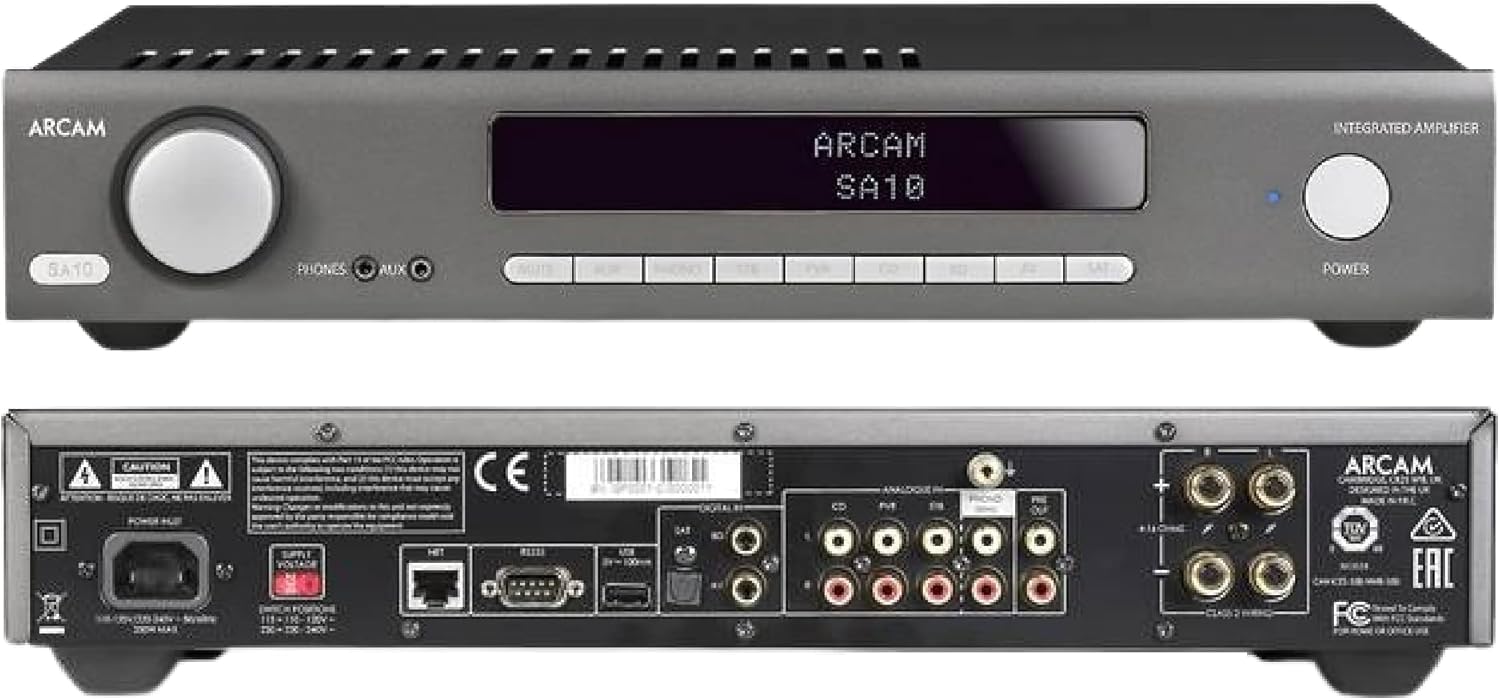
Figure 4.1: Front and Rear Panels of the Arcam SA10. The front panel features a large volume knob on the left, a display screen in the center, input selection buttons below the display, and a power button on the right. Headphone and auxiliary inputs are also present.
- Jilid Kenop: Saluyukeun volume kaluaran sakabéh.
- Layar tampilan: Shows current input, volume level, and other status information.
- Tombol Pilihan Input: Allows selection between various audio sources (CD, Tuner, AV, SAT, etc.).
- Tombol Daya: Toggles ka amplifier between standby and operational modes.
- Kaluaran headphone: Jack 3.5mm pikeun nyambungkeun headphone.
- Input bantu: Jack 3.5mm pikeun nyambungkeun alat audio portabel.
4.2 Panel tukang
The rear panel provides all the necessary connections for your audio system.
Figure 4.2: Detailed Rear Panel Connections. This view highlights the speaker terminals, analog RCA inputs (including Phono), digital optical and coaxial inputs, and the power inlet.
- Terminal Speaker: Connect your passive speakers (left and right channels).
- Analog Inputs (RCA): Multiple stereo RCA inputs for connecting analog audio sources like CD players, tuners, or other line-level devices.
- Phono Input (RCA): Dedicated input for turntables with moving magnet (MM) cartridges.
- Masukan Digital:
- Optik (Toslink): Pikeun sumber audio digital sapertos TV atanapi konsol gim.
- Koaksial: For digital audio sources like CD players or network streamers.
- Pra-kaluar: Pikeun nyambungkeun ka kakuatan éksternal ampLifier atanapi subwoofer Powered.
- Port USB: For firmware updates or service.
- Port Ethernet: For network control and future updates.
- Inlet Daya AC: Nyambungkeun ka ampLifier kana catu daya utama.
5. Setélan
5.1 Nempatkeun
Place the Arcam SA10 on a stable, level surface away from direct sunlight, heat sources, and excessive moisture. Ensure adequate ventilation around the unit to prevent overheating. Do not place other components directly on top of the amppangagung.
5.2 Nyambungkeun Speaker
Connect your passive speakers to the speaker terminals on the rear panel. Ensure correct polarity (+ to + and - to -) for both left and right channels. Use high-quality speaker cables for optimal sound performance.
5.3 Nyambungkeun Sumber Audio

Figure 5.3: The Arcam SA10 offers convenient connections including Toslink optical, two digital coaxial inputs, and three stereo analog RCA inputs, plus a dedicated phono input.
- Analog Sources: Connect CD players, tuners, or other line-level devices to the RCA analog inputs (CD, Tuner, AV, SAT).
- Méja puteran: Connect a turntable with a moving magnet (MM) cartridge to the dedicated PHONO input.
- Digital Sources: Connect digital audio sources using either the optical (Toslink) or coaxial digital inputs.
- Alat portabel: Use the 3.5mm AUX input on the front panel for quick connection of portable media players.
5.4 Sambungan Daya
Once all audio connections are made, connect the supplied AC power cord to the AC power inlet on the rear panel of the amplifier and then to a suitable wall outlet.
6. Parentah Operasi
6.1 Powering on / Pareum
Pencét éta POWER button on the front panel or the remote control to switch the amplifier on or into standby mode. The blue LED next to the power button indicates operational status.
6.2 Pamilihan Input
Use the input selection buttons on the front panel or the remote control to choose your desired audio source. The selected input will be displayed on the front panel screen.
6.3 Volume Control
Puterkeun anu ageung VOLUME knob on the front panel clockwise to increase volume and counter-clockwise to decrease it. Alternatively, use the volume up/down buttons on the remote control.
6.4 Paké headphone
Plug your headphones into the 3.5mm TELEPON jack on the front panel. Connecting headphones will automatically mute the main speaker outputs.
6.5 Remote Control & App Control

Figure 6.5: Control your SA10 with the included remote or via UPnP audio and basic functions using the FREE MusicLife App on your iPad, iPhone, or Android device.
The included remote control provides full functionality for the SA10. Ensure the supplied AAA batteries are correctly inserted. For advanced control and UPnP audio streaming, download the free Arcam MusicLife App from your device's app store (available for iOS and Android).
7. Pangropéa
To maintain the appearance and performance of your Arcam SA10:
- Ngusap permukaan luar ku lawon anu lemes, garing, henteu lint.
- Ulah make cleaners abrasive, lilin, atawa pangleyur.
- Pastikeun kisi-kisi ventilasi bébas tina lebu sareng halangan.
- Disconnect the power cord from the wall outlet before cleaning.
8. Cara ngungkulan
If you experience issues with your Arcam SA10, refer to the following common problems and solutions:
| Masalah | Mungkin Cukang lantaranana | Solusi |
|---|---|---|
| Taya kakuatan | ari kakuatan teu disambungkeun; stop kontak listrik lepat. | Pastikeun kabel listrik disambungkeun aman. Coba colokan listrik anu béda. |
| Taya sora | Input anu dipilih salah; kabel spiker leupas; volume teuing leutik; bisu diaktipkeun. | Select correct input. Check speaker cable connections. Increase volume. Deactivate mute. |
| Sora distort | Source signal too high; speaker impedance mismatch; faulty cables. | Reduce source output level. Ensure speakers are compatible (8 ohms recommended). Check/replace cables. |
| Kadali jauh teu jalan | Batteries depleted or incorrectly inserted; obstruction between remote and amppangagung. | Replace batteries. Ensure correct polarity. Remove obstructions. |
If the problem persists, please contact Arcam customer support or your authorized dealer.
9. Spésifikasi
Key technical specifications for the Arcam SA10 Integrated Amppanguat:

Figure 9.1: The Arcam SA10 delivers 50 watts per channel, features 5 analog inputs (including phono), 3 digital inputs, a 32-bit DAC, and boasts a low total harmonic distortion + noise of 0.003%.
- Kaluaran kakuatan: 50W per channel (8 ohms, 20-20,000 Hz, at 0.5% THD)
- AmpTipe Lifikasi: Kelas A/B
- Digital-to-Analog Converter (DAC): 32-bit ESS9016K2M Sabre DAC
- Masukan Analog: 5 (including 1 dedicated Phono input for Moving Magnet cartridges)
- Masukan Digital: 3 (1 Optical Toslink, 2 Coaxial)
- Total Harmonik Distorsi + Noise: 0.003%
- Ukuran (W x D x H): 17.05 x 12.72 x 3.43 inci (433 x 323 x 87 mm)
- beurat: 2.03 pon (0.92 kg)
- Kontrol: Full I/P control, Remote Control, MusicLife App compatibility
- Batré pikeun Remote: 2 AAA (kaasup)
10. Garansi jeung Rojongan
Arcam products are designed and manufactured to the highest standards. For information regarding warranty coverage, technical support, or service, please refer to the warranty card included with your product or visit the official Arcam websitus. Simpen bukti pameseran anjeun pikeun klaim garansi.


