1. Bubuka
Thank you for choosing the HTW PC-041P31 Portable Air Conditioner. This manual provides essential information for the safe and efficient operation, installation, and maintenance of your appliance. Please read this manual thoroughly before using the product and retain it for future reference.
The HTW PC-041P31 is a cooling-only portable air conditioner designed for rooms up to 30 square meters, offering 3,500 frig/h (4.1 kW) of cooling capacity with a low noise level of 53 dB.
2. Émbaran Kasalametan
Please observe the following safety precautions to reduce the risk of electric shock, fire, or injury.
- Pastikeun catu daya cocog sareng voltage dieusian dina labél rating.
- Ulah ngajalankeun unit ku kabel kakuatan ruksak atawa colokan.
- Salawasna cabut colokan unit sateuacan beberesih atanapi ngalayanan.
- Ulah meungpeuk inlets hawa atawa outlet. Ngajaga jarak minimum 20 cm ti témbok atawa objék séjén.
- Ulah ngasupkeun ramo atawa barang kana kisi-kisi kaluar hawa.
- Keep the unit on a flat, stable surface to prevent tipping.
- Alat ieu henteu dimaksudkeun pikeun dianggo ku jalma (kalebet murangkalih) anu ngirangan kamampuan fisik, indrawi atanapi mental, atanapi kirang pangalaman sareng pangaweruh, kecuali aranjeunna dipasihan pangawasan atanapi petunjuk ngeunaan panggunaan alat ku jalma anu tanggung jawab kana kasalametanana.
- Ulah dianggo dina lingkungan baseuh sapertos kamar mandi atanapi rohangan cuci baju.
- Entong nganggo pelarut kimia pikeun meresihan hijian.
3. Produk Langkungview
Familiarize yourself with the components of your HTW PC-041P31 Portable Air Conditioner.
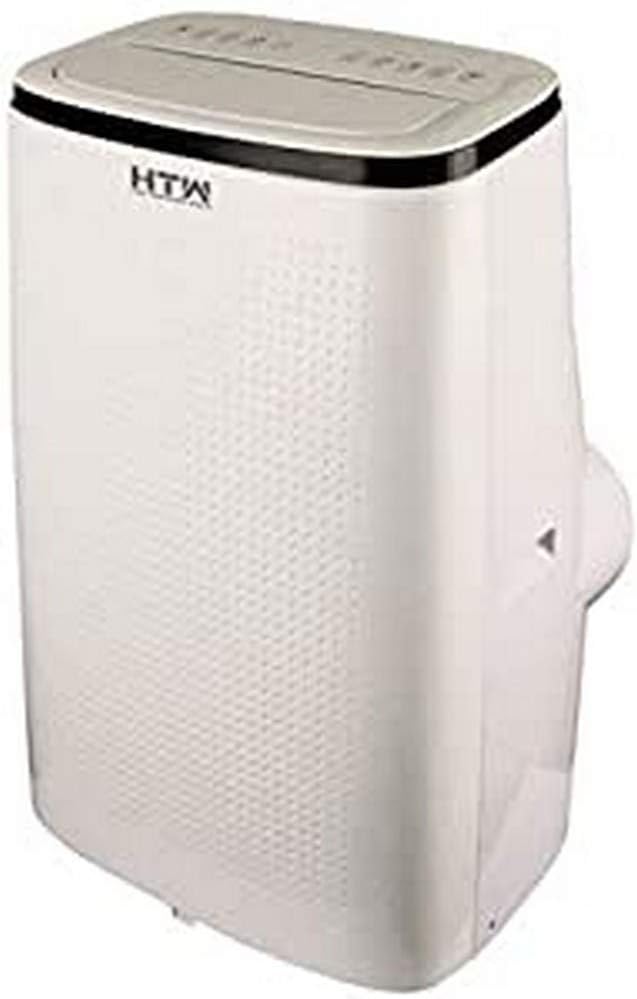
Gambar 3.1: Hareup jeung sisi view of the HTW PC-041P31 Portable Air Conditioner. This image shows the main body of the unit, including the control panel on top and the air outlet louvers.

Gambar 3.2: Sisi view of the HTW PC-041P31 Portable Air Conditioner. This image highlights the compact design and the handle for easy portability.

Gambar 3.3: Tukangeun view of the HTW PC-041P31 Portable Air Conditioner. This view displays the air intake grille, exhaust air outlet, and drainage port.
komponén:
- Panél kontrol
- Hawa outlet Louvers
- Air Filter (behind intake grille)
- Outlet Hawa knalpot
- Pelabuhan Drainase
- Kabel listrik
- Kastor (roda)
- Kadali jauh
- Window Kit (Exhaust hose, window slider kit, adapters)
4. Setup jeung Instalasi
4.1 Ngabongkar bungkusan
- Sacara saksama cabut AC tina bungkusanna.
- Remove all packing materials and ensure no components are missing.
- Keep the packaging for future storage or transportation.
4.2 Nempatkeun
- Teundeun unit dina teguh, permukaan datar di kamar nu dipikahoyong.
- Pastikeun aya sahenteuna 20 cm rohangan di sabudeureun unit pikeun aliran hawa anu leres.
- Posisikeun unit caket jandela atanapi panto kanggo masang selang knalpot.
4.3 Instalasi Kit Jandéla
The included window kit is essential for exhausting hot air outside, ensuring efficient cooling.
- Attach the exhaust hose to the exhaust air outlet on the back of the unit. Twist clockwise until secure.
- Connect the other end of the exhaust hose to the window slider kit adapter.
- Atur pakakas panggeser jandela supados pas sareng bukaan jandela anjeun. Pasangkeun dina tempatna.
- Insert the window slider kit adapter into the opening of the window slider kit.
- Ensure the window is sealed around the kit to prevent hot air from re-entering the room.
5. Parentah Operasi
The HTW PC-041P31 features a user-friendly control panel and a remote control for convenient operation.
5.1 Panel kontrol
The control panel is located on the top of the unit. It typically includes buttons for Power, Mode, Fan Speed, Timer, and Temperature Adjustment.
5.2 Jauh Jauh
The remote control allows you to operate the unit from a distance. Ensure batteries are correctly inserted.
5.3 Operasi Dasar
- Hurungkeun/Pareuman: Pencét éta POWER tombol pikeun ngahurungkeun atawa mareuman unit.
- Pilihan Mode: Pencét éta MODÉ button to cycle through available modes. This model is cooling-only, so the primary mode will be Cooling. Other modes may include Fan-only and Dehumidify (Dry).
- Penyesuaian Suhu: Dina modeu Cooling, nganggo UP jeung TURUN panah pikeun nyetel suhu anu dipikahoyong.
- Laju kipas: Pencét éta Kipas Gancang tombol pikeun milih antara kecepatan kipas Handap, Sedeng, sareng Luhur.
- Fungsi Timer: Ngagunakeun éta TIMER button to set a delay for the unit to turn on or off. Refer to the remote control section for detailed timer settings.
This unit features an auto-restart system, which means it will automatically resume operation with the previous settings after a power outage.
6. Pangropéa
Pangropéa rutin ngajamin kinerja optimal sareng manjangkeun umur AC anjeun.
6.1 Ngabersihan Saringan Udara
Saringan hawa kedah dibersihkeun unggal dua minggu atanapi langkung sering gumantung kana panggunaan sareng kualitas hawa.
- Cabut colokan AC tina stop kontak listrik.
- Locate the air filter, typically behind the intake grille on the rear of the unit.
- Taliti miceun saringan.
- Ngumbah saringan ku cai haneut sareng deterjen anu lembut. Bilas nepi ka tuntas.
- Ngidinan saringan ka hawa garing lengkep sateuacan dipasang deui. Ulah kakeunaan sinar panonpoé langsung.
6.2 Draining Akumulasi Cai
The unit collects condensation during operation. When the internal water tank is full, the unit will stop operating and display an indicator. You will need to drain the water.
- Cabut colokan AC.
- Position a shallow pan or container under the drainage port at the bottom rear of the unit.
- Cabut colokan solokan. Cai bakal mimiti ngalir kaluar.
- Sakali sadaya cai geus lemes, ngaganti colokan solokan aman.
For continuous drainage in Dehumidify (Dry) mode, you can connect a drain hose (not included) to the drainage port.
6.3 Ngabersihan Unit Exterior
- Ngusap luar ku hipu, damp lawon.
- Ulah make bahan kimia kasar, abrasives, atawa pangleyur, sabab ieu bisa ngaruksak beungeut cai.
7. Cara ngungkulan
Sateuacan ngahubungi dukungan palanggan, mangga tingal pituduh ngungkulan ieu di handap pikeun masalah umum.
| Masalah | Mungkin Cukang lantaranana | Solusi |
|---|---|---|
| Unit teu hurung. | No power, power cord loose, water tank full. | Check power connection, plug firmly, drain water tank. |
| Unit cools insufficiently. | Window kit not properly sealed, room too large, air filter dirty, air intake/outlet blocked. | Ensure window kit is sealed, clean air filter, clear obstructions, verify room size is within unit capacity. |
| Unit ribut. | Unit henteu dina permukaan datar, speed kipas teuing tinggi. | Place on a level surface, select a lower fan speed. |
| Cai bocor tina unit. | colokan solokan leupas, unit condong. | Pastikeun colokan solokan aman, nempatkeun unit dina permukaan anu rata. |
8. Spésifikasi
Technical specifications for the HTW PC-041P31 Portable Air Conditioner.
| Fitur | Spésifikasi |
|---|---|
| Nomer modél | HTW-PC-041P31 |
| Kamampuh cooling | 3,500 frig/h (4.1 kW) |
| Disarankeun Ukuran Kamar | Nepi ka 30 m² |
| Tingkat Noise | 53 dB |
| Jumlah Kecap Kipas | 3 |
| Kelas Énergi Énergi | A |
| Voltage | 220V |
| Ukuran (W x D x H) | 47 x 38.2 x 75.2 cm |
| Beurat | 28.5 kg |
| Fitur husus | Programmable, Auto Restart, Water Tank Full Indicator |
9. Garansi jeung Rojongan
HTW products are manufactured to high-quality standards. For warranty information and customer support, please refer to the warranty card included with your purchase or contact your local HTW dealer or service center. Keep your purchase receipt as proof of purchase.
For technical assistance or inquiries, please visit the official HTW websitus atanapi ngahubungan departemén layanan palanggan maranéhna.