1. Bubuka
This manual provides detailed instructions for the safe and efficient use of your Maxcom MM471 Senior Portable Phone. Designed with ease of use in mind, this device features large characters, big buttons, and an ergonomic design, making it ideal for seniors. Please read this manual thoroughly before operating your phone.

Gambar 1: Hareupeun view of the Maxcom MM471 Senior Portable Phone.
2. Setélan
2.1 Eusi pakét
Pastikeun sadaya item aya dina bungkusan:
- Maxcom MM471 Senior Portable Phone
- Batré
- Adaptor ngecas
- Manual pamaké
2.2 Nyelapkeun Kartu SIM sareng Batré
The Maxcom MM471 supports dual SIM cards. Follow these steps to install your SIM card(s) and battery:
- Turn off the phone and disconnect it from any power source.
- Cabut panutup tukang telepon sacara saksama.
- Selapkeun kartu SIM anjeun kana slot anu ditunjuk kalayan kontak emasna malik ka handap.
- Pasangkeun batréna, pastikeun kontakna geus sajajar kalawan bener.
- Ganti panutup tukang nepi ka klik aman kana tempatna.

Gambar 2: Balik view with battery and SIM card area.
2.3 Ngecas Batré
Before first use, fully charge the phone's battery:
- Connect the charging adapter to the phone's charging port or place the phone in its charging dock.
- Colokkeun adaptor ka colokan listrik.
- Indikator batré dina layar bakal nembongkeun status ngecas.
- Sanggeus dicas pinuh, pegatkeun sambungan carjer.
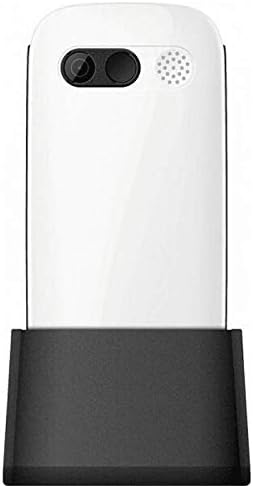
Gambar 3: Telepon dina dok ngecas.
3. Parentah Operasi
3.1 Powering on / Pareum
- Pikeun Ngahurungkeun: Pencét jeung tahan tombol Daya/Tungtung Telepon tombol nepi ka layar hurung.
- Pikeun mareuman: Pencét jeung tahan tombol Daya/Tungtung Telepon button until the power-off options appear, then select 'Power Off'.
3.2 Nelepon
- Tina layar utama, tuliskeun nomer telepon nganggo alas kenop.
- Pencét éta Nelepon tombol (tombol héjo) pikeun initiate panggero.
- Pikeun ngeureunkeun telepon, pencét tombol Daya/Tungtung Telepon tombol (tombol beureum).
3.3 Narima Telepon
- When a call comes in, the phone will ring and display the caller's number or name.
- Pencét éta Nelepon button (green button) to answer.
- Pikeun nolak telepon, pencét éta Daya/Tungtung Telepon tombol (tombol beureum).
3.4 Ngirim sareng Nampi Pesen
- Arahkeun ka menu 'Pesen' tina layar utama.
- Select 'New Message' to compose a text message.
- Lebetkeun nomer panarima sareng pesen anjeun.
- Pencét 'Kirim'.
- Pesen anu ditampi bakal muncul dina 'Kotak Surat' anjeun.
3.5 Ngatur Kontak
The phonebook can store up to 300 names.
- Go to the 'Contacts' or 'Phonebook' menu.
- Select 'Add New Contact' to save a new number.
- Lebetkeun nami sareng nomer telepon, teras simpen.
- To call a contact, select their name from the list and press the Nelepon kancing.
3.6 Ngagunakeun Bluetooth
Pikeun nyambung ka alat Bluetooth:
- Buka 'Setélan' > 'Bluetooth'.
- Hurungkeun Bluetooth 'Aktif'.
- Pilih 'Milarian pikeun devices' to find available Bluetooth accessories.
- Select the desired device and pair them.
3.7 Ngagunakeun Senter
Telepon ieu dilengkepan senter internal pikeun genah.
- To turn on the flashlight, locate the dedicated flashlight button (if available) or access it through the 'Tools' menu.
- Press the button or select the option again to turn it off.
4. Pangropéa sarta perawatan
To ensure the longevity and optimal performance of your Maxcom MM471 phone, follow these maintenance guidelines:
- beberesih: Anggo lawon anu lemes sareng garing pikeun ngabersihkeun permukaan telepon. Hindarkeun pembersih cair atanapi bahan anu kasar.
- Suhu: Ulah ngalaan telepon kana suhu anu ekstrim (panas atanapi tiis) atanapi sinar panonpoé langsung salami waktos anu lami.
- Uap: Jaga telepon tetep garing. Ulah dicelupkeun kana cai atanapi kakeunaan kalembaban anu luhur.
- Panyimpenan: When not in use for a long time, store the phone in a cool, dry place with the battery partially charged.
- Dampak: Hindarkeun ngaragragkeun telepon atanapi némpélkeun kana tabrakan anu kuat.
5. Cara ngungkulan
Upami anjeun ngalaman masalah sareng telepon anjeun, tingali tabel di handap ieu pikeun masalah umum sareng solusina:
| Masalah | Mungkin Cukang lantaranana | Solusi |
|---|---|---|
| Telepon teu hurung | Batré béak atanapi henteu leres diselapkeun. | Cas batréna. Pastikeun batréna dipasang kalayan leres. |
| Teu tiasa nelepon atanapi nampi telepon | No network signal, SIM card not inserted, or SIM card faulty. | Check network coverage. Reinsert SIM card(s). Contact your service provider. |
| Kualitas panggero goréng | Weak network signal, interference. | Pindah ka daérah anu sinyalna langkung saé. Hindarkeun halangan. |
| Batré gancang boros | Excessive usage, background applications, old battery. | Kurangan kacaangan layar. Tutup aplikasi anu teu dianggo. Pertimbangkeun pikeun ngaganti batréna upami parantos lami. |
| Keypad teu responsif | Kasalahan parangkat lunak, karusakan fisik. | Restart the phone. If the problem persists, contact support. |
6. Spésifikasi Téknis
Key technical details of the Maxcom MM471 Senior Portable Phone:
- model: MM471
- merek: Maxcom
- warna: Bodas
- Konektipitas: Bluetooth
- Dukungan SIM: Dual SIM
- Kapasitas Buku Telepon: 300 names
- Waktu ngobrol: Nepi ka 14 jam
- panganteur: Tombol fisik
- Fitur husus: Large characters, Big buttons, Ergonomic design, Speaker, Flashlight
7. Garansi sarta Émbaran Rojongan
For detailed warranty information, please refer to the warranty card included with your product or visit the official Maxcom website. For technical support or service inquiries, please contact your retailer or the manufacturer's customer service department.


