Bubuka
Thank you for choosing the Trevi RC 85D8 DAB Digital Alarm Clock Radio. This compact device offers DAB/DAB+ and FM RDS radio reception, a large LED display, dual alarms, snooze, sleep functions, and a unique time projection feature. This manual provides detailed instructions to help you set up and operate your new alarm clock radio effectively.
Eusi pakét
- Trevi RC 85D8 DAB Digital Alarm Clock Radio
- Adaptor kakuatan
- Manual pangguna (dokumén ieu)
Émbaran Kasalametan
Please read all safety instructions before using the device. Keep this manual for future reference.
- Ulah ngalaan alat ka hujan atawa beueus.
- Ulah dibongkar alatna. Serahkan sadaya perawatan ka tanaga anu mumpuni.
- Paké ngan adaptor kakuatan disadiakeun.
- Pastikeun ventilasi ditangtoskeun sabudeureun alat.
- Buangkeun batréna kalayan tanggung jawab.
Produk Leuwihview
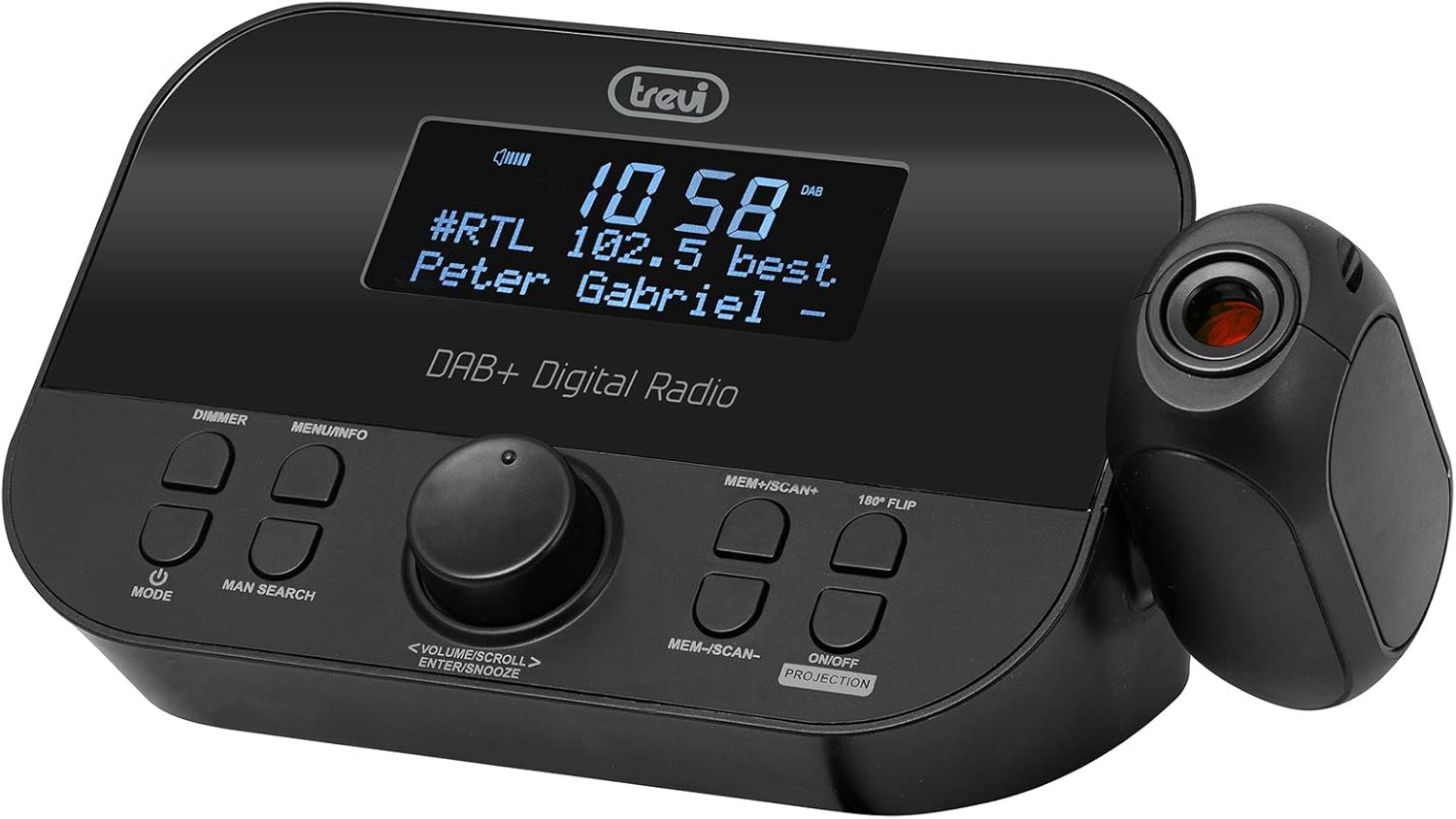
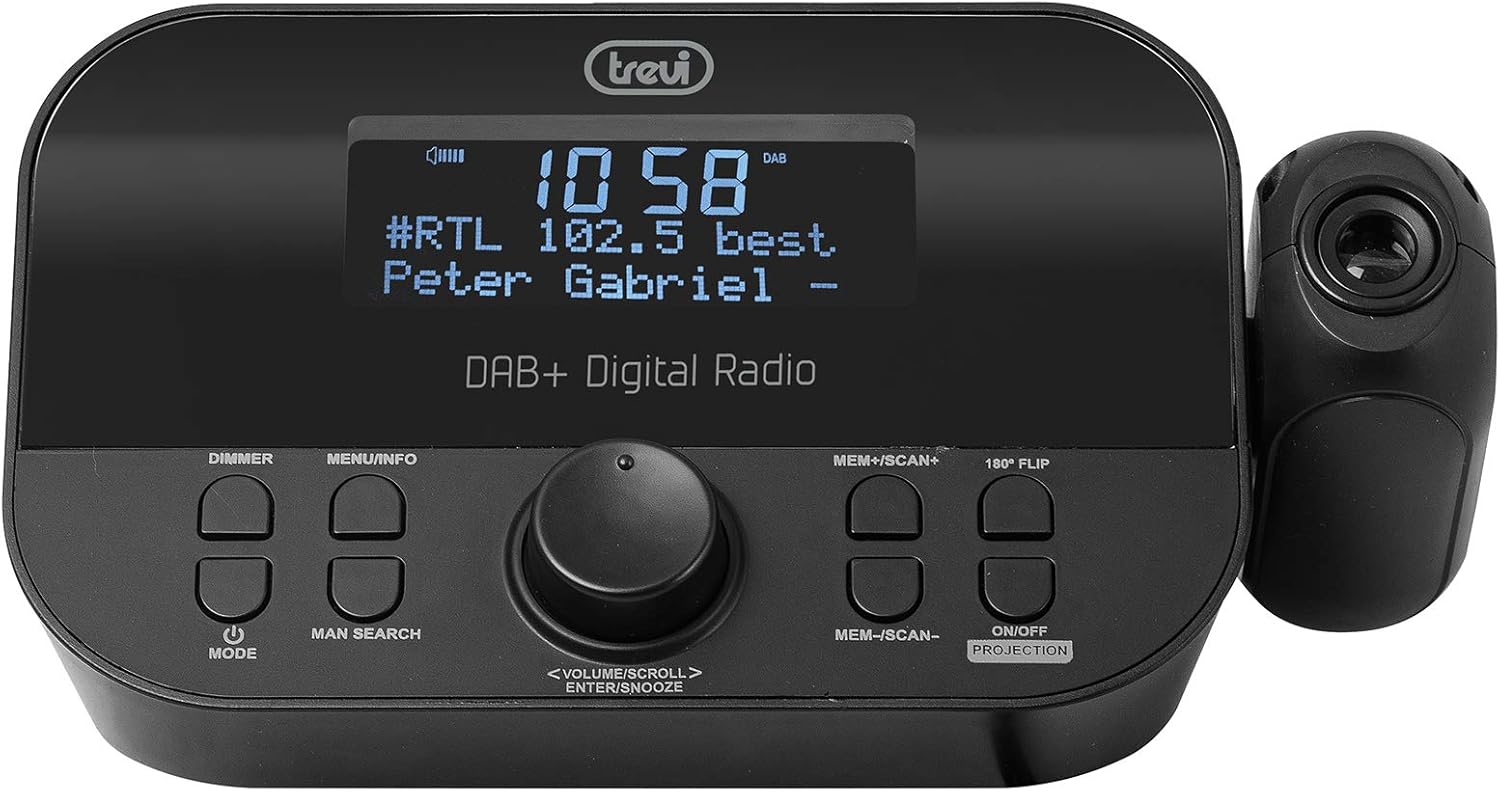
Hareupeun view of the Trevi RC 85D8 DAB Digital Alarm Clock Radio, showing the LED display, control buttons, and the time projector.
Kontrol sareng tampilan:
- Témbong LED: Shows time, radio station, song title/artist, volume, and other information.
- DIMMER Button: Saluyukeun kacaangan tampilan.
- Tombol MENU/INFO: Accesses menu options and displays radio information.
- Tombol MODE: Switches between DAB, FM, and other modes.
- MAN SEARCH Button: Initiates manual station search.
- VOLUME/SCROLL/ENTER/SNOOZE Knob: Multi-function knob for volume control, menu navigation, selection, and snooze activation.
- MEM+/SCAN+ Button: Stores/recalls presets, scans forward.
- MEM-/SCAN- Button: Stores/recalls presets, scans backward.
- 180° FLIP Button: Rotates projected time display.
- ON/OFF PROJECTION Button: Turns the time projection on or off.
- Lensa proyéksi: Projects time onto a surface.
Disetél
1. Sambungan Daya
- Connect the provided power adapter to the DC IN port on the back of the alarm clock radio.
- Colokkeun adaptor kana stop kontak témbok standar.
- The device will power on and the display will illuminate.
2. Pamasangan Batré Cadangan (Opsional)
The device has a battery compartment for anti-failure backup (2 AAA batteries, not included). This ensures time and alarm settings are retained during a power outage.
- Buka panutup kompartemen batré dina handapeun unit.
- Pasangkeun 2 batré AAA, bari tetep merhatikeun polaritasna (+/-) anu bener.
- Tutup panutup kompartemen batré aman.
3. Setup anteneu
Extend the telescopic antenna fully for optimal DAB/DAB+ and FM radio reception. Adjust its position for the best signal.

Samping view of the Trevi RC 85D8 DAB Digital Alarm Clock Radio, showing the extended telescopic antenna for improved reception.
4. Setélan Waktos sareng Tanggal Awal
Upon first power-on, the device will attempt to synchronize time and date automatically via DAB or FM RDS signal. If automatic synchronization fails or you wish to set it manually:
- Pencét éta MENU / INFO tombol pikeun ngasupkeun ménu.
- Puterkeun VOLUME/SCROLL knob to navigate to "Time/Date" or "Settings".
- Pencét éta Asupkeun (push the knob) to select.
- Follow the on-screen prompts to set the time, date, and 12/24-hour format using the VOLUME/SCROLL kenop jeung Asupkeun kancing.
Parentah Operasi
1. Daya Hurung / Pareum
- Pikeun ngahurungkeun, pencét éta MODÉ kancing.
- Pikeun mareuman, pencét jeung tahan tombol MODÉ kancing.
2. Radio Mode Selection (DAB/DAB+ / FM RDS)
- Pencét éta MODÉ button repeatedly to cycle between DAB/DAB+ and FM radio modes.
3. Tuning and Scanning
Radio DAB/DAB+:
- Dina modeu DAB, pencét MEM+/SCAN+ or MEM-/SCAN- to automatically scan for available stations.
- Alternatipna, pencét MAN SEARCH to manually tune. Rotate the VOLUME/SCROLL knob to select a station, then press Asupkeun.
Radio FM RDS:
- Dina modeu FM, pencét MEM+/SCAN+ or MEM-/SCAN- pikeun otomatis nyeken stasiun salajengna anu sayogi.
- Pencét MAN SEARCH to manually tune. Rotate the VOLUME/SCROLL knob to adjust the frequency, then press Asupkeun.
4. Storing and Recalling Presets
- Ngepaskeun ka stasiun anu dipikahoyong.
- Pencét jeung tahan MEM+/SCAN+ or MEM-/SCAN- until the display shows "Preset Store".
- Puterkeun VOLUME/SCROLL knob to select a preset number (e.g., P01, P02).
- Pencét Asupkeun to confirm and save the station.
- Pikeun ngelingan prasetél, pencét sakeudeung MEM+/SCAN+ or MEM-/SCAN- to cycle through stored stations.
5. Volume Control
- Puterkeun VOLUME/SCROLL knob to adjust the listening volume.
6. Setting Alarms (Dual Alarms)
The Trevi RC 85D8 supports two independent alarms (Alarm 1 and Alarm 2).
- Pencét éta MENU / INFO tombol pikeun ngasupkeun ménu.
- Puterkeun VOLUME/SCROLL knob to navigate to "Alarm 1 Setup" or "Alarm 2 Setup".
- Pencét Asupkeun pikeun milih.
- Follow the on-screen prompts to set:
- Waktos Alarm: Set the desired wake-up time.
- Sumber Alarm: Choose between "Buzzer" or "Radio" (DAB or FM).
- Volume alarem: Setel polumeu alarm nu dipikahoyong.
- Frékuénsi Alarm: Select "Daily", "Weekdays", "Weekends", or "Once".
- Status alarem: Turn the alarm "On" or "Off".
- Pencét Asupkeun pikeun mastikeun unggal setélan.
7. Fungsi Snooze
- Sawaktos alarm disada, pencét tombol VOLUME/SCROLL/ENTER/SNOOZE knob to activate snooze. The alarm will pause for a set period (usually 9 minutes) and sound again.
- To cancel snooze and turn off the alarm, press the MODÉ kancing.
8. Fungsi Pangatur Waktu Sare
Timer sare ngamungkinkeun radio pikeun muter pikeun durasi set sateuacan otomatis pareum.
- Pencét éta MENU / INFO tombol pikeun ngasupkeun ménu.
- Puterkeun VOLUME/SCROLL knob to navigate to "Sleep Timer".
- Pencét Asupkeun pikeun milih.
- Puterkeun VOLUME/SCROLL knob to choose the desired sleep duration (e.g., 15, 30, 60, 90 minutes, or Off).
- Pencét Asupkeun pikeun mastikeun.
9. Time Projection Feature
The Trevi RC 85D8 DAB Digital Alarm Clock Radio projecting the time onto a surface, demonstrating the adjustable projection lens.
- Turn Projection On/Off: Pencét éta ON/OFF PROJECTION kancing.
- Saluyukeun sudut proyéksi: Manually adjust the projection lens on the side of the unit to direct the time display onto your ceiling or wall.
- Rotate Projected Time: If the projected time is upside down or sideways, press the 180 ° Flip button to rotate it for correct viewing.
- Saluyukeun fokus: Rotate the ring around the projection lens to sharpen the projected image.
10. Dimmer Tampilan
- Pencét éta DIMMER button repeatedly to cycle through different brightness levels for the main LED display (e.g., High, Medium, Low, Off).
Pangropéa
- beberesih: Use a soft, dry cloth to clean the surface of the device. Do not use abrasive cleaners or solvents.
- Perawatan Antenna: Handle the telescopic antenna gently to avoid damage.
- Ngagantian batré: If using battery backup, replace AAA batteries annually or when the low battery indicator appears.
Pamérésan masalah
| Masalah | Mungkin Cukang lantaranana | Solusi |
|---|---|---|
| Henteu aya kakuatan / tampilan pareum | Power adapter not connected; Power outlet faulty; DIMMER set to Off. | Ensure power adapter is securely connected and outlet is functional. Press DIMMER tombol pikeun nyaluyukeun kacaangan tampilan. |
| Resepsi radio goréng (DAB/FM) | Antenna not extended; Weak signal area; Interference from other electronics. | Fully extend and adjust the telescopic antenna. Try repositioning the unit. Move away from other electronic devices. Perform a full scan for DAB stations. |
| Alarm teu disada | Alarm not activated; Alarm volume too low; Incorrect alarm time/frequency. | Check alarm settings (Alarm 1/2 Setup) to ensure it is "On", time is correct, frequency is set, and volume is audible. |
| Projected time is blurry or unclear | Focus not adjusted; Projection distance too far/close. | Rotate the ring around the projection lens to adjust focus. Ensure the projection surface is within an optimal distance. |
| Projected time is upside down/sideways | Projection orientation incorrect. | Pencét éta 180 ° Flip button to rotate the projected image. |
| Display is too bright at night | Dimmer setting too high. | Pencét éta DIMMER button repeatedly to select a lower brightness level or turn the display off. |
spésifikasi
| Fitur | Rincian |
|---|---|
| merek | Trevi |
| Nomer modél | RC 85D8 (0RC85D800) |
| Warna | Hideung |
| Téhnologi Tuning | DAB, FM RDS |
| Pita Radio Dirojong | DAB/DAB+, FM |
| Fitur husus | Alarm, Snooze, Sleep Timer, Time Projection, Dual Alarms |
| Téhnologi konektipitas | 3.5 mm Jack (for headphones) |
| Sumber Daya | AC Power Adapter (included), Battery backup (2x AAA, not included) |
| Dimensi produk | 23L x 13L x 14T séntiméter (kira-kira) |
| tampilan | LED Display with Dimmer |
Garansi sareng Rojongan
For warranty information and technical support, please refer to the documentation provided with your purchase or visit the official Trevi websitus. Simpen bukti pameseran anjeun pikeun klaim garansi.
Pabrikan: Trevi SpA
Negara asal: Cina


