1. Bubuka jeung Leuwihview
This manual provides essential instructions for the safe and efficient operation of your SAHAUHY 120 Pints Smart ENERGY STAR Dehumidifier. Designed for spaces up to 6200 sq.ft, this unit effectively removes up to 120 pints of moisture per day, helping to maintain optimal humidity levels in your home, basement, bedroom, or garage. Please read this manual thoroughly before use and retain it for future reference.

Figure 1.1: SAHAUHY 120 Pints Smart ENERGY STAR Dehumidifier. This image displays the dehumidifier unit alongside a smartphone screen illustrating its smart app control interface.
2. Parentah Kasalametan
Pikeun nyegah tatu ka pamaké atawa batur jeung karuksakan harta, parentah di handap ieu kudu dituturkeun. Operasi anu salah kusabab teu malire paréntah tiasa nyababkeun cilaka atanapi karusakan.
- Always ensure the dehumidifier is placed on a level, stable surface to prevent tipping.
- Ulah ngajalankeun unit ku kabel kakuatan ruksak atawa colokan. Upami kabelna rusak, éta kedah diganti ku produsén atanapi agén jasa anu mumpuni.
- Ensure the air inlet and outlet are not obstructed. Maintain at least 8 inches (20 cm) of clear space around the unit for proper airflow.
- Ulah nyelapkeun ramo atawa objék asing kana inlets hawa atawa outlet.
- Cabut colokan dehumidifier sateuacan ngabersihkeun, mindahkeun, atanapi ngalaksanakeun pangropéa naon waé.
- Alat ieu henteu dimaksudkeun pikeun dianggo ku jalma (kalebet murangkalih) anu ngirangan kamampuan fisik, indrawi atanapi mental, atanapi kirang pangalaman sareng pangaweruh, kecuali aranjeunna dipasihan pangawasan atanapi petunjuk ngeunaan panggunaan alat ku jalma anu tanggung jawab kana kasalametanana.
- Do not use the unit in areas where flammable gases or combustible materials are present.
- Only use the unit with the specified voltage jeung frékuénsi.
3. Komponén produk
Biasakeun diri anjeun sareng bagian utama dehumidifier anjeun:
- Panel kontrol sareng Tampilan Digital
- Émbaran hawa
- Air Inlet with Washable Filter
- Water Tank (1.14 Gallon capacity)
- Port solokan kontinyu
- Kabel listrik
- Casters (Wheels) for portability
- Nanganan samping

angka 3.1: Control Panel Leuwihview. This image highlights the various buttons and indicators on the dehumidifier's top panel, including Power, Display, Filter, Fan Speed, Mode, Timer, Lock, Humidity, and WiFi.
4. Setélan
Turutan léngkah ieu pikeun setelan awal:
- Ngabongkar bungkusan: Sacara saksama piceun dehumidifier tina bungkusanna. Nyimpen bahan bungkusan pikeun neundeun atanapi transportasi ka hareup.
- panempatan: Place the unit upright on a firm, level surface. Ensure there is at least 8 inches (20 cm) of space around the unit for proper air circulation. Avoid placing it near heat sources or in direct sunlight.
- Sambungan Daya: Colokkeun kabel listrik kana stop kontak listrik grounded. Pastikeun voltage cocog spésifikasi unit.
- Operasi awal: Allow the unit to stand upright for at least 24 hours before plugging it in and turning it on if it was not stored or transported in an upright position.
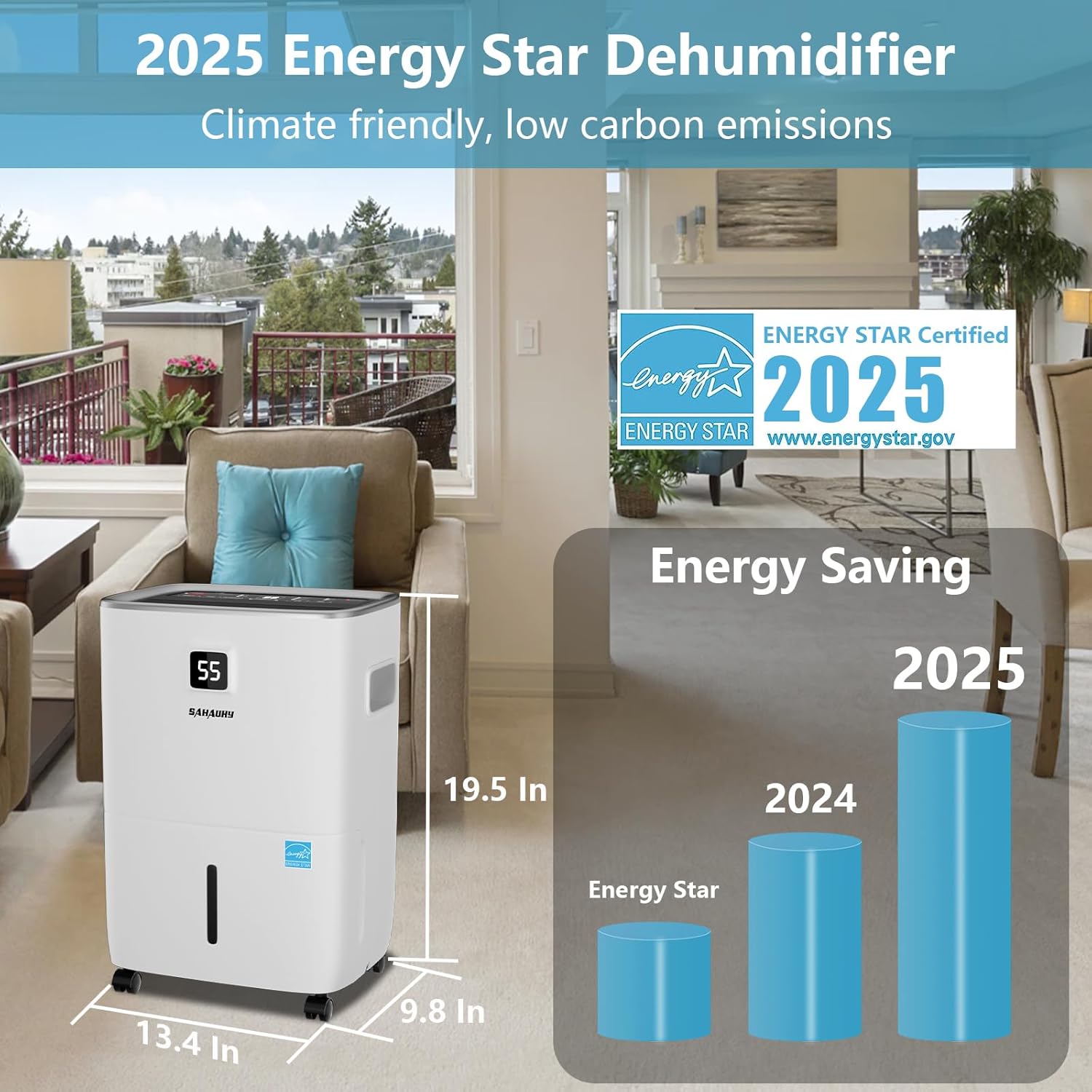
Figure 4.1: Dehumidifier Dimensions and Energy Star Certification. This image shows the physical dimensions of the dehumidifier (13.4 in x 9.8 in x 19.5 in) and prominently features the ENERGY STAR Certified 2025 logo, indicating its energy efficiency.
5. Parentah Operasi
The control panel allows you to manage all functions of your dehumidifier.
Fungsi Panel Kontrol:
- kakuatan: Pencét pikeun ngaktipkeun atanapi mareuman dehumidifier.
- TAMPILAN: Shows the current humidity level or timer settings.
- FILTER: Nyaangan pikeun ngingetkeun anjeun pikeun ngabersihkeun saringan hawa.
- Kipas gancang: Saluyukeun laju kipas (Rendah, Sedeng, Luhur).
- MODÉ: Milih modeu operasi:
Modeu bobo: Operates quietly for nighttime use.
Living Mode: Standard operation for general living spaces.
Basement Mode: Optimized for higher humidity environments.
Mode Kontinyu: Runs continuously regardless of humidity level. - TIMER: Nyetél timer 24 jam pikeun operasi hurung/pareum otomatis.
- LOCK (Child Lock): Pencét jeung tahan salila 3 detik pikeun ngaktipkeun/nganonaktipkeun konci anak, nyegah parobahan teu kahaja kana setelan.
- HUMIDITY %: Adjusts the desired humidity level (from 30% to 80% RH). The unit will operate until this level is reached.
- WIFI: Press 'Fan Speed' and 'Humidity %' buttons simultaneously for 3 seconds to activate Wi-Fi pairing mode for smart app control.
6. Pilihan Drainase
Your dehumidifier offers multiple ways to remove collected water:
6.1 Drainase Manual (Tangki Cai)
When the water tank is full, the unit will automatically shut off and an indicator light will illuminate. Carefully remove the tank, empty the water, and reinsert it securely. The unit will resume operation.
6.2 Drainase Kontinyu (Selang Drainase)
For continuous operation without emptying the tank, attach the included 3.28 ft drain hose to the continuous drain port on the back of the unit. Ensure the hose is sloped downwards to allow gravity drainage into a suitable floor drain or container. A standard garden hose (not included) can also be used for extended length.

Figure 6.1: Drainage Options. This image illustrates three methods for water drainage: manual drainage using the 1.14 Gallon water tank, automatic drainage with the included 3.28 ft drain hose, and automatic drainage using a user-supplied garden hose.
7. Smart App Control
Control your dehumidifier remotely using the dedicated smart app. This feature allows you to adjust settings, monitor humidity, and set schedules from anywhere.
- Unduh App: Download the SAHAUHY smart app from your device's app store.
- papasangan: On the dehumidifier, press and hold the 'Fan Speed' and 'Humidity %' buttons simultaneously for 3 seconds to activate Wi-Fi pairing mode. Follow the in-app instructions to connect your device.
- fungsi: The app allows you to turn the unit on/off, set desired humidity, adjust fan speed, select operating modes, and set a 24-hour timer.

Figure 7.1: Smart App Functions. This image displays four screenshots of the SAHAUHY smart app, illustrating controls for power on/off, 3-speed fan settings, mode selection (Continuous, Basement, Living, Sleeping), and a 24-hour timer setup.
8. Pangropéa
Pangropéa rutin ngajamin kinerja optimal sareng umur panjang dehumidifier anjeun.
8.1 Ngabersihan Saringan Udara
The reusable and washable filter should be cleaned every two weeks or when the 'FILTER' indicator light illuminates.
- Pareuman unit sareng cabut colokan tina stop kontak listrik.
- Cabut saringan ti tukang unit.
- Ngumbah saringan ku cai haneut, sabun. Bilas nepi ka tuntas.
- Ngidinan saringan ka hawa garing sagemblengna saméméh reinserting eta.
- Reinsert the dry filter and plug in the unit.
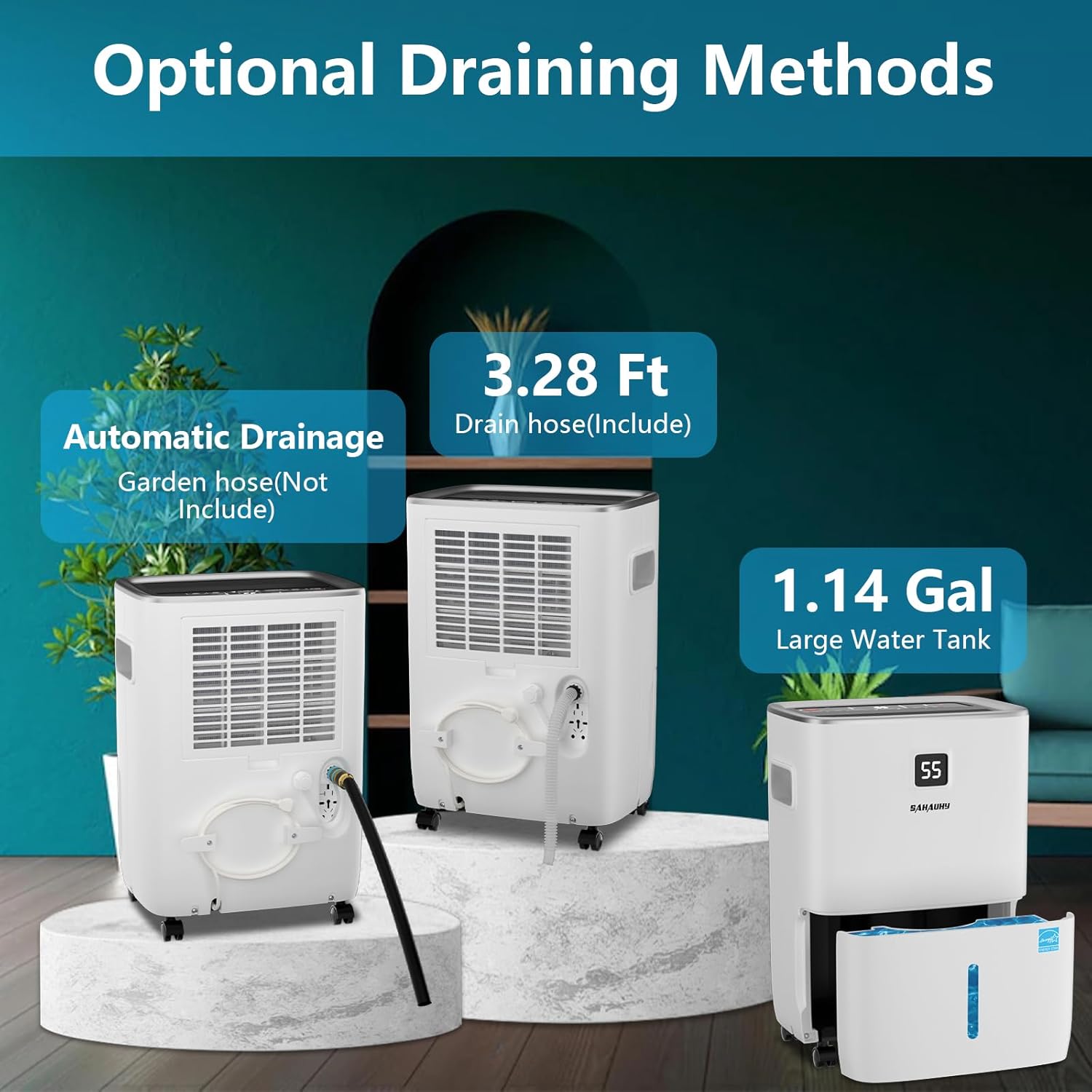
Figure 8.1: Air Filter Cleaning. This image provides a visual guide on how to access and clean the reusable air filter located on the back of the dehumidifier.
8.2 Ngabersihan Unit Exterior
Ngusap luar ku hipu, damp lawon. Ulah make bahan kimia kasar atawa cleaners abrasive.
8.3 Panyimpenan
If storing the unit for an extended period, ensure the water tank is empty and clean, and the filter is clean and dry. Store in an upright position in a cool, dry place.
9. Cara ngungkulan
Sateuacan ngahubungi dukungan palanggan, mangga tingal pituduh ngungkulan ieu di handap pikeun masalah umum.
| Masalah | Mungkin Cukang lantaranana | Solusi |
|---|---|---|
| Dehumidifier teu hurung. | No power; Water tank full or not properly seated; Child lock activated. | Check power connection; Empty and reinsert water tank correctly; Deactivate child lock by pressing and holding the LOCK button. |
| Unit jalan tapi teu dehumidify. | Air filter clogged; Room temperature too low; Humidity setting too high; Unit size inadequate for space. | Clean air filter; Ensure room temperature is above 5°C (41°F); Lower desired humidity setting; Consider if unit is appropriate for room size. |
| Cai bocor tina unit. | Water tank not properly seated; Drain hose connection loose or clogged; Unit tilted. | Reinsert water tank securely; Check drain hose for proper connection and clear any obstructions; Ensure unit is on a level surface. |
| Unit ribut. | Air filter clogged; Unit not on a level surface; Fan speed set to high. | Clean air filter; Place unit on a level surface; Reduce fan speed. |
| Masalah sambungan Wi-Fi. | Incorrect pairing procedure; Router issues; Distance from router. | Repeat pairing steps; Restart router; Move unit closer to router or use a Wi-Fi extender. |
10. Spésifikasi
- model: B08BR34KLR
- merek: SAHAUHY
- Kapasitas: 120 Pints/Day (under 89°F, 95%RH condition)
- Wewengkon Cakupan: Nepi ka 6200 suku pasagi
- Kapasitas Tangki Cai: 1.14 galon
- Beurat barang: 9.9 kg
- warna: Bodas
- Komponén Kaasup: Automatic Drainage & Manual Drainage, 3.28 ft Drain Hose
- Fitur husus: Smart APP Control, Automatic Defrost, Automatic Moisture Removal, Automatic Restart, Automatic Shutoff (tank full), Overheat Protection, Portable, Removable Tank, Washable Filter, 24 Hour Timer, Child Lock.
- Tingkat Noise: ≤36 dB(A)
- ENERGY STAR Sertifikasi: Sumuhun (2025)
11. Garansi jeung Rojongan
Your SAHAUHY Dehumidifier is covered by the following:
- Kabijakan pamulangan: 30-Day Return period.
- Garansi standar: 1-Taun jaminan.
- Garansi diperpanjang: A 2nd year extended warranty may be available. Refer to the user manual for details on how to register or activate.
- Bantosan Téknis: Lifetime expert technical support is provided.
For any questions or assistance, please contact SAHAUHY customer service. We aim to respond within 24 hours to help resolve any issues.

