Bubuka
Wilujeng sumping di manual pamaké pikeun anyar Anjeun KIDdesigns LOL SURPRISE Sing Along Karaoke BoomBox for Kids. This manual provides important information on how to set up, operate, and maintain your device. Please read it thoroughly before use to ensure proper functionality and safety.
The LOL SURPRISE Sing Along Karaoke BoomBox is designed to provide hours of musical fun for children. It features built-in music, LED flashing lights, and a working microphone, allowing kids to sing along to their favorite tunes or connect an external MP3 player for more song options. Its portable and durable design makes it suitable for both indoor and outdoor use.
Émbaran Kasalametan
Punten perhatikeun pancegahan kaamanan di handap ieu pikeun nyegah tatu atanapi karusakan kana alat:
- PERHATOSAN: Not suitable for children under 3 years due to small parts that may present a choking hazard.
- Salawasna ngawas barudak ngora salila pamakéan.
- Ulah ngalaan alat ka cai atawa kaleuleuwihan Uap.
- Ulah nyobian ngabongkar atawa ngaropéa alat.
- Use only the specified battery type (3 "AA" batteries). Ensure correct polarity when inserting batteries.
- Cabut batré upami alat moal dianggo kanggo waktos anu panjang.
- Jauhkeun alat tina sumber panas sareng sinar panonpoé langsung.
Eusi pakét
Mangga parios pakét pikeun mastikeun yén sadaya barang aya:
- LOL SURPRISE Sing Along Karaoke BoomBox Unit
- Mikropon
- Manual pangguna (dokumén ieu)
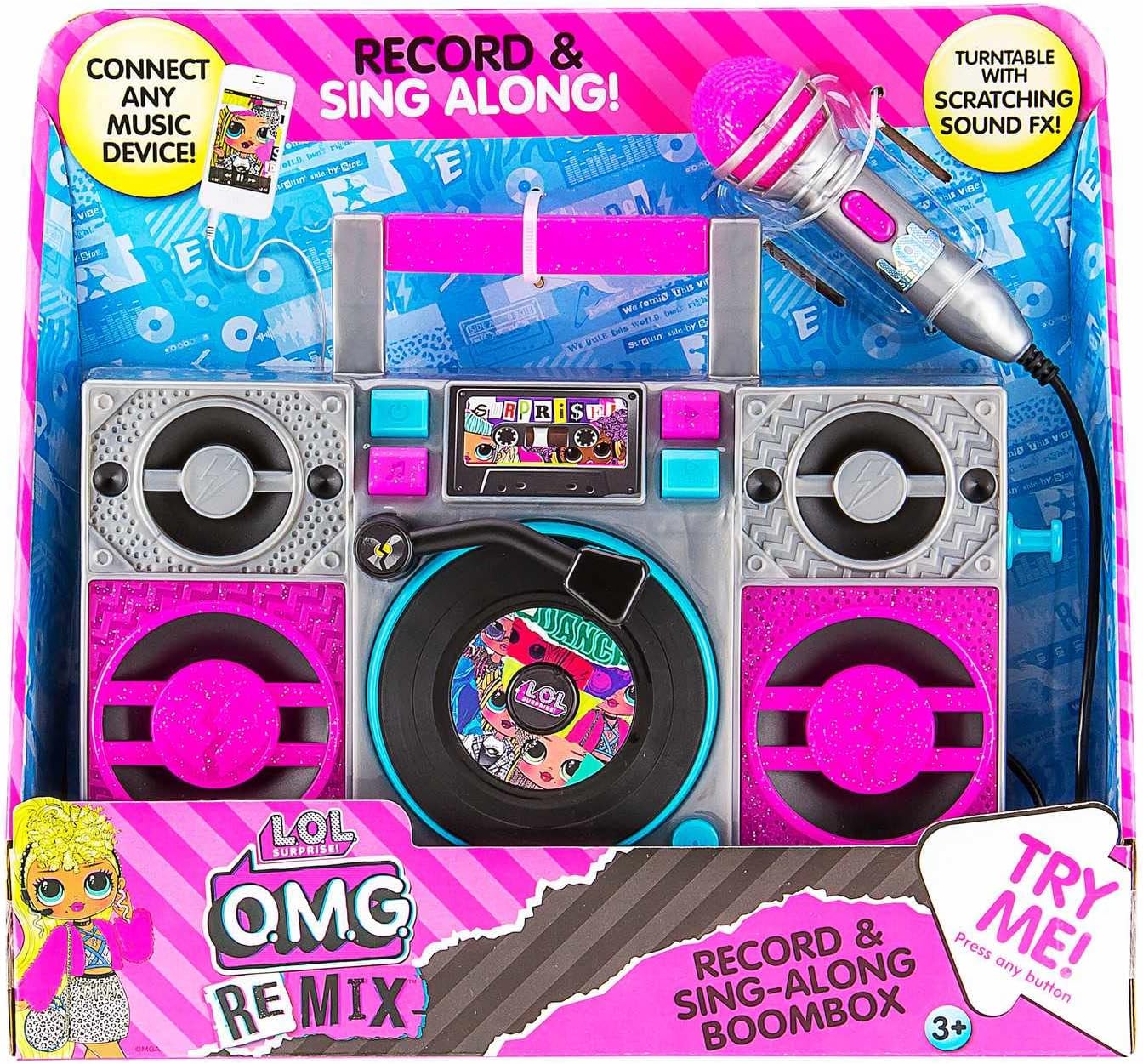
Image: The LOL SURPRISE Karaoke BoomBox as it appears in its retail packaging, highlighting its key features and included microphone.
Produk Leuwihview
Familiarize yourself with the different parts of your Karaoke BoomBox.

Gambar: Hareupeun view of the Karaoke BoomBox, illustrating its various components including speakers, central controls, and the attached microphone.
- cecekelan: Pikeun portability gampang.
- Panyatur: Ngaluarkeun audio.
- Panel Kontrol/Tampilan: For selecting modes and viewstatusna.
- Turntable (Decorative): Features scratching sound effects.
- Input mikropon: Connect the included microphone here.
- Mikropon: For singing along.
- Input bantu: Connect external audio devices (e.g., MP3 player, smartphone).
- Kompartemen batré: Located on the back/bottom of the unit.
Disetél
1. Pamasangan batré
The Karaoke BoomBox requires 3 "AA" batteries (not included).
- Locate the battery compartment on the back or bottom of the unit.
- Nganggo obeng sirah Phillips, cabut tutup kompartemen batré.
- Insert 3 "AA" batteries, ensuring the correct polarity (+/-) as indicated inside the compartment.
- Ganti panutup kompartemen batré jeung amankeun ku screw nu.
2. Sambungan Mikropon
Connect the included microphone to the microphone input jack on the unit.
Parentah Operasi
Ngahurungkeun/Pareuman
- To turn the unit ON, locate the Power button (usually on the front panel) and press it.
- To turn the unit OFF, press the Power button again.
Playing Built-in Music
- Once powered on, the unit may automatically start playing built-in music.
- Use the control buttons (e.g., Play/Pause, Next, Previous) on the front panel to navigate through the built-in songs.
Connecting an External Audio Device (MP3 Player/Smartphone)
You can connect your own music device to sing along to your favorite songs.

Image: The Karaoke BoomBox, showing the auxiliary input for connecting external audio devices like MP3 players or smartphones.
- Ensure the Karaoke BoomBox is powered on.
- Connect one end of a 3.5mm audio cable (not included) to the Auxiliary Input jack on the BoomBox.
- Connect the other end of the audio cable to the headphone jack or audio output of your MP3 player, smartphone, or other audio device.
- Start playing music on your connected device. The audio will now play through the BoomBox speakers.
- Adjust the volume on both your connected device and the BoomBox for optimal sound.
Ngagunakeun Mikropon
- Once the microphone is connected, simply speak or sing into it. Your voice will be amplified through the BoomBox speakers.
- Adjust the microphone volume if available on the unit, or control the overall volume.
Lampu Kedip-kedip LED
The unit features built-in LED flashing lights that activate during operation, adding to the karaoke experience.
Turntable Scratching Sound Effects
The decorative turntable on the front of the unit can be manually spun to produce fun scratching sound effects.
Pangropéa
- beberesih: Ngusap unit ku kaén anu lembut sareng garing. Ulah make cleaners abrasive atawa pangleyur.
- Panyimpenan: Store the unit in a cool, dry place away from direct sunlight when not in use.
- Perawatan batré: Remove batteries if the unit will not be used for an extended period to prevent battery leakage.
Pamérésan masalah
| Masalah | Mungkin Cukang lantaranana | Solusi |
|---|---|---|
| Unit teu hurung. | Batré pareum atawa salah dipasang. | Replace with new "AA" batteries, ensuring correct polarity. |
| Taya sora tina speaker. | Volume is too low; external device not connected properly or volume too low. | Increase volume on the BoomBox and/or the connected external device. Ensure audio cable is fully inserted. |
| Mikropon teu jalan. | Mikropon teu acan dipasang sapinuhna. | Ensure the microphone cable is securely plugged into the microphone input jack. |
| Sora nyimpang. | Volume too high; low batteries. | Lower the volume. Replace batteries if they are low. |
spésifikasi
- model: LOL SURPRISE Sing Along Karaoke BoomBox
- merek: EKIDS
- Ukuran (L x W x H): 30.48 x 8.74 x 27.94 cm (12 x 3.44 x 11 inci)
- beurat: 750 gram (1.65 lbs)
- Umur Disarankeun: 3 taun ka luhur
- Sumber Daya: Batré Powered
- Batré diperlukeun: 3 x "AA" (not included)
- Konektipitas: Input bantu (3.5mm)
- Jumlah Panyatur: 1
- Voltage: 4.5 volt
- UPC: 092298950778
- Komponén Kaasup: Karaoke BoomBox, Microphone
Garansi sareng Rojongan
This product is manufactured by eKids. For warranty information or technical support, please refer to the contact information provided on the product packaging or visit the official eKids websitus. Simpen resi pameseran anjeun salaku bukti pameseran pikeun klaim garansi.
Pikeun pitulung salajengna, anjeun tiasa nganjang ka EKIDS Brand Store on Amazon.


