1. Bubuka
Manual ieu nyayogikeun inpormasi penting pikeun nyetél, ngoperasikeun, sareng ngajaga Laptop Gaming Acer Predator Triton 500 PT515-52-73L3 anjeun. Mangga baca sacara saksama pikeun mastikeun kinerja anu optimal sareng umur panjang alat anjeun.
Acer Predator Triton 500 PT515-52-73L3 nyaéta laptop gaming kinerja tinggi anu dirancang pikeun tugas-tugas anu nungtut sareng pangalaman gaming anu imersif. Laptop ieu dilengkepan prosesor Intel Core i7-10750H Generasi ka-10, grafis NVIDIA GeForce RTX 2070 SUPER, layar Full HD 15.6 inci kalayan refresh rate 300Hz sareng téknologi NVIDIA G-SYNC, RAM DDR4 16GB, sareng SSD NVMe 512GB.
2. Émbaran Kasalametan
- Ulah ngantepkeun laptop ka suhu anu ekstrim, sinar panonpoé langsung, atanapi kalembaban anu luhur.
- Ulah neundeun barang beurat dina laptop.
- Anggo ngan ukur adaptor AC sareng kabel daya anu disayogikeun.
- Jauhkeun cairan tina alat. Upami aya anu tumpah, langsung mareuman sareng cabut adaptorna.
- Ulah nyobian ngabongkar atanapi ngalereskeun laptop nyalira. Hubungi petugas servis anu mumpuni.
- Pastikeun ventilasi anu cekap pikeun nyegah panas teuing, khususna nalika dianggo sacara intensif.
3. Eusi Paket
Pastikeun yén sadaya item aya dina bungkusan:
- Laptop Kaulinan Acer Predator Triton 500 PT515-52-73L3
- Adaptor AC
- Kabel listrik
4. Leuwih fisikview
4.1. Hareupeun View
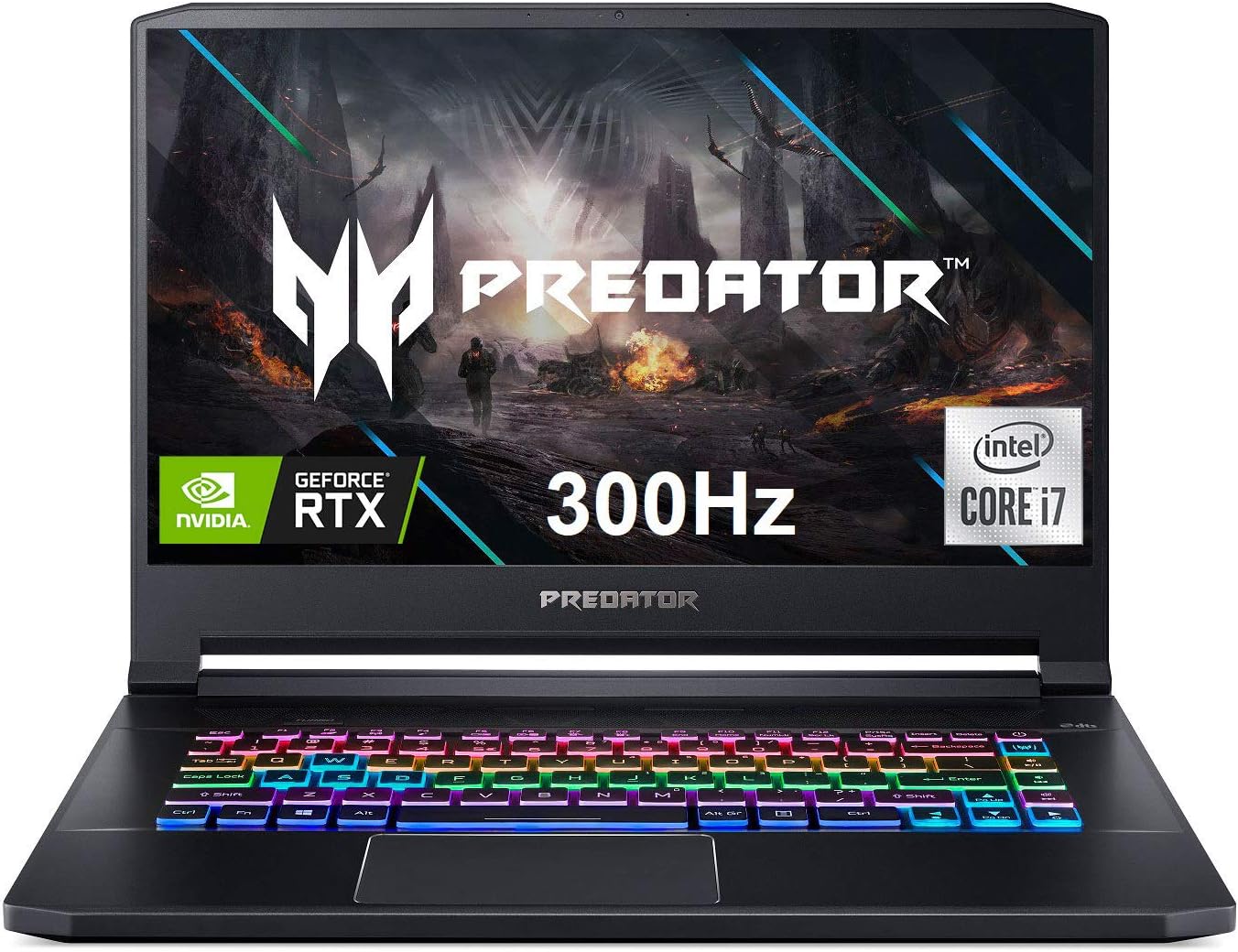
Gambar 4.1: Hareupeun view tina Acer Predator Triton 500, nunjukkeunasinlayarna nganggo branding Predator, kibor kalayan lampu latar RGB, sareng bezel ipis.
4.2. Fitur tampilan

Gambar 4.2: Layar Full HD (1920 x 1080) 15.6 inci ngagaduhan laju refresh 300Hz sareng Waktos Respons Overdrive 3ms, ditingkatkeun ku téknologi NVIDIA G-SYNC pikeun midangkeun anu henteu gampang soék.
4.3. Keyboard jeung Touchpad

Gambar 4.3: Laptop ieu dilengkepan kibor RGB backlit per tombol kalayan cahaya anu tiasa disaluyukeun sareng tombol 'Turbo' khusus pikeun overclocking instan. Touchpad ayana di handapeun kibor.
4.4. Palabuhan sarta Panyambungna

Gambar 4.4: Laptop ieu dilengkepan ku rupa-rupa port, kalebet Daya (DC-In), Ethernet (RJ-45), sababaraha port USB 3.2 Gen 2, HDMI, Mic-in, Headset/spiker, Thunderbolt 3 / USB Type-C, Mini DisplayPort, sareng slot konci Kensington.
5. Setélan
5.1. Mimiti Power-On
- Sambungkeun adaptor AC kana port daya laptop teras kana stop kontak.
- Buka tutup léptop.
- Pencét tombol daya, biasana ayana di luhur kibor atanapi di sisi.
- Turutan pitunjuk dina layar pikeun ngalengkepan setelan Windows 10 Home awal.
5.2. Nyambungkeun périferal
Sambungkeun beurit, kibor éksternal, atanapi alat USB anu sanés kana port USB 3.2 Gen 2 anu sayogi. Pikeun tampilan éksternal, anggo HDMI atanapi Mini DisplayPort 1.4. Port Thunderbolt 3 ngadukung fungsi USB 3.1 Tipe-C lengkep.
6. Nyuping
6.1. Daya Hurung / Pareum
- Daya Hurung: Pencét tombol daya.
- Pareum listrik: Klik tombol Mimitian, teras Daya > Pareuman.
- Modeu Bobo: Tutupkeun panutupna atanapi klik tombol Mimitian, teras Daya > Sare.
6.2. Fitur tampilan
Layar IPS 15.6 inci Full HD (1920 x 1080) nawiskeun laju refresh 300Hz sareng Waktos Respons Overdrive 3ms. Téhnologi NVIDIA G-SYNC nyingkronkeun laju refresh layar sareng GPU, ngaleungitkeun layar anu robek sareng ngaminimalkeun gagap tampilan sareng lag input.
6.3. Fitur Kibor
Kibor RGB backlit per-konci ngamungkinkeun épék cahaya anu tiasa disaluyukeun. Anggo parangkat lunak PredatorSense pikeun ngapersonalkeun zona sareng épék cahaya. Tombol 'Turbo' tiasa dianggo pikeun overclocking CPU/GPU instan.
6.4. Manajemén Kinerja nganggo PredatorSense

Gambar 6.4: Parangkat lunak PredatorSense nyayogikeun kontrol anu lengkep kana kinerja laptop anjeun, kalebet pangaturan kecepatan kipas (Otomatis, Maks, Khusus), ngawas suhu CPU sareng GPU, sareng ngatur pencahayaan RGB.
PredatorSense ngamungkinkeun anjeun pikeun ngawas kinerja sistem, nyaluyukeun kecepatan kipas, ngaropea cahaya RGB, sareng ngatur setélan overclocking pikeun kaulinan sareng produktivitas anu optimal. Anjeun tiasa ngalih antara modeu kinerja anu béda (contona, Quiet, Default, Extreme) dumasar kana kabutuhan anjeun.
6.5. Konektipitas
- Nirkabel: Killer Double Shot Pro Wireless-AX 1650i 802.11ax Wi-Fi 6 kanggo internét nirkabel kecepatan tinggi.
- Maké kabel: Killer Gaming Network E3100G 10/100/1000 Gigabit Ethernet LAN pikeun sambungan kabel anu stabil.
- Bluetooth: Bluetooth terintegrasi pikeun nyambungkeun periferal nirkabel.
6.6. Audio
Laptop ieu dilengkepan ku DTS X: Ultra-Audio kalayan Bass, Loudness, sareng Speaker Protection anu dioptimalkeun, sareng Téhnologi Acer True Harmony sareng dua speaker stereo internal. Acer Purified. Téhnologi sora sareng dua mikropon internal ningkatkeun kajelasan sora pikeun komunikasi.
7. Pangropéa
7.1. beberesih
- Anggo lawon anu lemes sareng henteu buluan pikeun ngabersihkeun layar sareng bagian luarna.
- Pikeun smudges nekad, rada dampen lawon jeung cai atawa cleaner layar.
- Anggo hawa anu dikomprés pikeun ngabersihan lebu tina tombol kibor sareng kisi-kisi ventilasi.
7.2. Apdet parangkat lunak
Apdet sistem operasi anjeun (Windows 10 Home), driver grafis (NVIDIA), sareng parangkat lunak khusus Acer (PredatorSense) sacara rutin pikeun mastikeun kinerja sareng kaamanan anu optimal.
7.3. Manajemén gudang
Laptop ieu dilengkepan ku SSD PCIe NVMe 512GB. Laptop ieu ngawengku dua slot PCIe M.2, kalayan hiji slot anu sayogi pikeun ningkatkeun panyimpenan anu gampang. Jieun cadangan data penting sacara rutin sareng atur rohangan disk pikeun ngajaga kinerja.
7.4. Kaperawatan batré
Pikeun manjangkeun umur batré, ulah sering-sering ngosongkeun batréna. Disarankeun pikeun ngajaga laptop tetep disambungkeun nalika sesi kaulinan intensif pikeun mastikeun suplai daya anu konsisten sareng nyegah kinerja anu laun.
8. Cara ngungkulan
- Laptop teu hurung: Pastikeun adaptor AC disambungkeun kalayan pageuh sareng stop kontakna tiasa dianggo. Cobi stop kontak anu sanés.
- Overheating: Pastikeun kisi-kisi ventilasi bébas tina halangan. Anggo PredatorSense pikeun ningkatkeun kecepatan kipas. Pertimbangkeun nganggo bantalan pendingin pikeun panggunaan beurat anu berkepanjangan.
- Masalah tampilan (robek/gagap): Pariksa yén NVIDIA G-SYNC diaktipkeun dina Panel Kontrol NVIDIA sareng PredatorSense. Pastikeun supir grafis parantos mutahir.
- Kahirupan batré goréng: Atur setélan daya dina Windows ka modeu anu langkung hemat daya. Kurangi kacaangan layar. Tutup aplikasi latar tukang anu teu perlu.
- Teu aya sora: Pariksa tingkat volume dina Windows sareng pastikeun speaker/headphone disambungkeun kalayan leres. Apdet driver audio.
9. Spésifikasi
| Fitur | Rincian |
|---|---|
| Prosesor | Intel Core i7-10750H Generasi ka-10 6-Core (Nepi ka 5.0GHz) |
| Grafika | NVIDIA GeForce RTX 2070 SUPER anu tiasa di-overclock kalayan Desain Max-Q & VRAM GDDR6 8GB |
| tampilan | 15.6" Full HD (1920 x 1080) IPS, Laju Refresh 300Hz, Overdrive 3ms, NVIDIA G-SYNC, Kacaangan 300nit, 100% sRGB |
| Ram | 16GB DDR4 2933MHz |
| Panyimpenan | SSD PCIe NVMe 512GB (2 x Slot PCIe M.2, 1 Slot Sadia) |
| Sistem operasi | Windows 10 Imah |
| kibor | Keyboard RGB Backlit per-konci kalayan Lampu anu Tiasa Disaluyukeun |
| Konéktipitas Wireless | Killer Double Shot Pro Wireless-AX 1650i 802.11ax Wi-Fi 6 |
| Konektipitas kabel | Jaringan Kaulinan Killer E3100G 10/100/1000 Gigabit Ethernet LAN |
| Palabuhan | 1x Thunderbolt 3 (USB 3.1 Tipe C lengkep), 3x USB 3.2 Gen 2 (1 sareng Ngecas Pareum), 1x HDMI 2.0, 1x Port Mini Display 1.4 |
| Audio | DTS X: Ultra-Audio, Téhnologi Acer True Harmony, Spiker Stereo Ganda, Acer Purified.Voice |
| Kahirupan batré | Nepi ka 5.5 jam (rata-rata) |
| Beurat | 4.63 lbs (2.1 kg) |
| Ukuran (L x W x H) | 14.11 x 10.04 x 0.7 inci |
10. Video Produk Resmi
10.1. Predator Triton 500 PT515-52 360 Derajat View
Video ieu nyayogikeun tampilan 360 derajat anu pondok view tina Acer Predator Triton 500 PT515-52, nunjukkeunasing desainna sareng rupa-rupa sudutna.
10.2. Laptop Gaming Fitur Lengkap sareng Keyboard RGB
Pidéo ieu nyorot fitur lengkep Acer Predator Triton 500, nekenkeun kana kibor RGB sareng kamampuan kaulinan sacara umum.
11. Émbaran jaminan
Laptop Gaming Acer Predator Triton 500 PT515-52-73L3 anjeun dijamin ku garansi ti produsén. Mangga tingali kartu garansi anu kalebet dina pakét anjeun atanapi kunjungi dukungan resmi Acer. websitus pikeun istilah jeung kaayaan lengkep.
- Rencana Perlindungan 2 Taun (Opsional)
- Rencana Perlindungan 4 Taun (Opsional)
12. Rojongan
Kanggo bantosan salajengna, dukungan téknis, atanapi kanggo ngaunduh driver sareng manual pangénggalna, mangga buka dukungan resmi Acer. websitus:
Anjeun ogé tiasa mendakan sumber daya tambahan sareng inpormasi kontak di toko mérek Acer:


