1. Bubuka
The ELECDER D19 True Wireless Earbuds are designed to provide a superior audio experience with advanced features such as Bluetooth 5.0 connectivity, noise cancellation, and IPX7 waterproofing. This manual provides comprehensive instructions for setting up, operating, and maintaining your earbuds to ensure optimal performance and longevity.
Fitur konci:
- Bluetooth 5.0: Fast and stable wireless transmission with CVC8.0 noise cancellation for clear calls.
- Premium Hi-Fi Stereo Audio: APTX audio for lossless transmission, delivering immersive sound with crystal clarity and deep bass.
- IPX7 waterproof: Resistant to sweat, water, and rain, ideal for workouts and outdoor activities.
- Desain ergonomis: Lightweight (5g per earbud) with flexible silicone ear-fins and S/M/L ear caps for a secure and comfortable fit.
- Quick Pairing Technology: Automatic power-on and pairing upon removal from the charging case.
- USB Quick Charge & Wireless Charging: Up to 4.5 hours of music on a single charge, with an additional 18 hours from the charging case, supporting both USB and wireless charging.
2. Produk Langkungview

Figure 2.1: ELECDER D19 True Wireless Earbuds in their charging case. The earbuds are black, sleek, and designed for in-ear use, while the compact charging case is also black with a smooth finish.
Naon anu aya dina Kotak:
- ELECDER D19 True Wireless Earbuds (Left and Right)
- Ngecas Case
- Kabel Ngecas USB
- Ujung Ceuli (ukuran S/M/L)
- Manual pangguna (dokumén ieu)
3. Setup Guide
3.1 Ngecas Earbuds sareng Case
Before first use, fully charge the earbuds and the charging case. The charging case supports both USB cable charging and wireless charging.
- Ngecas USB: Connect the provided USB cable to the charging port on the case and plug the other end into a USB power source (e.g., computer, wall adapter). The indicator light on the case will show charging status.
- Ngecas nirkabel: Place the charging case on a compatible wireless charging pad. The indicator light will flash to confirm charging.

Figure 3.1: The ELECDER D19 charging case being charged wirelessly on a charging pad, also showing the Micro USB port for wired charging. This image highlights the dual charging capabilities of the case.
A full charge for the earbuds provides approximately 4.5 hours of music playback, and the charging case provides an additional 18 hours of battery life.
3.2 Nyapasangkeun sareng Alat Anjeun
The ELECDER D19 earbuds feature quick pairing technology for seamless connection.
- Lengkah 1: Open the charging case and take out both earbuds. They will automatically power on and pair with each other.
- Lengkah 2: Dina smartphone Anjeun atawa alat Bluetooth-diaktipkeun, buka setélan Bluetooth.
- Lengkah 3: Milarian pikeun available devices and select "Elecder D19" from the list to connect.
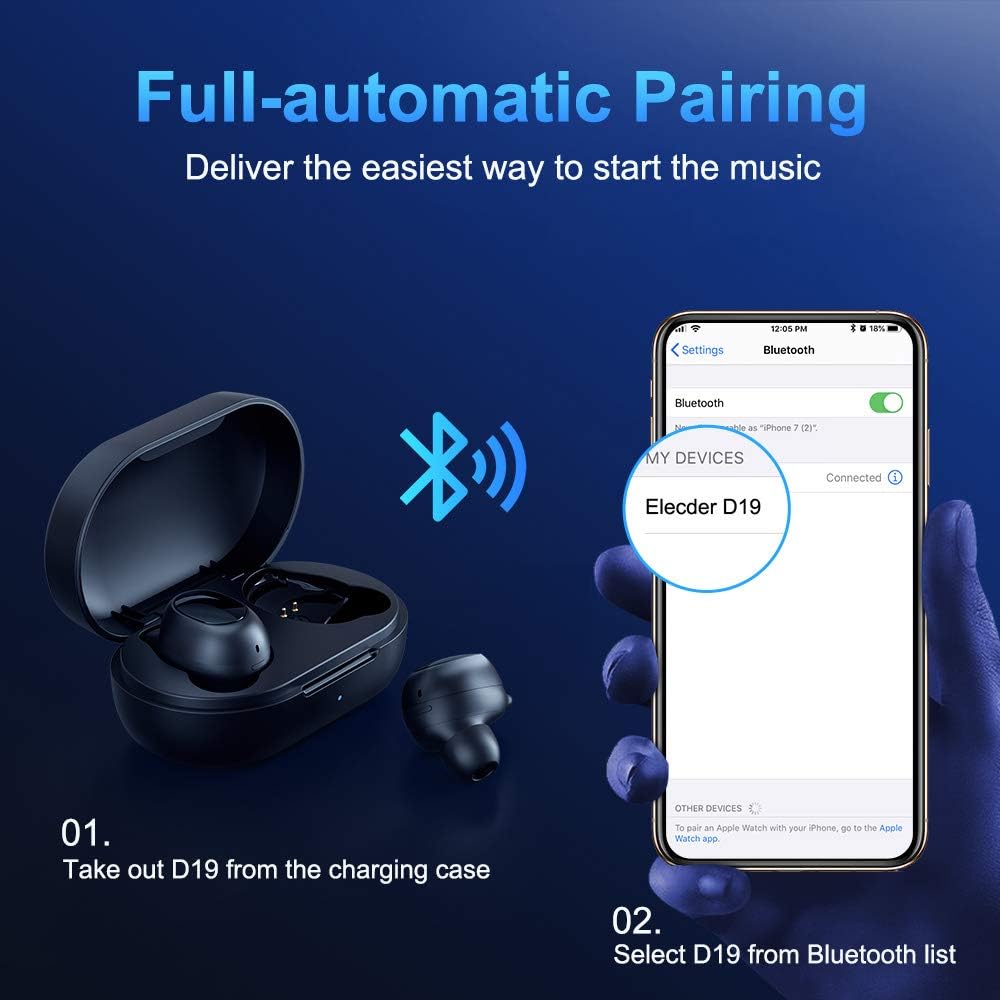
Figure 3.2: A visual guide demonstrating the automatic pairing process. The image shows the earbuds being taken out of the case and then the "Elecder D19" option appearing in a smartphone's Bluetooth settings for connection.
Saatos dipasangkeun awal, earbud bakal otomatis nyambung ka alat anu terakhir dipasangkeun nalika dicabut tina wadah ngecas.

Figure 3.3: An illustration showing the stable Bluetooth connection between the ELECDER D19 earbuds and various smart devices, including smartphones and tablets.
4. Parentah Operasi
4.1 Maké Earbuds
For optimal sound quality and comfort, choose the ear tips that best fit your ears. The earbuds come with S, M, and L sizes. Insert the earbuds into your ears and gently rotate them to find a secure and comfortable fit. The ergonomic ear-fin design helps ensure stability during movement.
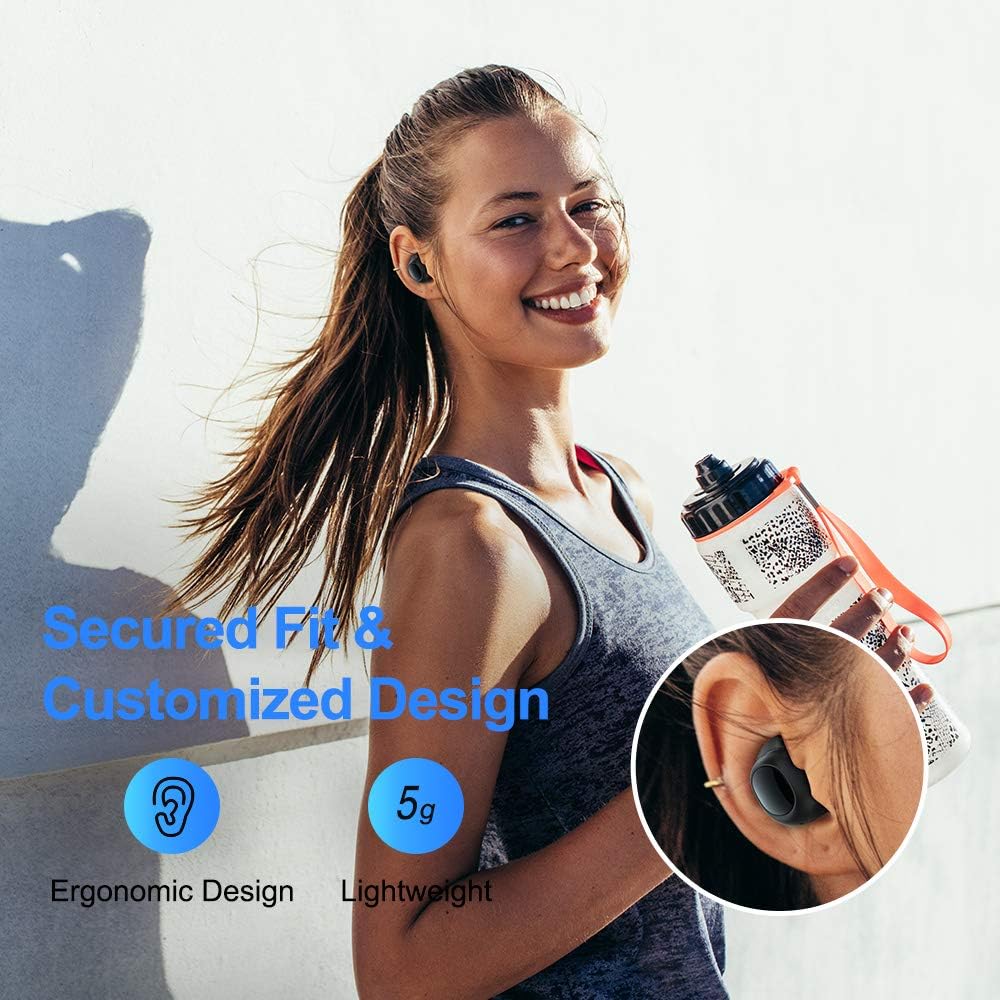
Figure 4.1: A person wearing the ELECDER D19 earbuds during a workout, demonstrating the secure and comfortable fit provided by the ergonomic design and customizable ear tips.
4.2 Kontrol Média
The ELECDER D19 earbuds feature physical buttons for media control. Specific button functions may vary slightly based on the device and operating system, but common controls include:
- Puter / Reureuh: Pencét sakali dina salah sahiji earbud.
- Lagu salajengna: Pencét dua kali dina earbud katuhu.
- Lagu Sateuacanna: Pencét dua kali dina earbud kénca.
- Volume Up: Triple press on the right earbud.
- Volume Turun: Triple press on the left earbud.
4.3 Manajemén Telepon
Atur telepon anjeun langsung tina earbud:
- Ngajawab / mungkas Telepon: Pencét sakali dina salah sahiji earbud.
- Nolak Telepon: Pencét jeung tahan boh earbud salila 2 detik.
- Aktipkeun Asisten Sora: Press and hold either earbud for 3 seconds (e.g., Siri, Google Assistant).
5. Pangropéa sarta perawatan
Proper maintenance ensures the longevity and optimal performance of your ELECDER D19 earbuds.
5.1 beberesih
- Rutin ngabersihkeun earbuds sareng wadah ngecas ku lawon anu lemes, garing, teu aya lint.
- Cabut tip ceuli sareng bersihkeun ku sabun sareng cai anu hampang, teras garing sateuacana dipasang deui.
- Anggo kapas atanapi sikat alit pikeun ngabersihkeun kontak pangisi daya dina earbud sareng wadahna sacara saksama.
- Ulah make bahan abrasive, alkohol, atawa cleaners kimiawi.
5.2 Tahan Cai (IPX7)
The ELECDER D19 earbuds are IPX7 waterproof, meaning they can withstand submersion in up to 1 meter of water for 30 minutes. This makes them suitable for protection against sweat, rain, and accidental splashes.

Figure 5.1: The ELECDER D19 earbuds shown with water droplets, illustrating their IPX7 waterproof rating, which protects them from sweat, rain, and splashes.
Catetan: The charging case is not waterproof. Ensure earbuds are dry before placing them back into the charging case.
5.3 Panyimpenan
When not in use, store the earbuds in their charging case to protect them and keep them charged. Store the case in a cool, dry place away from extreme temperatures and direct sunlight.
6. Cara ngungkulan
If you encounter issues with your ELECDER D19 earbuds, refer to the following common solutions:
| Masalah | Mungkin Cukang lantaranana | Solusi |
|---|---|---|
| Earbuds henteu dipasangkeun sareng alat. | Bluetooth is off on device; earbuds not in pairing mode; previously paired device interfering. | Ensure Bluetooth is enabled. Place earbuds back in case, then take them out to re-enter pairing mode. Forget "Elecder D19" from your device's Bluetooth list and re-pair. |
| Ngan hiji earbud jalan. | Earbuds not paired with each other; low battery on one earbud. | Place both earbuds back into the charging case, close the lid, wait a few seconds, then open and take them out again. Ensure both earbuds are charged. |
| Taya sora atawa volume low. | Device volume too low; ear tips not properly sealed; debris in earbud nozzle. | Increase volume on your device. Adjust earbud position or try different sized ear tips for a better seal. Clean earbud nozzles. |
| Kasus ngecas teu ngecas. | Faulty cable/charger; improper placement on wireless charger. | Try a different USB cable and power adapter. Ensure the case is correctly aligned on the wireless charging pad. |
| Sambungan Bluetooth teu stabil. | Interference; distance from device; low earbud battery. | Reduce distance between earbuds and device. Avoid environments with strong Wi-Fi or other Bluetooth signals. Ensure earbuds are fully charged. |
7. Spésifikasi
Detailed technical specifications for the ELECDER D19 True Wireless Earbuds:
| Fitur | Rincian |
|---|---|
| Ngaran modél | ELECDER D19 |
| Téhnologi konektipitas | Nirkabel (Bluetooth 5.0) |
| Rentang Bluetooth | 33 suku |
| Panempatan Ceuli | Dina Ceuli |
| Faktor Bentuk | Dina Ceuli |
| Kontrol bising | Pembatalan Noise Aktif (CVC8.0) |
| Mikropon | Kaasup |
| Tingkat Résistansi Cai | IPX7 Waterproof |
| Kahirupan Batré (Earbuds) | Up to 4.5 hours (music) / 4 hours (calling) |
| Charging Case Additional Playtime | 18 jam |
| Waktu Ngecas | Kurang leuwih 2 Jam |
| Pangecas Interface | Micro USB, Wireless Charging |
| Item Beurat | 1.92 ounces (total) / 5g (each earbud) |
| Dimensi produk | 3.89 x 3.89 x 1.65 inci |
| Alat nu cocog | iOS and Android Smartphones |
| Bahan | Silikon (tip ceuli) |
| Warna | Hideung |

Figure 7.1: An infographic detailing the battery life of the ELECDER D19 earbuds and charging case, showing 4 hours for calls, 4.5 hours for music, and a total of 18 hours with the 500mAh charging case.
8. Garansi jeung Rojongan
ELECDER products are manufactured to high quality standards. For information regarding warranty coverage, technical support, or service inquiries, please refer to the contact information provided with your product packaging or visit the official ELECDER websitus.
Kanggo bantosan langkung lanjut, anjeun ogé tiasa ngahubungi pangecér tempat anjeun mésér produk éta.


