1. Bubuka
The GVDA GD128 SMART Digital Multimeter is a professional testing instrument designed for accurate and reliable measurements. It is an ideal choice for professional electricians, engineers, electronics enthusiasts, and for general household use. This manual provides detailed instructions on the safe and effective operation of your GD128 multimeter.
Kamampuhan konci kalebet:
- AC jeung DC Voltage Pangukuran
- Pangukuran Arus AC sareng DC
- Résistansi Ukur
- Pangukuran Kapasitansi
- Pangukuran Kontinuitas
- Pangukuran Dioda
- NCV (Non-Kontak Voltage) Pangukuran
- True RMS for accurate readings of non-sinusoidal signals
- Large VA color HD LCD screen with 9999 counts display
- Otomatis sareng Ranging Manual
- Flashlight and Input Connector LED Indication

Figure 1.1: GVDA GD128 Digital Multimeter with test probes.
2. Émbaran Kasalametan
WARNING: To avoid electrical shock or personal injury, please read and understand all instructions and safety information before using this multimeter.
- Salawasna pastikeun multimeter aya dina fungsi sareng rentang anu leres sateuacan ngukur.
- Ulah ngaleuwihan nilai input maksimum pikeun rentang mana wae.
- Paké caution nalika gawé bareng voltagnyaeta luhur 30V AC RMS, 42V puncak, atawa 60V DC. Ieu voltagÉta nyababkeun bahaya shock.
- Pariksa heula kabel uji pikeun insulasi anu ruksak atanapi logam anu kakeunaan sateuacan dianggo. Ganti upami ruksak.
- Do not operate the multimeter if it appears damaged or if it is not operating properly.
- Salawasna pegatkeun daya ka sirkuit sareng kaluarkeun sadaya voltase tinggitage kapasitor saméméh nguji résistansi, continuity, diodes, atawa kapasitansi.
- Pastikeun panutup batré ditutup pageuh sateuacan dioperasikeun.
- This device meets safety standards EN61010-1,-2-030, EN61010-2-033, EN61326-1 CAT III 1000V, CAT IV 600V.
3. Produk Langkungview jeung Komponén
Familiarize yourself with the different parts of your GVDA GD128 Digital Multimeter.

Gambar 3.1: Hareup jeung sisi view of the GD128 Multimeter with labeled components.
- Wewengkon Sénsor NCV
- Konci kakuatan
- Konci senter
- Indikator Awas
- Senter
- Indikator jack input
- Jack other than current and NCV
- COM jack (Common)
- mA (<600mA) jack
- 10A jack
- Auto power off key
- konci fungsi
- tampilan
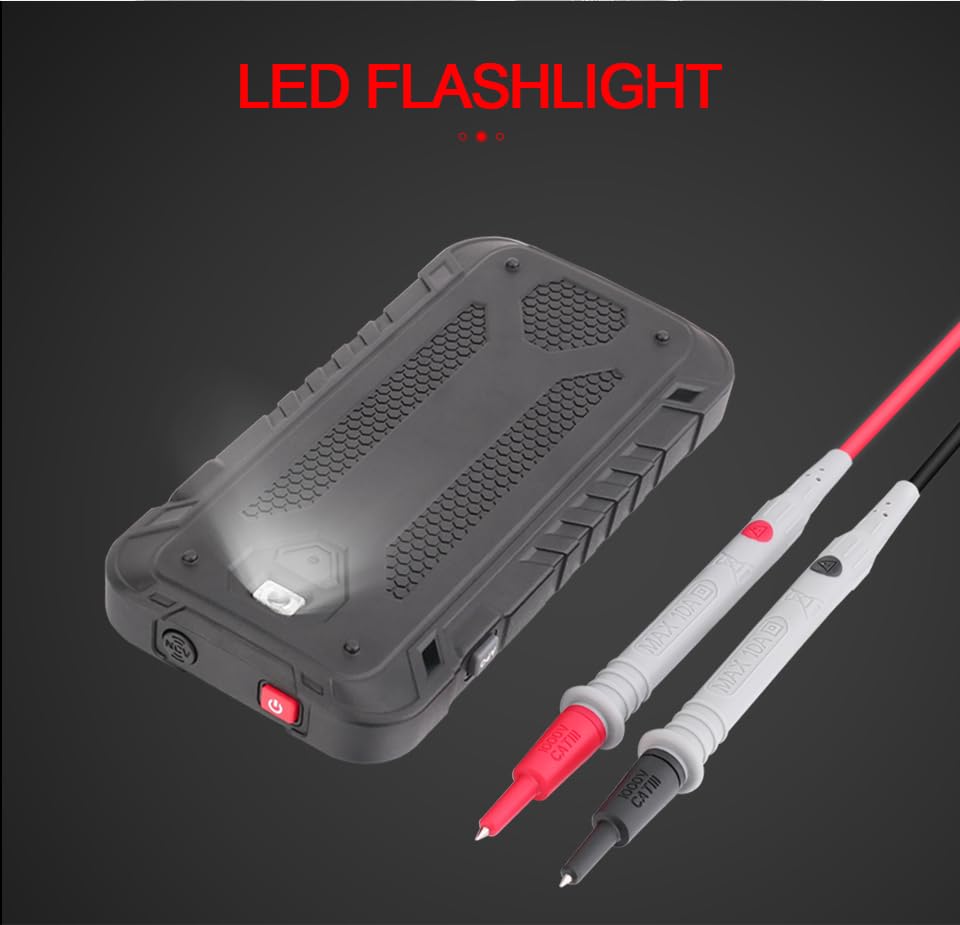
Gambar 3.2: Tukangeun view of the GD128 Multimeter highlighting the integrated LED flashlight.
4. Setélan
4.1 Pamasangan batré
The GVDA GD128 Multimeter requires 3 x 1.5V AAA batteries (not included) for operation.
- Ensure the multimeter is powered off.
- Tangtukeun lokasi kompartemen batré dina tonggong alat.
- Paké obeng pikeun muka panutup kompartemen batré.
- Selapkeun 3 batré AAA, niténan polaritasna bener (+ jeung -) sakumaha dituduhkeun di jero kompartemen.
- Ganti panutup kompartemen batré jeung amankeun ku screw nu.
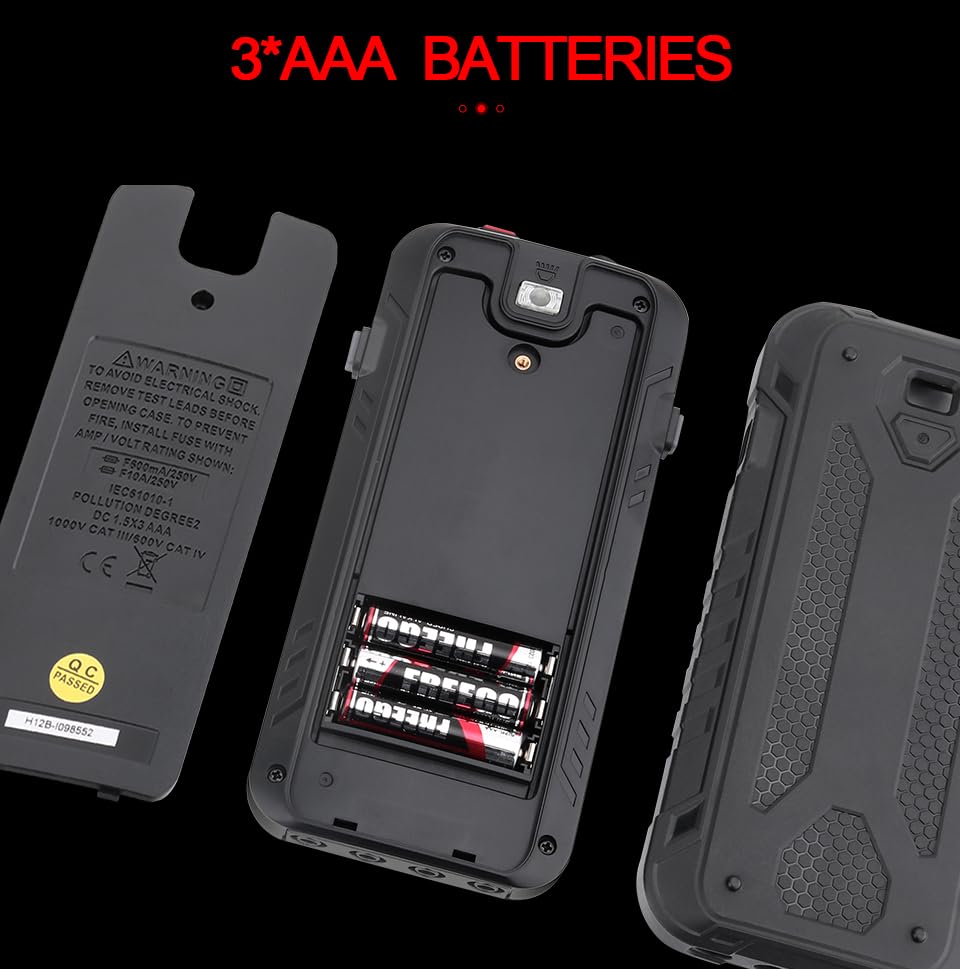
Angka 4.1: Kompartemen batré pikeun 3 batré AAA.
4.2 Nyambungkeun Test Leads
Connect the test leads to the appropriate input jacks for the desired measurement function. Always connect the black test lead to the COM (Common) jack. Connect the red test lead to the jack corresponding to the measurement type (e.g., VΩHz for voltage / lalawanan / frékuénsi, mA pikeun milliampere current, 10A for ampayeuna).
5. Parentah Operasi
The GD128 features both auto-ranging and manual-ranging capabilities. The "SMART" function automatically identifies AC/DC voltage, lalawanan, sarta continuity.
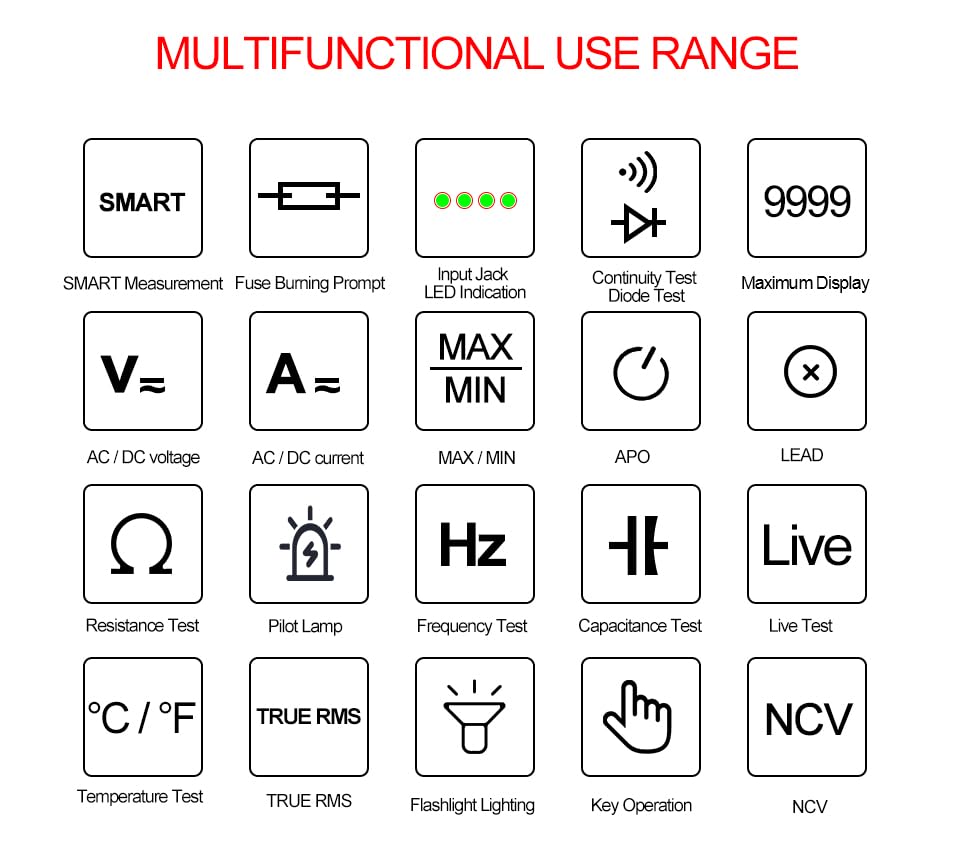
Figure 5.1: Multifunctional Use Range icons.
5.1 Daya Hurung/Pareuman
Pencét éta Konci kakuatan (2) to turn the multimeter on or off.
5.2 Pamilihan Fungsi
The multimeter typically starts in SMART mode. Press the FUNC (Function) key (12) or SEL key to cycle through different measurement modes within a category (e.g., AC/DC voltage, résistansi/kontinuitas/dioda).
5.3 Common Measurement Functions
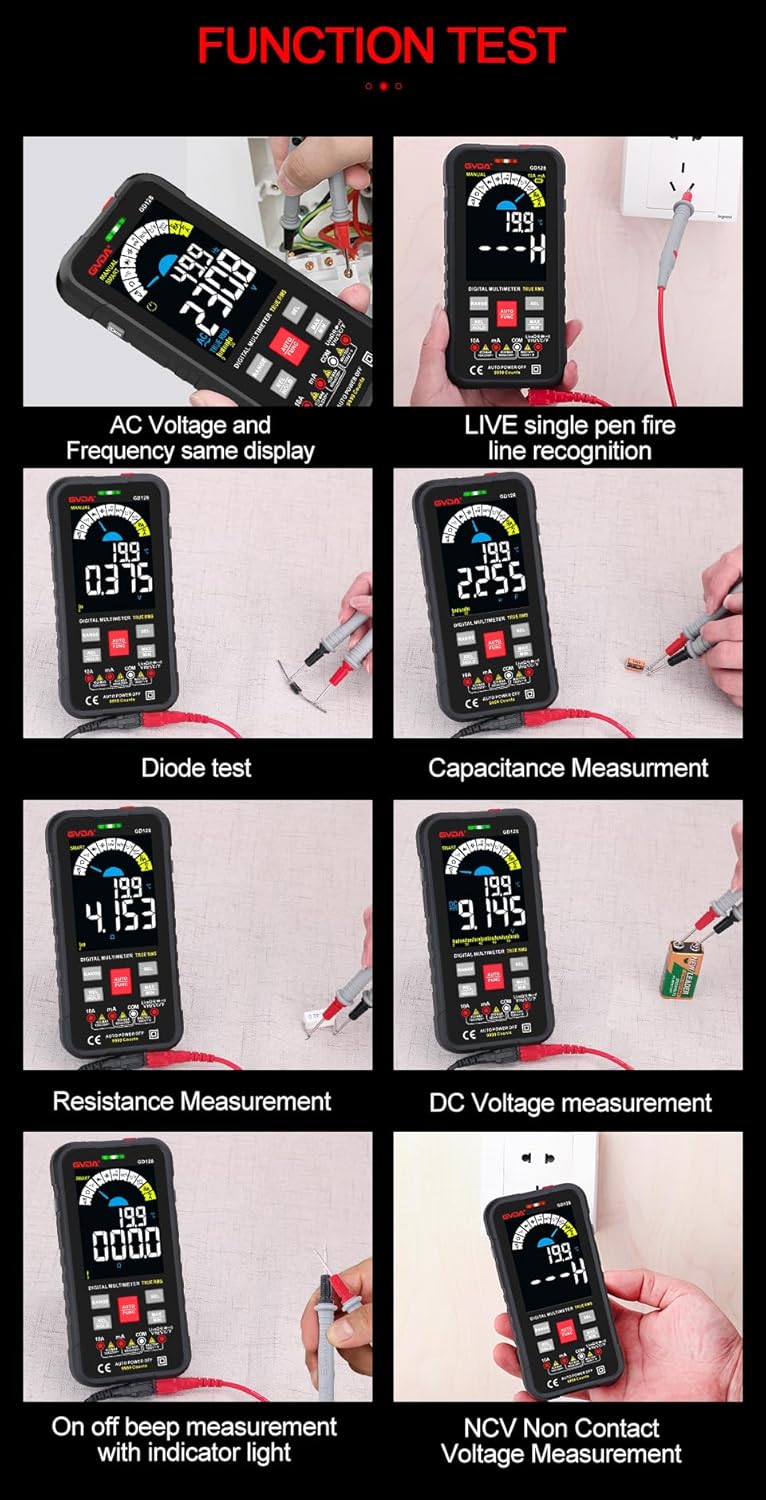
Gambar 5.2: Kelamples of various function tests.
5.3.1 JilidtagPangukuran (AC/DC)
- Sambungkeun kabel tés hideung kana jack COM sareng kabel tés beureum kana jack VΩHz.
- Select the appropriate AC (~) or DC (---) voltagmodeu e.
- Sambungkeun kabel tés sacara sajajar jeung sirkuit atawa komponén anu rék diukur.
- tampilan bakal nembongkeun voltage maca.
5.3.2 Pangukuran Arus (AC/DC)
- Sambungkeun lead test hideung kana jack COM.
- For current up to 600mA, connect the red test lead to the mA jack. For current up to 10A, connect the red test lead to the 10A jack.
- Select the appropriate AC (~) or DC (---) current mode.
- Connect the multimeter in series with the circuit to be measured.
- Layar bakal némbongkeun bacaan ayeuna.
5.3.3 Ukur Résistansi (Ω)
- Sambungkeun kabel tés hideung kana jack COM sareng kabel tés beureum kana jack VΩHz.
- Select the Resistance (Ω) mode.
- Pastikeun sirkuit geus dipareuman énergina sateuacan ngukur résistansi.
- Sambungkeun lead test kana komponén anu bakal diukur.
- Layar bakal némbongkeun bacaan résistansi.
5.3.4 Pangukuran Kapasitansi (F)
- Sambungkeun kabel tés hideung kana jack COM sareng kabel tés beureum kana jack VΩHz.
- Select the Capacitance (F) mode.
- Ensure the capacitor is fully discharged before measurement to avoid damage to the multimeter.
- Sambungkeun lead test peuntas terminal kapasitor.
- Layar bakal némbongkeun bacaan kapasitansi.
5.3.5 Uji Kontinuitas (Ω)
- Sambungkeun kabel tés hideung kana jack COM sareng kabel tés beureum kana jack VΩHz.
- Select the Continuity mode.
- Touch the test leads to the points you want to check for continuity. A continuous beep indicates a complete circuit.
5.3.6 Uji Dioda (→|)
- Sambungkeun kabel tés hideung kana jack COM sareng kabel tés beureum kana jack VΩHz.
- Select the Diode Test mode.
- Sambungkeun kabel uji beureum ka anoda sareng kabel uji hideung ka katoda dioda. Layar bakal nunjukkeun voltase maju.tage drop. Reverse the leads; an open circuit (OL) reading indicates a good diode.
5.3.7 NCV (Vol. Non-Kontaktage) Pangukuran
- Pilih modeu NCV.
- Move the NCV sensor area (1) near the conductor. The multimeter will beep and the warning indicator (4) will light up with increasing frequency as it detects AC voltage.
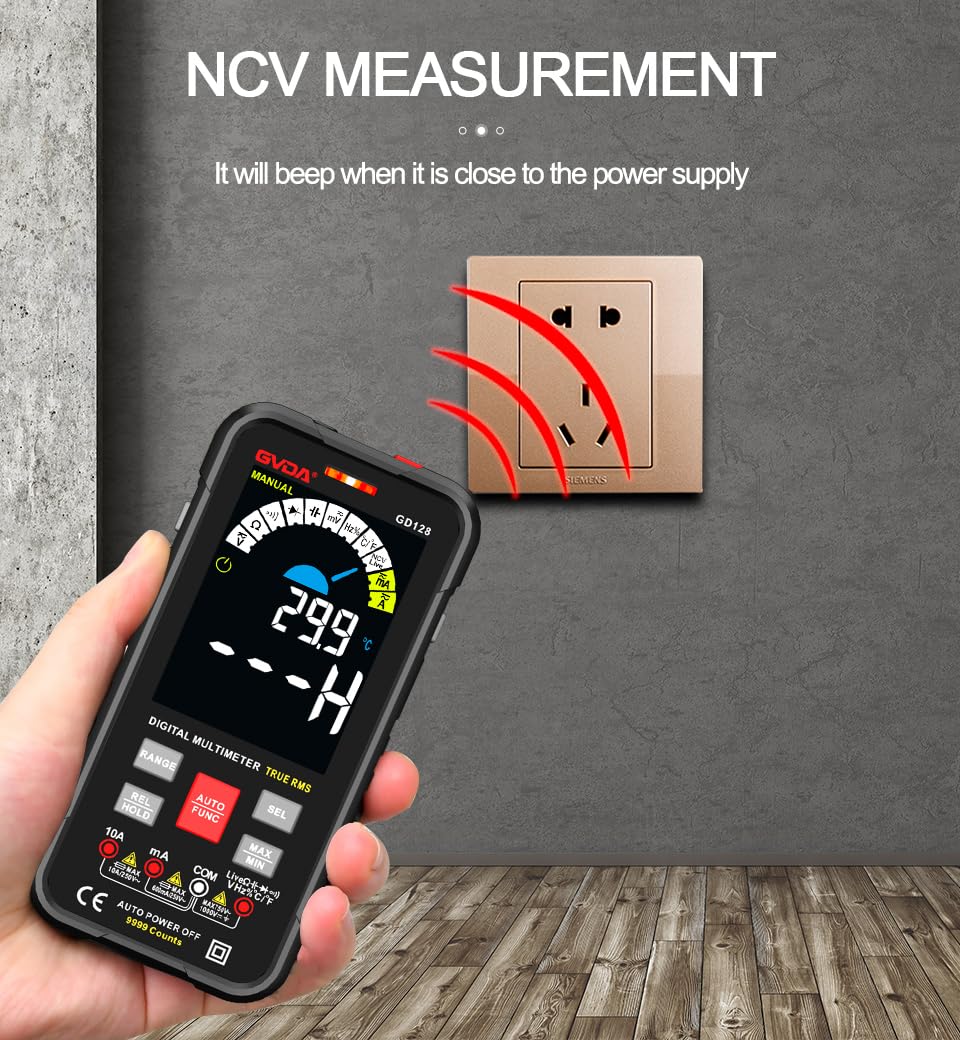
Gambar 5.3: NCV (Vol Non-Kontaktage) measurement in progress.
5.3.8 Fungsi séjén
- RMS leres: Provides accurate readings for both sinusoidal and non-sinusoidal AC waveforms.
- MAKSIMUM/MIN/RATA-RATA: Pencét éta MAX/MIN key to record maximum, minimum, and average readings.
- REL (Ukur Relatif): Pencét éta REL / nahan key briefly to set the current reading as a reference for subsequent measurements.
- Tahan Data: Pencét éta REL / nahan key briefly to freeze the current reading on the display.
- Senter: Pencét éta Konci senter (3) to turn the built-in flashlight on/off.
- Pareum Otomatis (APO): The multimeter will automatically power off after a period of inactivity to save battery life.
6. Aplikasi
The GVDA GD128 Digital Multimeter is versatile and suitable for a wide range of applications, including but not limited to:

Figure 6.1: Diverse applications of the GD128 Multimeter.
- Electronic beginners and hobbyists
- Electronic circuit installation and testing
- Electronic maintenance and repair
- Electromechanical maintenance
- Vehicle inspection and automotive electrical work
- Maintenance of household appliances
- General electrical troubleshooting
7. Spésifikasi
Detailed technical specifications for the GVDA GD128 Digital Multimeter:
| Fitur | Rentang | Precision |
|---|---|---|
| DC Voltage | 99.99mV/999.9mV; 9.999V/99.9V/1000V | ± (0.5% + 3) |
| AC Voltage | 99.9mV/999.9/mV; 9.999V/99.9V/750V | ± (0.8% + 3) |
| DC Ayeuna | 9.999mA/99.99mA/999.9mA; 9.99A | ±(0.8%+3) for mA, ±(1.2%+3) for A |
| AC Ayeuna | 9.999mA/99.99mA/999.9mA; 9.99A | ±(1.0%+3) for mA, ±(1.5%+3) for A |
| Résistansi | 99.99/999.9 ohms/9.999k/99.99k/999.9kohm; 9.999 m/99.99 m ohms | ±(0.8%+3) pikeun kΩ, ±(1.2%+3) pikeun MΩ |
| Kapasitansi | 9.999/99.99/999.9nF/9.999/99.99/999.9uF; 9.999mF/99.99mF | ±(4.0%+3) for nF/uF, ±(5.0%+5) for mF |
| Frékuénsi | 99.99/999.9/9.999k/99.99k/999.9kHz/9.999mHz | ± (1.0% + 3) |
| Siklus tugas | 0.1%-99.99% | ± (1.0% + 2) |
| Suhu | -40~1000°C; -40-1832°F | ± 2 ° C |
| Jumlah tampilan | 9999 cacah | |
| Tipe tampilan | VA color screen | |
| Sampling Laju | Kira-kira. 3 kali per detik | |
| Leuwih Range Tampilan | "OL" | |
| Low Voltage Indikasi | indikasi batré low | |
| Sasayogian tanaga | Batré AAA 3 x 1.5V (teu kalebet) | |
| Beurat produk | Kira-kira. 230g | |
| Ukuran produk | 83 x 23 x 165 mm | |
| Peunteun Kasalametan | EN61010-1,-2-030 EN61010-2-033, EN61326-1 CAT III 1000 V CAT IV 600 V |
8. Pangropéa
Pangropéa anu leres mastikeun umur panjang sareng akurasi multimeter anjeun.
- beberesih: Ngusap kasus kalayan iklanamp kaén sareng detérjen hampang. Entong nganggo abrasives atanapi pangleyur.
- Ngagantian batré: Ganti batré gancang-gancang nalika indikator batré lemah nembongan pikeun mastikeun bacaan akurat.
- Ngagantian sekering: If the current measurement function fails, the fuse may be blown. Refer to the warning label inside the battery compartment for fuse specifications (e.g., F600mA/250V, F10A/250V). Ensure the multimeter is off and test leads are disconnected before replacing fuses.
- Panyimpenan: If the multimeter is not used for a long period, remove the batteries to prevent leakage. Store in a cool, dry place away from direct sunlight.
9. Cara ngungkulan
If you encounter issues with your GVDA GD128 Multimeter, try the following:
- Teu Aya Layar/Nyala: Pariksa pamasangan batré sareng pastikeun batréna henteu béak. Ganti upami diperyogikeun.
- Bacaan anu salah: Verify test lead connections, ensure the correct function and range are selected, and check if the circuit is de-energized for resistance/continuity/capacitance tests.
- "OL" Display: Indicates an over-range condition or an open circuit (e.g., when measuring resistance on an open wire).
- Taya Continuity Bip: Check if the circuit is truly continuous. If not, the circuit is open.
- Fuse Blown Warning: If the current measurement function is not working, the fuse might be blown. Replace the fuse as per maintenance instructions.
Pikeun masalah pengkuh, kontak rojongan customer.
10. Garansi jeung Rojongan
Your GVDA GD128 Digital Multimeter comes with a garansi 30 poé for system failures or factory problems. Please retain your proof of purchase for warranty claims.
For technical support, warranty claims, or further assistance, please refer to the contact information provided with your product packaging or visit the official GVDA websitus.
11. Eusi Paket
Upon opening your GVDA GD128 Digital Multimeter package, you should find the following items:

Figure 11.1: Contents included in the GD128 Multimeter package.
- 1 x GVDA GD128 Digital Multimeter
- 1 x Test Lead Set (Original pen cable)
- 1 x Kantong Kain
- 1 x Probe Termokopel
- 1 x Manual Pamaké
- 1 x Gift Box (Packaging)


