Bubuka
The Lexibook CR753EN Collins Crossword Solver is an electronic device designed to assist with crossword puzzles, word games, and general word reference. It features a comprehensive database from the Collins Bradford 11th edition dictionary, phonetic spell-correction, and various word-solving tools.

Image: The Lexibook CR753EN Collins Crossword Solver, a compact electronic device with a QWERTY keyboard and a green display screen.
Disetél
Pamasangan batré
The device requires one CR2032 battery (included). To install or replace the battery:
- Tangtukeun lokasi kompartemen batré dina tonggong alat.
- Use a small screwdriver or coin to open the battery compartment cover.
- Selapkeun batré CR2032 kalayan sisi positif (+) nyanghareup ka luhur.
- Ganti panutup kompartemen batré sareng amankeun.
Ngahurungkeun/Pareuman
Pencét éta tombol kakuatan beureum located on the top right of the keyboard to turn the device on or off.
Parentah Operasi
The Lexibook CR753EN offers several functions to assist with word puzzles and general reference. Use the dedicated function buttons (XWORD, CLUE, ADV, SYN, SOLV) and the QWERTY keyboard for input.
Xword Function (Crossword Solver)
This function helps solve crosswords by finding words that match a given pattern.
- Pencét éta XWORD kancing.
- Enter the known letters of the word, using a question mark (?) for unknown letters. For example, to find a 5-letter word starting with 'L' and ending with 'R', enter "L???R".
- Pencét Asupkeun. The device will display a list of matching words. Use the arrow keys to scroll through the list.
Clue Function
Use this function to find words based on a clue and a pattern.
- Pencét éta CLUE kancing.
- Enter the clue (e.g., "Planet").
- Enter a pattern if known (e.g., "E?RT?").
- Pencét Asupkeun. The device will suggest words related to the clue and pattern.
Synonyms Function
Find synonyms for a given word.
- Pencét éta SYN kancing.
- Enter the word for which you need synonyms (e.g., "Learn").
- Pencét Asupkeun. A list of synonyms will be displayed.
Fungsi Maju
This function helps find words that are related to a given word or pattern, often used for word association.
- Pencét éta ADV kancing.
- Enter a word or pattern (e.g., "Game").
- Pencét Asupkeun. The device will show related words.
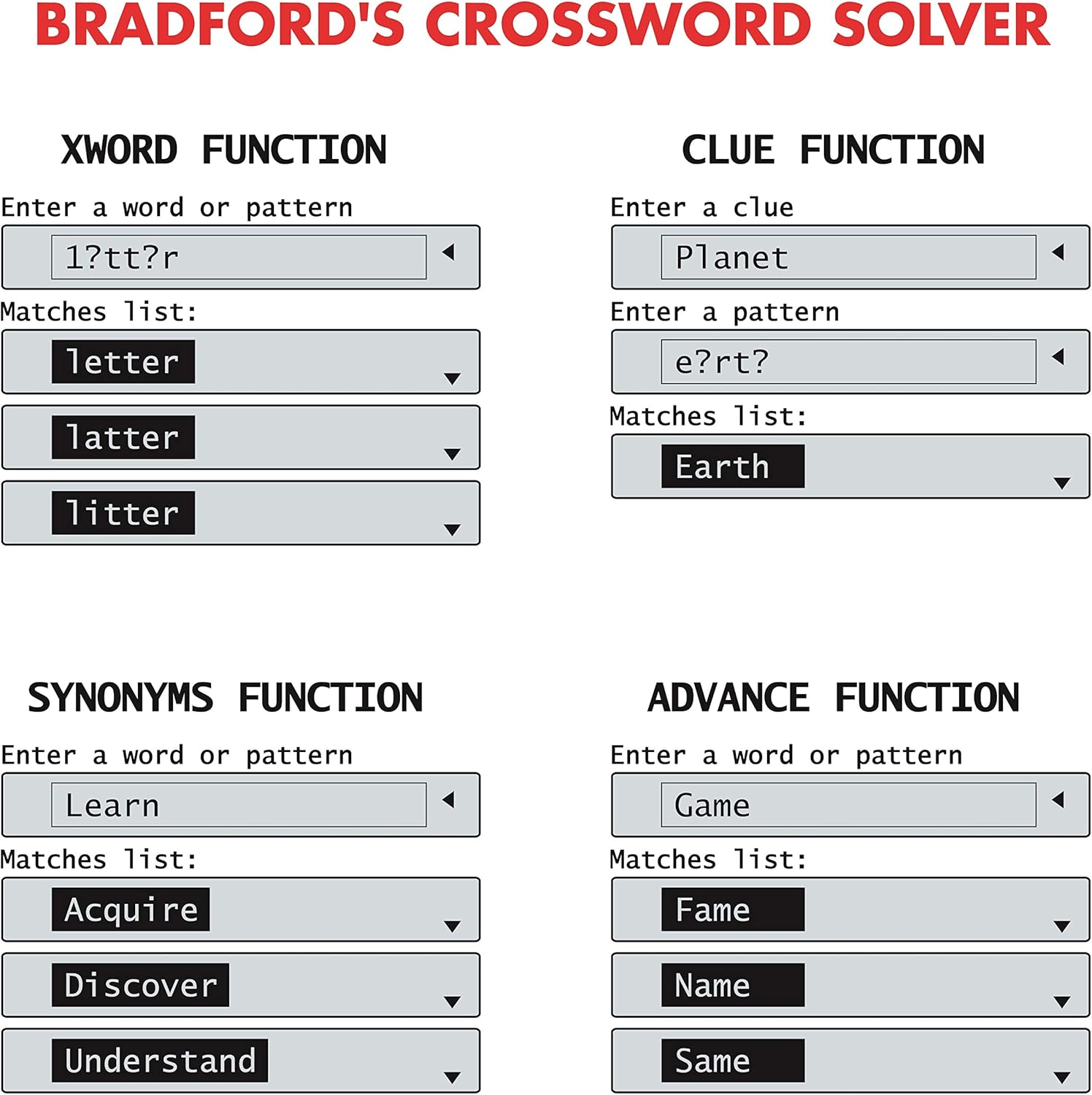
Image: Screen examples demonstrating the Xword, Clue, Synonyms, and Advance functions, showing input fields and matching word lists.
List Function (User List)
Create and manage a personalized list of words.
- Pencét éta DAFTAR kancing.
- Follow the on-screen prompts to add, edit, or search words within your custom list.
Solver Function (Anagram & Word Builder)
This function includes tools for solving anagrams and building words.
- Pencét éta SOLV kancing.
- Pilih boh Anagram Solver or Pangwangun Kecap ti ménu.
- For Anagram Solver: Enter a jumbled set of letters (e.g., "snutes"). Press Asupkeun to see possible words (e.g., "sunset").
- For Word Builder: Enter a set of letters, and the device will suggest words that can be formed from them.
Phonetic Spell-Correction
Corrects misspelled words phonetically.
- Enter a word as it sounds (e.g., "fonetik").
- The device will suggest the correct spelling (e.g., "phonetic"). This feature is often integrated into the main word entry functions.
Kaulinan Kecap
The device includes three word games: Hangman, Word Jumble, and Anagram.
- Access the games through the main menu or a dedicated game button if available.
- Follow the on-screen instructions to play each game.

Image: Screen examples showing the Anagram Solver, Phonetic Spell-Correction, and various Word Games like Hangman and Word Jumble.
Utiliti sanés
The device also includes a calculator, currency converter, and unit converter. These can typically be accessed via the main menu or dedicated buttons.
Pitulung dina layar
Contextual help is available at any time. Look for a 'Help' or '?' icon on the screen or press a designated Help button if present.
Pangropéa
beberesih
- Usap alatna nganggo lawon anu lemes sareng garing.
- Ulah make cleaners cair atawa bahan abrasive.
Panyimpenan
- Simpen alat dina tempat anu tiis sareng garing jauh tina sinar panonpoé langsung.
- Upami disimpen kanggo waktos anu lami, cabut batréna pikeun nyegah bocor.
Pamérésan masalah
Alat Teu Hurungkeun
- Check if the battery is correctly installed.
- Ganti batré CR2032 ku nu anyar.
Incorrect Word Suggestions
- Ensure the correct function (Xword, Clue, Synonyms) is selected.
- Verify the spelling or pattern entered.
- The device uses the Collins Bradford 11th edition dictionary; some very obscure or newly coined words may not be included.
Masalah tampilan layar
- If the screen is dim or flickering, the battery may be low. Replace the battery.
- If the screen is blank, try turning the device off and on again.
spésifikasi
| Nomer modél | CR753EN |
| merek | Lexibook |
| Ukuran (L x W x H) | 11.8 x 7.8 x 1.4 cm |
| Beurat | 160 gram |
| Sumber Daya | 1 x batré CR2032 |
| Bahan | palastik |
Garansi
This Lexibook CR753EN device comes with a garansi 2 taun from the date of purchase. Please retain your proof of purchase for any warranty claims. The warranty covers manufacturing defects under normal use conditions.
Ngarojong
For further assistance or technical support, please refer to the official Lexibook websitus atanapi ngahubungan departemén layanan palanggan maranéhna. Inpormasi kontak biasana tiasa dipendakan dina bungkusan produk atanapi produsén websitus.


