Bubuka
Thank you for choosing the APEXEL Nano Zoom 100x Phone Micro Lens. This compact and versatile microscope attachment is designed to transform your smartphone into a powerful tool for exploring the microscopic world. Featuring a high-quality glass lens and a built-in LED light, it allows for detailed observation and photography of various subjects such as plants, insects, textiles, and electronic components. This manual provides essential information for proper setup, operation, and maintenance to ensure optimal performance.
Naon dina Box
- APEXEL Nano Zoom 100x Phone Micro Lens
- Kabel Ngecas USB
- Kain beberesih
- Instruksi Manual

Image: The package contents, including the microscope lens, charging cable, cleaning cloth, and user manual.
Disetél
1. Charging the LED Light
Before initial use, ensure the built-in LED light is fully charged. Connect the provided USB charging cable to the lens's charge port and to a compatible USB power source. A full charge takes approximately 1.5 hours and provides about 2 hours of continuous LED light usage.

Image: The microscope lens with its USB charging port visible, indicating where to connect the charging cable.
2. Attaching to Your Smartphone
- Identify your smartphone's primary camera lens. The APEXEL Nano Zoom lens is designed to align with this lens for optimal performance.
- Gently clip the microscope lens onto your smartphone, ensuring the center of the microscope lens is perfectly aligned with your phone's primary camera lens. The universal clip design accommodates most smartphones, even with a phone case (especially recommended if your phone's camera is convex).
- No special app is required. Simply open your phone's native camera application.
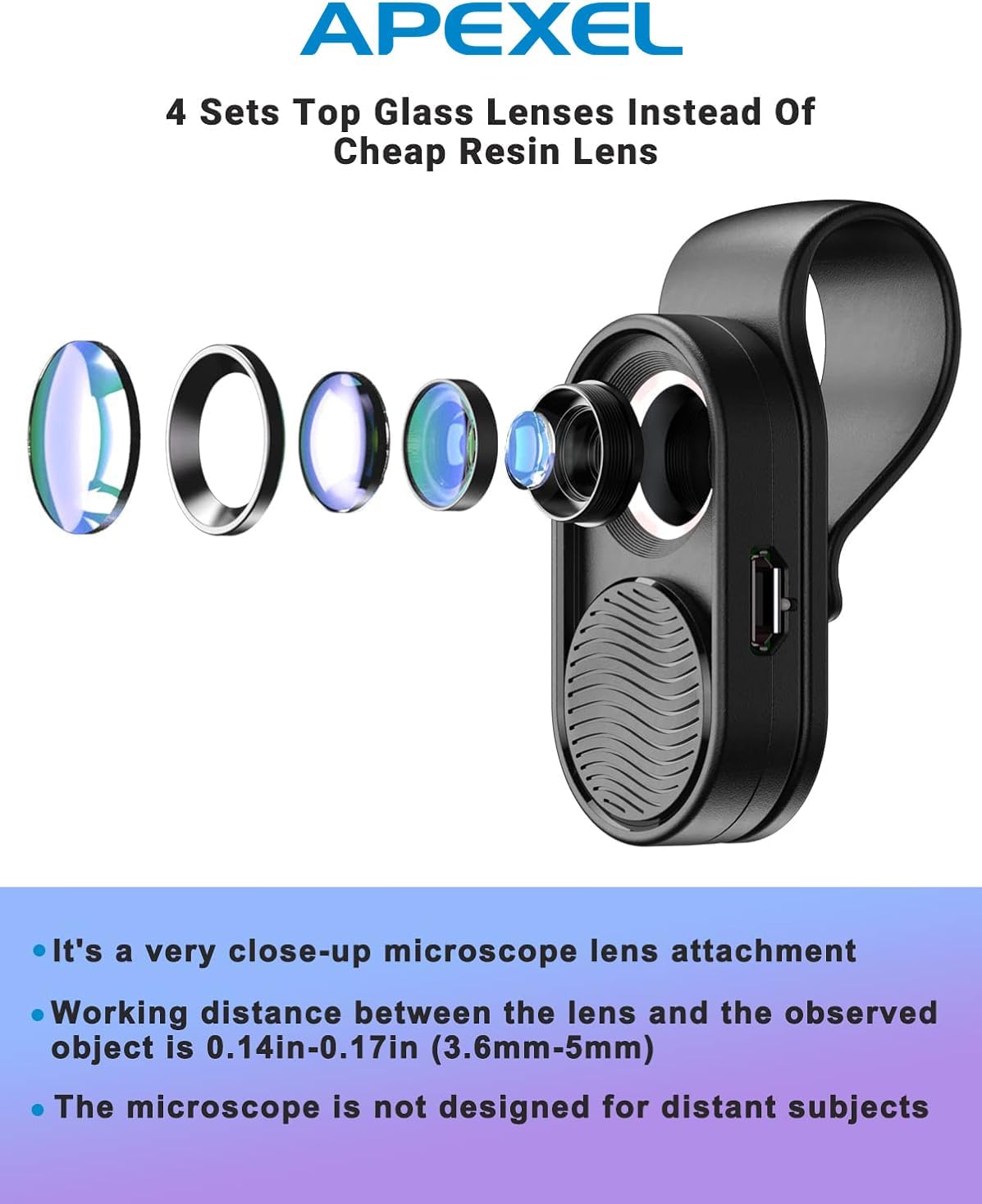
Image: The APEXEL Nano Zoom 100x Phone Micro Lens securely clipped onto a smartphone, aligned with the device's camera.

Image: A visual guide demonstrating the correct alignment of the microscope lens with the primary camera of different iPhone models.
3. Activating the LED Light
The LED ring light automatically turns on when the lens cover is slid open. This provides essential illumination for clear microscopic viewing.

Gambar: A lengkep view of the microscope lens, highlighting the slideway mechanism that activates the LED ring light when opened.
Parentah Operasi
1. Observing and Capturing Images
- With the lens attached and the LED light on, position your smartphone's camera over the subject you wish to observe.
- The optimal working distance between the microscope lens and the observed object is very close, approximately 0.14-0.17 inches (3.6-5mm). Slowly move your phone closer to or further from the subject until it appears in focus on your screen.
- Use your phone's digital zoom function to further magnify the image up to 100x.
- To prevent your phone's camera from automatically switching lenses or adjusting focus, utilize the 'hold' or 'AE/AF Lock' feature in your camera app, if available. This locks the exposure and focus on the primary lens.
- Capture photos or videos as you normally would with your smartphone camera.

Image: A diagram showing the critical working distance of 3.6-5mm between the microscope lens and the observed object for clear focus.
2. Kelample Aplikasi
This micro lens is ideal for observing fine details in various items:
- Biological Specimens: Examine plants, trichomes, insects, and skin.
- Industrial Testing: Inspect CPU pins, circuit boards, and chip numbers.
- Kontrol kualitas: Analyze fabric textures, diamond codes, and other material details.
- Éksplorasi Atikan: Engage in child exploration of everyday objects.

Gambar: A digedékeun view of trichomes, demonstrating the lens's capability to capture intricate biological details.

Image: A smartphone screen showing a highly magnified view of trichomes, captured with the APEXEL Nano Zoom lens attached.

Image: A smartphone screen showing a magnified view of blue fabric, illustrating the lens's ability to reveal textile patterns.
3. Video Demonstrasi
Video: A demonstration of the Apexel 100x Microscope lens in use, showcasing its features and capabilities for capturing magnified images and videos with a smartphone.
Pangropéa
- Ngabersihan lensa: Use the provided cleaning cloth to gently wipe the lens surfaces. Entong use alcohol or harsh chemicals, as this may damage the lens coatings.
- Panyimpenan: When not in use, keep the lens cover closed to protect the lens from dust and scratches. Store the lens in a dry, clean environment.
- Ngecas: Recharge the LED light as needed. Avoid overcharging for extended periods.
Pamérésan masalah
- Issue: Unclear or blurry images.
- Solusi: Ensure the lens is properly aligned with your phone's primary camera. Adjust the working distance (0.14-0.17 inches / 3.6-5mm) by slowly moving the phone closer to or further from the subject until the image is sharp. Make sure the built-in LED light is on and fully charged to provide adequate illumination.
- Issue: Phone camera keeps switching lenses or losing focus.
- Solusi: Many smartphone camera apps have an 'AE/AF Lock' or 'hold' feature. Tap and hold on the screen where you want to focus to activate this lock. This will prevent the camera from automatically adjusting focus or switching to other lenses, which can happen when working at very close distances.
- Issue: LED light is not turning on or is dim.
- Solusi: Ensure the lens cover is fully slid open to activate the LED. If the light is dim or not turning on, the battery may be low. Recharge the device using the provided USB cable for approximately 1.5 hours.
spésifikasi
| Nomer modél | MS001 |
| Magnification | 10x (optical), up to 100x (with phone digital zoom) |
| Tipe Lénsa | Microscope, 4 Elements Groups |
| Optical Lens Material | Quality Glass with Multi-Layer Coatings (FMC) |
| Panjang fokus | 4.3 milimeter |
| Jarak Gawé | 0.14-0.17 inci (3.6-5mm) |
| Paneangan | Built-in LED Ring Light |
| Kahirupan Batré LED | Approx. 2 hours (use), 1.5 hours (charge) |
| Kasaluyuan | Universal Clip for most smartphones |
| Dimensi produk | 2.16 x 1.37 x 1.06 inci |
| Item Beurat | 0.388 ons |
Garansi sareng Rojongan
The APEXEL Nano Zoom 100x Phone Micro Lens comes with a 1-year warranty from the date of purchase. This warranty covers manufacturing defects and ensures that the product functions as intended under normal use. If you encounter any issues with your device or require technical assistance, please contact APEXEL customer support.
For further support and product information, please visit the official APEXEL-US Amazon Store.