1. Produk Langkungview
The BuTure BR600 is a powerful and versatile portable car jump starter designed to provide emergency starting power for 12V vehicles. It also functions as a portable power bank with wireless charging capabilities and a multi-mode LED flashlight. This manual provides essential information for safe and effective use of your device.
Fitur konci:
- Mimitian Luncat anu Kuat: Delivers 2500A peak current to start all gasoline engines and up to 8.0L diesel engines.
- Batré Kapasitas Tinggi: 27000mAh lithium battery for multiple jump starts and device charging.
- Ngecas nirkabel: Integrated 10W wireless charging pad for compatible smartphones.
- Bank Daya Portabel: Equipped with USB 1 (Quick Charge 3.0: 5V 3A / 9V 2A / 12V 1.5A), USB 2 (5V 2.4A), and USB-C (5V 3A) outputs for charging various electronic devices.
- Smart Protection Clamps: Features intelligent protection against short circuits, overheating, over-voltage, over-charge, deep discharge, over-current, and reverse polarity.
- Senter LED multi-mode: Includes Flashlight, Strobe, SOS, and Warning Light modes for emergencies.
- Desain awét: Operates effectively in extreme temperatures, including cold winter conditions.
2. Eusi Paket
Mangga parios eusi bungkusan nalika dibuka. Upami aya barang anu leungit atanapi ruksak, mangga hubungi layanan palanggan.

Image: Contents of the BuTure BR600 package.
- 1 x BuTure BR600 Jump Starter
- 1 x Kabel Jumper Smart
- 1 x Kabel USB-C
- 1 x Adaptor Korek Api EC5
- 1 x Manual Pamaké
- 1 x Kasus Panyimpenan
3. Émbaran Kasalametan penting
Read all safety warnings and instructions before using this product. Failure to follow these instructions may result in electric shock, fire, and/or serious injury.
- Ulah ngalelepkeun produk kana cai atanapi ngantepkeun ka hujan.
- Do not open or disassemble the product. There are no user-serviceable parts inside.
- Jauhkeun tina jangkauan barudak.
- Anggo ngan ukur kabel jumper pinter anu disayogikeun.
- Entong luncat ngamimitian batréna beku.
- Pastikeun sambungan polaritas anu leres (beureum clamp mun positif, hideung clamp ka négatip).
- Ulah nyambungkeun cl positif jeung negatifamps babarengan.
- If the product becomes excessively hot during use, discontinue use immediately.
- Nyimpen produk dina tempat anu tiis sareng garing jauh tina sinar panonpoé langsung.
- Wear eye protection and gloves when jump starting a vehicle.
- Consult your vehicle's owner's manual for specific jump-starting procedures.

Image: The BuTure BR600 features multiple protection modes for safe operation, including error detection and intelligent indicators.
4. Charging the BuTure BR600
Before first use, fully charge the jump starter. It is recommended to recharge the device every 3-6 months to maintain battery health, even if not in use.
4.1. Charging via USB-C Input
- Sambungkeun kabel USB-C anu disayogikeun kana port input USB-C dina jump starter.
- Connect the other end of the USB-C cable to a USB wall adapter (not included) or a car charger.
- The LED indicator lights will illuminate and flash to show the charging status. All four lights will be solid when fully charged.
4.2. Indikator Level Batré
The LED indicator lights on the device show the remaining battery capacity:
- 4 lights: 75% - 100%
- 3 lights: 50% - 75%
- 2 lights: 25% - 50%
- 1 light: 0% - 25% (Recharge immediately)

Image: The BuTure BR600 features a 27000mAh battery designed for long standby times, up to 12 months.
5. Ngahurungkeun Kandaraan sacara Langsung
Ensure the jump starter is at least 50% charged (2 LED lights) before attempting to jump start a vehicle.
- Nyiapkeun Kendaraan: Turn off the vehicle's ignition and all accessories (headlights, radio, air conditioning, etc.). Engage the parking brake.
- Sambungkeun Kabel Jumper:
- Insert the blue plug of the smart jumper cables into the 12V jump start port on the BuTure BR600. Ensure a firm connection.
- Nyambungkeun BEureum positip (+) clamp kana terminal batré positif (+) kandaraan.
- Nyambungkeun HIDEUNG négatip (-) clamp kana terminal batré négatif (-) kandaraan.
- Nu pinter clamp indicator light will show the connection status. Refer to the smart clamp manual for specific light indications.
- Mimitian Kendaraan: Sakali kelas pinteramp indicator shows a safe connection, start your vehicle's engine. If the vehicle does not start immediately, wait 20-30 seconds before trying again. Do not crank the engine for more than 3 seconds per attempt.
- Cabut Kabel Jumper: As soon as the vehicle starts, disconnect the HIDEUNG négatip (-) clamp kahiji, teras teh BEureum positip (+) clamp from the vehicle battery. Finally, unplug the smart jumper cables from the BuTure BR600.
penting: Upami kelas pinteramp indicates an error (e.g., reverse polarity), correct the connection before attempting to start the vehicle.

Image: Illustration of connecting the BuTure BR600 to a car battery for jump starting.
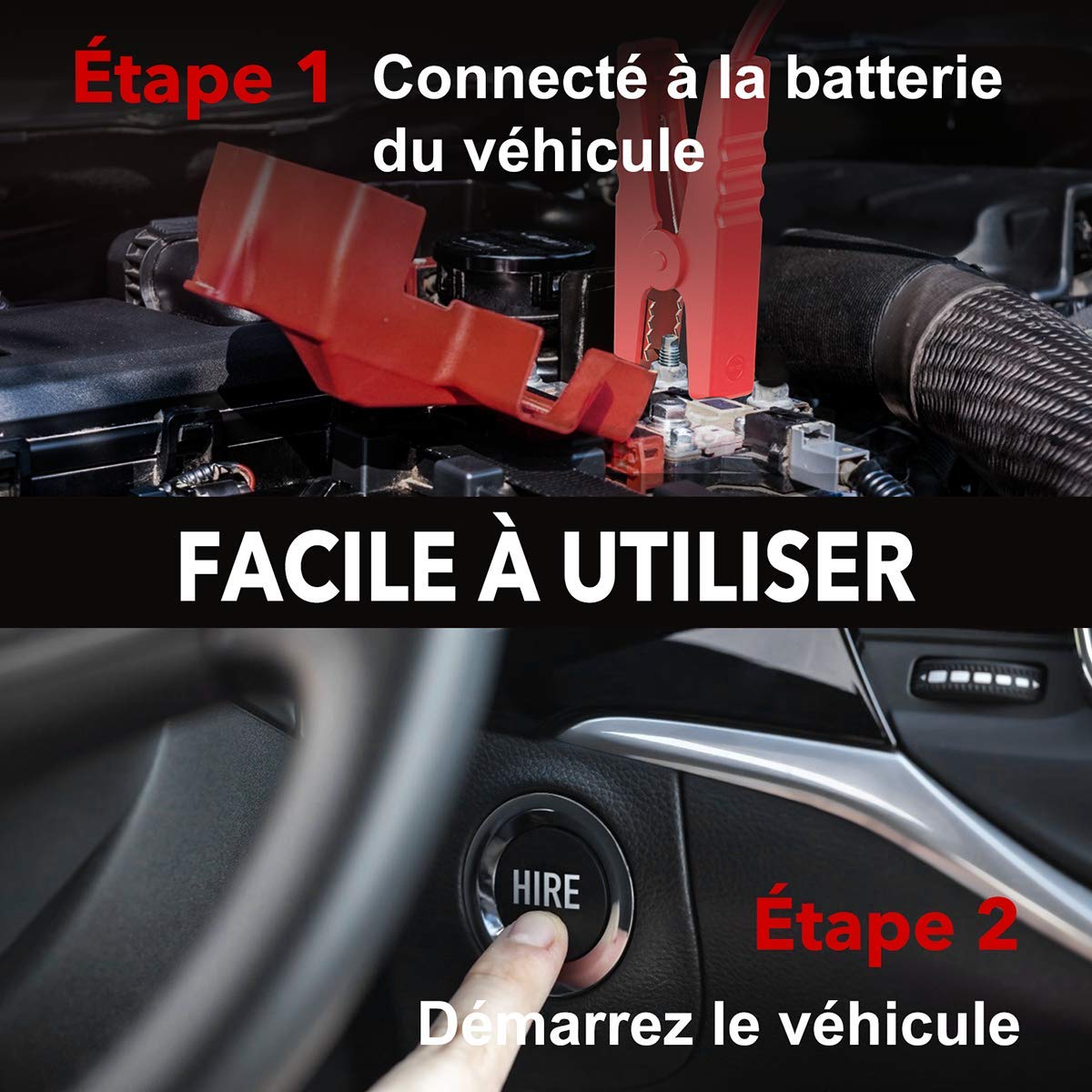
Image: Step-by-step guide showing how to connect the jump starter to the vehicle battery and then start the vehicle.

Image: The BuTure BR600 is designed to perform reliably even in cold winter temperatures down to -20°C.
6. Operating Other Functions
6.1. Dianggo salaku Power Bank (Kaluaran USB)
The BuTure BR600 can charge various electronic devices via its USB output ports.
- Connect your device's USB charging cable to either the USB 1 (Quick Charge 3.0) or USB 2 port on the jump starter.
- Jump starter bakal otomatis mimiti ngecas alat anjeun.
6.2. Ngecas nirkabel
For devices compatible with 10W wireless charging:
- Place your wireless charging compatible device (e.g., smartphone) on the wireless charging pad located on the top surface of the jump starter.
- Pastikeun alatna aya di tengah bantalan pikeun ngecas anu optimal.
- The wireless charging indicator light will illuminate to confirm charging is active.

Image: The BuTure BR600 offers both 10W wireless charging and Quick Charge 3.0 USB output for multiple devices.
6.3. Senter LED
The built-in LED flashlight has multiple modes for different situations.
- Press and hold the power button for 3 seconds to turn on the flashlight (steady light mode).
- Press the power button again to cycle through modes: Strobe → SOS → Warning Light → Off.
- Press and hold the power button again for 3 seconds to turn off the flashlight from any mode.

Image: The BuTure BR600 features an ultra-bright LED flashlight with Flash, SOS, Strobe, and Warning light modes for various emergencies.
7. Pangropéa
- beberesih: Anggo kaén anu lemes sareng garing pikeun ngabersihan alat. Ulah make cleaners abrasive atawa pangleyur.
- Panyimpenan: Store the jump starter in a cool, dry place between 0°C and 45°C (32°F and 113°F). Avoid direct sunlight and high humidity.
- Ngecas: Recharge the device every 3-6 months to prevent battery degradation, even if not in use.
- Kahirupan batré: The internal lithium battery is designed for long life, but like all rechargeable batteries, its capacity will decrease over time.
8. Cara ngungkulan
| Masalah | Mungkin Cukang lantaranana | Solusi |
|---|---|---|
| Jump starter teu hurung. | Batré discharged lengkep. | Charge the jump starter for several hours. |
| Kandaraan teu ngamimitian. |
|
|
| Cl pinteramp indicator shows error. | Reverse polarity, short circuit, or other fault. | Pegatkeun sambungan clamps, check connections, and reconnect ensuring correct polarity (Red to +, Black to -). Refer to smart clamp manual for specific error codes. |
| Ngecas nirkabel teu jalan. |
|
|
9. Spésifikasi
| Modél | BR600 |
| Puncak Arus | 2500A |
| Kapasitas batré | 27000 mah |
| Mimitian Voltage | 12V |
| Kaluaran USB 1 (QC3.0) | 5V/3A, 9V/2A, 12V/1.5A |
| Kaluaran USB 2 | 5V / 2.4A |
| USB-C Input / Kaluaran | 5V / 3A |
| Kaluaran Ngecas Nirkabel | 10W |
| Suhu Operasi | -20°C nepi ka 60°C (-4°F nepi ka 140°F) |
| Ukuran (L x W x H) | 24.5 x 15.4 x 9.6 cm |
| Beurat | 1.21 kg |
| Komposisi batré | Lithium Metallic |
10. Garansi sarta Rojongan Palanggan
BuTure products are designed and manufactured to the highest quality standards. This product comes with a standard manufacturer's warranty. For detailed warranty information, product support, or technical assistance, please refer to the warranty card included in your package or visit the official BuTure websitus.
If you encounter any issues or have questions regarding your BuTure BR600, please contact our customer support team. Provide your model number (BR600) and purchase details for faster service.


