1. Bubuka
This manual provides detailed instructions for the operation and maintenance of your Douk Audio P2 Mini Bluetooth 5.0 Vacuum Tube Preamp. Please read this manual thoroughly before using the device to ensure proper functionality and to maximize your audio experience. This device combines a vacuum tube preamplifier, a HiFi USB player, and a stereo audio headphone amplifier, offering versatile connectivity options including Bluetooth 5.0, RCA, USB, and TF card inputs.
2. Émbaran Kasalametan
- Sasayogian tanaga: Anggo ngan ukur adaptor daya anu disayogikeun. Nganggo catu daya anu teu cocog tiasa ngaruksak alat sareng ngabatalkeun garansi.
- Ventilasi: Pastikeun ventilasi nyukupan di sabudeureun unit. Ulah meungpeuk bukaan ventilasi.
- Uap: Jauhkeun alat ieu tina cai, kalembaban, sareng lingkungan anu kalembabanna luhur.
- Panas: Hindarkeun nempatkeun unit caket sumber panas atanapi dina sinar panonpoé langsung.
- Handling Tubes: Vacuum tubes can become hot during operation. Exercise caution when handling or replacing them.
- beberesih: Cabut daya sateuacan dibersihkeun. Anggo lawon anu lemes sareng garing. Entong nganggo pembersih cair atanapi aerosol.
- Palayanan: Ulah nyobian ngalereskeun unit ieu nyalira. Serahkan sadaya perawatan ka tanaga anu mumpuni.
3. Eusi Paket
Pastikeun yén sadaya item aya dina bungkusan:
- 1x Douk Audio P2 Preamp Unit
- 1x Power Supply Adapter (DC 12V)
- 1x Antena Bluetooth
- 2x 6K4 Vacuum Tubes
- 1x Kadali Jauh
- 1 x Manual Instruksi

4. Produk Langkungview
The Douk Audio P2 is a compact and versatile audio device designed to enhance your listening experience. It features multiple input options and a vacuum tube stage for a warm, rich sound.
4.1 Kontrol Panel hareup jeung sambungan
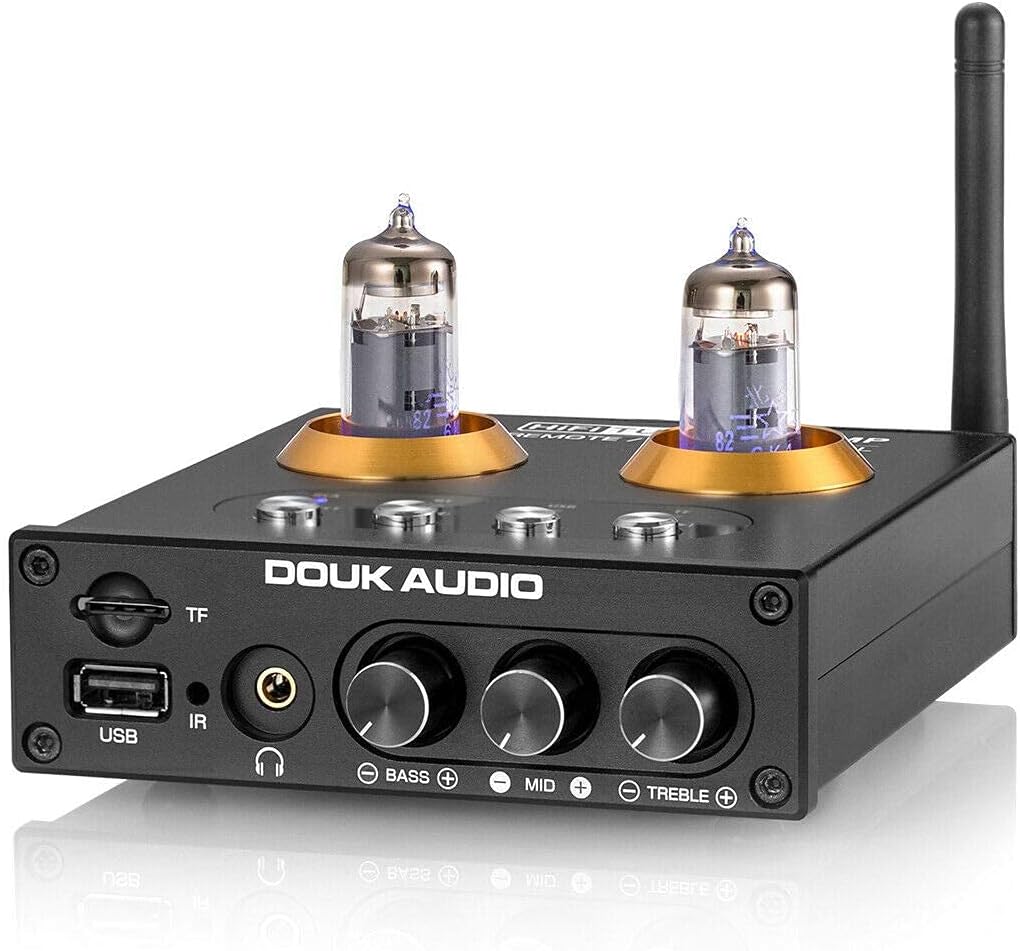
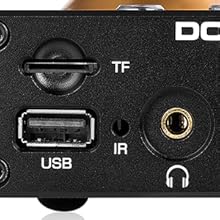
- Input Kartu TF: Slot for TransFlash (MicroSD) cards for media playback.
- Input USB: USB-A port for connecting USB flash drives for media playback.
- Panarima IR: Panarima Infrabeureum pikeun kadali jauh.
- Kaluaran headphone: Jack 3.5mm pikeun nyambungkeun headphone.
- Tombol Bass: Nyaluyukeun tingkat audio frékuénsi handap.
- Tombol tengah: Adjusts mid-range frequency audio levels.
- Treble kenop: Nyaluyukeun tingkat audio frékuénsi luhur.
- Tombol Pilihan Input: Buttons for selecting input sources (RCA, BT, USB, TF).
- Tombol Daya/Pilih: Powers the unit on/off and cycles through inputs.
4.2 Sambungan Panel Rear

- Konektor Antena Bluetooth: Pikeun masang anteneu Bluetooth anu kalebet.
- Input RCA (Kiri/Katuhu): Stereo analog audio input for connecting external audio sources.
- Kaluaran RCA (L/R): Stereo analog audio output for connecting to an amplifier atawa speaker aktif.
- Input Daya DC 12V: Pikeun nyambungkeun adaptor kakuatan.
5. Setélan
Turutan léngkah ieu pikeun setelan awal:
- Pasang Tabung Vakum: Carefully insert the two 6K4 vacuum tubes into their sockets on the top of the unit. Ensure they are seated firmly.
- Pasang Anteneu Bluetooth: Screw the provided Bluetooth antenna onto the connector on the rear panel.
- Sambungkeun Kaluaran Audio: Connect the RCA output jacks (L/R) on the rear panel to your ampspeaker aktif atawa speaker aktif nu make kabel RCA.
- Connect Audio Input (Optional): If using an external analog source (e.g., CD player), connect its RCA output to the RCA input jacks (L/R) on the rear panel.
- Sambungkeun Kakuatan: Connect the DC 12V power adapter to the power input on the rear panel, then plug the adapter into a wall outlet.
- Daya Hurung: Press the Power/Select button on the front panel or the power button on the remote control to turn on the unit.

6. Parentah Operasi
6.1 Pamilihan Input
Use the input selection buttons on the front panel or the remote control to switch between available audio sources:
- RCA: For external analog audio sources connected via RCA cables.
- BT (Bluetooth): Pikeun streaming audio nirkabel tina alat Bluetooth-diaktipkeun.
- USB: For audio playback from a USB flash drive.
- TF: For audio playback from a TF (MicroSD) card.
6.2 Operasi Bluetooth
- Select the "BT" input using the front panel button or remote. The Bluetooth indicator LED will flash.
- Dina alat sélulér anjeun atanapi komputer, aktipkeun Bluetooth sareng milarian alat anu sayogi.
- Select "Douk Audio P2" from the list to pair. Once paired, the Bluetooth indicator LED will remain solid.
- You can now stream audio wirelessly to the P2.
6.3 USB / TF Card Playback
- Selapkeun flash drive USB kana port USB atanapi kartu TF kana slot kartu TF.
- Select the "USB" or "TF" input using the front panel button or remote.
- The unit will automatically begin playing supported audio files (MP3, APE, FLAC, WAV, WMA).
- Anggo remot kontrol pikeun fungsi puter deui (puter/pareum, lagu salajengna/saméméhna).

6.4 Headphone AmpFungsi Lifier
Connect your headphones to the 3.5mm headphone jack on the front panel. The P2 will amplify the selected audio source for private listening. The RCA output remains active, allowing simultaneous output to speakers and headphones.

6.5 PraampFungsi Lifier
The P2 acts as a preamplifier, processing the audio signal through its vacuum tube stage before sending it to your main amplifier or active speakers via the RCA output. This tube stage is designed to add warmth and richness to the audio.

6.6 Kontrol Nada
Adjust the Bass, Mid, and Treble rotary knobs on the front panel to fine-tune the audio output to your preference. These controls allow for independent adjustment of different frequency ranges.

6.7 Jauh Jauh
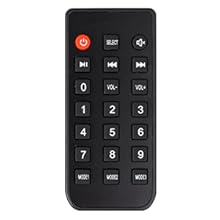
The included remote control provides convenient access to power, input selection, volume adjustment, and media playback controls.
7. Pangropéa
7.1 beberesih
To clean the unit, first disconnect it from the power outlet. Use a soft, dry, lint-free cloth to wipe the exterior surfaces. Do not use abrasive cleaners, solvents, or chemical sprays, as these can damage the finish or internal components.
7.2 Tube Replacement
The 6K4 vacuum tubes are designed to be user-replaceable. If you wish to experiment with different compatible tubes (e.g., 6J1, 6J4, GE5654, 6AK5, 6*1n) or if a tube needs replacement:
- Ensure the unit is powered off and unplugged from the wall outlet. Allow the tubes to cool completely before handling.
- Gently grasp the top of the tube and pull it straight up from its socket. Avoid twisting or bending the pins.
- Align the pins of the new tube with the holes in the socket. Carefully push the new tube straight down until it is firmly seated.
- Reconnect power and test the unit.

8. Cara ngungkulan
| Masalah | Mungkin Cukang lantaranana | Solusi |
|---|---|---|
| Taya kakuatan | Adaptor daya teu nyambung; stop kontak teu aktip. | Ensure power adapter is securely connected to the unit and a working power outlet. |
| Taya kaluaran sora | Incorrect input selected; cables loose; amplifier/speakers off; volume too low. | Verify correct input source. Check all audio cable connections. Ensure connected amplifier/speakers are powered on and volume is adequate. |
| Bluetooth teu dipasangkeun | Unit teu dina modeu pasangan; alatna jauh teuing; gangguan. | Ensure "BT" input is selected and LED is flashing. Move device closer to the P2. Restart Bluetooth on your device. |
| Kartu USB/TF teu tiasa diputer | Incorrect input selected; unsupported file format; corrupted media. | Select "USB" or "TF" input. Ensure files are supported (MP3, APE, FLAC, WAV, WMA). Try a different USB drive/TF card. Note: USB drives larger than 32GB may not be fully supported. |
| Static or humming noise | Ground loop; faulty cables; tube issue. | Check cable connections. Try a different power outlet. Allow tubes to warm up. If persistent, consider replacing tubes. |
9. Spésifikasi
- merek: Douk Audio
- model: P2
- Téknologi konektipitas: Bluetooth 5.0, RCA, USB, TF Card
- Alat anu cocog: Personal Computer, Television, Speaker, Mobile Phones, CD/MP3 Players
- Tipe Panyambung: 3.5mm Jack (Headphone Out), RCA (Input/Output)
- Encoding Audio: Stereo
- Mode Kaluaran Audio: Stereo
- Jumlah Saluran: 2
- tabung vakum: 2x 6K4 (replaceable with 6J1, 6J4, GE5654, 6AK5, 6*1n)
- Input kakuatan: DC 12V
- Ukuran (L x W x H): Approximately 128mm x 115mm x 33mm (5.04 x 4.53 x 1.30 inches)
- Beurat barang: Approximately 420g (0.93 lbs)
- Supported USB/TF Card Capacity: Up to 32GB (for optimal performance)
- Supported Audio Formats (USB/TF): MP3, APE, FLAC, WAV, WMA
10. Garansi jeung Rojongan
Douk Audio products are designed for reliability and performance. For warranty information and technical support, please refer to the official Douk Audio websitus atanapi hubungi pangecér anjeun. Simpen resi pameseran anjeun salaku bukti pameseran pikeun klaim garansi.
Resmi Websitus: www.dokaudio.com


