1. Bubuka
This manual provides essential instructions for the safe and efficient use of your Xiaomi Mi LED TV L65M5-5ASP. Please read this manual thoroughly before operating the television and retain it for future reference. This 65-inch 4K Ultra HD Smart TV features an Android operating system, offering a wide range of entertainment options and connectivity.
2. Émbaran Kasalametan
Perhatikeun pancegahan kaamanan di handap ieu pikeun nyegah karusakan TV sareng mastikeun kasalametan pribadi:
- Sumber Daya: Sambungkeun TV ngan ka stop kontak listrik AC jeung vol nu benertage sakumaha anu dituduhkeun dina labél TV.
- Ventilasi: Pastikeun ventilasi nyukupan sabudeureun TV. Ulah meungpeuk bukaan ventilasi.
- Cai sareng Uap: Do not expose the TV to rain, moisture, or excessive humidity. Do not place objects filled with liquids, such as vases, on the TV.
- Sumber Panas: Jauhkeun TV tina sumber panas sapertos radiator, register panas, kompor, atanapi alat-alat sanésna anu ngahasilkeun panas.
- beberesih: Cabut TV tina stop kontak sateuacan beberesih. Paké lawon lemes, garing. Ulah make cleaners cair atawa cleaners aerosol.
- Palayanan: Entong nyobian ngalayanan produk ieu nyalira. Rujuk sadayana ngalayanan ka tanaga jasa anu mumpuni.
- Pamasangan: When mounting the TV on a wall, follow the instructions provided by the wall mount manufacturer and ensure proper installation.
3. Eusi Paket
Pastikeun yén sadaya item aya dina bungkusan:
- Xiaomi Mi LED TV L65M5-5ASP (65-inch)
- Kadali jauh
- Kabel Daya
- Meja TV (2 unit)
- Screws pikeun TV Stand
- Manual pangguna (dokumén ieu)
4. Produk Langkungview
Hareupeun View
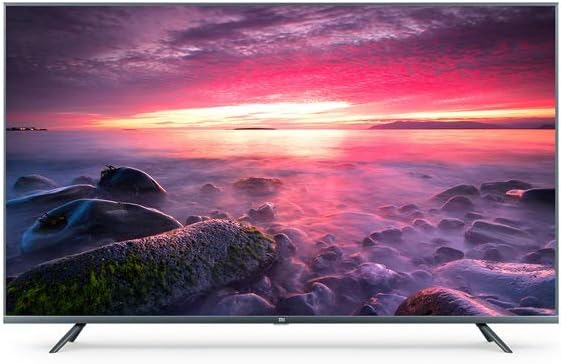
Gambar: Hareupeun view of the Xiaomi Mi LED TV L65M5-5ASP, showcasing the display and slim bezels.
Angled hareup View

Gambar: hareup miring view of the Xiaomi Mi LED TV L65M5-5ASP, highlighting the screen and stand design.
Balik deui View

Gambar: Tukangeun view of the Xiaomi Mi LED TV L65M5-5ASP, showing the port area and VESA mounting points.
Samping View

Gambar: Sisi profile of the Xiaomi Mi LED TV L65M5-5ASP, illustrating its thin design.
Palabuhan jeung sambungan
TV gaduh sababaraha palabuhan pikeun nyambungkeun alat éksternal:
- Port HDMI: Pikeun nyambungkeun alat-alat definisi luhur sapertos pamuter Blu-ray, konsol game, atanapi set-top box.
- Port USB (total 3): Pikeun nyambungkeun alat panyimpen USB pikeun muterkeun media atawa pikeun apdet software.
- Port Ethernet (LAN): Pikeun sambungan internét kabel.
- Antenna/Kabel Input: Pikeun nyambungkeun anteneu atawa sinyal TV kabel.
- Kaluaran Audio: Pikeun nyambungkeun sistem audio éksternal.
5. Setélan
5.1 Assembling the TV Stands
- Teundeun TV sacara saksama dina tempat anu lemes sareng datar pikeun nyegah karusakan layar.
- Sebutkeun posisi nangtung kénca jeung katuhu.
- Sejajarkeun unggal stand sareng slot anu aya dina handapeun TV.
- Ngamankeun unggal nangtung kalawan screws disadiakeun maké obeng a.
5.2 Kakuatan Awal sareng Wizard Setup
- Sambungkeun kabel listrik ka TV teras ka stopkontak.
- Pencét tombol Daya dina kadali jauh atanapi dina TV.
- The TV will display the initial setup wizard. Follow the on-screen prompts to:
- Pilih basa anu anjeun pikaresep.
- Connect to a Wi-Fi network or use an Ethernet cable for a wired connection.
- Lebet nganggo akun Google anjeun pikeun ngaksés fitur sareng aplikasi Android TV.
- Scan for available TV channels (if connecting an antenna/cable).
- Satuju kana syarat sareng katangtuan.
6. Ngoperasikeun TV
6.1 Fungsi Remote Control
Remot kontrol ngamungkinkeun anjeun pikeun nganapigasi fitur-fitur TV:
- Tombol Daya: Ngahurungkeun atawa mareuman TV.
- Volume +/-: Nyaluyukeun tingkat sora.
- Saluran +/-: Robah saluran TV.
- Tombol Navigasi (Kaluhur/Turun/Kénca/Katuhu): Mindahkeun kursor atanapi pilihan.
- Tombol OK/Lebetkeun: Konfirmasi pilihan.
- Tombol Balik: Mulih ka layar saméméhna.
- Tombol imah: Ngaksés layar utama Android TV.
- Tombol Input: Milih sumber input (HDMI, AV, jsb.).
- Tombol Asisten Google: Ngaktipkeun paréntah sora.
6.2 Fitur Smart TV (Android TV)
Your Xiaomi Mi LED TV runs on Android TV, providing access to a variety of applications and services:
- App Store: Unduh sareng pasang aplikasi ti Google Play Store.
- Layanan streaming: Access pre-installed or downloadable streaming apps like Netflix.
- Asisten Google: Anggo paréntah sora pikeun milarian eusi, ngontrol alat home pinter, sareng kéngingkeun inpormasi.
- Chromecast Diwangun-di: Matak eusi tina smartphone atawa tablet anjeun langsung ka TV.
6.3 Konéktipitas
TV ngadukung sababaraha pilihan konektipitas:
- Wifi: Connect wirelessly to your home network for internet access.
- Bluetooth: Pair with Bluetooth-enabled devices such as headphones, speakers, or game controllers.
- USB: Muterkeun média files from USB drives or connect compatible peripherals.
- HDMI: Connect external video sources for high-quality audio and video transmission.
7. Pangropéa
7.1 Ngabersihan TV
- layar: Lembut usap layar nganggo lawon anu lemes sareng teu aya serat. Pikeun tanda nekad, rada dampen lawon kalawan cai atawa cleaner layar husus (ulah menyemprot langsung dina layar).
- Casing: Anggo kaen anu lemes sareng garing pikeun ngusap TV casing. Avoid abrasive materials or chemical cleaners.
- Sok cabut TV samemeh beberesih.
7.2 Panyimpenan
If storing the TV for an extended period, ensure it is:
- Stored in a cool, dry place.
- Protected from dust and extreme temperatures.
- Kept in its original packaging if possible, to prevent damage.
8. Cara ngungkulan
Tingali tabel di handap ieu pikeun masalah umum sareng solusina:
| Masalah | Mungkin Cukang lantaranana | Solusi |
|---|---|---|
| Taya kakuatan | kabel kakuatan teu disambungkeun; Stop kontak listrik teu jalan | Pariksa sambungan kabel daya; Uji stop kontak nganggo alat anu sanés |
| Henteu aya gambar, tapi aya sora | Sumber input salah dipilih; Masalah alat éksternal | Press the 'Input' button on the remote to select the correct source; Check external device connections |
| Henteu aya sora, tapi aya gambar | Volume diheureuyan atawa handap teuing; Masalah sistem audio éksternal | Increase volume; Check if TV is muted; Verify external audio system connections |
| Teu bisa nyambung ka Wi-Fi | Sandi salah; Masalah router; TV jauh teuing ti router | Re-enter Wi-Fi password; Restart router; Move TV closer to router or use Ethernet |
| Kadali jauh teu jalan | batré maot; Ngahalangan; Jauh teu dipasangkeun | Replace batteries; Remove obstructions; Re-pair remote if necessary (refer to TV settings) |
Upami masalahna teras-terasan saatos nyobian solusi ieu, mangga ngahubungi dukungan palanggan.
9. Spésifikasi
| Fitur | Spésifikasi |
|---|---|
| merek | XIAOMI |
| Nomer modél | S0227634 (L65M5-5ASP) |
| Ukuran layar | 65 inci |
| Téknologi tampilan | LED |
| Resolusi | 4K (Ultra HD) |
| Refresh Laju | 120 hz |
| Sistem operasi | Android |
| Fitur husus | Smart / Internét |
| Téhnologi konektipitas | Bluetooth, Ethernet, HDMI, USB, Wi-Fi |
| Total palabuhan USB | 3 |
| Dirojong jasa Internét | Netflix |
| Komponén Kaasup | Remote control, Power cable |
| Format Gambar | 16:9 |
10. Garansi jeung Rojongan
Your Xiaomi Mi LED TV L65M5-5ASP is covered by a limited warranty. For detailed warranty terms and conditions, please refer to the warranty card included with your product or visit the official Xiaomi support website. For technical assistance, troubleshooting beyond this manual, or service requests, please contact Xiaomi customer support.


