Bubuka
The UMAX Air Mouse M1 is a versatile wireless controller designed to enhance your interaction with various devices. Featuring a built-in gyroscope for precise air mouse functionality, a full QWERTY keyboard for easy text input, and voice control capabilities, it offers a comprehensive solution for navigation and command. Its ergonomic design ensures comfortable handling, and the integrated Li-Ion battery provides extended usage time. This manual will guide you through the setup, operation, and maintenance of your Air Mouse M1.

Gambar 1: Hareupeun view of the UMAX Air Mouse M1, showing the directional pad, OK button, volume controls, and voice button.
Eusi pakét
Punten pastikeun sadaya barang aya dina pakét:
- UMAX Air Mouse M1
- Panarima USB
- Kabel Ngecas
- Manual pangguna (dokumén ieu)
Disetél
1. Ngecas Alat
The UMAX Air Mouse M1 comes with a built-in Li-Ion battery. Before first use, it is recommended to fully charge the device. Connect the charging cable to the charging port on the Air Mouse and the other end to a standard USB power source (e.g., computer USB port, USB wall adapter).
2. Nyambungkeun Panarima USB
The Air Mouse M1 connects wirelessly via a USB receiver. Locate the USB receiver, typically stored within the battery compartment or a dedicated slot on the device itself. Insert the USB receiver into an available USB port on your target device (e.g., Smart TV, PC, Android TV Box).
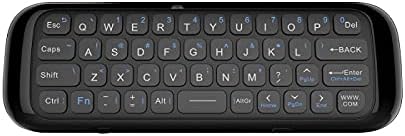
Gambar 2: Balik view of the UMAX Air Mouse M1, showing the full QWERTY keyboard.
3. Initial Pairing (Automatic)
Once the USB receiver is plugged in, the Air Mouse M1 should automatically pair with your device. No manual pairing steps are typically required. The device should be ready for use within a few seconds.
Parentah Operasi
1. Air Mouse Function
The Air Mouse M1 utilizes a gyroscope for cursor control. Hold the remote in your hand and move your wrist to control the on-screen cursor. The cursor will follow your hand movements. Press the OK tombol pikeun ngaklik.
2. Keyboard Input
Flip the Air Mouse M1 over to access the full QWERTY keyboard. Use the keys to type text as you would on a standard keyboard.
3. Kontrol sora
Pencét terus tahan tombol husus Sora button (often indicated by a microphone icon) to activate voice input. Speak clearly into the microphone located on the device. Release the button when you have finished speaking. This feature requires compatible software or operating system support on your connected device.
4. Fungsi Tombol
- Tombol Daya: Turns the device on/off or puts it into sleep mode.
- Tombol OK: Confirms selection, acts as left-click.
- Pad arah: Navigates ménu sareng pilihan.
- Volume Buttons (V+/V-): Saluyukeun volume audio.
- Tombol imah: Returns to the home screen of the connected device.
- Tombol Balik: Navigates back in menus or applications.
- Tombol Menu: Muka menu anu sénsitip kana kontéks.
Pangropéa
1. Kaperawatan batré
The UMAX Air Mouse M1 is equipped with a rechargeable Li-Ion battery. To prolong battery life:
- Hindarkeun sering-sering ngeusi batre.
- Charge the device when the low battery indicator appears.
- Simpen alat ieu di tempat anu tiis sareng garing upami henteu dianggo kanggo waktos anu lami.
2. beberesih
To clean the device, use a soft, dry cloth. For stubborn dirt, a slightly damp cloth can be used, but ensure no moisture enters the device's ports or openings. Do not use harsh chemicals or abrasive cleaners.
Pamérésan masalah
| Masalah | Mungkin Cukang lantaranana | Solusi |
|---|---|---|
| Alat teu ngabales | Low battery; USB receiver not connected; Device not paired. | Charge the device; Ensure USB receiver is securely plugged in; Re-insert USB receiver to re-establish connection. |
| Kursor erratic atanapi henteu lancar | Interference; Low battery. | Move closer to the USB receiver; Ensure no strong electromagnetic interference; Charge the device. |
| Kibor teu ngetik | Device in air mouse mode; Low battery. | Ensure the device is flipped to the keyboard side; Charge the device. |
| Kontrol sora teu jalan | Microphone blocked; No internet connection on host device; Host device does not support voice input. | Ensure microphone is clear; Check host device's internet connection; Verify host device's compatibility with voice input. |
spésifikasi
- model: UMAX Air Mouse M1 (laishutin)
- Téknologi deteksi gerakan: Stabilisasi Gyroscopic
- Konektipitas: Nirkabel (Receiver USB)
- Batré: 1 batré Litium Ion (kaasup)
- warna: oranyeu (Note: Product images show a black device, but specifications list 'Orange'.)
- Beurat barang: 7 ons (0.2 Kilogram)
- Ukuran Paket: 7.09 x 3.94 x 0.79 inci
- Sistem Operasi anu cocog: Android, Windows, Linux
Rojongan sarta Garansi
For technical support or inquiries regarding your UMAX Air Mouse M1, please refer to the official UMAX website or contact their customer service. Specific warranty details may vary by region and retailer. Please retain your proof of purchase for warranty claims.
Kanggo inpo nu leuwih lengkep, mangga buka: UMAX Official Websitus