1. Bubuka
Thank you for choosing the FREESTYLE FH0955 LED Bluetooth Headphones. This manual provides essential information for the proper setup, operation, and maintenance of your new headphones. Please read it carefully before use to ensure optimal performance and longevity of the product.
2. Produk Langkungview
The FREESTYLE FH0955 headphones offer a wireless audio experience with integrated features designed for convenience and style. Key features include Bluetooth 5.0 + EDR connectivity, a built-in microSD card slot for direct music playback, a foldable headband for portability, and subtle LED backlighting on the earcups.

Gambar 2.1: Hareupeun view of the FREESTYLE FH0955 LED Bluetooth Headphones, showcasing the over-ear design and LED lighting.

Gambar 2.2: Sisi profile of the FREESTYLE FH0955 LED Bluetooth Headphones, highlighting the earcup and headband design.

Image 2.3: A person wearing the FREESTYLE FH0955 LED Bluetooth Headphones, demonstrating typical usage.
3. Setélan
3.1. Ngecas Headphone
Before first use, fully charge the headphones. The FH0955LB model is equipped with a 400 mAh Lithium-ion battery.
- Connect the supplied MicroUSB charging cable to the charging port on the headphones.
- Connect the other end of the cable to a USB power source (e.g., computer USB port, USB wall adapter, or power bank).
- The LED indicator will illuminate during charging and turn off or change color once fully charged.
- A full charge typically takes approximately 2 hours and provides up to 10 hours of continuous music playback.
3.2. Papasangan Bluetooth
Pikeun nyambungkeun headphone anjeun sacara nirkabel ka alat:
- Pastikeun headphone dicas sareng dipareuman.
- Pencét terus tahan tombol Daya dina headphone nepi ka indikator LED kedip-kedip, nunjukkeun modeu pairing.
- Dina alat anjeun (smartphone, tablet, komputer), aktipkeun Bluetooth sareng milarian alat anu sayogi.
- Select "FH0955" or a similar name from the list of found devices.
- Sakali nyambung, indikator LED bakal eureun kedip-kedip sareng tetep hurung atanapi pareum, gumantung kana modélna.
- The Bluetooth 5.0 + EDR technology allows for a stable connection up to 10 meters.
3.3. MicroSD Card Playback
The headphones feature an integrated microSD card slot for direct music playback without a connected device.
- Insert a microSD card (pre-loaded with audio files) into the designated slot on the headphones.
- The headphones should automatically switch to microSD playback mode. If not, use the Mode button (if available) to switch.
- Use the playback controls on the headphones to manage your music.
3.4. Sambungan Kabel (Jack Audio 3.5mm)
For devices without Bluetooth or when the battery is depleted, you can use the included 3.5mm audio cable.
- Sambungkeun hiji tungtung kabel audio 3.5mm ka jack audio dina headphone.
- Sambungkeun tungtung nu sejen ka kaluaran audio 3.5mm alat Anjeun.
- Headphone bakal beroperasi dina modeu pasif, sareng fungsi Bluetooth bakal dinonaktipkeun.
4. Parentah Operasi
4.1. Daya Hurung / Pareum
- Daya Hurung: Pencét jeung tahan tombol Daya salila kurang leuwih 3 detik nepi ka indikator LED hurung.
- Pareum listrik: Pencét terus tahan tombol Daya salila kurang leuwih 3-5 detik nepi ka indikator LED pareum.
4.2. Puterkeun Musik
- Puter / Reureuh: Pencét tombol Play / Reureuh sakali.
- Lagu salajengna: Press the "Next" button (often Volume Up, long press).
- Lagu Sateuacanna: Press the "Previous" button (often Volume Down, long press).
- Volume Up: Pencét pondok tombol Volume Up.
- Volume Turun: Pencét pondok tombol Volume Turun.
4.3. Manajemén nelepon
Ku ayana mikropon internal, anjeun tiasa ngatur telepon nalika nyambung via Bluetooth.
- Ngajawab / mungkas Telepon: Pencét tombol Puter/Pause sakali nalika aya telepon asup.
- Nolak Telepon: Press and hold the Play/Pause button for approximately 2 seconds during an incoming call.
- Telepon deui Nomer Panungtungan: Pencét dua kali tombol Play/Reureuh.
4.4. Lampu tukang LED
The headphones feature subtle LED backlighting. Refer to the specific controls on your device for toggling or changing LED modes, if available. This feature is primarily aesthetic.
5. Pangropéa
5.1. beberesih
- Anggo lawon anu lemes sareng garing pikeun ngabersihkeun permukaan headphone.
- Do not use abrasive cleaners, alcohol, or chemical solvents, as these may damage the finish.
- Keep the charging port and audio jack free from dust and debris.
5.2. Panyimpenan
- Simpen headphone dina tempat anu tiis sareng garing jauh tina sinar panonpoé langsung sareng suhu anu ekstrim.
- Upami teu dianggo salami lami, ngecas batréna sahenteuna tilu bulan sakali pikeun ngajaga kaséhatan batréna.
- Utilize the foldable headband feature for compact storage and transport.
6. Cara ngungkulan
| Masalah | Mungkin Cukang lantaranana | Solusi |
|---|---|---|
| Headphone teu hurung. | batré lemah. | Ngecas headphone pinuh. |
| Teu bisa masangkeun via Bluetooth. | Headphone henteu dina mode papasangan; alat Bluetooth pareum; jauh teuing ti alat. | Ensure headphones are in pairing mode. Turn device Bluetooth off/on. Move closer to device (within 10m). |
| Taya sora. | Volume low teuing; sumber audio salah; headphone teu nyambung. | Increase volume on headphones and device. Check Bluetooth connection or 3.5mm cable. Ensure correct mode (Bluetooth/MicroSD). |
| MicroSD card not playing. | Kartu henteu diselapkeun leres; teu didukung file format; kartu ruksak. | Reinsert card. Ensure audio files are in a supported format (e.g., MP3). Try a different microSD card. |
7. Spésifikasi
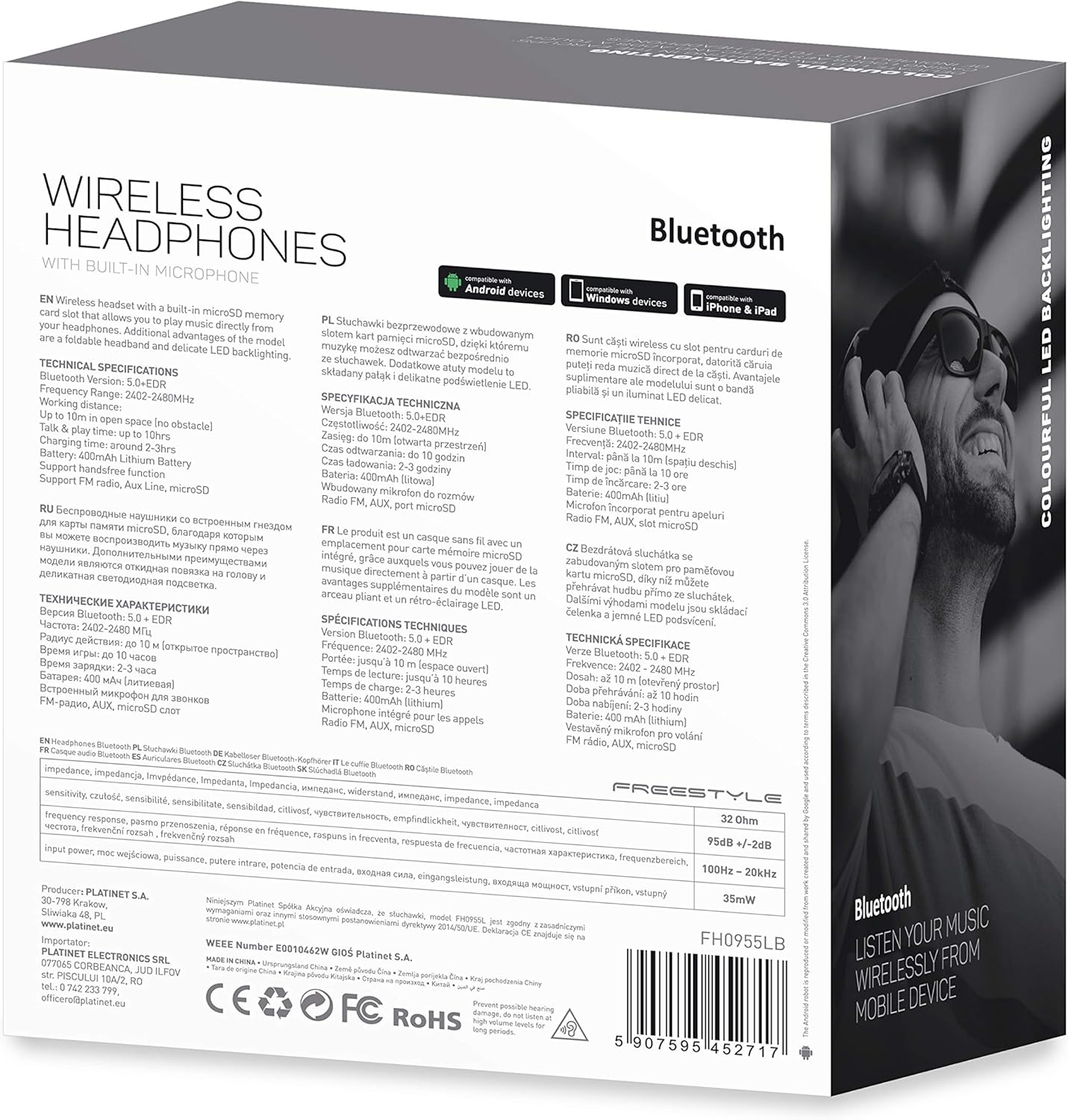
Gambar 7.1: Detil view of the product packaging, showing technical specifications and compliance information.
| Fitur | Spésifikasi |
|---|---|
| Nomer modél | FH0955LB |
| merek | Gaya bébas |
| Téhnologi konektipitas | Wireless (Bluetooth 5.0 + EDR) |
| Range nirkabel | Nepi ka 10 méter |
| Audio Jack | 3.5 mm |
| Faktor Bentuk | Over-Ear (Circum-Auricular) |
| Fitur husus | Noise Cancellation, LED Backlighting, MicroSD Card Slot |
| Jenis Batré | Integrated Lithium-ion (400 mAh) |
| Waktu Playback | Nepi ka 10 jam |
| Waktu Ngecas | Kurang leuwih 2 jam |
| Port ngecas | MicroUSB |
| Warna | Hideung |
| Bahan | Leather (earpads/headband) |
| Tingkat Résistansi Cai | Tahan cai |
| Komponén Kaasup | 1 pasang headphone |
| Produsén | Platinet |
8. Garansi jeung Rojongan
Rincian jaminan khusus biasana disayogikeun sareng dokuméntasi pameseran anjeun atanapi dina resmi produsén websitus. Punten tahan bukti pameseran anjeun pikeun klaim garansi.
For technical support or inquiries, please refer to the contact information provided by your retailer or the manufacturer, Platinet.
9. Émbaran Kasalametan
- Ulah ngalaan headphone ka suhu ekstrim, kalembaban, atawa cairan.
- Hindarkeun dengekeun dina tingkat polumeu luhur pikeun période anu panjang pikeun nyegah karusakan dédéngéan.
- Do not attempt to disassemble or modify the headphones, as this may void the warranty and cause damage.
- Jauhkeun tina jangkauan barudak.
- Dispose of the product responsibly according to local electronic waste regulations.


