1. Bubuka
This manual provides essential information for the safe and efficient operation, installation, and maintenance of your LG LDP6810SS 24-inch Top Control Dishwasher. Please read all instructions thoroughly before using your appliance and retain this manual for future reference.

Gambar 1: Hareupeun view of the LG LDP6810SS dishwasher.
2. Émbaran Kasalametan
Always follow basic safety precautions to reduce the risk of fire, electric shock, or injury to persons when using your dishwasher. This includes proper grounding, avoiding flammable materials, and supervising children near the appliance. Refer to the full safety section in the printed manual for detailed warnings and instructions.
3. Produk Langkungview
Fitur konci:
- QuadWash™ System: Utilizes four spray arms and Multi-Motion action for comprehensive cleaning.
- TrueSteam® Technology: Penetrates food residue and reduces water spots by up to 60%.
- Height Adjustable 3rd Rack: Provides flexible loading space for flatware and small items.
- LoDecibel™ Operation (44 dBA): Ensures quiet performance.
- ThinQ Care & SmartDiagnosis™: Proactive smart alerts and remote troubleshooting via smartphone.
- PrintProof™ Stainless Steel Finish: Resists fingerprints and smudges.
- EasyRack™ Plus System: Adjustable racks for accommodating various dish sizes.

Gambar 2: Interior view highlighting the adjustable 3rd rack.
Panél kontrol:
The control panel is located on the top edge of the dishwasher door. It features touch controls for power, cycle selection, and various options. The display shows cycle status and remaining time.

Figure 3: Dishwasher interior with control panel visible.
4. Pamasangan
Installation of this appliance requires professional expertise. Ensure proper electrical, water, and drainage connections are made according to local codes and the detailed instructions provided in the full installation guide. Incorrect installation can lead to property damage or personal injury.
5. Setélan
Pamakéan awal:
- After installation, ensure the water supply is turned on.
- Add rinse aid to the dispenser located on the inner door.
- Load dishes according to the loading guidelines.
- Place detergent in the main detergent dispenser.
Muatan Mesin Pencuci Piring:
Proper loading is crucial for optimal cleaning and drying. Avoid overcrowding and ensure water spray can reach all surfaces. The EasyRack™ Plus System allows for flexible loading.
- Rak katilu: Ideal for flatware, long-handled utensils, and small espresso cups. Adjust its height using the slider.
- Rak luhur: Suitable for glasses, cups, and small plates. The height can be adjusted to accommodate taller items below.
- Rak handap: Designed for dinner plates, bowls, pots, and pans. Fold-down tines provide flexibility for larger items.

Gambar 4: Kelample of a fully loaded dishwasher.
6. Parentah Operasi
Milih Siklus Cuci:
Pencét éta POWER button to turn on the dishwasher. Select your desired wash cycle from the available options:
- Otomatis: Automatically detects soil level and adjusts wash time and temperature.
- beurat: Pikeun piring, panci, sareng wajan anu kotor pisan.
- halus: Gentle wash for fragile items.
- Refresh: Uses steam to refresh lightly soiled dishes.
- Normal: Siklus standar pikeun masakan sapopoé.
- Turbo: Faster wash for lightly soiled dishes.
- Download Cycle: Customizable cycles via the ThinQ app.
- Mesin Bersih: For cleaning the dishwasher interior.
- Bilas: Quick rinse for dishes not immediately washed.
- Express: Siklus pondok pikeun barang anu hampang.
Pilihan anu sayogi:
Enhance your wash cycle with these options:
- Zona Ganda: Allows different wash intensities for upper and lower racks.
- Satengah Beban: For smaller loads, saves water and energy.
- Saver Énergi: Optimalkeun konsumsi énergi.
- uap: Adds steam for improved cleaning and reduced water spots.
- Suhu luhur: Increases water temperature for enhanced sanitization.
- Tambahan garing: Extends drying time for better results.
- Tunda ngamimitian: Delays the start of the cycle.
- Konci Konci: Ngonci panel kontrol pikeun nyegah parobahan teu kahaja.
- Peuting garing: Runs a fan periodically to help dry dishes overnight.
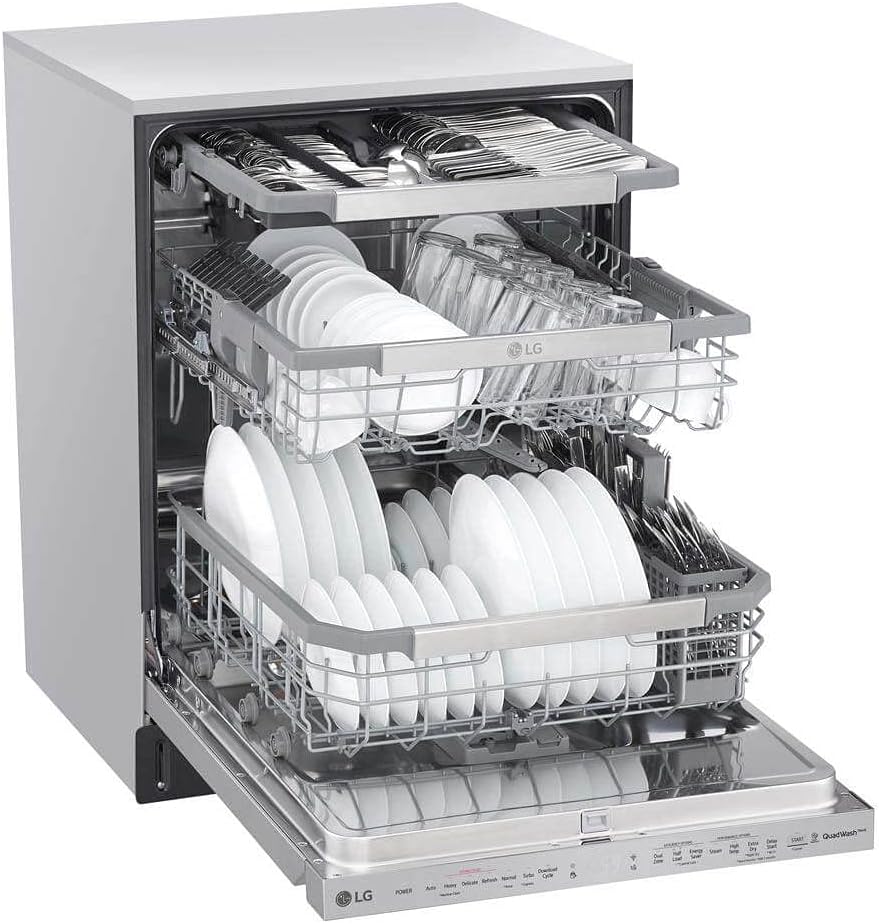
Figure 5: Flexible loading with adjustable racks.
Ngamimitian Siklus:
After selecting the cycle and options, press the MULAI button and close the door firmly within 4 seconds to begin the wash cycle.
7. Pangropéa
Ngabersihan saringan:
Regularly clean the dishwasher filters to maintain optimal wash performance and prevent odors. Refer to the detailed instructions in the full manual for filter removal and cleaning procedures.
Perawatan Umum:
- Ngusap luar ku hipu, damp cloth. For PrintProof™ Stainless Steel, use a soft, dry cloth.
- Clean the interior tub periodically using the Machine Clean cycle.
- Check and clean the spray arms for any clogged nozzles.
8. Cara ngungkulan
If your dishwasher experiences issues, consult the following common troubleshooting tips:
- Mesin pencuci piring henteu ngamimitian: Ensure the door is fully closed and latched, power is on, and the Delay Start option is not active.
- Piring henteu beresih: Check filter cleanliness, ensure proper loading, and verify detergent and rinse aid levels.
- Cai henteu ngocor: Inspect the drain hose for kinks or blockages, and check the drain filter.
- Diagnosa Pinter™: For more complex issues, use the SmartDiagnosis™ feature via the LG ThinQ app for remote assistance.
9. Spésifikasi
| Fitur | Spésifikasi |
|---|---|
| Nomer modél | LDP6810SS |
| Ukuran (W x H x D) | 23 3/4" x 33 3/5" x 24 3/5" |
| Beurat | 87.3 pon |
| Tingkat Noise | 44 dBA |
| Setélan tempat | 15 |
| Nyeuseuh Siklus | 10 (Auto, Heavy, Delicate, Refresh, Normal, Turbo, Download Cycle, Machine Clean, Rinse, Express) |
| Pilihan Nyeuseuh | 9 (Dual Zone, Half Load, Energy Saver, Steam, High Temp, Extra Dry, Delay Start, Control Lock, Night Dry) |
| Bahan | Beusi sténless |
| Peunteun Énergi | ENERGY STAR® Mumpuni |
| Konektipitas | Wi-Fi Enabled, Works with Google Assistant and Amazon Alexa |
10. Émbaran jaminan
Your LG LDP6810SS dishwasher comes with the following limited warranties:
- Buruh: 1 Taun
- bagian: 1 Taun
- Control Board and Rack Parts: 5 Taun
- Direct Drive Motor: 10 Taun
- Stainless Steel Door Liner or Tub: Saumur hirup
Please retain your proof of purchase for warranty claims. For full terms and conditions, refer to the warranty card included with your product or visit the official LG websitus.
11. Rojongan Palanggan
For technical assistance, service, or to order parts, please contact LG Customer Service. You can find contact information on the LG websitus atanapi dina bahan pendaptaran produk Anjeun.
Nganjang ka LG Toko kanggo inpormasi sareng asesoris anu langkung lengkep.