1. Bubuka
The Sygonix SY-4504968 Digital Timer is designed for automated control of electrical devices, such as lighting, in homes or offices. This versatile timer offers 15 programmable configurations, including weekly settings, allowing for up to 20 switching times per day, totaling 140 switching points per week. It features automatic summer and winter time adjustment, a countdown function, and a random mode. The timer supports both flush and surface mounting.
Please read this manual thoroughly before installation and operation to ensure correct usage and to prevent damage.

Gambar 1: Hareupeun view of the Sygonix SY-4504968 Digital Built-in Timer, showing the digital display and the main power button.
2. Parentah Kasalametan
- Pamasangan kedah dilakukeun ku tukang listrik anu mumpuni luyu sareng kode sareng peraturan listrik lokal.
- Ensure the power supply is disconnected before installation, maintenance, or any wiring work.
- The device requires a neutral wire for operation. Verify its presence in your electrical box.
- Ulah ngaleuwihan kapasitas beban maksimum 1800 W.
- Ulah ngalaan alat ka beueus, suhu ekstrim, atawa sinar panonpoé langsung.
- Ulah nyobian ngabongkar atawa ngaropéa alat. Rujuk sadayana jasa ka tanaga anu mumpuni.
3. Eusi Paket
Pastikeun yén sadaya item aya dina bungkusan:
- Sygonix SY-4504968 Digital Built-in Timer
- Surface mount frame
- Pamasangan screws na colokan témbok
- Buku pituduh
4. Produk Langkungview
The timer features a digital display and control buttons located behind a protective cover.

Gambar 2: Pahareup-hareup view of the timer's digital display, showing time, day (TU for Tuesday), and 'PROG' and 'ON' indicators.

Gambar 3: The timer with its protective cover open, revealing the control buttons for programming and settings.
4.1. Indikator tampilan
- Tampilan waktos: Shows current time in HH:MM format.
- Day Indicator: Displays the current day of the week (e.g., MO, TU, WE).
- PROG: Indicates that a program is active or being set.
- ON/OFF: Indicates the current switching state of the connected device.
4.2. Control Buttons (behind cover)
- Clock/Set Button: Used to set the current time and day.
- Tombol PROG: Lebet kana modeu setélan program.
- RND (Random) Button: Activates/deactivates random switching mode.
- CD (Countdown) Button: Activates/deactivates countdown function.
- +/- Tombol: Used to adjust values (time, program settings).
- R (Reset) Button: Resets the timer to factory defaults.
5. Pamasangan
The timer can be installed either flush-mounted into a wall box or surface-mounted using the provided frame.
5.1. Diagram Kabel
penting: Ensure the main power supply is switched off before proceeding with any wiring. This device requires a neutral wire connection.
Connect the Live (L), Neutral (N), and Switched Live (L') wires according to the diagram provided with the product. The neutral wire is essential for the timer's internal clock and display to function.
5.2. Pasang siram
- Prepare a standard wall box (minimum depth of 50mm recommended for easier wiring).
- Connect the electrical wires to the terminals on the back of the timer as per the wiring diagram.
- Carefully push the timer into the wall box, ensuring wires are not pinched.
- Amankeun timer ka kotak témbok ngagunakeun screws disadiakeun.
- Attach the front cover plate.

Gambar 4: The digital timer flush-mounted into a wall, blending with the room's decor.
5.3. Surface Mounting
- Attach the surface mount frame to the wall using the provided screws and wall plugs.
- Connect the electrical wires to the terminals on the back of the timer.
- Insert the timer into the surface mount frame, ensuring a secure fit.
- Attach the front cover plate.
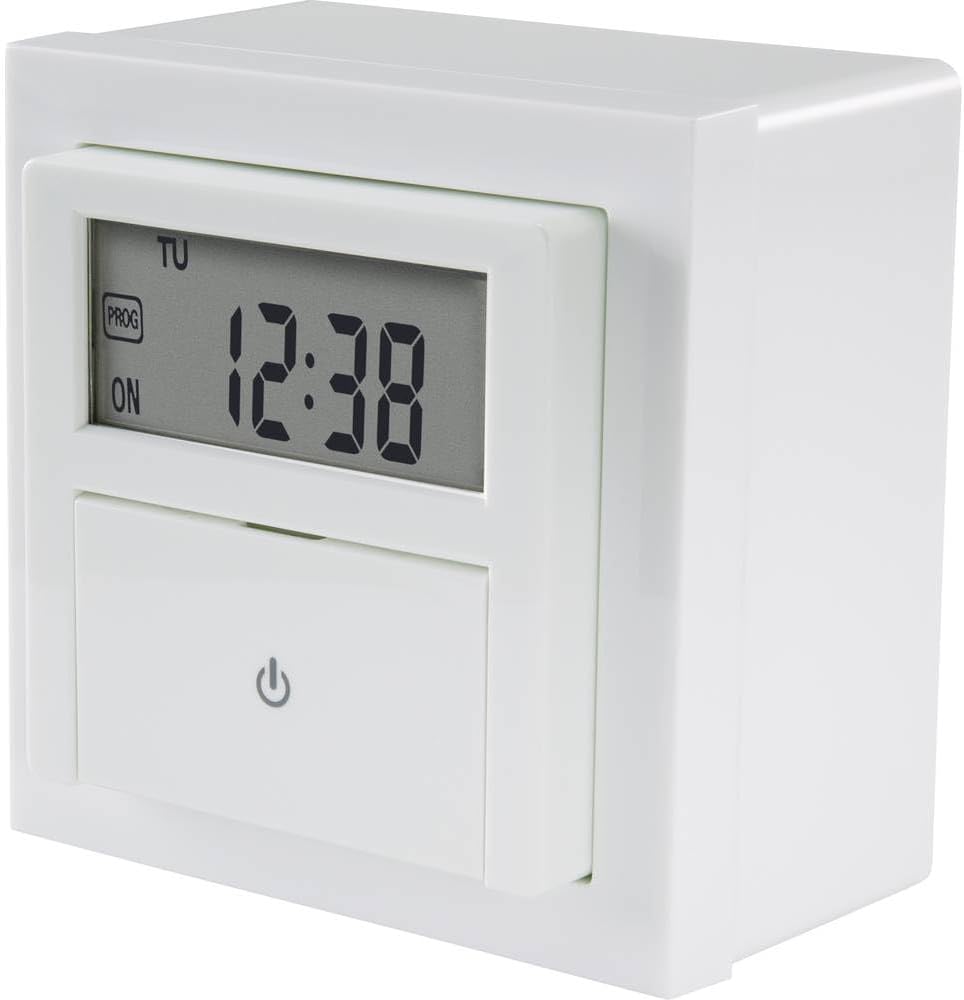
Gambar 5: Samping view of the timer, illustrating its depth for installation considerations.
6. Setélan
6.1. Initial Power-On and Reset
After installation and restoring power, the display will light up. If the display is erratic or shows incorrect values, press the R (Reset) button with a pointed object (e.g., a pen tip) to clear all settings and restore factory defaults.
6.2. Nyetél Waktos sareng Dinten Ayeuna
- Open the protective cover to access the control buttons.
- Pencét jeung tahan tombol Clock/Set button for approximately 3 seconds until the time display flashes.
- Ngagunakeun éta +/- tombol pikeun nyaluyukeun jam. Pencét Clock/Set deui pikeun mastikeun sareng ngalih ka menit.
- Ngagunakeun éta +/- tombol pikeun nyaluyukeun menit. Pencét Clock/Set again to confirm and move to day.
- Ngagunakeun éta +/- buttons to select the current day of the week (MO, TU, WE, TH, FR, SA, SU).
- Pencét Clock/Set one last time to save the settings and exit the time setting mode.
6.3. Automatic Summer/Winter Time Adjustment
The timer is equipped with an automatic summer/winter time adjustment feature. This function typically activates automatically based on pre-programmed dates. No manual intervention is usually required for this feature.
7. Nyuping
7.1. Programming Weekly Schedules
The timer allows for up to 15 different program configurations, with 20 switching times per day, totaling 140 switching points per week.
- Pencét éta PROG button to enter program setting mode. The display will show '1 ON' (for program 1, switch-on time).
- Ngagunakeun éta +/- buttons to set the desired switch-on hour. Press PROG kanggo mastikeun sareng ngalih ka menit.
- Ngagunakeun éta +/- buttons to set the desired switch-on minutes. Press PROG to confirm and move to day selection.
- Ngagunakeun éta +/- buttons to select the day(s) for this program. You can choose individual days, blocks of days (e.g., MO-FR), or all days. Press PROG pikeun mastikeun.
- The display will now show '1 OFF' (for program 1, switch-off time). Repeat steps 2-4 to set the switch-off time and day(s) for this program.
- After setting the 'OFF' time, press PROG again to move to the next program ('2 ON') or to exit program setting mode if no more programs are needed.
- To exit program mode at any time, press the Clock/Set kancing.
7.2. Fungsi undur mundur
The countdown function allows you to set a specific duration after which the connected device will switch ON or OFF.
- Pencét éta CD (Countdown) button. The display will show 'CD' and a default countdown time.
- Ngagunakeun éta +/- buttons to adjust the desired countdown duration (hours and minutes).
- Pencét CD again to start the countdown. The device will switch its state (ON to OFF, or OFF to ON) once the countdown finishes.
- Pikeun ngabolaykeun mundur mundur, pencét tombol CD button again during the countdown.
7.3. Modeu Acak
The random mode switches the connected device ON and OFF at irregular intervals, simulating presence for security purposes.
- Pencét éta RND (Random) button. The display will show 'RND'.
- The timer will now activate and deactivate the connected device at random times within a predefined period (e.g., 30 minutes to 2 hours).
- To deactivate random mode, press the RND button again. The 'RND' indicator will disappear.
8. Pangropéa
- Bersihkeun alat ku kaen anu lemes sareng garing. Ulah make cleaners abrasive atawa pangleyur.
- The internal battery (if present for memory backup) is typically long-lasting and not user-replaceable. If the timer loses settings during power outages, the battery may need professional replacement.
9. Cara ngungkulan
| Masalah | Mungkin Cukang lantaranana | Solusi |
|---|---|---|
| Tampilan pangatur waktu kosong. | No power supply; internal battery depleted. | Check power connection. If power is present, the internal battery may need replacement (professional service recommended). |
| Timer does not switch connected device. | Incorrect wiring; program not activated; device faulty. | Verify wiring (especially neutral connection). Ensure programs are correctly set and activated. Test the connected device independently. |
| Setélan leungit saatos dipareumantage. | Internal backup battery depleted. | The internal battery needs replacement. Contact customer support or a qualified technician. |
| Cannot set time/program. | Incorrect button sequence; device frozen. | Refer to the 'Setup' and 'Operating' sections. Press the R (Reset) button to clear and try again. |
10. Spésifikasi
- model: SY-4504968
- Pabrikan: Sygonix
- Voltage: 230 volt
- Max. Beban: 1800 W
- Ukuran produk (L x W x H): 12 x 9 x 8 cm
- beurat: 230 gram
- Jenis tampilan: Digital
- Jumlah Program: 15
- Switching Points: Up to 140 per week (20 per day)
- Batré diperlukeun: Yes (for internal clock/memory backup, typically not user-replaceable)
11. Garansi jeung Rojongan
Sygonix products are manufactured to high-quality standards. For warranty information, please refer to the warranty card included with your purchase or visit the official Sygonix website. For technical support, troubleshooting assistance, or spare parts, please contact your retailer or the Sygonix customer service department.


