1. Bubuka
This manual provides comprehensive instructions for the installation, operation, and maintenance of the Cisco C9200L-24T-4G-E 24-Port Full Gigabit Layer 2 Access Switch. This device is designed to provide reliable network connectivity with advanced features for various network environments.
2. Émbaran Kasalametan
Please read all safety warnings and instructions before installing or operating this equipment. Failure to follow these guidelines may result in injury or damage to the device.
- Ensure proper grounding for the device.
- Ulah ngajalankeun alat dina baseuh atawa damp kaayaan.
- Use only the power supply provided or specified by the manufacturer.
- Ulah meungpeuk bukaan ventilasi pikeun nyegah overheating.
- Rujuk sadayana jasa ka tanaga anu mumpuni.
3. Produk Langkungview
The Cisco C9200L-24T-4G-E switch features 24 Gigabit Ethernet ports and 4 1G SFP uplink ports, designed for efficient network access and aggregation.
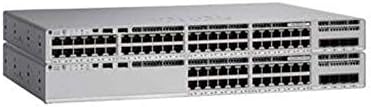
Gambar 3.1: Hareupeun view of the Cisco C9200L-24T-4G-E switch, showing 24 Ethernet ports and 4 SFP uplink ports.

Gambar 3.2: Angled view of the Cisco C9200L-24T-4G-E switch, highlighting the port layout and chassis design.
Fitur Panel hareup:
- 24 x 10/100/1000Base-T Ports: For connecting network devices.
- 4 x 1G SFP Uplink Ports: For high-speed fiber or copper uplinks to other switches or routers.
- Indikator LED: System status, port status, and power indicators.
4. Setup jeung Instalasi
4.1 Ngabongkar bungkusan
Carefully unpack the switch and verify that all components are present. Inspect the device for any signs of damage during shipping. If any items are missing or damaged, contact your vendor immediately.
4.2 Instalasi fisik
- Pamasangan rak: The switch is designed for standard 19-inch rack mounting. Secure the switch using the provided rack-mount brackets and screws.
- Penempatan Desktop: If not rack-mounting, place the switch on a flat, stable surface, ensuring adequate ventilation around the device.
4.3 Nyambungkeun Daya
- Connect the power cord to the AC power inlet on the rear panel of the switch.
- Colokkeun tungtung kabel listrik anu sanés kana stop kontak listrik anu dibumikeun.
- Pastikeun yén LED kakuatan dina panel hareup hurung, nunjukkeun yén switch narima kakuatan.
4.4 Sambungan Jaringan
- Port Ethernet: Connect network devices (computers, servers, other switches) to the 24 10/100/1000Base-T ports using standard Ethernet cables.
- SFP Uplink Ports: Insert compatible 1G SFP transceivers into the 4 SFP uplink ports. Connect fiber optic or copper cables from these transceivers to your core network or other switches.
5. Parentah Operasi
The Cisco C9200L-24T-4G-E is a Layer 2 access switch with Layer 3 capabilities. Initial configuration typically involves accessing the switch via a console port, Telnet, SSH, or a web-panganteur dumasar.
5.1 Konfigurasi Dasar
- Console Access: Connect a console cable to the console port and use a terminal emulator (e.g., PuTTY) to access the command-line interface (CLI).
- Tugas Alamat IP: Configure an IP address for the management VLAN interface to enable remote access.
- Akun pamaké: Create secure user accounts with appropriate privilege levels.
5.2 Fitur konci
- Dukungan VLAN: Jieun sareng atur Jaringan Area Lokal Virtual pikeun ngabagi lalu lintas jaringan.
- QoS (Kualitas Palayanan): Prioritize critical network traffic for optimal performance.
- SNMP (Protokol Manajemén Jaringan Basajan): Monitor and manage the switch remotely.
- LACP (Link Aggregation Control Protocol): Bundle multiple physical links into a single logical link for increased bandwidth and redundancy.
- Layer 3 Capabilities: Supports OSPF, EIGRP, ISIS, RIP, and routed access for advanced routing functionalities.
6. Pangropéa
- Ngabersihan rutin: Keep the switch free from dust and debris. Use a soft, dry cloth for cleaning.
- Pembaruan firmware: périodik pariksa Cisco websitus pikeun apdet firmware pikeun mastikeun kinerja optimal sarta kaamanan.
- Kontrol Lingkungan: Ensure the operating environment maintains appropriate temperature and humidity levels as specified in the product's technical specifications.
7. Cara ngungkulan
7.1 Taya Daya
- Pastikeun kabel listrik disambungkeun sacara aman ka saklar sareng stopkontak.
- Pariksa stop kontak listrik ku alat sejen pikeun mastikeun eta fungsi.
- Pastikeun unit catu daya (upami éksternal) disambungkeun kalayan leres sareng tiasa dianggo.
7.2 Teu Aya Konéktivitas Jaringan
- Check the Ethernet cable connections to ensure they are secure and not damaged.
- Pastikeun LED tautan/aktivitas dina port saklar hurung pikeun alat anu nyambung.
- Confirm IP address settings and VLAN configurations are correct.
- Test with a different cable or port.
7.3 Performance jaringan slow
- Check for network congestion or excessive broadcast traffic.
- Ensure duplex settings match between the switch and connected devices.
- Verify that QoS policies are correctly configured if prioritizing traffic.
8. Spésifikasi
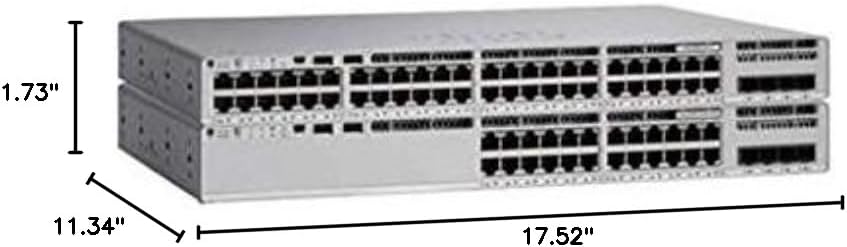
Gambar 8.1: Physical dimensions of the Cisco C9200L-24T-4G-E switch.
| Fitur | Katerangan |
|---|---|
| Nomer modél | C9200L-24T-4G-E |
| Palabuhan | 24 x 10/100/1000Mbps Ethernet, 4 x 1G SFP Uplink |
| Laju transmisi | 10/100/1000Mbps |
| Ngalihkeun Kamampuh | 56 Gbps |
| Neraskeun Laju | 41.66 Mpps |
| Modeu Komunikasi | Full-Duplex & Satengah-Duplex |
| Ukuran (W x D x H) | 44.5 x 28.8 x 4.4 cm (17.52" x 11.34" x 1.73") |
| Sasayogian tanaga | PWR-C5-125WAC (Default Primary AC) |
| Layer 3 Capabilities | OSPF, EIGRP, ISIS, RIP, Routed Access |
| Sertifikasi | FCC, CE, RoHS, ISO9001 |
| UPC | 764256220338 |
9. Garansi jeung Rojongan
The Cisco C9200L-24T-4G-E switch typically comes with a 1-year warranty. For detailed warranty information, technical support, or to download the latest drivers and firmware, please visit the official Cisco websitus atanapi hubungi reseller resmi anjeun.
Official Cisco Store: Toko Cisco on Amazon


