1. Bubuka
This manual provides essential information for the safe and efficient operation of your Cecotec Ready Warm 800 Thermal Connected 600W Digital Heater. Please read these instructions carefully before using the appliance and retain them for future reference. This heater is designed to provide supplementary heating for indoor spaces and features Wi-Fi connectivity for remote control.
2. Parentah Kasalametan
PERHATOSAN: Upami teu nuturkeun pitunjuk kaamanan ieu tiasa nyababkeun kahuruan, sengatan listrik, atanapi cilaka.
- Pastikeun voltage dituduhkeun dina labél rating cocog vol mains Anjeuntage sateuacan nyambungkeun alat.
- Ulah nutupan manaskeun. Overheating bisa lumangsung lamun manaskeun katutupan atawa obstructed.
- Keep flammable materials such as furniture, curtains, and bedding at least 1 meter (3 feet) away from the heater.
- Ulah ngoperasikeun pemanas nganggo kabel atanapi colokan anu rusak, atanapi saatos alatna teu jalan fungsina atanapi murag atanapi ruksak ku cara naon waé.
- Alat ieu henteu dimaksudkeun pikeun dianggo ku jalma (kalebet murangkalih) anu ngirangan kamampuan fisik, indrawi atanapi mental, atanapi kirang pangalaman sareng pangaweruh, kecuali aranjeunna dipasihan pangawasan atanapi petunjuk ngeunaan panggunaan alat ku jalma anu tanggung jawab kana kasalametanana.
- Barudak kedah diawaskeun pikeun mastikeun yén aranjeunna henteu maén sareng alatna.
- Ulah make manaskeun di sakuliling saharita tina mandi, pancuran atawa kolam renang.
- Salawasna cabut pamanas nalika henteu dianggo atanapi sateuacan beberesih.
- Do not insert any objects into the ventilation or exhaust openings as this may cause electric shock, fire, or damage to the heater.
3. Produk Langkungview
Familiarize yourself with the components of your Cecotec Ready Warm 800 Digital Heater.

This image shows the Cecotec Ready Warm 800 Digital Heater from a side angle, highlighting its slim profile and the integrated control panel on the right side. The heater is white with black vents at the top and stands on two white feet.

The heater is shown in a home environment, positioned on a wooden floor next to a person seated on a black armchair, illustrating its compact size and how it fits into a living space.
Panel kontrol sareng tampilan
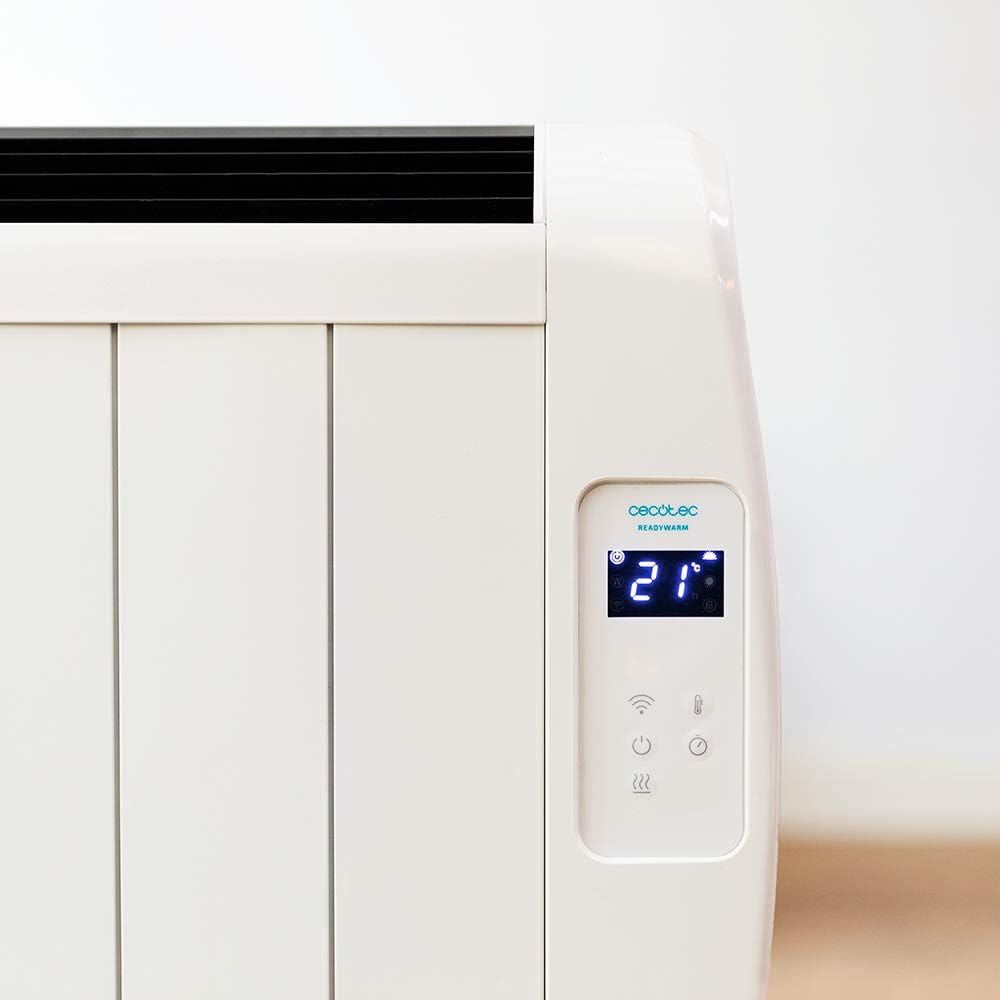
A lengkep view of the heater's digital control panel, featuring a clear LCD screen showing '21' degrees Celsius, indicating the current temperature setting. Below the screen are touch-sensitive buttons for power, Wi-Fi, mode selection, and temperature adjustment.

This image focuses on the digital control panel, showing the LCD screen set to a timer function, displaying '04' hours. This indicates the heater is programmed to operate for a specific duration.
The digital display shows the current temperature, timer settings, and Wi-Fi status. The touch-sensitive buttons allow for easy control of the heater's functions.
Pindah kakuatan

A close-up shot of the heater's base, revealing the physical on/off power switch. This switch provides a direct way to cut power to the unit.
A physical power switch is located at the base of the unit for complete power disconnection.
4. Setélan
- Ngabongkar bungkusan: Taliti cabut manaskeun tina bungkusan na. Simpen bungkusan pikeun neundeun atanapi transportasi.
- panempatan: Place the heater on a firm, level surface. Ensure there is at least 1 meter (3 feet) of clear space around the heater from walls, furniture, and other objects. Do not place it directly under a power outlet.
- Sambungan Daya: Plug the power cord into a suitable 230V AC power outlet. Ensure the main power switch at the base of the unit is in the 'OFF' position before plugging in.
- Daya mimiti Hurung: Flip the main power switch at the base of the unit to the 'ON' position. The digital display on the control panel should illuminate.
Dimensions for Placement

This image provides a clear diagram of the heater's physical dimensions: 63 cm in width, 10.5 cm in depth, and 53.5 cm in height, useful for planning placement.
5. Parentah Operasi
Operasi Dasar
- Hurungkeun/Pareuman: Pencét tombol kakuatan (U) dina panel kontrol pikeun ngaktipkeun atawa mareuman manaskeun.
- Penyesuaian Suhu: Use the temperature up (+) sareng handap (-) buttons to set your desired room temperature. The display will show the set temperature.
- Pilihan Mode: Press the mode button to cycle through available heating modes (e.g., Low, Medium, High, or Eco, depending on the model's specific programming).
- Fungsi Timer: Press the timer button to set an operating duration. Use the temperature adjustment buttons to set the desired hours (e.g., 0-24 hours). The heater will automatically turn off after the set time.
Konéktivitas Wi-Fi sareng Kontrol Aplikasi
The Cecotec Ready Warm 800 features Wi-Fi connectivity, allowing you to control the heater remotely via a smartphone application.

A hand holding a smartphone with the Cecotec Ready Warm mobile application open. The app interface shows a large dial indicating '33°C' and various control options, demonstrating remote control capabilities.
- Unduh Aplikasi: Milarian pikeun the 'Cecotec Ready Warm' app in your smartphone's app store (iOS or Android).
- Ngadaptar / Asup: Jieun akun atanapi log in upami anjeun parantos gaduh.
- Tambahkeun Alat: Follow the in-app instructions to add your Ready Warm 800 heater. This typically involves putting the heater into pairing mode (often by pressing and holding the Wi-Fi button on the control panel) and connecting it to your home Wi-Fi network.
- Kadali jauh: Once connected, you can control the heater's power, temperature, modes, and timer functions from your smartphone.
6. Pangropéa
Pangropéa rutin ngajamin kinerja optimal sareng umur panjang pamanas anjeun.
- beberesih: Salawasna cabut pamanas sarta ngidinan pikeun niiskeun sagemblengna saméméh beberesih. Ngagunakeun lemes, damp lawon pikeun ngusap surfaces exterior. Ulah make cleaners abrasive atawa pangleyur.
- Ngaleungitkeun lebu: Periodically use a vacuum cleaner with a brush attachment to remove dust from the air intake and exhaust vents.
- Panyimpenan: If storing the heater for an extended period, unplug it, clean it thoroughly, and store it in a cool, dry place, preferably in its original packaging.
- Henteu aya Bagian anu Bisa Dilayanan Pamaké: Ulah nyobian muka atanapi ngalereskeun pemanas nyalira. Serahkan sadaya perawatan ka tanaga anu mumpuni.
7. Cara ngungkulan
Upami anjeun ngalaman masalah sareng pemanas anjeun, tingali tabel di handap ieu pikeun masalah umum sareng solusina.
| Masalah | Mungkin Cukang lantaranana | Solusi |
|---|---|---|
| Pemanas teu hurung. | No power supply. Main power switch off. | Check if the power cord is securely plugged in. Ensure the main power switch at the base is ON. Check the wall outlet. |
| Taya kaluaran panas. | Temperature setting too low. Overheat protection activated. | Increase the desired temperature setting. Unplug the heater, let it cool for 30 minutes, then plug it back in. Ensure vents are not blocked. |
| Sambungan Wi-Fi gagal. | Incorrect Wi-Fi password. Heater too far from router. App issues. | Verify Wi-Fi password. Move heater closer to the router. Restart the app and heater. Ensure your router is 2.4GHz compatible. |
| Pemanas pareum teu disangka-sangka. | Timer function activated. Overheat protection. | Check if the timer is set. If not, unplug the heater, let it cool, and check for obstructions. |
8. Spésifikasi
| Fitur | Rincian |
|---|---|
| merek | Cecotec |
| Nomer modél | 05372 |
| Daya / Wattage | 600W |
| Voltage | 230 volt |
| Dimensi produk | 63 x 10.5 x 53.5 cm |
| Beurat | 3.4 kg |
| Fitur husus | Portable, Wireless (Wi-Fi Control), LCD Screen |
| Métode pemanasan | Pancaran |
| Pamakéan jero rohangan / outdoor | jero rohangan |
| Tipe Pamasangan | Wall Mount (optional, accessories not included) / Freestanding |
9. Garansi jeung Rojongan
Your Cecotec Ready Warm 800 Digital Heater is covered by a manufacturer's warranty. Please refer to the warranty card included with your purchase for specific terms and conditions, including the warranty period and coverage details.
For technical support, troubleshooting assistance beyond this manual, or warranty claims, please contact Cecotec customer service. Contact information can typically be found on the Cecotec official websitus atanapi dina bungkusan produk Anjeun.
Nalika ngahubungi dukungan, punten gaduh nomer modél produk anjeun (05372) sareng bukti pameseran sayogi sayogi.


