1. Bubuka
The OttLite Entertain LED Speaker Lamp (Model S83WGW) is a versatile lighting and audio solution designed for various indoor environments. This device integrates an LED lamp with adjustable brightness and color modes, a Bluetooth speaker for wireless audio streaming, and a detachable emergency light feature. This manual provides detailed instructions for the proper setup, operation, and maintenance of your lamp.

Image 1.1: The OttLite Entertain LED Speaker Lamp, nuduhkeuncasing desain terpadu na.
2. Eusi Paket
Pastikeun yén sadaya item aya dina bungkusan:
- OttLite Entertain LED Speaker Lamp (S83WGW)
- Kabel Daya
3. Setélan
- Ngabongkar bungkusan: Sacara saksama miceun sadaya komponén tina bungkusan.
- panempatan: Teundeun lamp dina stabil, permukaan datar.
- Sambungan Daya: Connect the provided power cable to the lamp's power input port and then plug it into a standard 120V AC wall outlet. The lamp's internal battery will begin charging automatically.
4. Parentah Operasi
4.1. Fungsi Lampu
Anu lamp features touch-activated controls located on the top of the shade for easy adjustment of light settings.
- Hurungkeun/Pareuman: Lightly touch the metallic button on the top center of the lamp shade to turn the light on or off.
- Saluyukeun Caang: With the light on, repeatedly touch the metallic button to cycle through three brightness levels.
- Robah Mode Warna: Press and hold the metallic button for approximately 2 seconds to switch between the three color temperature modes: warm white, bright white, and natural daylight. Release the button when the desired mode is active.
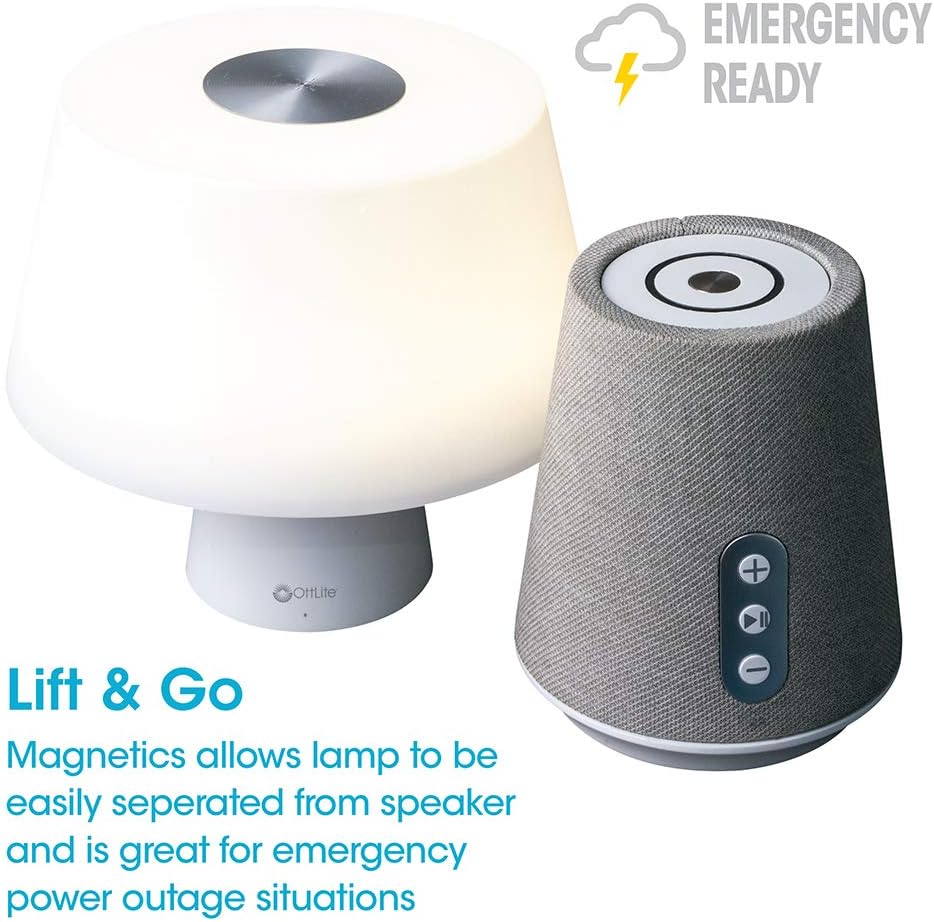
Image 4.1: Activating the lamp's light functions via the touch control on top of the shade.

Gambar 4.2: The lamp offers three distinct color temperature modes for varied lighting needs.
4.2. Speaker Bluetooth
The integrated Bluetooth speaker allows for wireless audio playback from compatible devices.
- Power On Speaker: Press the Play/Pause button on the front of the speaker base to turn the speaker on. A tone will indicate it is ready for pairing.
- papasangan: On your audio device (e.g., smartphone, tablet), enable Bluetooth and search for available devices. Select "OttLite Entertain" from the list. A confirmation tone will sound upon successful pairing.
- Kontrol Audio:
- Pencét éta + tombol pikeun ngaronjatkeun polumeu.
- Pencét éta - tombol pikeun ngurangan polumeu.
- Pencét éta Play / Reureuh tombol pikeun maénkeun atanapi ngareureuhkeun audio.
- Power Off Speaker: Press and hold the Play/Pause button for approximately 3 seconds to turn the speaker off.

Image 4.3: The speaker base with clearly labeled controls for volume and playback.

Image 4.4: The speaker base highlights its Bluetooth connectivity feature.
4.3. Emergency Light Feature (Lift & Go)
Anu lamp portion can be detached from the speaker base to function as a portable emergency light.
- Detaching the Light: Lalaunan angkat lamp shade portion straight up from the speaker base. It is held in place by magnets.
- Using the Emergency Light: The detached light will operate on its internal rechargeable battery. Use the touch control on top of the shade to turn it on/off and adjust brightness as described in Section 4.1. The light can provide illumination for 5 to 30+ hours depending on the brightness setting.
- Ngecas: To recharge the emergency light, simply place it back onto the speaker base. Ensure it is properly seated for charging to commence.

Image 4.5: The 'Lift & Go' feature allows the lamp to be used as a portable emergency light.
5. Pangropéa
To ensure the longevity and optimal performance of your OttLite Entertain LED Speaker Lamp, turutan tungtunan pangropéa ieu:
- beberesih: Pegatkeun sambungan lamp from the power source before cleaning. Use a soft, dry cloth to wipe down the exterior surfaces. Do not use abrasive cleaners, solvents, or harsh chemicals, as these may damage the finish.
- Panyimpenan: Lamun teu dipaké pikeun période nambahan, nyimpen lamp dina tiis, tempat garing jauh ti sinar panonpoé langsung jeung suhu ekstrim.
- Perawatan batré: For the internal rechargeable battery, avoid fully discharging it frequently. Recharge the lamp regularly, even if not in constant use, to maintain battery health.
6. Cara ngungkulan
Lamun sapatemon masalah sareng l Anjeunamp, tingal léngkah-léngkah ngungkulan ieu:
| Masalah | Mungkin Cukang lantaranana | Solusi |
|---|---|---|
| Lamp lampu teu hurung. | Teu plugged di; kakuatan outage; internal battery depleted; faulty connection. | Ensure power cable is securely plugged in. Check power outlet. Recharge the lamp by placing it on the base. |
| Bluetooth speaker does not connect. | Speaker not in pairing mode; device Bluetooth off; already connected to another device. | Ensure speaker is on and in pairing mode. Turn Bluetooth on your device. Disconnect from other devices. |
| Emergency light does not work when detached. | Internal battery depleted. | Place the light back on the speaker base to recharge its internal battery. |
| Kualitas audio ti speaker goréng. | Device too far from speaker; interference; low battery. | Move device closer to speaker. Avoid obstacles. Ensure speaker is charged. |
7. Spésifikasi
| Fitur | Rincian |
|---|---|
| Nomer modél | S83WGW |
| merek | OttLite |
| Dimensi produk | 3.12 "D x 3.12" W x 10.87" H |
| Item Beurat | 2.6 pon |
| Tipe Sumber Cahaya | LED |
| Wattage | 3 watt |
| Caang | 337 Lumén |
| Suhu Warna | 5000 Kelvin (Daylight) |
| Métode kontrol | Toél |
| Sumber Daya | Corded Electric (with rechargeable battery for emergency light) |
| Batré | 1 batré Litium Ion (kaasup) |
| Bahan | palastik |
| UPC | 761712019116 |
8. Garansi jeung Rojongan
For warranty information or technical support, please refer to the official OttLite websitus atanapi ngahubungan departemén layanan palanggan maranéhna. Simpen resi pameseran anjeun salaku bukti pameseran pikeun klaim garansi.
Inpormasi kontak: Mangga didatangan OttLite's official store page for current support options and contact details.


