1. Bubuka
Welcome to the Uten 2685A Electronic Sewing Machine user manual. This guide provides detailed instructions for setting up, operating, maintaining, and troubleshooting your sewing machine. Please read this manual thoroughly before using the machine to ensure safe and efficient operation.
The Uten 2685A is a versatile computerized sewing machine designed for both beginners and experienced users, offering 200 utility and decorative stitches, including letter patterns, and an extension table for larger projects.
2. Parentah Kasalametan penting
Nalika nganggo alat listrik, pancegahan kaamanan dasar kedah diturutan, kalebet ieu:
- Salawasna cabut colokan mesin tina stop kontak langsung saatos nganggo sareng sateuacan beberesih, nyabut panutup, atanapi ngadamel panyesuaian ngalayanan pangguna.
- Ulah dianggo salaku cocooan. Perhatosan anu saksama diperyogikeun nalika mesin ieu dianggo ku atanapi caket sareng murangkalih.
- Anggo alat ieu ngan ukur pikeun panggunaan anu dimaksud sakumaha anu dijelaskeun dina manual ieu. Paké ngan kantétan dianjurkeun ku produsén sakumaha anu aya dina manual ieu.
- Teu pernah ngoperasikeun mesin ieu upami aya kabel atanapi colokan anu ruksak, upami teu jalan leres, upami parantos turun atanapi rusak, atanapi murag kana cai.
- Ulah leupaskeun atanapi nyelapkeun obyék naon waé kana bukaan naon waé.
- Ulah make di luar.
- Ulah beroperasi dimana produk aerosol (semprot) dipaké atawa dimana oksigén keur dikaluarkeun.
- Pikeun megatkeun sambungan, balikkeun sadaya kadali kana posisi pareum, teras cabut colokan tina stop kontak.
3. Komponen Produk sareng Langkung tiview
Familiarize yourself with the main parts of your Uten 2685A sewing machine.

Gambar 3.1: Uten 2685A Electronic Sewing Machine with Extension Table. This image shows the overall view of the sewing machine, highlighting its compact design and the attached extension table for increased workspace.

Gambar 3.2: Puncak view of the Uten 2685A Sewing Machine, showing the bobbin winding area and thread path. This perspective helps in understanding the threading process from the top.
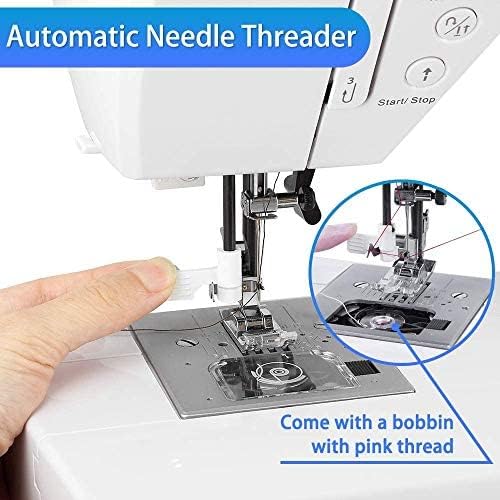
Gambar 3.3: Pahareup-hareup view of the automatic needle threader mechanism. This feature simplifies the threading process, making it quicker and easier for users.

Gambar 3.4: Example of embroidery work possible with the Uten 2685A. This image demonstrates the machine's capability for decorative stitching, though an embroidery presser foot may be required (not included).
4. Setup jeung Persiapan Awal
4.1 Ngabongkar bungkusan
Carefully remove the machine from its packaging. Retain all packing materials for future transport or storage. Ensure all accessories listed in the packing list are present.
4.2 Sambungan Daya
Connect the power cord to the machine's power input and then to a suitable electrical outlet. The machine operates on standard household electricity.
4.3 Ngapasangkeun Méja Éksténsi
The Uten 2685A comes with an extension table. To attach it, slide the table onto the free arm of the machine until it clicks securely into place. This provides a larger, flat work surface, ideal for quilting or handling larger fabric pieces.

Gambar 4.1: The Uten 2685A Sewing Machine with its extension table attached, shown in a sewing environment. The extension table significantly increases the work area, making it easier to manage larger sewing projects.
4.4 Threading Mesin
Proper threading is crucial for good stitch quality. Follow the numbered guides on the machine for upper thread path. For the bobbin, ensure it is correctly wound and inserted into the bobbin case.

Gambar 4.2: Close-up of the LCD screen and control panel for stitch selection, length, and width adjustments. This display provides visual feedback on selected stitch patterns and settings.

Gambar 4.3: A comprehensive diagram illustrating the 200 available stitch patterns, including utility, decorative, and letter stitches. This chart is typically found on the machine itself for quick reference.
5. Parentah Operasi
5.1 Milih Jahitan
Use the stitch selection buttons (up/down arrows) to navigate through the 200 built-in stitches displayed on the LCD screen. The machine offers 100 utility and decorative stitches, and 100 letter patterns.
5.2 Nyaluyukeun Panjang jeung Lebar Stitch
The stitch length can be adjusted from 0.5mm to 3.5mm, and stitch width from 0mm to 7mm using the dedicated '+' and '-' buttons. These adjustments allow for customization of stitches to suit different fabric types and project requirements.
5.3 Sewing with the Free Arm
To use the free arm, remove the extension table. The free arm is ideal for sewing cylindrical items such as pant legs, sleeves, or cuffs.
5.4 Automatic Buttonholes
The machine features 8 different automatic buttonhole styles. Select the desired buttonhole pattern, attach the buttonhole foot, and follow the on-screen prompts for easy, consistent buttonholes.
5.5 Ngagunakeun Suku Presser Anu Béda
The Uten 2685A comes with various quick-change presser feet for different sewing tasks, including:
- General purpose foot
- Sleting suku
- Satin stitch suku
- Suku kancing
- Buta stitch suku
- Suku kancing


Gambar 5.1: Examples of various presser feet included with the Uten 2685A, designed for specific sewing applications like zippers, satin stitches, and button attachment.
6. Pangropéa sarta perawatan
Pangropéa rutin ngajamin umur panjang sareng kinerja optimal mesin jahit anjeun.
6.1 beberesih
Always unplug the machine before cleaning. Use a soft brush to remove lint and dust from the bobbin area, feed dogs, and needle plate. Do not use liquid cleaners or harsh chemicals.
6.2 Minyakan
Refer to the specific oiling points indicated in the full manual (if applicable). Use only high-quality sewing machine oil. Over-oiling can cause issues.
6.3 Ngagantian jarum
Replace the needle regularly, especially if it becomes bent, dull, or if you notice skipped stitches. Always use the correct needle type and size for your fabric and thread.
7. Guide ngungkulan
Bagian ieu ngabahas masalah umum anu anjeun tingali sareng solusina.
| Masalah | Mungkin Cukang lantaranana | Solusi |
|---|---|---|
| Jahitan dilewatan | Jarum lepat, jarum bengkok, benang teu leres, ukuran jarum lepat pikeun lawon. | Ganti jarum, mesin ulang benang, mastikeun jinis / ukuran jarum anu leres. |
| Thread megatkeun | Incorrect tension, poor quality thread, needle inserted incorrectly, burr on needle plate. | Adjust tension, use good quality thread, re-insert needle correctly, check for burrs. |
| Lawon Teu Dahar | Feed dogs lowered, presser foot not down, lint accumulation. | Raise feed dogs, lower presser foot, clean feed dog area. |
| Mesin Teu Dimimitian | Power cord not connected, power switch off, safety feature engaged. | Check power connection, turn on switch, ensure presser foot is down. |
8. Spésifikasi produk
| Fitur | Spésifikasi |
|---|---|
| Nomer modél | UTE-A06 |
| merek | Uten |
| Program Jahitan | 200 (100 utility/decorative + 100 letter patterns) |
| Tombol | 8 automatic styles |
| Stitch Panjang adjustment | 0.5mm - 3.5mm |
| Stitch Width Adjustment | 0mm - 7mm |
| Kakuatan | 36 Watt |
| Bahan | alumunium |
| Ukuran (L x W x H) | 46.2 x 34.59 x 29.9 cm (18.2 x 13.6 x 11.8 inci) |
| Beurat | 6 Kilogram (13.2 lbs) |
| Fitur | Automatic needle threader, LCD display, Free arm, Extension table |
9. Garansi jeung Rojongan
For warranty information and customer support, please refer to the documentation included with your purchase or contact Uten customer service directly. If you encounter any problems with your sewing machine, you can contact Uten via email for assistance.
The product has been tested before leaving the factory to ensure quality and functionality.


