1. Bubuka
Thank you for choosing the Uten 10L Digital Air Fryer Oven. This versatile appliance is designed to provide a healthier and more efficient way to cook your favorite meals. Utilizing a 360-degree intelligent hot air circulation system, it ensures food is cooked evenly and thoroughly with significantly less oil, resulting in crispy exteriors and tender interiors.
This manual provides essential information for the safe and effective operation, maintenance, and troubleshooting of your new air fryer oven. Please read it thoroughly before first use and retain it for future reference.

Figure 1.1: Uten 10L Digital Air Fryer Oven in operation, showing fries cooking in the rotisserie basket.

Figure 1.2: The 360° Rapid Air Circulation system ensures efficient and healthy cooking.
2. Parentah Kasalametan penting
Nalika nganggo alat-alat listrik, pancegahan kaamanan dasar kedah diturutan pikeun ngirangan résiko kahuruan, kejutan listrik, sareng tatu pikeun jalma.
- Baca sadaya parentah sateuacan nganggo alat.
- Do not touch hot surfaces. Use handles or knobs. Always use oven mitts or heat-resistant gloves when handling hot materials.
- Pikeun ngajaga tina sengatan listrik, ulah ngalelepkeun kabel, colokan, atanapi awak alat kana cai atanapi cairan sanésna.
- Pengawasan anu ketat diperyogikeun nalika alat naon waé dianggo ku atanapi caket barudak.
- Cabut colokan tina stop kontak nalika henteu dianggo sareng sateuacan beberesih. Ngidinan pikeun niiskeun sateuacan dipasang atanapi nyabut bagian.
- Entong ngoperasikeun alat naon waé anu nganggo kabel atanapi colokan anu ruksak, atanapi saatos alatna teu tiasa dianggo atanapi parantos ruksak dina cara naon waé. Kontak rojongan customer pikeun pitulung.
- Pamakéan kantétan aksésori anu henteu disarankeun ku produsén alat tiasa nyababkeun tatu.
- Ulah make di luar.
- Entong ngantepkeun kabel ngagantung dina ujung méja atanapi konter, atanapi nyabak permukaan anu panas.
- Ulah nempatkeun dina atawa deukeut gas panas atawa burner listrik, atawa dina oven dipanaskeun.
- Awas pisan kedah dianggo nalika mindahkeun alat anu ngandung minyak panas atanapi cairan panas sanés.
- Sok pasangkeun heula colokan kana alat, teras colokkeun kabel kana stop kontak témbok. Pikeun megatkeun sambungan, balikkeun sagala kadali kana "off", teras cabut colokan tina stop kontak témbok.
- Ulah make alat pikeun lian ti pamakéan dimaksudkeun.
- The appliance has a circuit protection system: when the body temperature exceeds 240-250 degrees Celsius, it will automatically enter standby mode.
- Ensure adequate ventilation around the appliance during use. Maintain at least 10 cm of clear space on all sides.
3. Produk Langkungview
3.1 Komponén jeung Asesoris
The Uten 10L Digital Air Fryer Oven comes with several components and accessories designed to enhance your cooking experience.
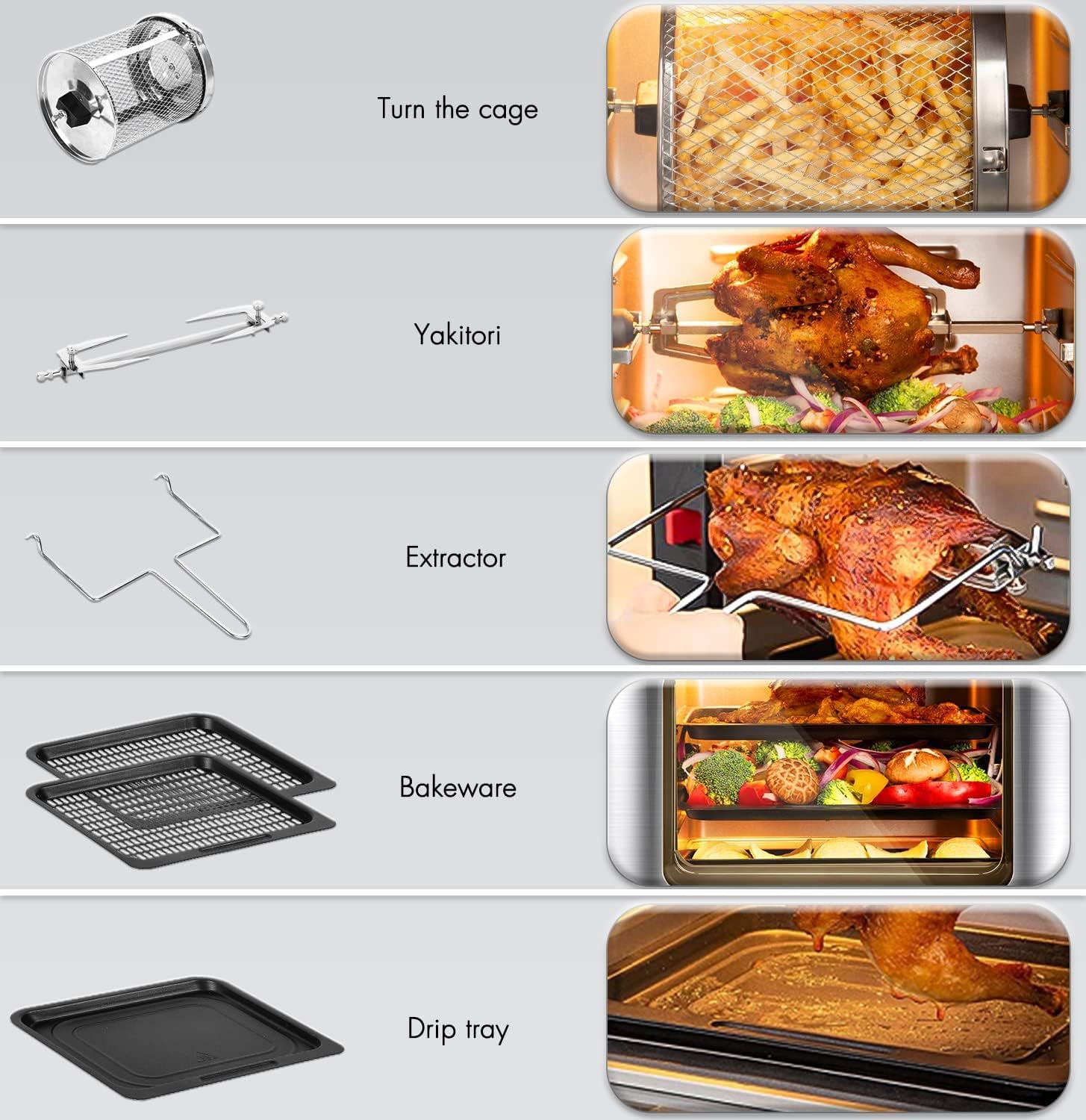
Figure 3.1: Included accessories for the Uten Air Fryer Oven.
- Karanjang Jaring Puteran: Ideal for fries, nuts, and other small items that benefit from tumbling.
- Rotisserie Fork (Yakitori): Pikeun manggang sadayana hayam atanapi potongan daging anu langkung ageung.
- Extractor Tool: Used to safely remove hot rotisserie items and the rotating basket.
- Bakeware Trays (2): For baking, roasting, or dehydrating on multiple levels.
- Baki netes: Collects excess oil and food particles, making cleanup easier.
3.2 Panel kontrol
The intuitive LED touch screen and control knob allow for easy selection of cooking functions and precise adjustments.

Figure 3.2: Digital Control Panel with 12 automatic programs.

Figure 3.3: Key functions of the Digital Control Panel.
- 12 Menu prasetél: Icons for various food types (e.g., fries, steak, fish, chicken wings, cake, pizza) for one-touch cooking.
- Témbong LED: Shows temperature, time, and selected program.
- PILIH Kenop: Used to manually set temperature and time, and confirm selections.
- Tombol Daya / Pareuman: Pikeun ngahurungkeun atawa mareuman alat.
- Tombol Lampu: Activates the interior light for monitoring cooking progress.
- Tombol Rotasi: Controls the rotation of the rotisserie basket or spit.
- Tombol Panaskeun deui: For quickly reheating food.

Figure 3.4: Key features including the observation window and non-stick accessories.
4. Setélan
4.1 Ngabongkar bungkusan sareng beberesih Awal
- Carefully remove all packaging materials from the air fryer oven and its accessories.
- Ngusap bagian luar alat nganggo iklanamp lawon.
- Wash all removable accessories (rotating basket, rotisserie fork, bakeware trays, drip tray) with warm, soapy water. Rinse thoroughly and dry completely. These accessories are dishwasher safe.
- Before first use, it is recommended to run the air fryer oven empty for about 10-15 minutes at 180°C (350°F) to burn off any manufacturing residues. A slight odor may be present, which is normal. Ensure good ventilation during this process.
4.2 Nempatkeun
- Place the air fryer oven on a stable, heat-resistant, and level surface.
- Ensure there is at least 10 cm (4 inches) of clear space on all sides of the appliance to allow for proper air circulation. Do not place it against a wall or under cabinets.
- Ulah nempatkeun alat dina atawa deukeut gas panas atawa burner listrik, atawa dina oven dipanaskeun.
4.3 Sambungan Daya
- Pastikeun voltage tina stop kontak kakuatan Anjeun cocog voltaganu ditangtukeun dina labél rating alat (230 Volt).
- Colokkeun kabel listrik kana stop kontak témbok grounded.
5. Parentah Operasi
5.1 Operasi Dasar
- Daya Hurung: Plug in the appliance. The display will light up. Press the Power On/Off button to activate the control panel.
- Pra-pemanasan: For best results, pre-heat the air fryer oven for 3-5 minutes before adding food. Set the desired temperature and time, then press the start button (often the SELECT knob).
- Ngamuat Dahareun: Place food into the appropriate accessory (basket, tray, or rotisserie spit). Do not overfill to ensure even cooking.
5.2 Ngagunakeun ménu prasetél
The air fryer oven features 12 preset menus for common dishes, simplifying your cooking process.
- From the main display, touch the icon corresponding to your desired food type (e.g., fries, chicken wings, steak).
- The appliance will automatically set the optimal temperature and time for that preset.
- You can adjust the temperature and time manually using the SELECT knob if needed, after selecting a preset.
- Press the SELECT knob to start cooking.

Figure 5.1: The 12 One-Touch Cooking Functions simplify meal preparation.
5.3 Manual Temperature and Time Settings
For custom recipes or precise control, you can manually set the temperature and time.
- After powering on, use the SELECT knob to adjust the temperature (range: 80°C - 200°C for cooking, 25°C - 60°C for defrosting).
- Press the SELECT knob to switch to time adjustment. Use the knob to set the desired cooking time (range: 2-8 minutes for bread, 10-45 minutes for defrosting, general cooking times vary).
- Press the SELECT knob again to start cooking.
5.4 Fungsi Husus
- Lampu interior: Press the Light button to illuminate the interior, allowing you to monitor cooking progress without opening the door.
- Fungsi Rotasi: When using the rotating mesh basket or rotisserie spit, press the Rotation button to activate continuous rotation for even cooking.
- Multi-Level Cooking: The 10L capacity allows for cooking on multiple levels using the bakeware trays. Ensure adequate space for air circulation around food.
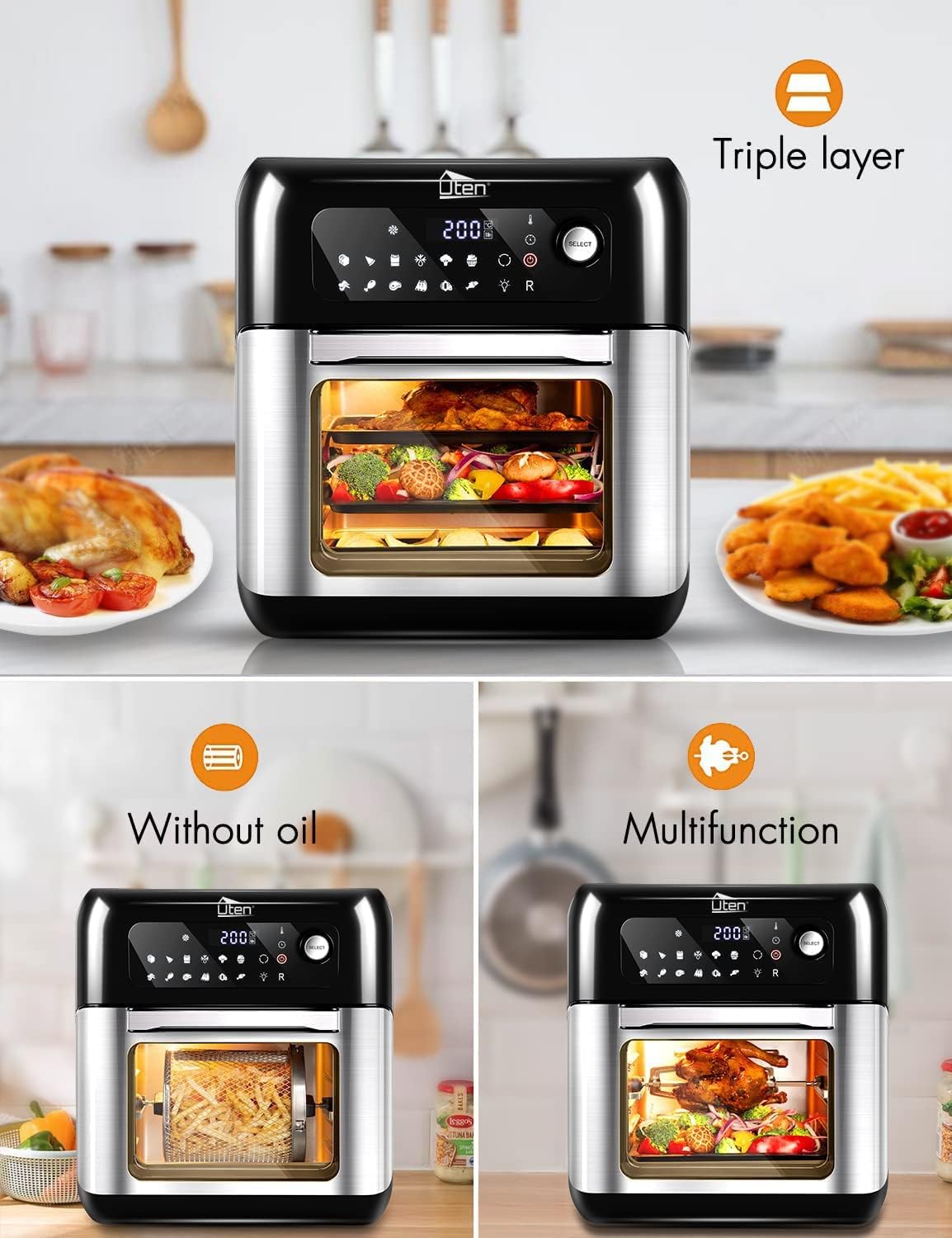
Figure 5.2: The triple-layer design allows for cooking multiple dishes simultaneously.

Figure 5.3: Simultaneous cooking on 2 or 3 levels.

Gambar 5.4: Kelample of multi-rack cooking.
penting: The countdown timer will automatically close and provide a reminder when cooking is about to end.
6. Pangropéa jeung beberesih
Regular cleaning of your air fryer oven will ensure optimal performance and extend its lifespan.
- Salawasna cabut colokan alat tina colokan listrik sarta ngidinan pikeun niiskeun sagemblengna saméméh beberesih.
- Luar: Ngusap luar ku hipu, damp lawon. Ulah make cleaners abrasive atawa hampang scouring.
- Interior: Ngusap témbok interior nganggo iklanamp cloth and mild detergent. For stubborn food residue, a non-abrasive sponge can be used. Ensure the interior is completely dry before next use.
- Asesoris: All removable accessories (rotating mesh basket, rotisserie fork, bakeware trays, drip tray) are dishwasher safe. For manual cleaning, wash with warm, soapy water, rinse, and dry thoroughly.
- Removable Tempered Glass Door: The double-layer heat-resistant tempered glass door can be removed for thorough cleaning. Refer to the product diagram for removal instructions (if applicable, otherwise general statement).
- Unsur pemanasan: Gently ngabersihan elemen pemanasan ku sikat lemes pikeun miceun sagala partikel dahareun. Entong nganggo cai atanapi pembersih cair langsung dina unsur pemanasan.
- Panyimpenan: Store the clean and dry air fryer oven in a cool, dry place.

Figure 6.1: Accessories are dishwasher safe for easy cleaning.
7. Cara ngungkulan
If you encounter any issues with your Uten Air Fryer Oven, please refer to the following common problems and solutions:
| Masalah | Mungkin Cukang lantaranana | Solusi |
|---|---|---|
| Alat henteu hurung. | Teu plugged di; gangguan stop kontak listrik; gangguan alat. | Pastikeun kabel listrik dicolokkeun sacara aman kana stop kontak anu tiasa dianggo. Pariksa circuit breaker. Upami masalahna tetep, hubungi dukungan palanggan. |
| Dahareun teu asak rata. | Overcrowding the basket/trays; insufficient shaking/turning; incorrect temperature/time. | Do not overcrowd the cooking space. Cook in smaller batches if necessary. Shake the basket or turn food on trays halfway through cooking. Adjust temperature and time as needed. |
| Dahareun teu garing. | Too much moisture; not enough oil (for certain foods); low temperature. | Pat food dry before air frying. A light coating of oil can help achieve crispiness for some foods. Increase temperature slightly or extend cooking time. Ensure proper air circulation. |
| Haseup bodas kaluar tina alat. | résidu gajih tina pamakéan saméméhna; masak dahareun tinggi-lemak. | Clean the drip tray and interior thoroughly after each use. For high-fat foods, place a small amount of water in the drip tray to prevent smoke. |
| Appliance automatically shuts off during operation. | Perlindungan overheating diaktipkeun. | This is a safety feature. Unplug the appliance and allow it to cool down for at least 30 minutes. Check for proper ventilation around the unit. Plug back in and resume operation. |
If the problem persists after trying these solutions, please contact Uten customer support for further assistance.
8. Spésifikasi
Technical specifications for the Uten 10L Digital Air Fryer Oven (Model: TXG-TM10L):
| Fitur | Rincian |
|---|---|
| merek | Uten |
| Nomer modél | TXG-TM10L |
| Warna | Hideung, Stainless Steel |
| Dimensi produk | 33 x 30 x 36 cm (P x L x T) |
| Kapasitas | 10 ltr |
| Daya / Wattage | 1500 watt |
| Voltage | 230 volt |
| Bahan | Tempered Glass (door) |
| Fitur husus | Programmable, Temperature Control, LED Touch Screen, 12 Preset Menus, Interior Light, Rotation Function |
| Item Beurat | 7.3 kg |
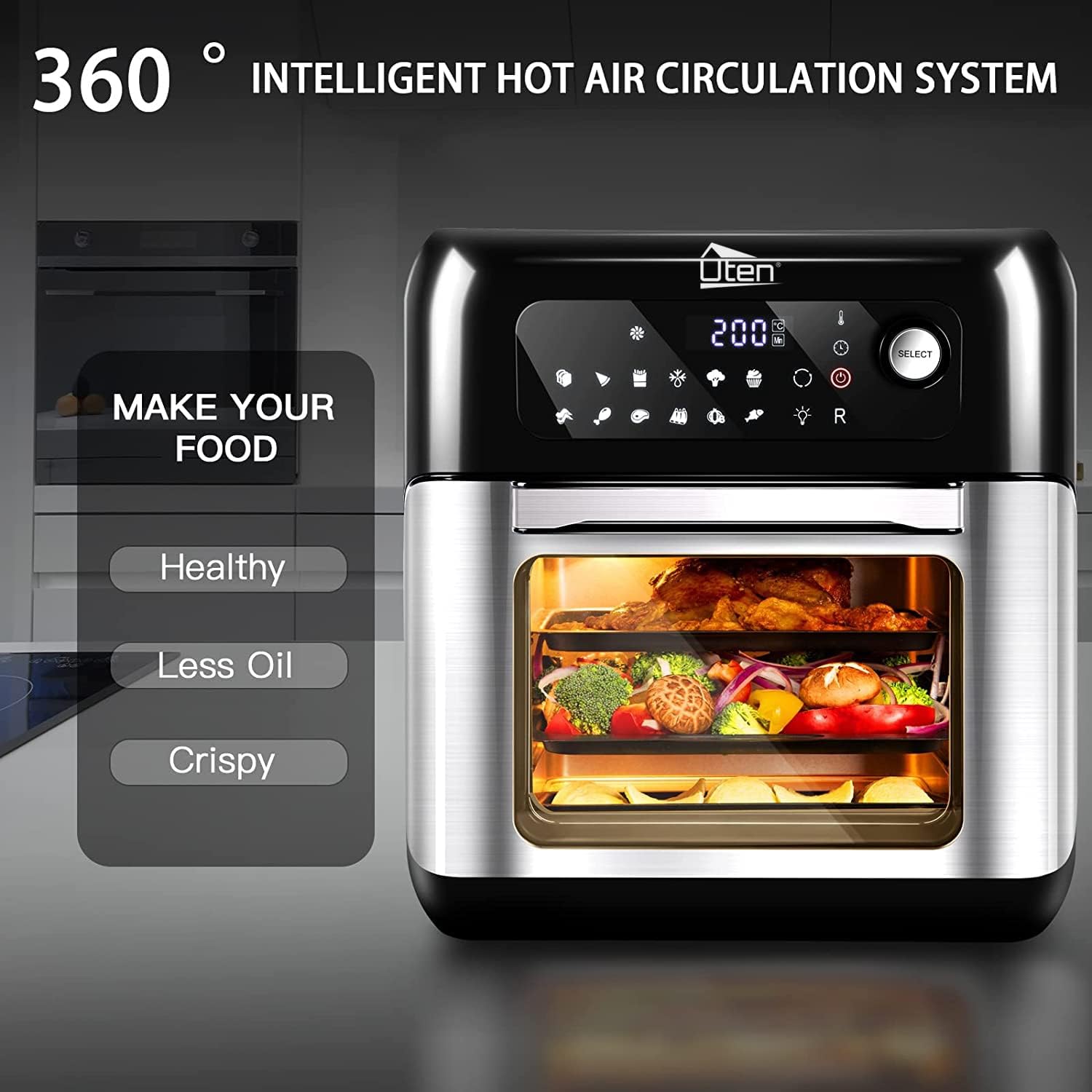
Figure 8.1: Product dimensions and 10-liter capacity.
9. Garansi jeung Rojongan
Uten products are manufactured to high-quality standards. For information regarding warranty coverage, please refer to the warranty card included with your purchase or visit the official Uten websitus.
For technical support, troubleshooting assistance beyond what is provided in this manual, or to inquire about replacement parts, please contact Uten customer service. Contact details can typically be found on the Uten brand store page or on the product packaging.
Visit the official Uten Store for more information: Uten Store on Amazon.co.uk


