1. Bubuka
Thank you for choosing the SOOCAS S5 Electric Razor. This versatile 4-in-1 grooming kit is designed to provide a smooth, efficient, and comfortable shaving experience. Featuring a 3D rotary design, wet and dry use capability, and an intuitive LED display, the S5 model is engineered for convenience and performance. Please read this manual thoroughly before use to ensure proper operation and maintenance.

Figure 1.1: SOOCAS S5 Electric Razor and Accessories
Video 1.1: Leuwihview of the SOOCAS 4-in-1 Electric Shaver, highlighting its cordless and wet/dry capabilities.
Video 1.2: Detailed demonstration of the SOOCAS 4-in-1 Cordless USB Rechargeable Electric Shaver's features and attachments.
2. Komponén produk
- SOOCAS S5 Electric Razor (Main Body)
- 3D Rotary Shaver Head (Pre-installed)
- Facial Cleansing Brush Attachment
- Sideburn Trimmer Attachment
- Irung Bulu Trimmer Attachment
- Kabel Ngecas USB-C
- Sikat beberesih
- Kasus Travel
- Manual pangguna (dokumén ieu)
3. Setélan
3.1 Ngecas Alat
The SOOCAS S5 supports USB-C charging. A full charge takes approximately 1.5 hours and provides up to 60 days of use (based on 1 minute of daily use). The LED display will show the battery percentage salila ngecas.
- Ensure the charging port at the bottom of the shaver is dry before connecting the cable.
- Connect the provided USB-C cable to the shaver's charging port.
- Plug the other end of the USB-C cable into a compatible power source (e.g., USB wall adapter, power bank, PC, laptop).
- The LED display will illuminate and show the charging progress.

Figure 3.1: Charging the SOOCAS S5 Electric Razor
3.2 Ngapasangkeun sareng Nyabut Huluna
The SOOCAS S5 comes with four interchangeable heads for various grooming needs. To change a head:
- Pastikeun alat cukur dipareuman.
- To detach a head, firmly pull it straight upwards from the main body. Do not twist.
- To attach a head, align the slot on the desired head with the corresponding slot on the shaver's main body. Press it down firmly until it clicks into place.
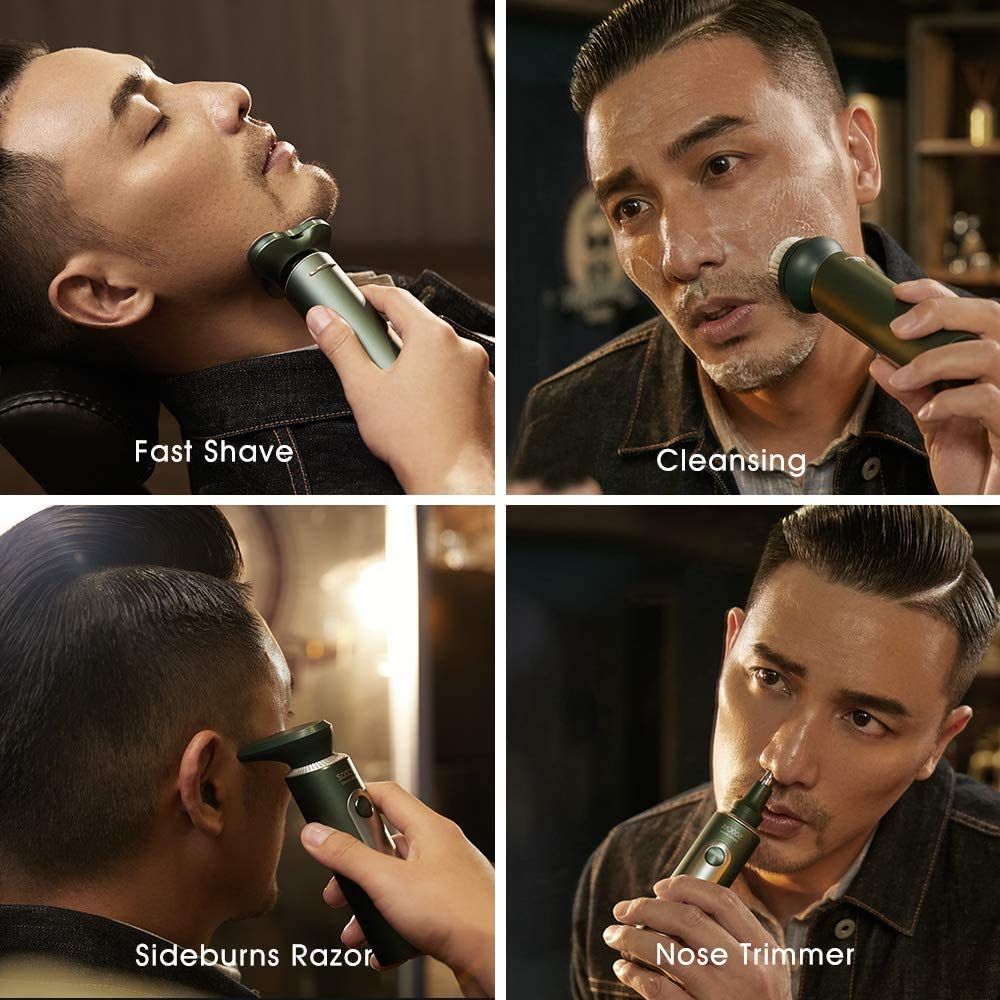
Figure 3.2: Attaching and Detaching Heads
4. Parentah Operasi
4.1 Dasar Cukur
The 3D rotary shaver head features innovative Air Cushion technology and double-layer, self-grinding blades for a close and comfortable shave. The blades automatically sharpen with use, maintaining efficiency over time.
- Pencét tombol daya pikeun ngahurungkeun alat cukur.
- Gently move the shaver in circular motions across your face, allowing the 360° floating heads to adjust to your facial contours.
- The shaver can be used for both dry and wet shaving. For a more comfortable and cleaner shave, especially with thick beards, wet shave with shaving foam.

Figure 4.1: Smooth & Efficient Close Shave Technology
4.2 Modeu Speed
The SOOCAS S5 offers two speed modes for customized shaving:
- Modeu standar: Default speed for regular shaving.
- Mode Laju Kacepetan: Provides a cutting speed of 3.9m/s and a blade rotation speed of 3400 rpm. Ideal for thicker or harder beards.
To switch between speed modes, long-press the power button for approximately 1 second while the shaver is on. The LED display will indicate the current speed mode.
4.3 Ngagunakeun Kantétan
- Sikat Pembersih Beungeut: Attach the brush head to deeply clean pores, grease, and dirt. Use with your preferred facial cleanser.
- Sideburn Trimmer: Attach the trimmer head to precisely trim sideburns and maintain your hairstyle details.
- Pangkas Bulu Irung: Attach the nose hair trimmer head. Its 360° rotating blade safely trims excess nose hair without harming the nasal cavity.
Figure 4.2: 4-in-1 Multifunctional Use
4.4 Konci Perjalanan
The travel lock feature prevents accidental activation of the shaver during transport, ensuring safety and preserving battery life.
- Pikeun Aktipkeun: Long-press the power button for 3 seconds while the shaver is off. A lock icon will appear on the LED display.
- Pikeun mareuman: Long-press the power button for 3 seconds. The lock icon will disappear, and the shaver will be ready for use.
5. Pangropéa
5.1 beberesih
The SOOCAS S5 is IPX7 waterproof, allowing for full body washing under running water. This makes cleaning convenient and hygienic.
- Ensure the shaver is switched off and disconnected from the charging cable before cleaning.
- Rinse the shaver head and main body under warm running water.
- For thorough cleaning, detach the shaver head and rinse both the head and the internal mechanism. Use the provided cleaning brush to remove any stubborn hair residue.
- Ngocok kaluar kaleuwihan cai sarta ngidinan sakabeh bagian ka hawa garing sagemblengna saméméh reassembling atawa nyimpen.

Figure 5.1: Wet & Dry Use and Full Body Washable Feature
5.2 agul ngagantian
The double-layer blades of the SOOCAS S5 are designed to self-grind, becoming sharper with continued use. Under normal daily use (1 minute per day), the blades are expected to maintain optimal performance for approximately one year. Replacement blades will be available from the manufacturer.
6. Cara ngungkulan
If you encounter any issues with your SOOCAS S5 Electric Razor, please refer to the following common problems and solutions:
- Alat cukur henteu hurung: Ensure the travel lock is deactivated (long-press power button for 3 seconds). Check battery level on the LED display and recharge if necessary.
- Kinerja cukur anu goréng: Ensure the shaver head is clean and free of hair residue. Try using the high-speed mode for thicker beards. Consider wet shaving with foam for a closer result.
- Iritasi kulit: Ensure you are using the correct shaving technique (gentle circular motions). For sensitive skin, try wet shaving with foam. If irritation persists, consult a dermatologist.
- Masalah ngecas: Verify that the USB-C cable is properly connected to both the shaver and the power source. Ensure the charging port is dry.
7. Spésifikasi
- Ngaran modél: S5
- Sumber Daya: Batré Powered (1 batré Litium Ion kaasup)
- Fitur husus: Cordless, LED Display, Rechargeable
- Pamakéan anu disarankeun: Janggot, Bulu Irung
- Rating waterproof: IPX7 (Fully washable)
- Waktu Ngecas: 1.5 jam pikeun muatan pinuh
- Waktos damel: Up to 60 days (based on 1 min daily use)
- Laju motong: 3.9m/s (High-Speed Mode)
- Blade Rotation Speed: 3400 rpm (High-Speed Mode)
- Ukuran produk: 8.31 x 6.89 x 2.95 inci
- Beurat barang: 8.82 ons
- Pabrikan: SOOCAS
8. Émbaran Kasalametan
Pikeun kasalametan anjeun, mangga perhatikeun ieu:
- Do not use the shaver in the shower or near water while it is plugged in or charging.
- Exercise caution when using high-speed mode and wet shaving to avoid potential skin irritation, especially if you have sensitive skin.
- Jauhkeun alat tina jangkauan barudak.
- Ulah ngabongkar atanapi nyobian ngalereskeun produk sorangan. Kontak rojongan customer pikeun pitulung.
9. Jaminan & Dukungan
Specific warranty details for the SOOCAS S5 Electric Razor are not provided in this manual. For information regarding warranty coverage, product support, or replacement parts, please refer to the manufacturer's official websitus atanapi ngahubungan layanan palanggan maranéhanana langsung. Simpen resi pameseran anjeun salaku bukti pameseran.


