1. Bubuka
The DIGITNOW HD Video Capture Box is a versatile device designed to convert and record video from various analog and digital sources into a digital format. Featuring a 5-inch OLED screen, it allows for direct viewing and playback without the need for a computer. This manual provides detailed instructions to help you set up, operate, and maintain your device effectively.
2. Eusi Paket
Punten parios yén sadaya barang anu didaptarkeun di handap kalebet kana pakét anjeun:
- DIGITNOW HD Video Capture Box (V102-Silver)
- 5V Daya adaptor
- Kabel HDMI
- Kabel USB TYPE-C
- AV kabel
- Manual pamaké
- kartu SD

Figure 2.1: Contents included in the DIGITNOW HD Video Capture Box package.
3. Fitur konci
- HD 1080P Video Capture: Records video from VCRs, VHS Tapes, Hi8, Camcorders, DVD, TV BOX, and Gaming Systems at 1080P 60FPS.
- Layar OLED 5 inci: Allows for direct viewing and playback of captured video.
- Desain portabel: Built-in large capacity battery and lightweight size for on-the-go use. The battery can be charged via the power adapter or a computer's USB port.
- Dukungan Kartu USB/SD: Save your videos directly to a USB flash drive or SD card (up to 128GB, formatted to FAT32 or exFAT, Class 10 or higher speed recommended). No computer required for recording or playback.
- Konektipitas serbaguna: Supports AV and HDMI HD 1080P video signal input and output, with 3.5mm video input/output ports.
- Speaker stéréo diwangun-di: Provides clear audio playback directly from the device.

Figure 3.1: 5-inch OLED Screen
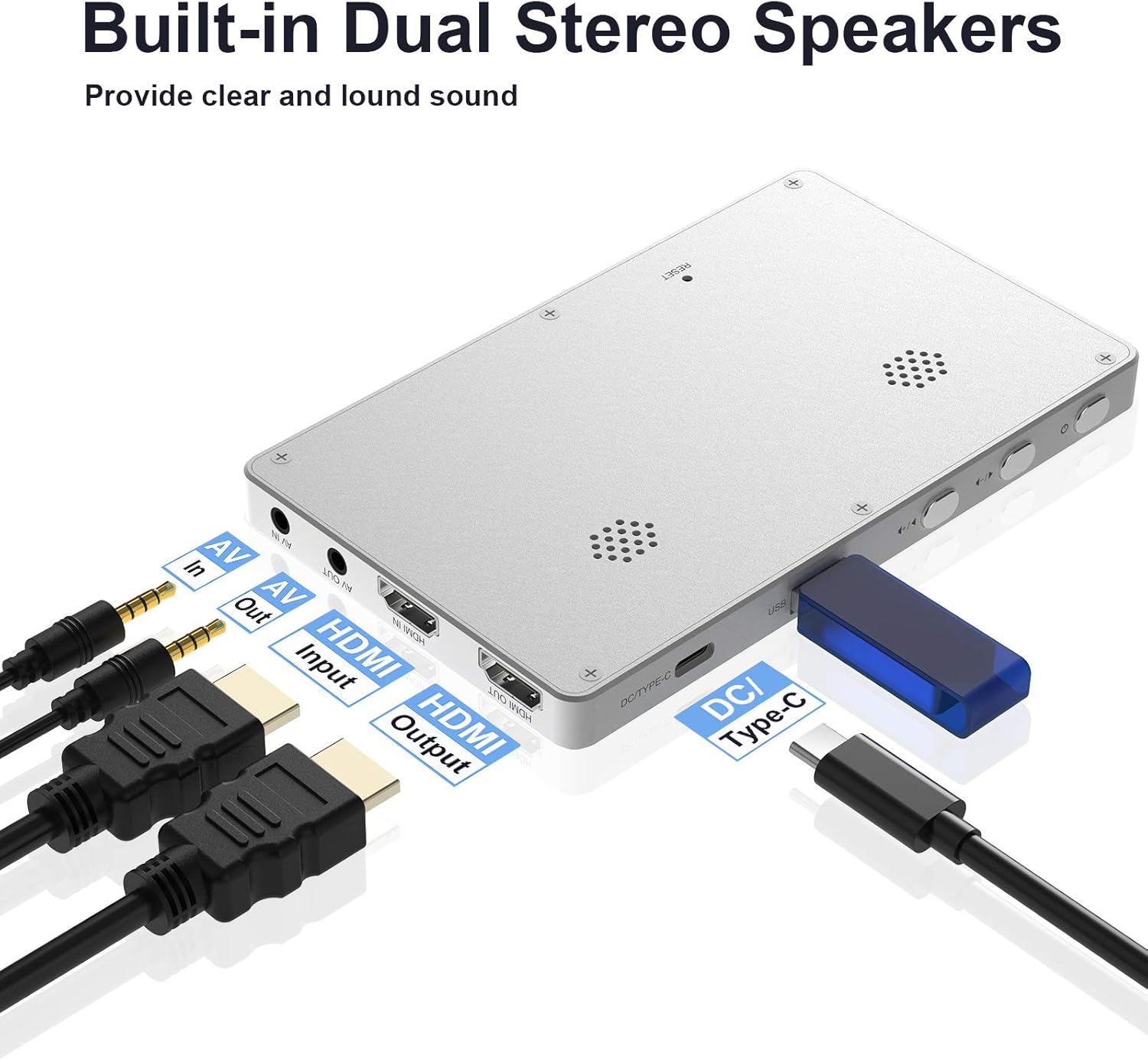
Figure 3.2: Built-in Dual Stereo Speakers and Ports

Figure 3.3: USB/SD Ports

Figure 3.4: Built-in Large Capacity Battery

Figure 3.5: Full HD 1080P 60FPS Capture
4. Setélan
4.1 Nyelapkeun Kartu SD
Before using the device, insert a compatible SD card (Class 10 or above, formatted to FAT32 or exFAT, max 128GB) into the designated slot on the side of the device. Ensure it clicks into place.
4.2 Ngahurungkeun sareng Setélan Mimiti
Press and hold the power button to turn on the device. Upon first use or after a reset, you may need to configure basic settings.
Video 4.1: Demonstrates inserting the SD card, powering on the device, and navigating initial settings such as language, time, date, movie quality, and video source selection.
- Basa: Select your preferred language from the menu.
- System Date/Time Setting: Adjust the year, month, day, hour, and minute for accurate timestamps dina rekaman anjeun.
- Tanggal St.amp: Choose whether to display the date and time on your recorded videos.
- Movie Quality: Select your desired recording resolution (e.g., 1080p60 H, 1080p60 L, 720p).
- Sumber Video: Choose between HDMI or AV input based on your source device.
5. Parentah Operasi
5.1 Connecting to a Video Source
Connect your video source (e.g., VCR, DVD player, game console) to the DIGITNOW HD Video Capture Box using either an HDMI cable or the provided AV cable, depending on your source's output. Ensure the connection is secure.
5.2 Ngarékam Pidéo
Once connected and the video source is playing, the live feed will appear on the 5-inch OLED screen. Press the REC button to start recording. A recording indicator will typically appear on the screen. Press the REC tombol deui pikeun ngeureunkeun ngarékam.
5.3 Playback
To play back recorded videos, navigate to the playback mode using the device's menu buttons. Select the desired video file from your SD card or USB drive to begin playback on the OLED screen.
5.4 Mindahkeun Files kana Komputer
To transfer recorded videos to your computer:
- Remove the SD card or USB flash drive from the capture box.
- Insert the SD card into your computer's card reader or connect the USB flash drive directly.
- Access the storage device on your computer and copy the video files (.MOV format) to your desired location.
6. Pangropéa
To ensure the longevity and optimal performance of your DIGITNOW HD Video Capture Box, follow these maintenance guidelines:
- Jaga alat tetep bersih ku cara ngusap ku kaén anu lembut sareng garing. Hindarkeun nganggo pembersih cair atanapi aerosol.
- Simpen alat dina tempat anu tiis sareng garing jauh tina sinar panonpoé langsung sareng suhu anu ekstrim.
- Protect the screen from scratches by using a screen protector or storing it in a protective case when not in use.
- Tangani kabel sareng konektor kalayan ati-ati pikeun nyegah karusakan kana portna.
- Jieun cadangan sacara rutin pikeun rékaman anjeun files to a computer or external storage to prevent data loss.
7. Cara ngungkulan
If you encounter issues with your DIGITNOW HD Video Capture Box, please refer to the following troubleshooting steps:
- Henteu aya Sinyal/Layar Hideung: Before pressing the REC button, ensure input sources (such as set-top boxes, computers, game consoles, etc.) are turned on and providing an audio or video signal to the product. Make sure that all cables are securely connected to both the input sources and the device.
- Device Crashes/Seizes Up: If the product crashes or the software seizes up, use a needle or similar pointed object to push the mini hole at the back of the product to reset the device.
- SD Card Issues: Please use an SD card whose transfer speed is Class 10 or above. Ensure the USB flash drive or SD card is formatted to FAT32 or exFAT, and the maximum capacity is 128G. Incorrect format or a low speed level SD card may affect the normal use of the device.
- Screen Remains Black (Battery): If the screen remains black despite pressing the on/off menu button for a protracted period, the battery may be depleted. Connect the charger and try again.
- Masalah Rekaman: If you do not succeed in recording video material, the cables may be incorrectly connected or connected too loosely.
- File ngabagi: This device will automatically split longer recordings into MOV video files that are 4 GB each (capture 1080p video is about 20 minutes, capture 720p video is about 40 minutes). If you wish to combine a longer recording into one file, this must be done on a computer after recording. Segments cannot currently be combined on the device.
8. Spésifikasi
| Fitur | Rincian |
|---|---|
| Dimensi produk | 6.21 x 2.63 x 0.72 inci |
| Item Beurat | 1.26 pon |
| Nomer modél | V102-Silver |
| merek | DIGITNOW |
| Panganteur Hardware | USB 2.0 |
| Resolusi Capture Video | 1080 p |
| Kasaluyuan System Operasi | Android, Linux, Mac, Windows |
| Fitur husus | DC/Type C, HDMI Input/Output |
9. Garansi jeung Rojongan
For warranty information and technical support, please refer to the documentation included with your product or visit the official DIGITNOW website. You may also contact DIGITNOW customer service for assistance with product inquiries or troubleshooting beyond the scope of this manual.