Bubuka
This manual provides essential information for setting up, operating, maintaining, and troubleshooting your Google Pixel 4a with 5G smartphone. Designed for ease of use, the Pixel 4a with 5G offers a seamless Android experience with advanced camera capabilities and 5G connectivity. Please read this manual thoroughly to ensure optimal performance and longevity of your device.
Naon dina Box
- Google Pixel 4a with 5G Smartphone
- USB-C ka USB-C Cable
- Adaptor Daya (bisa rupa-rupa dumasar wewengkon)
- Gancang Mimitian Guide
- Alat SIM
Note: Contents may vary based on the specific renewed package.
Produk Leuwihview
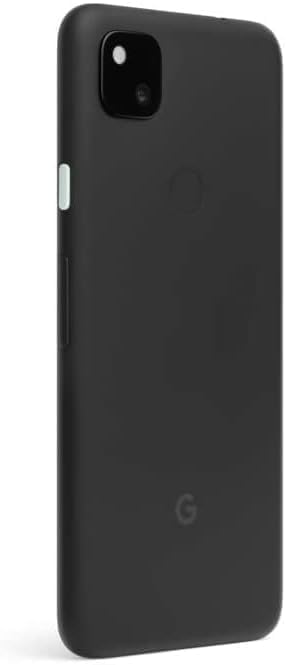
The Google Pixel 4a with 5G features a 6.2-inch display, 128GB of internal storage, and 6GB of RAM, providing a robust platform for daily use and multimedia. It is equipped with a powerful camera system and supports 5G cellular connectivity for faster data speeds.


Disetél
1. Ngecas Alat
Before first use, fully charge your Pixel 4a with 5G. Connect the USB-C cable to the phone's charging port and the other end to the power adapter. Plug the adapter into a wall outlet. The battery indicator on the screen will show charging progress.
2. Nyelapkeun Kartu SIM
Locate the SIM card tray on the side of the phone. Use the provided SIM tool to gently push into the small hole on the tray to eject it. Place your Nano-SIM card into the tray with the gold contacts facing down and the cut corner aligned. Carefully reinsert the tray into the phone.
3. Ngahurungkeun sareng Setup Awal
Press and hold the Power button (located on the right side) until the Google logo appears. Follow the on-screen prompts to select your language, connect to Wi-Fi, sign in with your Google account, and transfer data from an old device if desired. Complete the setup wizard to begin using your phone.
Ngoperasikeun Alat Anjeun
1. Napigasi layar
- Gesek ka luhur: Aksés laci aplikasi.
- Gesek ka handap: Open the notification shade and quick settings.
- Ketok: Pilih hiji item atawa buka aplikasi.
- Pencét Panjang: Aksés ménu kontekstual atanapi pindahkeun ikon aplikasi.
- Ciwit-pikeun-Zoom: Ngadeukeutkeun atanapi ngaleutikan poto, peta, atanapi web kaca.
2. Nelepon jeung Ngirim Talatah
Tap the Phone icon to make calls. Enter the number or select a contact. Tap the Messages icon to send text messages. Select a contact or enter a number, then type your message.
3. Ngagunakeun kaméra
Open the Camera app from your home screen or app drawer. Tap the shutter button to take a photo. Swipe left or right to switch between modes like Portrait, Night Sight, and Video. The Pixel 4a with 5G features advanced computational photography for high-quality images.
4. Internét jeung Konéktipitas
Connect to Wi-Fi networks via Settings > Network & internet > Wi-Fi. Enable mobile data for internet access when Wi-Fi is unavailable (Settings > Network & internet > Mobile network). The device supports 5G for faster data speeds where available.
Pangropéa
- beberesih: Anggo lawon anu lemes sareng henteu lint pikeun ngabersihan layar sareng awak. Hindarkeun bahan abrasive atanapi bahan kimia kasar.
- Apdet parangkat lunak: Regularly check for and install system updates (Settings > System > System update) to ensure your device has the latest features and security patches.
- Perawatan batré: Pikeun manjangkeun umur batre, ulah hawa ekstrim. Disarankeun tetep ngeusi batre antara 20% sareng 80% kanggo pamakean sapopoé.
- Manajemén Panyimpenan: Périodik mupus teu perlu files and apps to free up storage space and maintain optimal performance (Settings > Storage).
Pamérésan masalah
| Masalah | Solusi anu mungkin |
|---|---|
| Alat teu hurung | Pastikeun batréna geus dieusian. Pencét jeung tahan tombol Daya sahenteuna 10 detik pikeun maksakeun balikan deui. |
| Aplikasi nabrak atanapi katirisan | Tutup teras buka deui aplikasina. Hapus cache aplikasi (Setélan > Aplikasi & bewara > Info aplikasi > [Ngaran Aplikasi] > Panyimpenan & cache > Hapus cache). Pareuman terus hurungkeun deui telepon. |
| umur batre goréng | Reduce screen brightness, disable unused features like Bluetooth/GPS, limit background app activity, or use Battery Saver mode. |
| Taya sambungan jaringan | Check if Airplane mode is off. Reinsert the SIM card. Reset network settings (Settings > System > Reset options > Reset Wi-Fi, mobile & Bluetooth). Contact your carrier. |
| Sénsor sidik henteu jalan | Ensure your finger is clean and dry. Re-register your fingerprints (Settings > Security > Fingerprint Unlock). |
Reset pabrik
If persistent issues occur, a factory reset may be necessary. This will erase all data on your phone. Back up important data before proceeding. Go to Settings > System > Reset options > Erase all data (factory reset).
spésifikasi
| Fitur | Rincian |
|---|---|
| Ngaran modél | Pixel 4a with 5G |
| Nomer Modél Item | GA02293-US-cr |
| merek | |
| Sistem operasi | Android |
| Ukuran layar | 6.2 inci |
| Resolusi | 1080 x 2340 |
| Ram | 6 GB |
| Kapasitas Panyimpenan Mémori | 128 GB |
| Kapasitas batré | 3885 Miliamp Jam-jaman |
| Item Beurat | 5.9 ons |
| Dimensi produk | 6.05 x 2.91 x 0.32 inci |
| Pamawa nirkabel | Henteu dikonci |
| Téhnologi konektipitas | Bluetooth, Wi-Fi, Cellular (5G) |
| Audio Jack | Taya jack headphone |
Émbaran penting
Bantahan Hukum
Produk ieu ngandung bahan kimia anu dipikanyaho ku Nagara California pikeun nyababkeun kanker sareng cacad kalahiran atanapi cilaka réproduktif sanés. Kanggo inpo nu leuwih lengkep buka www.P65warnings.ca.gov
Garansi sareng Rojongan
As a renewed product, your Google Pixel 4a with 5G is typically covered by a limited warranty provided by the seller or refurbisher. Please refer to the specific warranty information provided at the time of purchase for details on coverage duration and terms. For technical support, software updates, and additional resources, please visit the official Google Support websitus atanapi ngahubungan seller langsung.
For general Google Pixel support, you can visit: support.google.com/pixelphone


