1. Bubuka
This manual provides detailed instructions for the Symcode Portable Barcode Clip with Bluetooth. This device is designed for efficient and versatile barcode scanning, offering portability and multiple connectivity options. It can be directly clipped to the back of a smartphone, used independently via Bluetooth, or connected via a 2.4G dongle.
Eusi pakét:
- 1x 2D Clip-Back Barcode Scanner
- 1x Kabel Ngecas
- 1 x Manual Pamaké
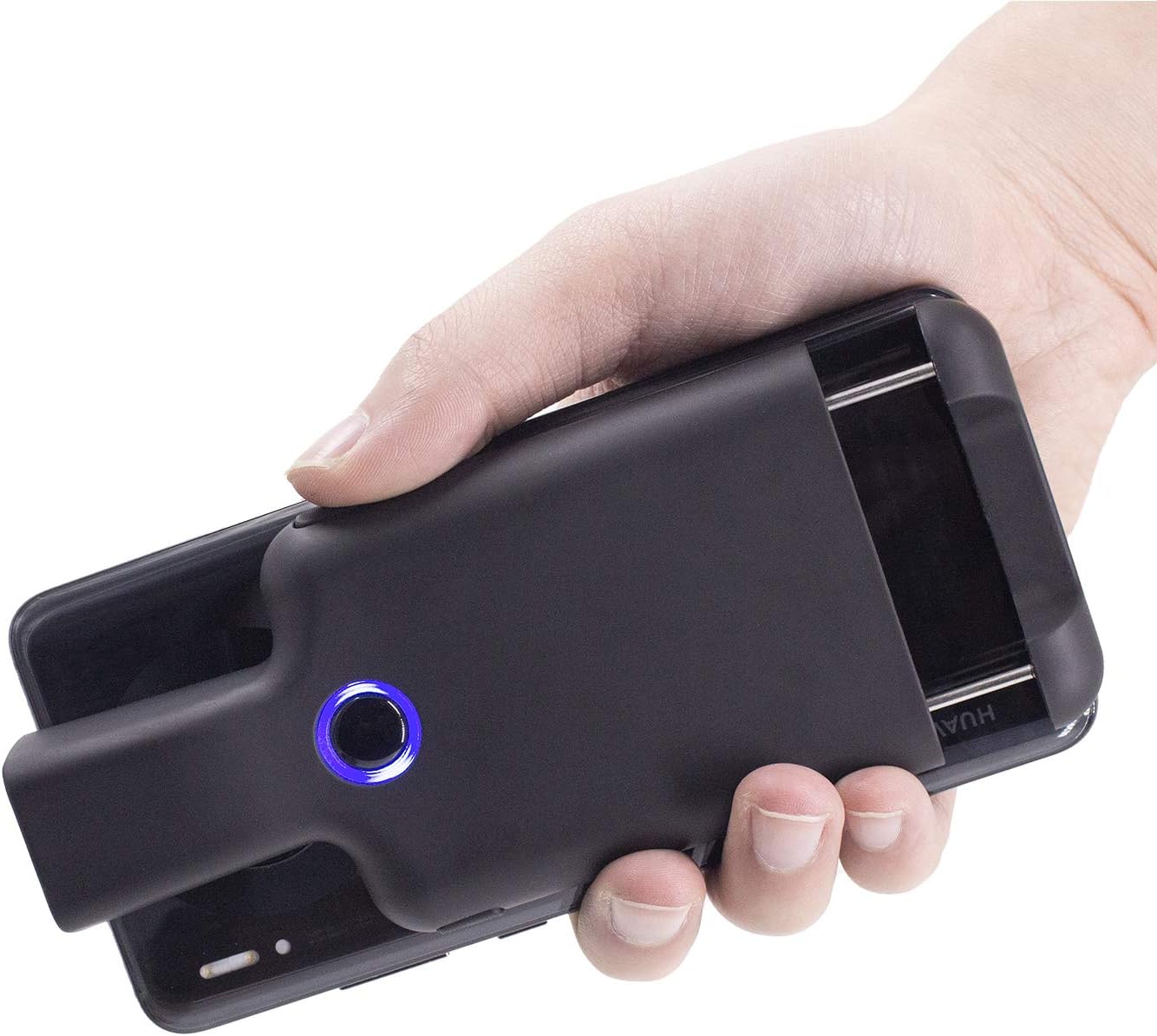
Figure 1.1: Symcode Portable Barcode Clip attached to a smartphone, demonstrating its compact design and ease of handling.
2. Fitur konci
- Direct Phone Attachment: Designed to clip directly onto the back of a smartphone for integrated use. Features protective flannel to prevent scratches.
- Automatic Bluetooth Connection: Bluetooth activates automatically upon powering on, simplifying the connection process.
- Kasaluyuan lega: Works with phones, iPads, computers, and is compatible with POS systems, iOS, Android, Windows, Mac OS, and Linux. Supports US/DE/FR/IT/ES keyboard layouts.
- Desain ringan: Weighs approximately 90g (3.1oz) for enhanced portability.
- Manjangkeun Umur Batré: Equipped with a 1600mAh rechargeable battery (some models may feature 1800mAh or 3000mAh), providing up to 7.5 hours of continuous operation or 25,000 scans on a full charge. Charging time is approximately 1.5 hours.
- Comprehensive Barcode Support: Scans most 1D and 2D barcodes, including those displayed on screens.
- 1D Barcode Types: UPC-A, UPC-E, UPC-E1, EAN-8, EAN-13, EAN-14, EAN-128, UCC128, ISBN/ISSN, KODE11, KODE32, KODE39, KODE39 ASCII Lengkep, KODE93, KODE128, Interleaved 2 ti 5, Industri 2 ti 5, Matriks 2 ti 5, Kode Pos Cina, Inggris/Plessey, GS1, jsb.
- 2D Barcode Types: QR, DataMatrix, PDF417, Aztec, Hanxin, Micro PDF417, sareng anu sanésna.
- Sababaraha Tombol Scanning: Features left, middle, and right scanning buttons for user convenience.
- Hemat Daya: Automatically shuts down after 5 minutes of inactivity (configurable).
- Optional Phone Charging: Some models feature a built-in 3000mAh battery that can also charge the connected mobile phone.

Figure 2.1: Barcode scanning capabilities, including various 1D and 2D formats and challenging barcode conditions.

Figure 2.2: Physical dimensions and weight of the barcode clip.

Figure 2.3: The scanner's capability to charge a mobile phone, highlighting its built-in 3000 mAh battery.
3. Setup Awal
3.1 Ngecas Alat
Before first use, fully charge the barcode scanner. Connect the provided charge cable to the scanner's charging port and a suitable USB power source. A full charge typically takes approximately 1.5 hours. The indicator light will change to show charging status and completion.
3.2 Powering on / Pareum
- Pikeun Ngahurungkeun: Press and hold the middle scanning button until the blue signal light flashes.
- Pikeun mareuman: The scanner will automatically shut down after 5 minutes of no operation by default to conserve power. This setting can be adjusted or canceled.
4. Connectivity and Pairing
4.1 Nyapasangkeun Bluetooth
The Symcode barcode clip connects wirelessly via Bluetooth. Follow these steps to pair it with your device:
- Activate Scanner Bluetooth: Press the middle scanning button on the barcode clip. The Bluetooth signal light will flash, indicating it is ready for pairing.
- Open Device Bluetooth Settings: On your phone, tablet, or computer, navigate to the Bluetooth settings menu. Ensure Bluetooth is turned on.
- Pilarian sareng Sambungkeun: Milarian pikeun available devices. Locate and click on "FSC-BarcodeScanner" in the list of found devices to initiate the pairing process.
- Konfirmasi: Once connected successfully, you will hear a beep from the scanner, and the blue indicator light on the left side of the scanner will remain solid (always on). The scanner will automatically reconnect to the last paired device upon restart.

Figure 4.1: Step-by-step guide for Bluetooth pairing.
4.2 Modeu sambungan
The scanner offers flexible connection options:
- Installed with Phone: Clip the scanner directly to the back of your smartphone for a compact, integrated scanning solution.
- Used Alone (Bluetooth): The scanner can be used as a standalone Bluetooth device, transmitting scanned data wirelessly to any compatible Bluetooth-enabled host device.
- Paired with 2.4G Dongle: For devices without Bluetooth or for a dedicated wireless connection, the scanner can be paired with a 2.4G USB dongle (sold separately or included with specific models) for use with laptops or desktop computers.

Figure 4.2: Three primary ways to use the Symcode barcode scanner.
5. Parentah Operasi
5.1 Nyeken barkod
To scan a barcode, point the scanner's window at the barcode you wish to read. Ensure the barcode is within the scanner's field of view. Press one of the scanning buttons to activate the scan engine. A successful scan will typically be indicated by a beep and/or a change in the indicator light.
5.2 Scanning Buttons
The scanner features three distinct scanning buttons for user convenience:
- Left Scanning Button: Located on the left side of the scanner.
- Middle Scanning Button: Located centrally on the scanner, also used for power on/off and Bluetooth activation.
- Right Scanning Button: Located on the right side of the scanner.
Any of these buttons can be used to trigger a scan.

Figure 5.1: Location and use of the three scanning buttons.
5.3 Pilihan Konfigurasi
The scanner supports various customizations, which can typically be configured by scanning specific setup barcodes found in the full user manual (not included in this summary). These options may include:
- Automatic sensing mode
- Nyumputkeun karakter barkod
- Adding prefixes or suffixes to scanned data
- Nyaluyukeun polumeu
- Setting or canceling automatic shutdown time
6. Pangropéa
6.1 beberesih
To maintain optimal performance and appearance, clean the scanner regularly:
- Anggo lawon anu lemes, garing, henteu lint pikeun ngusap bagian luar alat.
- For the scanning window, use a lens cleaning cloth or a soft cloth lightly dampdibersihkeun ku pembersih anu hampang sareng henteu abrasif. Hindarkeun bahan kimia anu keras atanapi bahan abrasif.
- Pastikeun teu aya cairan anu asup kana bukaan alat.
6.2 Panyimpenan
When not in use, store the scanner in a cool, dry place, away from direct sunlight, extreme temperatures, and high humidity. Protect it from physical impact.
7. Cara ngungkulan
This section addresses common issues you might encounter with your Symcode barcode scanner.
| Masalah | Mungkin Cukang lantaranana | Solusi |
|---|---|---|
| Scanner teu hurung. | Batré lemah; Alat teu jalan. | Charge the scanner fully. If issue persists, contact support. |
| Teu bisa masangkeun via Bluetooth. | Scanner not in pairing mode; Bluetooth off on host device; Interference; Already paired to another device. | Ensure scanner's blue light is flashing. Turn Bluetooth off/on on host device. Move closer to host device. Disconnect from other devices. |
| Scanner henteu maca barkod. | Barcode damaged/unreadable; Incorrect barcode type setting; Scanning window dirty; Insufficient lighting. | Ensure barcode is clear and flat. Check scanner's configuration for supported barcode types. Clean scanning window. Provide adequate lighting. |
| Scanned data is slow or incorrect. | Bluetooth signal interference; Incorrect keyboard layout setting; Data format issue. | Reduce distance to host device. Ensure no strong interference sources. Check keyboard layout settings (e.g., US/DE/FR). Review data formatting options. |
| Scanner automatically shuts down too quickly. | Default power-saving setting. | Refer to the full manual for instructions on how to adjust or disable the auto-shutdown timer. |
8. Spésifikasi
| Fitur | Rincian |
|---|---|
| Modél | B08R78W41N |
| Téhnologi konektipitas | Bluetooth (BLE, SPP, HID) |
| Alat nu cocog | Smartphone, Tablet, Computer (iOS, Android, Windows, Mac OS, Linux) |
| Sumber Daya | Batré Powered |
| Jenis Batré | Litium Polimér (kaasup) |
| Kapasitas batré | 1600mAh (some models 1800mAh/3000mAh) |
| Waktu Ngecas | Kira-kira. 1.5 jam |
| Waktos Gawé Terus-terusan | Up to 7.5 hours / 25,000 scans (on full charge) |
| Resolusi sénsor | 648 x 488 piksel |
| Sénsor Widang tina View | 66 ° sacara horisontal, 50 ° nangtung |
| Résistansi Cahaya | 0-10,000 Lux |
| Tahan Gempa | 1.2m (4ft) drop on cement surface |
| Item Beurat | 7.8 ounces (approx. 90g / 3.1oz) |
| Ukuran (approx.) | 147mm (5.8in) length, 68mm (2.7in) width, 20.25mm (0.8in) card buckle thickness |
9. Émbaran jaminan
Warranty details for the Symcode Portable Barcode Clip are typically provided with your purchase documentation or can be found on the official Symcode websitus. Punten tahan bukti pameseran anjeun pikeun klaim garansi.
10. Rojongan Palanggan
For further assistance, technical support, or inquiries not covered in this manual, please refer to the contact information provided with your product or visit the official Symcode website. You may also find additional resources and FAQs on their support pages.


