1. Bubuka
Thank you for choosing the FLOMASTA TD230W Programmable Digital Thermostat. This modern, wall-mounted thermostat is designed to provide precise and efficient control over your HVAC system. Featuring a touch control interface, LCD display with backlight, and BACnet MS/TP connectivity, it offers advanced functionality for optimal climate management in your space.
This manual provides detailed instructions for installation, operation, and maintenance of your TD230W thermostat. Please read it thoroughly before beginning installation or operation to ensure safe and correct usage.
2. Émbaran Kasalametan
PERHATOSAN: Résiko Setrum Listrik!
- Always disconnect power to the heating/cooling system at the main fuse or circuit breaker before installing or servicing the thermostat.
- Installation should only be performed by a qualified electrician or HVAC professional.
- Pastikeun sadaya sambungan kabel aman sareng sasuai sareng kode listrik lokal.
- Do not operate the thermostat with wet hands or in damp kaayaan.
- This device operates on 230 Volts. Exercise extreme caution.
Simpen manual ieu kanggo rujukan ka hareup.
3. Fitur Produk
- Kontrol anu tiasa diprogram: Allows for setting custom temperature schedules.
- Antarmuka Kontrol Toél: Intuitive and easy-to-use touch buttons.
- Layar LCD kalayan Lampu Latar: Clear temperature and setting visibility, even in low light.
- Desain Wall Mount: Sleek and modern aesthetic for seamless integration.
- BACnet MS/TP Connectivity: For integration into building management systems.
- Electric Cable Power Source: Reliable wired power supply.
- Voltage: 230 volt.
4. Eusi Paket
Mangga cék kotak pikeun item di handap ieu:
- FLOMASTA TD230W Digital Thermostat Unit
- Pemasangan Screws sareng Jangkar Tembok
- Manual pangguna (dokumén ieu)
5. Setup jeung Instalasi
The FLOMASTA TD230W thermostat is designed for wall mounting and requires a wired electrical connection. Professional installation is highly recommended to ensure proper functionality and safety.
5.1 Milih Lokasi
Select a location on an interior wall, approximately 1.5 meters (5 feet) above the floor. Avoid locations near heat sources (e.g., direct sunlight, lamps, fireplaces), drafts (e.g., windows, doors), or areas with poor air circulation.
5.2 Parentah Wiring
Before proceeding, ensure power to the HVAC system is OFF at the circuit breaker.
- Carefully remove the front cover of the thermostat to expose the wiring terminals.
- Connect the electrical cables from your HVAC system to the corresponding terminals on the thermostat. Refer to the wiring diagram provided with your HVAC system or consult a professional for specific connections. The thermostat operates on 230V.
- Pastikeun sadaya sambungan kedap tur aman.
5.3 Pasang Thermostat
- Once wired, secure the thermostat base to the wall using the provided mounting screws and wall anchors.
- Pasangkeun deui panutup hareup termostat kalayan ati-ati, pastikeun éta ngaklik pageuh kana tempatna.
- Balikkeun daya ka sistem HVAC dina pemutus sirkuit.

Gambar 1: Hareupeun view of the FLOMASTA TD230W Thermostat. The display is dark, and two touch buttons are visible: one for day mode (sun icon) and one for night mode (crescent moon icon).
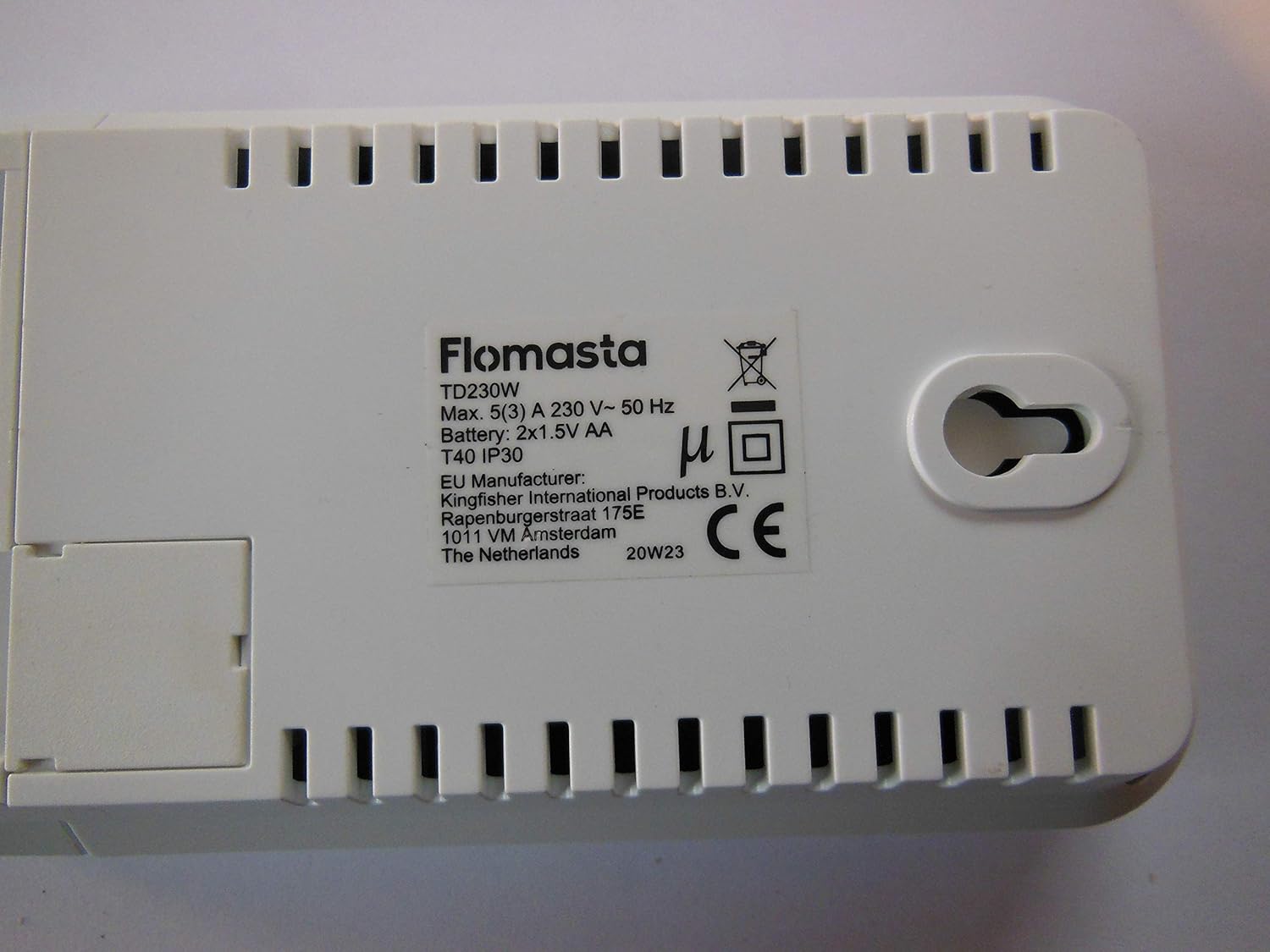
Gambar 2: Balik view of the FLOMASTA TD230W Thermostat. The label clearly shows the model TD230W, electrical ratings, and indicates a battery compartment for 2x1.5V AA batteries, which are likely for memory backup or low-power functions.
6. Parentah Operasi
The TD230W thermostat features a user-friendly touch control interface and an LCD display for easy operation.
6.1 Mimiti Power-On
Upon first power-on, the thermostat may prompt you to set the current time and day. Follow the on-screen instructions using the touch controls.
6.2 Kontrol Suhu Dasar
- Nyaluyukeun Suhu: Ngagunakeun éta + jeung - touch buttons (if present, or implied by "Touch Control") on the display to increase or decrease the desired temperature.
- Pilihan Mode: The thermostat typically supports heating, cooling, and auto modes. Use the mode button (if present) to cycle through these options.
- Lampu tukang: The LCD display features a backlight for improved visibility. It may activate automatically upon touch or have a dedicated button.
6.3 Jadwal Programming
The TD230W is a programmable thermostat, allowing you to set different temperatures for various times of the day and days of the week. Refer to the on-screen menu for detailed programming steps. Common programming options include:
- Weekday/Weekend Schedules: Set different programs for weekdays and weekends.
- Multiple Periods: Typically allows for 4-6 temperature periods per day (e.g., Wake, Leave, Return, Sleep).
- Override samentara: Temporarily adjust the temperature without changing the programmed schedule.
- Tahan Permanén: Maintain a set temperature indefinitely until manually changed.
6.4 BACnet MS/TP Integration
For advanced users and building management systems, the TD230W supports BACnet MS/TP protocol. Consult your building management system administrator or a qualified technician for integration details and configuration. This feature allows for remote monitoring and control of the thermostat within a larger network.
7. Pangropéa
Pangropéa rutin ngajamin kinerja optimal sareng umur panjang termostat anjeun.
- beberesih: Gently usap exterior thermostat urang ku lemes, damp lawon. Ulah make cleaners abrasive, pangleyur, atawa cleaners semprot langsung kana unit.
- Ngagantian batré: The back of the unit indicates it uses 2x1.5V AA batteries. These are likely for memory backup or to power the display during power outages. Replace batteries annually or when a low battery indicator appears on the display. To replace, carefully remove the thermostat from its wall mount (refer to installation steps in reverse), access the battery compartment on the back, replace the batteries, and re-mount.
- Vents hawa: Ensure that any small vents on the thermostat casing are free from dust and debris to allow for accurate temperature sensing.
8. Cara ngungkulan
If you experience issues with your FLOMASTA TD230W thermostat, try the following solutions:
| Masalah | Mungkin Cukang lantaranana | Solusi |
|---|---|---|
| Pintonan kosong atanapi taram. | No power, loose wiring, dead batteries (if applicable for display). | Check circuit breaker. Ensure wiring is secure. Replace AA batteries if present. |
| Thermostat not controlling HVAC. | Incorrect wiring, HVAC system off, thermostat in wrong mode. | Verify wiring connections. Check HVAC system power. Ensure thermostat is in heating/cooling mode. |
| Maca suhu sigana teu akurat. | Thermostat location, blocked air vents. | Ensure thermostat is not near heat sources or drafts. Clean any dust from vents. |
| Teu tiasa program jadwal. | Incorrect settings, user error. | Review "Operating Instructions" section on programming. Reset thermostat to factory defaults if necessary (consult manufacturer for procedure). |
If the problem persists after attempting these solutions, please contact a qualified HVAC technician or the manufacturer's support.
9. Spésifikasi
| Fitur | Spésifikasi |
|---|---|
| Modél | TD230W |
| Produsén | FLOMASTA TD230W |
| Gaya | Modern |
| Sumber Daya | Kabel Listrik |
| Voltage | 230 volt |
| Tipe tampilan | LCD sareng Lampu latar |
| Tipe Pamasangan | Tembok Gunung |
| Fitur husus | Bisa diprogram |
| Métode kontrol | Toél Control |
| Protokol konektipitas | BACnet MS / TP |
| Battery (for backup) | 2x 1.5V AA (as per product image label) |
| Max Wayah | 5(3) A (as per product image label) |
| Peunteun IP | IP30 (as per product image label) |
10. Garansi jeung Rojongan
Warranty information for the FLOMASTA TD230W thermostat is typically provided at the point of purchase or included with the product packaging. Please retain your proof of purchase for warranty claims.
For technical support, troubleshooting assistance beyond this manual, or inquiries regarding spare parts, please contact the manufacturer or your retailer. Information regarding spare parts availability is currently unavailable.
You may find further information on the manufacturer's official websitus: www.flomasta.com (Catetan: Ieu mangrupikeun pananda tempat URL. Please refer to your product packaging for the correct manufacturer websitus.)


