1. Parentah Kasalametan penting
PERHATOSAN: Pikeun ngurangan résiko kaduruk, seuneu, shock listrik, atawa tatu pikeun jalma:
- Baca sadaya parentah sateuacan nganggo alat ieu.
- Jauhkeun barudak sareng piaraan tina treadmill salami operasi.
- Always use the safety key. The treadmill will not operate without it.
- Ensure adequate clearance around the treadmill (7 feet from the back, 4 feet from front and sides).
- Ulah beroperasi dina simbut atawa bantal. Pemanasan kaleuleuwihan bisa lumangsung sarta ngabalukarkeun seuneu, shock listrik, atawa tatu pikeun jalma.
- Ulah leupaskeun atanapi nyelapkeun obyék naon waé kana bukaan naon waé.
- Ulah make di luar.
- Pikeun ngahindarkeun tatu, nangtung dina rel samping sateuacan ngamimitian unit.
2. Eusi Paket
Pastikeun sadaya komponén aya sateuacan dirakit:
- LifePro Compact Foldable Treadmill (Main Unit)
- Manual pamaké
- Key Kasalametan
- Multi-tool (Hex key, Screwdriver)
- Socket Head Screws with Washers (for handrails)
- Nuts and Bolts (for wheel brackets)
3. Parentah Majelis
Follow these steps to assemble your LifePro Compact Foldable Treadmill. It is recommended to have assistance for certain steps.
3.1 Unboxing jeung Nempatkeun
Carefully remove the treadmill from its packaging. Ensure you have sufficient clear space for assembly and operation: 7 feet behind the treadmill, and 4 feet on the front and sides. If placing on a slick surface, use a mat measuring at least 60x36 inches underneath.
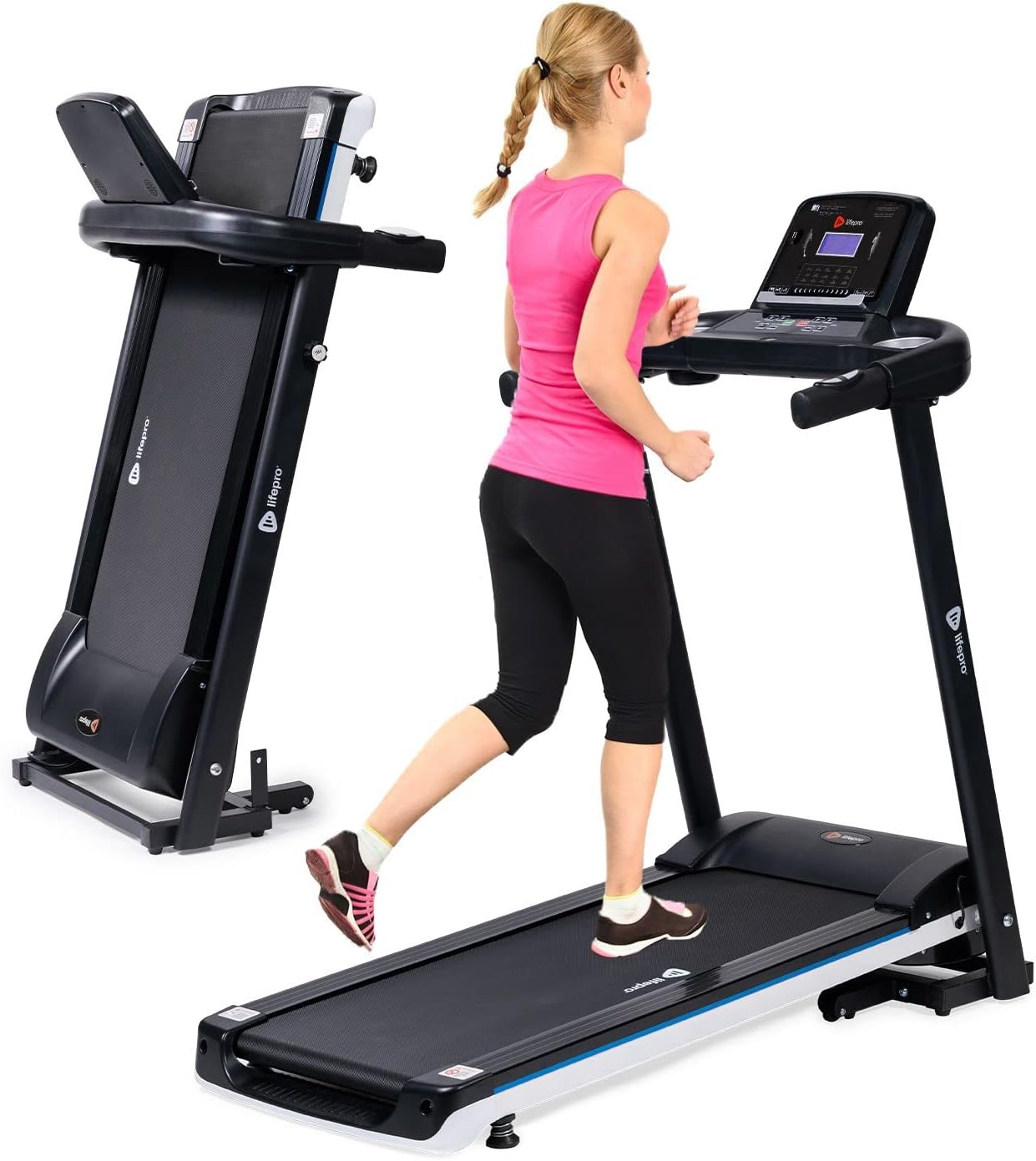
Image: The LifePro Compact Foldable Treadmill shown both in an unfolded, operational state with a user, and in a folded, compact state for storage.
3.2 Installing Wheel Brackets
With the treadmill lying flat, locate the pre-drilled holes at the base. Align the wheel brackets and secure them using the provided nuts and bolts. Do not fully tighten until both sides are in place to allow for minor adjustments.
Video Description: This video demonstrates the process of installing the wheel brackets. It shows how to carefully position the treadmill and secure the brackets using the provided hardware.
3.3 Unfolding nu Treadmill
Carefully lift the treadmill into an upright position, ensuring the wheels are properly aligned on the floor. Locate the security knob on the side of the main frame. Pull it out and slowly lower the running deck until it rests flat on the floor. Re-insert and rotate the security knob to lock the treadmill in the unfolded position.
3.4 Securing the Handrails
Tilt the handrails downward. Use the provided socket head screws with washers and the hex head of the multi-tool to secure the handrails. Insert one set of screws into the inside of each handrail, ensuring they are tightened securely.
3.5 Installing the Display Panel
Connect all wires from the main frame to the corresponding ports on the back of the display panel. Ensure each connection clicks into place. Carefully tuck the wires into the designated space. Align the display panel with the top of the handrail assembly and secure it from underneath using the three 40mm screws and the multi-tool. Ensure the control panel is tilted upward during this process.

Gambar: A close-up view of the LifePro Compact Foldable Treadmill's control panel, featuring an LCD display, various control buttons for speed and programs, heart rate sensors on the handrails, and cup holders.
4. Parentah Operasi
Familiarize yourself with the control panel and safety features before beginning your workout.
4.1 Daya Hurung/Pareuman
Plug the treadmill into a grounded electrical outlet. Attach the safety key to the designated magnetic area on the console and clip the other end to your clothing. Press the MULAI button to begin operation. To stop, press the EUREUN tombol atawa tarik kenop kaamanan.
4.2 Fungsi Konsol
The LCD display shows time, distance, speed, calories burned, and pulse. Use the LAJU +/- buttons to adjust the speed. Quick speed buttons (4, 6, 8 MPH) are available for instant adjustments. The PROGRAM button allows selection from 15+ pre-set training programs. The MODÉ button cycles through different display modes.
Heart rate sensors are integrated into the handrails. Grip them firmly to monitor your pulse during exercise.
The console also features a USB port for charging devices and built-in Bluetooth speakers for audio playback. Connect your smartphone or tablet to enjoy music or videos during your workout.

Image: A user is shown interacting with the LifePro Compact Foldable Treadmill's console, which includes a tablet holder, Bluetooth speakers, and a USB charging port.
5. Pangropéa
Regular maintenance ensures optimal performance and longevity of your treadmill.
5.1 Lubrication
The running belt requires periodic lubrication. Refer to the "Lubricating Your Running Belt" section in the operations video for detailed instructions. This should be done before the first use and every few months depending on usage.
5.2 beberesih
Ngusap handap surfaces treadmill kalawan iklanamp cloth after each use. Avoid using abrasive cleaners or solvents. Regularly vacuum underneath the treadmill to prevent dust buildup.
6. Cara ngungkulan
Upami anjeun ngalaman masalah, mangga tingali bagian ieu sateuacan ngahubungi dukungan.
| Masalah | Mungkin Cukang lantaranana | Solusi |
|---|---|---|
| Treadmill teu ngamimitian | Safety key not in place; Power cord unplugged; Power switch off. | Ensure safety key is correctly placed; Check power connection; Turn power switch ON. |
| Ngajalankeun sabuk | tegangan sabuk teuing leupas; Sabuk perlu lubrication. | Adjust belt tension (refer to manual); Lubricate belt (refer to maintenance section). |
| Noise mahiwal salila operasi | Loose components; Belt misalignment. | Check all assembly bolts and tighten if necessary; Adjust belt alignment (refer to manual). |
7. Spésifikasi
| merek: | LifePro |
| model: | LP-SWFT-BLK |
| Ukuran produk (dilipat): | 49.6 "D x 26" W x 48.8" H |
| Ukuran dilipat: | 21.3 "D x 26" W x 48.8" H |
| Beurat barang: | 64 pon |
| Laju maksimum: | 10 Mil per Jam |
| Daya kuda maksimum: | 0.75 Daya kuda |
| Maksimum Beurat rekomendasi: | 285 pon |
| Panjang dek: | 39 inci |
| Lebar dek: | 15 inci |
| Jenis tampilan: | LCD |
| Téknologi konektipitas: | Bluetooth |
| Fitur husus: | Lipat |
8. Garansi jeung Rojongan
LifePro offers a Garansi saumur hirup and dedicated customer support for this product. For any questions, assistance, or warranty claims, please contact LifePro customer service.
Nganjang ka LifePro Store on Amazon pikeun inpormasi lengkep sareng sumber pangrojong.


