1. Bubuka
This manual provides essential information for the safe and efficient operation of your DOOGEE S97 Pro Rugged Smartphone. Please read it thoroughly before using your device.

Image 1.1: The DOOGEE S97 Pro Rugged Smartphone, showcasing desain sareng tampilan anu kuat.
2. Alat Leuwihview
The DOOGEE S97 Pro is a rugged smartphone designed for durability and performance. Key features include:
- Sistem operasi: Android 11
- Prosesor: Helio G95 Octa Core 2.1GHz 12nm
- Mémori: 8GB RAM + 128GB ROM
- Batré: 8500mAh Super Battery with 33W Fast Charging and 10W Wireless Charging
- tampilan: 5.71-inch Corning Gorilla Glass
- Kaméra tukang: Samsung 48MP AI Main Camera (48MP + 8MP + 2MP + 2MP)
- Kaméra hareup: 16MP
- Fitur husus: 40m Rangefinder, IP68 Waterproof, Dustproof, Shockproof, NFC Support
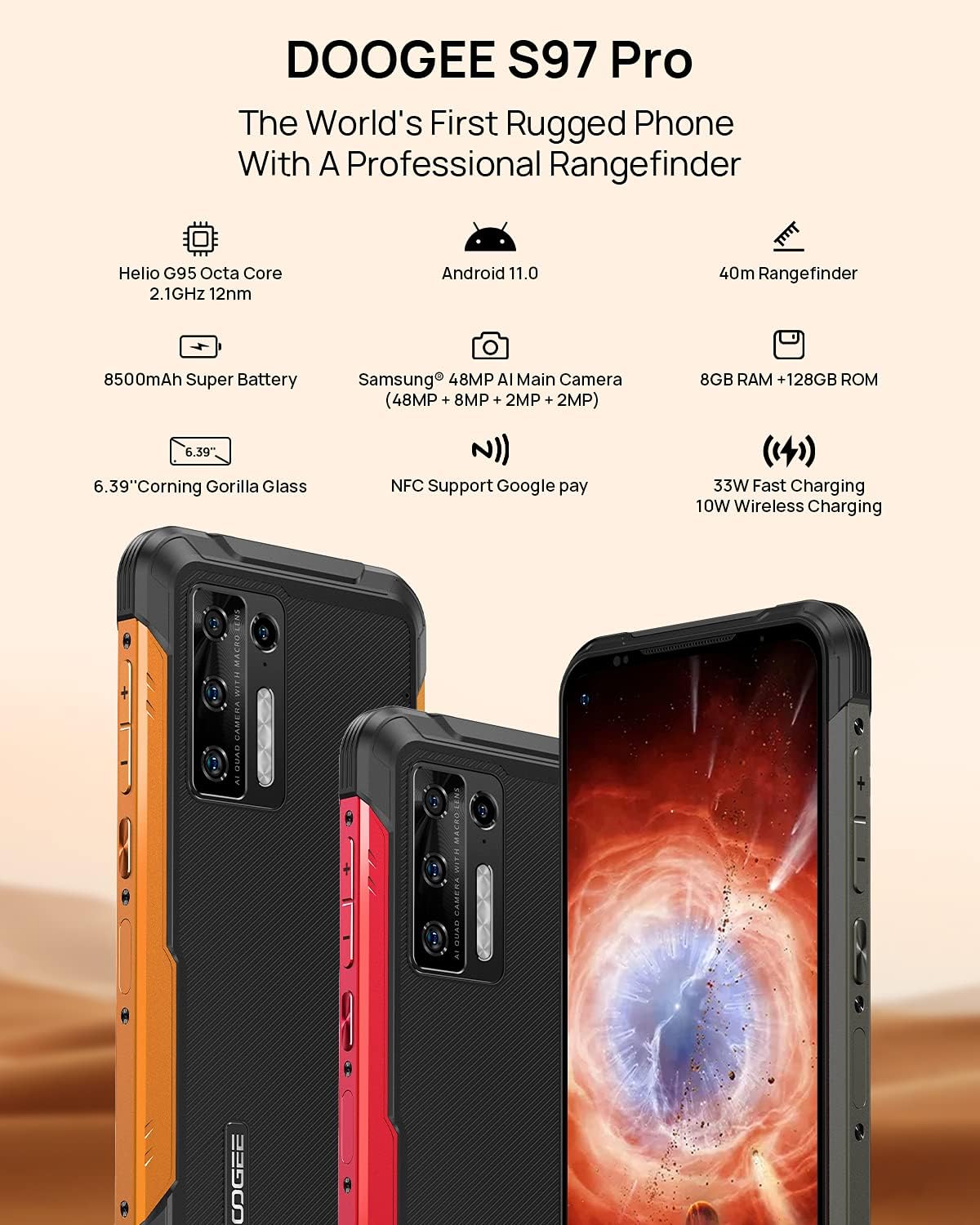
Image 2.1: Visual representation of the DOOGEE S97 Pro's main features, including processor, battery, camera, and display.
3. Setélan
3.1 Pamasangan Kartu SIM
- Tangtukeun lokasi baki kartu SIM di sisi alat Anjeun.
- Paké alat ejector SIM disadiakeun pikeun muka baki.
- Carefully place your Nano SIM card(s) into the designated slots. Ensure proper orientation.
- Gently push the SIM card tray back into the device until it is flush with the body.
Catetan: This device supports specific frequency bands. Please verify compatibility with your network carrier before use. The DOOGEE S97 Pro does not support certain CDMA network carriers such as Verizon, Sprint, Xfinity, and TracFone.
3.2 Daya Awal Hurung
- Press and hold the Power button located on the side of the device until the DOOGEE logo appears.
- Turutan pitunjuk dina layar pikeun ngalengkepan setelan awal, kalebet pilihan basa, sambungan Wi-Fi, sareng setelan akun Google.
4. Parentah Operasi
4.1 Napigasi Dasar
- Back Function: Swipe from the left or right edge of the screen towards the center.
- Layar Utama: Gesek ka luhur ti bagean handap layar pikeun mulang ka layar utama.
- Aplikasi panganyarna: Swipe up from the bottom of the screen and hold briefly to view recent applications. Swipe left or right along the very bottom of the screen to scroll through recent apps.
- Laci Aplikasi: The device does not feature a traditional app drawer. All installed applications are displayed on the home screen. Additional home screens are automatically added to the right as more apps are installed.
4.2 Pamakéan kaméra
DOOGEE S97 Pro dilengkepan ku sistem kaméra anu serbaguna:
- Kaméra tukang: 48MP main sensor, 8MP ultra-wide angle, 2MP portrait, and 2MP macro lens.
- Kaméra hareup: 16MP pikeun selfies sareng telepon pidéo.
To access the camera, tap the Camera icon on your home screen. Select desired modes (Photo, Video, Portrait, Macro, etc.) from the interface.

Gambar 4.1: Deukeut view of the Samsung 48MP AI Quad Rear Camera system on the DOOGEE S97 Pro.
4.3 Rangefinder Functionality
The integrated 40m laser rangefinder allows for precise distance measurements. To use:
- Locate and open the 'Rangefinder' application on your device.
- Select the desired measurement mode (Length, Area, Volume, Pythagoras).
- Follow the on-screen instructions to aim the laser and take measurements.

Image 4.2: Screenshots of the DOOGEE S97 Pro's 40m Rangefinder application interface, showing various measurement modes.
4.4 Manajemén batré
The DOOGEE S97 Pro features an 8500mAh battery. To optimize battery life and charging:
- Ngecas kabel: Use the provided USB Type-C cable and a compatible 33W fast charger for optimal charging speed.
- Ngecas nirkabel: The device supports 10W wireless charging. Place the phone on a compatible wireless charging pad.
- Optimasi batré: Access battery settings to manage app power usage and enable power-saving modes.

Image 4.3: Illustration of the DOOGEE S97 Pro's 8500mAh Super Battery and charging capabilities.
4.5 Fitur durability
The S97 Pro is built to withstand harsh environments:
- Peunteun IP68: Provides protection against dust ingress and immersion in water up to 1.5 meters for 30 minutes.
- Shockproof: Designed to resist drops and impacts.
- Corning Gorilla Glass: Enhances screen durability against scratches and minor impacts.

Image 4.4: Demonstrations of the DOOGEE S97 Pro's waterproof, dustproof, and shockproof capabilities.
Video 4.5: An official video from DOOGEE showcasing the rugged features and capabilities of the S59 Pro smartphone.
4.6 Android 11 Operating System
The device runs on Android 11, offering enhanced privacy controls, improved notification management, and a streamlined user experience.

Image 4.6: Visual representation of the Android 11 operating system interface on the DOOGEE S97 Pro.
5. Pangropéa
5.1 Ngabersihan Alat Anjeun
Due to its waterproof design, the DOOGEE S97 Pro can be cleaned with water. Ensure all ports are securely closed before rinsing. Use a soft, damp cloth to wipe the screen and body. Avoid harsh chemicals or abrasive materials.
5.2 Apdet parangkat lunak
Rutin pariksa sareng pasang apdet parangkat lunak pikeun mastikeun kinerja optimal, kaamanan, sareng aksés ka fitur anyar. Arahkeun ka Setélan > Sistem > Apdet sistem pikeun mariksa apdet sadia.
6. Cara ngungkulan
Upami anjeun ngalaman masalah sareng alat anjeun, tingal solusi umum ieu:
- Alat Teu Ngabales: Pencét jeung tahan tombol Daya salila kurang leuwih 10-15 detik pikeun maksa balikan deui.
- Masalah Konektipitas Jaringan: Verify your SIM card is correctly inserted. Check network settings (Setelan > Jaringan & Internét > Jaringan seluler). Balikan deui alat.
- Masalah ngecas: Ensure the USB cable and charger are securely connected and undamaged. Try a different charger or cable. For wireless charging, ensure the phone is correctly positioned on the charging pad.
- Fingerprint Sensor Inaccuracy: Pastikeun ramo anjeun bersih sareng garing. Catet deui sidik jari anjeun dina Setelan > Kaamanan > Sidik.
- Performance Lambat: Close unused applications. Clear cache (Settings > Apps & notifications > See all apps > [App Name] > Storage & cache > Clear cache). Consider a factory reset as a last resort (Setélan> Sistem> Pilihan Reset> Pupus sadaya data (reset pabrik)).
7. Spésifikasi
| Fitur | Rincian |
|---|---|
| Dimensi produk | 6.41 x 3.19 x 0.63 inci |
| Item Beurat | 12 ons (340 gram) |
| Sistem operasi | Android 11.0 |
| Ram | 8 GB (Note: Product data shows 4GB RAM, but images and title indicate 8GB. This manual uses 8GB as per prominent product claims.) |
| Kapasitas Panyimpenan Mémori | 128 GB |
| Ukuran layar | 5.71 inci |
| Kapasitas batré | 8500 Miliamp Hours (Note: Product data shows 10050 mAh, but images and title indicate 8500 mAh. This manual uses 8500 mAh as per prominent product claims.) |
| Téknologi Komunikasi Nirkabel | Sélular, Wi-Fi |
| Téhnologi sélular | LTE |
| Tipe Panyambung | USB Tipe C |
| Input Antarmuka Manusa | Kancing |
| Naon dina kotak | Kabel USB |
For detailed specifications, please refer to the product packaging or the official DOOGEE websitus.

Image 7.1: The DOOGEE S97 Pro highlighting its 8GB RAM and 128GB ROM, powered by a Helio G95 Octa Core processor.
8. Garansi jeung Rojongan
Your DOOGEE S97 Pro smartphone is covered by a manufacturer's warranty. Please refer to the warranty card included in your product packaging for specific terms and conditions, including warranty duration and coverage details.
For technical support, product inquiries, or service requests, please visit the official DOOGEE website or contact their customer service department. Contact information can typically be found on the DOOGEE websitus atanapi dina bungkusan produk.


