Varmilo VBS108 Lure Bot Mechanical Keyboard
Instruksi Manual
Bubuka
Thank you for choosing the Varmilo VBS108 Lure Bot Mechanical Keyboard. This keyboard is designed for versatility and durability, featuring triple mode connectivity (Bluetooth 5.0, 2.4GHz Wireless, and USB-C), high-quality PBT dye-sub keycaps, and Cherry MX Brown switches for a tactile typing experience. This manual provides detailed instructions for setup, operation, maintenance, and troubleshooting to ensure optimal performance and longevity of your keyboard.
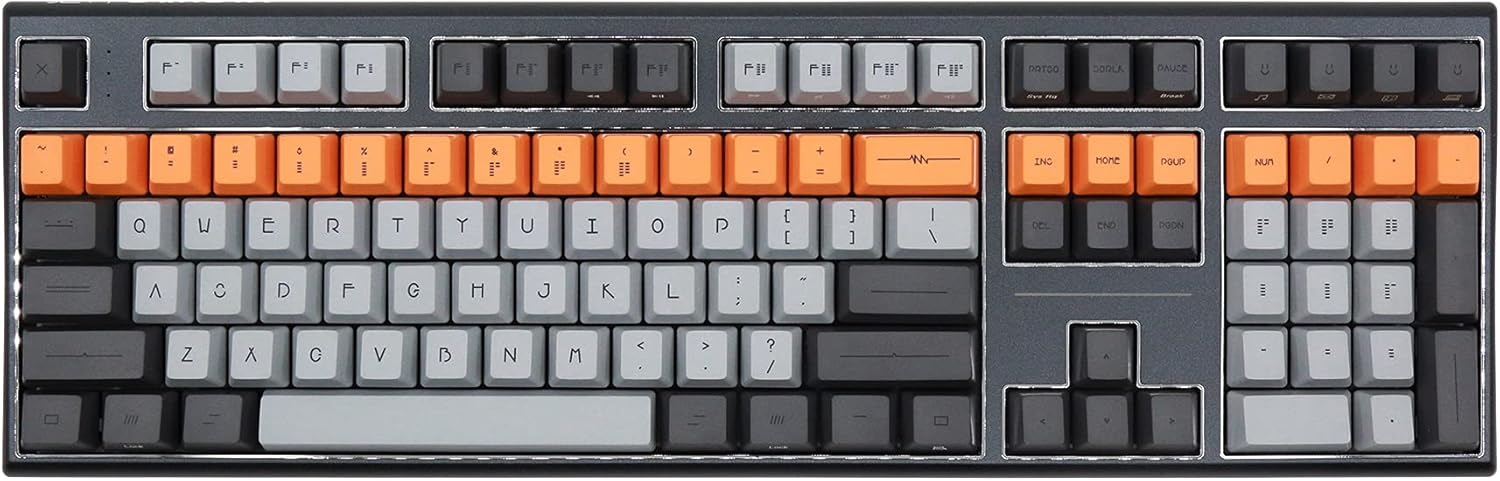
Figure 1: Varmilo VBS108 Lure Bot Mechanical Keyboard
Eusi pakét
Punten pastikeun sadaya barang aya dina pakét:
- Varmilo VBS108 Lure Bot Mechanical Keyboard
- USB-C ka USB-A Cable
- 2.4GHz Wireless Dongle (typically stored in the keyboard's battery compartment or a dedicated slot)
- Keycap Puller (may be included)
- Manual pangguna (dokumén ieu)
Disetél
The Varmilo VBS108 offers three connectivity modes: USB-C wired, 2.4GHz wireless, and Bluetooth 5.0.
1. Sambungan Kabel USB-C
- Locate the USB-C port on the keyboard (usually on the top edge).
- Sambungkeun hiji tungtung kabel USB-C anu disayogikeun kana kibor.
- Sambungkeun tungtung séjén (USB-A) ka port USB sadia dina komputer Anjeun.
- Kibor bakal otomatis dikenal sareng siap dianggo.
2. 2.4GHz Wireless Connection
- Panggihan dongle nirkabel 2.4GHz.
- Colokkeun dongle ka port USB nu sadia dina komputer Anjeun.
- Ensure the keyboard is in 2.4GHz mode (refer to the keyboard's function key combinations or a physical switch if available).
- Kibor kedah nyambung sacara otomatis.
3. Sambungan Bluetooth 5.0
- Ensure the keyboard is in Bluetooth pairing mode. This typically involves holding down a specific Fn key combination (e.g., Fn + 1, Fn + 2, or Fn + 3 for different profiles) until an indicator light flashes. Consult your keyboard's specific key legend for Bluetooth pairing.
- Dina komputer atanapi alat anjeun, buka setélan Bluetooth.
- Milarian pikeun new devices and select "Varmilo VBS108" or a similar name from the list.
- Turutan ajakan dina layar pikeun ngarengsekeun prosés papasangan.
Ngoperasikeun
The Varmilo VBS108 keyboard includes various function key combinations for enhanced control.
Function Key Combinations (Fn + Key)
- Fn + F1-F12: Multimedia controls (play/pause, volume up/down, mute, etc.). Refer to the keycap legends for specific functions.
- Fn + Meunang: Konci/Buka konci Windows.
- Fn + Left Alt: Switch between macOS and Windows layouts (if supported).
- Fn + Q/W/E: Switch between Bluetooth profiles (lamun lumaku).
- Fn + R: Pindah ka modeu nirkabel 2.4GHz.
- Fn + T: Ganti ka modeu kabel USB-C.
- Fn + Backlight Keys: Adjust backlight brightness or effects (if applicable).
Adjustable Flip-out Feet
The keyboard features 3-stage adjustable flip-out feet on the underside, allowing you to customize the typing angle for ergonomic comfort.

Figure 2: Adjustable Flip-out Feet
Pangropéa
Proper maintenance ensures the longevity and performance of your Varmilo keyboard.
Ngabersihan kibor
- Keycaps: Use a keycap puller to carefully remove keycaps. Clean them with a mild soap solution and a soft cloth, then rinse thoroughly and air dry completely before reattaching.
- Kasus: Wipe the keyboard case with a soft, slightly damp, lawon anu teu ngaganggu. Ulah nganggo bahan kimia anu kasar atanapi bahan anu abrasif.
- Antara konci: Use compressed air to remove dust and debris from between the key switches. A small brush can also be used for stubborn particles.

Figure 3: PBT Dye-Sub Keycaps
Pamérésan masalah
If you encounter issues with your Varmilo VBS108 keyboard, try the following solutions:
- Kibor teu ngaréspon (Kabel): Pastikeun kabel USB-C nyambung pageuh kana kibor sareng komputer. Cobi port atanapi kabel USB anu sanés.
- Keyboard not responding (Wireless/Bluetooth):
- Pariksa tingkat batré.
- Ensure the keyboard is in the correct mode (2.4GHz or Bluetooth).
- Pikeun 2.4GHz, pastikeun dongle dipasangkeun kalayan leres sareng cobian port USB anu béda.
- For Bluetooth, unpair and re-pair the keyboard with your device. Ensure your device's Bluetooth is enabled.
- Konci henteu ngadaptar: Remove the keycap and check for any obstructions around the switch. Clean the area with compressed air.
- Sambungan intermiten: Ensure there are no major sources of interference (e.g., other wireless devices) near the keyboard or dongle.
- Pembaruan firmware: Check the official Varmilo website for any available firmware updates for your model, which can resolve known issues.
spésifikasi
| Fitur | Rincian |
|---|---|
| merek | Varmilo |
| Modél | VBS108 Lure Bot |
| Téhnologi konektipitas | Bluetooth 5.0, 2.4GHz Wireless, USB-C |
| Pindah Tipe | Cherry MX Brown |
| Bahan Keycap | PBT Dye-Sub |
| Jumlah konci | 104 |
| Alat nu cocog | PC |
| Warna | Cherry MX Brown (keyboard color scheme) |
| Fitur husus | 3-Stage Adjustable Flip-out Feet |
Garansi sareng Rojongan
Varmilo products are designed for quality and reliability. For information regarding warranty coverage, technical support, or service, please refer to the warranty card included with your product or visit the official Varmilo websitus. Anjeun ogé tiasa ngahubungi pangecér tempat anjeun mésér produk pikeun kéngingkeun bantosan.


