1. Bubuka
This manual provides detailed instructions for the CaDA Pro HighSpeed Power System (Model S059-003). This system is designed to enhance your building block models with advanced motorization, lighting, and remote control capabilities. Please read this manual thoroughly before use to ensure proper operation and maintenance.
2. Produk Langkungview
The CaDA Pro HighSpeed Power System includes the following components:
- 3 High-Performance Motors (M-Motor, L-Motor, Servo Motor)
- 2.4 GHz Rechargeable Battery Box (500 mAh, 7.4 V)
- Set Lampu LED
- 2.4 GHz Jauh Control
- Extension Cable (30 cm)
- Micro USB Charging Cable (75 cm)
- Components for Steering Wheel Control

Gambar 2.1: Leuwihview of the CaDA Pro HighSpeed Power System components as packaged.

angka 2.2: Tutup-up view of the individual components including motors, battery box, remote control, and cables.
3. Setup jeung Instalasi
Follow these steps to set up your CaDA Pro HighSpeed Power System with your building block model.
- Charge the Battery Box: Connect the Micro USB charging cable to the battery box and a suitable USB power source. The indicator light will show charging status. A full charge is recommended before first use.
- Pasang Batré dina Kadali Jauh: Open the battery compartment on the 2.4 GHz remote control and insert 2 x 1.5V AA batteries (not included), ensuring correct polarity.
- Connect Motors and LEDs: Attach the M-Motor, L-Motor, Servo Motor, and LED Light Set to your building block model as per your model's instructions. Use the 30 cm extension cable if additional reach is needed.
- Connect to Battery Box: Plug the cables from the motors and LED lights into the appropriate ports on the rechargeable battery box.
- Nyapasangkeun Remote Control:
- Ensure the battery box is powered on.
- Turn on the remote control. The indicator light on the remote control will flash.
- Press and hold the pairing button on the battery box until the indicator light on both the battery box and remote control become solid, indicating successful pairing.

Figure 3.1: The 2.4GHz rechargeable battery box, which powers the system components.
4. Parentah Operasi
Once the system is set up and paired, you can control your model using the 2.4 GHz remote control.
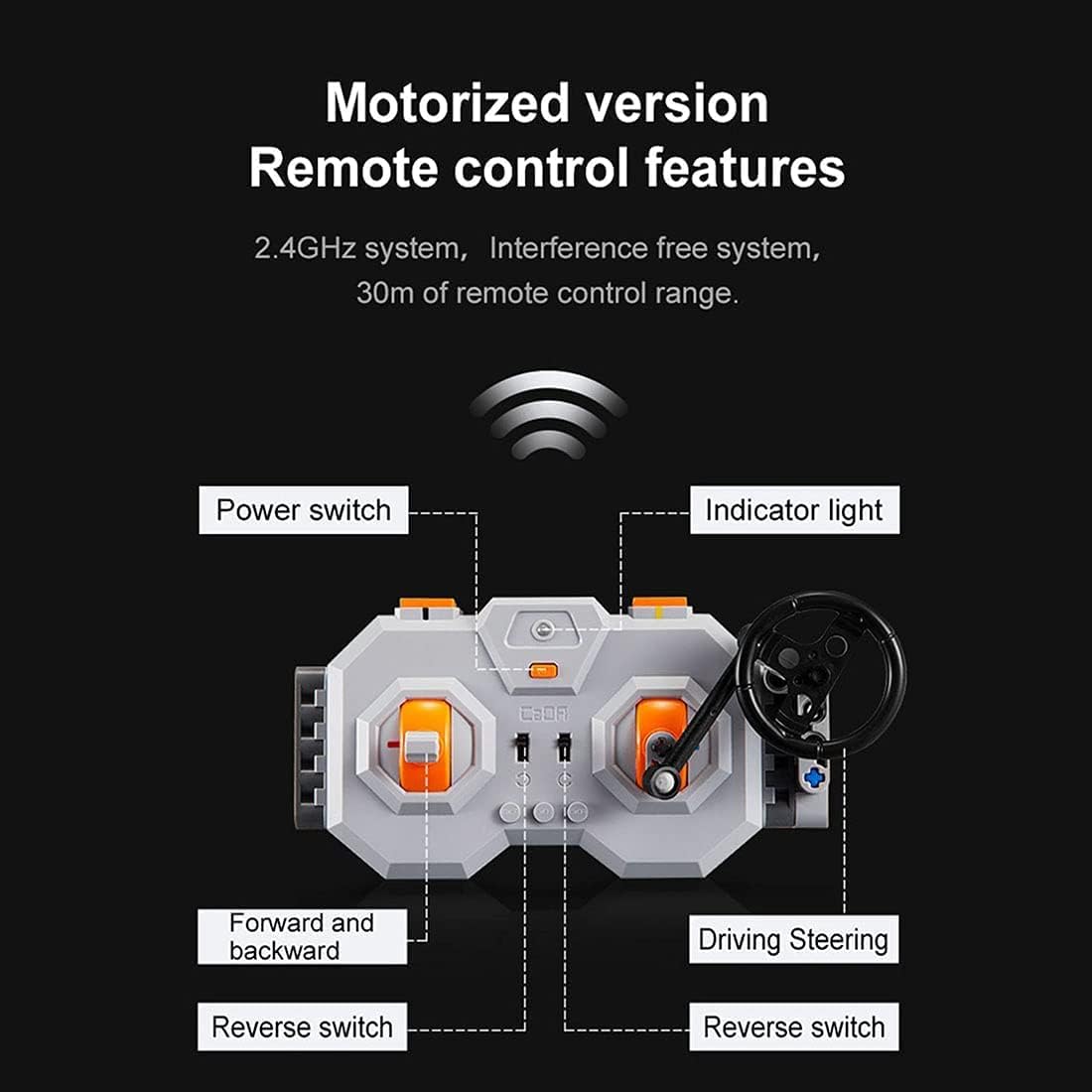
Figure 4.1: Diagram illustrating the features of the 2.4GHz remote control, including power switch, indicator light, forward/backward controls, and driving/steering controls.
- Saklar kakuatan: Located on the remote control, turn it on to activate the system.
- Lampu Indikator: Shows the connection status. Solid light indicates successful pairing.
- Forward and Backward Controls: Use the left joystick/buttons to control the forward and backward movement of the model.
- Driving/Steering Controls: Use the right joystick/steering wheel to control the steering or other directional movements of the model.
- Reverse Switches: Specific switches may be present for fine-tuning motor direction.
- Smooth Start Control: The motors feature a smooth start control, accelerating gradually over one second instead of abruptly.
The 2.4 GHz system provides an interference-free connection with a remote control range of up to 30 meters.
5. Pangropéa
To ensure the longevity and optimal performance of your CaDA Pro HighSpeed Power System, follow these maintenance guidelines:
- beberesih: Use a dry, soft cloth to clean the components. Do not use water or chemical cleaners, as this can damage the electronic parts.
- Perawatan batré:
- Recharge the lithium-ion battery box regularly, even if not in use, to maintain battery health.
- Ulah ngecas batréna kaleuleuwihi atanapi ngosongkeun batréna dugi ka kosong.
- Remove AA batteries from the remote control if storing for extended periods to prevent leakage.
- Panyimpenan: Store the system components in a cool, dry place away from direct sunlight and extreme temperatures.
- Manajemén Kabel: Avoid bending or crimping cables excessively to prevent internal damage.
6. Cara ngungkulan
If you encounter issues with your CaDA Pro HighSpeed Power System, refer to the following common problems and solutions:
| Masalah | Mungkin Cukang lantaranana | Solusi |
|---|---|---|
| Sistem henteu hurung. | Battery box is not charged or remote control batteries are dead. | Charge the battery box. Replace AA batteries in the remote control. |
| Kadali jauh teu ngabales. | Henteu dipasangkeun, di luar jangkauan, atanapi gangguan. | Re-pair the remote control and battery box. Ensure you are within 30m range. Move away from other 2.4GHz devices. |
| Motors not moving or moving slowly. | Low battery, incorrect connection, or motor obstruction. | Charge the battery box. Check all cable connections. Ensure no parts are blocking motor movement. |
| Lampu LED teu jalan. | Loose connection or damaged LED set. | Check the connection of the LED light set to the battery box. |
If the problem persists after trying these solutions, please contact CaDA customer support.
7. Spésifikasi
| Fitur | Rincian |
|---|---|
| Nomer modél | S059-003 |
| Motor Kaasup | 1x M-Motor (up to 650 rpm), 1x L-Motor (up to 680 rpm), 1x Servo Motor |
| Kotak batré | Lithium-ion, 500 mAh, 7.4 V, Rechargeable via Micro USB |
| Kadali jauh | 2.4 GHz, requires 2x 1.5V AA batteries |
| LED Light Set Cable Length | 53 cm |
| Panjang Cable Extension | 30 cm |
| Micro USB Charging Cable Length | 75 cm |
| Kasaluyuan | Universal for CaDA and Lego models (e.g., C61001W, C61003W, C61007W, etc.) |
| Disarankeun Umur | 12 taun ka luhur |
| Bahan Utama | Acrylonitrile Butadiene Styrene (ABS) |
8. Warnings Kasalametan
WARNING: Contains toys. Adult supervision recommended.
- Produk ieu ngandung bagian-bagian alit sareng henteu cocog pikeun murangkalih di handap 3 taun kusabab bahaya kaselek.
- Do not disassemble or modify the components.
- Do not expose the battery box to water, fire, or extreme temperatures.
- Ensure proper battery polarity when inserting batteries into the remote control.
- Buang batré sacara tanggung jawab nurutkeun peraturan lokal.
9. Garansi jeung Rojongan
CaDA products are manufactured to high-quality standards. For warranty information or technical support, please refer to the official CaDA websitus atanapi ngahubungan pangecér Anjeun.
For further assistance, you may visit the official CaDA websitus: www.doubleeagle.cc


