1. Bubuka
The M5Stack Core2 is a versatile IoT development kit designed for rapid prototyping and deployment of various applications. It features an ESP32-D0WDQ6-V3 microcontroller, a 2-inch TFT LCD touch screen, and integrated Wi-Fi and Bluetooth connectivity. This manual provides essential information for setting up, operating, and maintaining your Core2 device.

Figure 1.1: M5Stack Core2 IoT Development Kit, showcasing desain sareng tampilanna anu ringkes.
2. Naon dina Box
Pastikeun yén sadaya item anu didaptarkeun di handap kalebet kana pakét anjeun:
- 1 x M5Stack Core2 Unit
- 1 x USB Type-C Cable (20cm)
- 1 x Hex rengkuh

Figure 2.1: Contents of the M5Stack Core2 package, including the Core2 unit, USB-C cable, and hex wrench.

Figure 2.2: Visual representation of the shipping list for the M5Stack Core2.
3. Produk Langkungview
The M5Stack Core2 is built around the ESP32-D0WDQ6-V3 chip, offering robust performance for various applications. Key features include:
- Kinerja anu kuat: Equipped with an ESP32-D0WDQ6-V3 microcontroller for high computing performance.
- Tampilan layar toél: Features a 2-inch TFT LCD touch screen (320x240 resolution) for intuitive user interaction.
- Konéktipitas nirkabel: Integrated Wi-Fi and Bluetooth capabilities for seamless communication.
- Fungsi anu tiasa dilegaan: Multiple expansion ports (GPIO, I2C, SPI, UART) for connecting additional modules and sensors.
- Speaker Diwangun-di: Pikeun kaluaran audio.
- Motor Geter: Nyayogikeun eupan balik haptik.
- Mikropon: Pikeun input audio.
- Slot Kartu SD: Pikeun panyimpenan anu tiasa dilegaan.
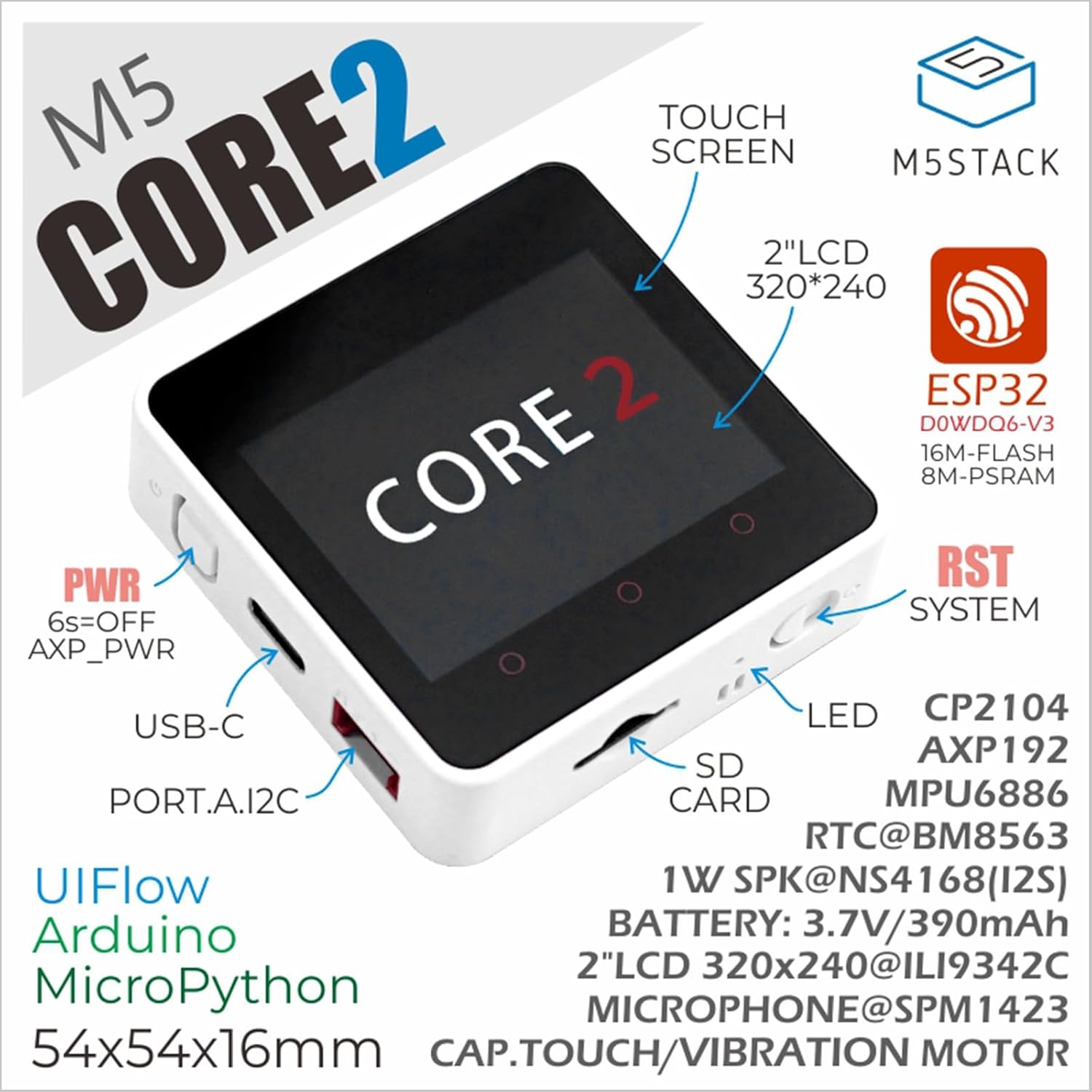
Figure 3.1: Annotated diagram of the M5Stack Core2, highlighting its main components and interfaces.

Figure 3.2: Key features of the M5Stack Core2, including memory and display type.
4. Spésifikasi
The following table details the technical specifications of the M5Stack Core2:
| Spésifikasi | Parameter |
|---|---|
| SoC | ESP32-D0WDQ6-V3, 240MHz dual core, 600 DMIPS, 520KB SRAM, Wi-Fi |
| Kilat | 16 MB |
| PSRAM | 8 MB |
| Masukan Voltage | 5V @ 500mA |
| Panganteur Inangna | Tipe-C x 1, GROVE(I2C+I/O+UART) x 1 |
| LED | Lampu indikator kakuatan héjo |
| Kancing | Power button, RST button, screen virtual buttons x 3 |
| Siaga Geter | Motor geter |
| Item Beurat | 2.82 ons (kira-kira 80 gram) |
| Ukuran Paket | 3.19 x 2.28 x 0.87 inci |
| Batré | 1 batré Litium Ion (kaasup) |

Figure 4.1: M5Stack Core2 weight measurement.

Figure 4.2: M5Stack Core2 dimensions.
5. Setélan
To begin using your M5Stack Core2, follow these initial setup steps:
- Ngecas: Connect the M5Stack Core2 to a 5V USB power source using the provided USB Type-C cable. The device will begin charging.
- Daya Hurung: Press and hold the power button (usually located on the side) for approximately 6 seconds to turn on the device.
- Lingkungan Perangkat Lunak: The Core2 supports various development environments, including UIFlow, Arduino, and MicroPython. Choose your preferred environment and set up the necessary drivers and IDE on your computer.
- Program Kahiji: Refer to the official M5Stack documentation for guides on uploading your first program or firmware to the Core2.
6. Parentah Operasi
The M5Stack Core2 is designed for flexible operation depending on your application. Here are general guidelines:
- Touch Screen Interaction: Navigate menus and interact with applications using the 2-inch capacitive touch screen.
- Tombol Virtual: The three virtual buttons below the screen can be programmed for various functions within your applications.
- Tombol fisik: The physical RST (Reset) button can be used to restart the device. The power button can be used for power cycling.
- Modul éksternal: Connect compatible M5Stack modules and sensors to the GROVE port to expand functionality. Ensure proper connection and power supply for external modules.
- Pamakéan Kartu SD: Insert a microSD card into the designated slot for additional storage. Ensure the card is formatted correctly (e.g., FAT32).
7. Pangropéa
Proper maintenance ensures the longevity and optimal performance of your M5Stack Core2:
- beberesih: Anggo kaén anu lemes sareng garing pikeun ngabersihan alat. Hindarkeun nganggo pembersih cair atanapi bahan abrasive.
- Panyimpenan: Simpen alat dina tempat anu tiis sareng garing jauh tina sinar panonpoé langsung sareng suhu anu ekstrim.
- Perawatan batré: Avoid fully discharging the battery frequently. If storing for extended periods, charge the battery to about 50-70% to preserve its lifespan.
- Pembaruan firmware: Regularly check the official M5Stack websitus pikeun apdet firmware pikeun mastikeun alat anjeun ngagaduhan fitur pangénggalna sareng perbaikan bug.
- Perlindungan fisik: While durable, avoid dropping the device or exposing it to excessive force or moisture.
8. Cara ngungkulan
This section addresses common issues you might encounter with your M5Stack Core2.
- Q1: What is the maximum supported capacity of the SD card, and why is there no response when the SD card is inserted?
- Theoretically, devices based on ESP32 support up to 16GB. We recommend using a SD card model SDSQUNC-016G-ZN6MA. Ensure the SD card is properly inserted and formatted.
- Q2: Using the battery in either of the battery ports on the USB unit or the Core2 forces the unit to stay powered on continuously. Any attempt to shut down using the side button causes the device to restart after.
- We have found that the reason is that the filter capacitor capacity of the USB 1.2 module is too large. If you still need to use batteries to power the Core2 + USB 1.2 solution, to avoid frequent restarts, the following two solutions can be adopted:
- Remove the filter capacitor.
- Replace it with a smaller capacity filter capacitor (10uF is recommended).
- Q3: How to extend the Core2 with an extension module?
- You must remove the original bottom and battery of the Core2, then you can stack another module extension.

Figure 8.1: Common questions and solutions for the M5Stack Core2.
9. Wengkuan Aplikasi
The M5Stack Core2 is suitable for a wide range of applications, including but not limited to:
- Alat Smart Home: Control and monitor home automation systems.
- Atikan STEM: An excellent tool for learning about IoT, programming, and electronics.
- IoT Controller: Serve as a central controller for various Internet of Things projects.
- Proyék DIY: Ideal for custom electronic projects and rapid prototyping.
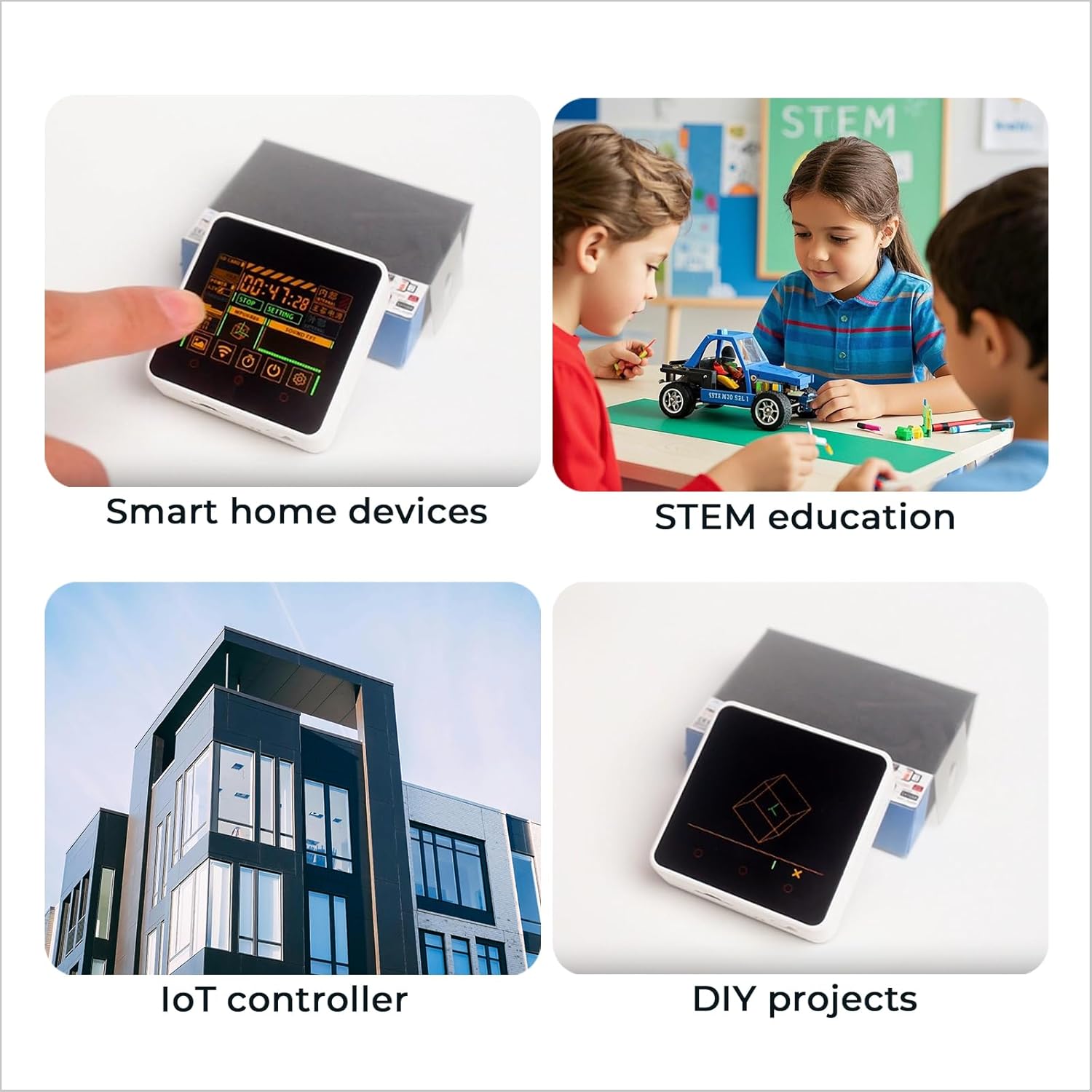
Gambar 9.1: Kelamples of M5Stack Core2 applications.

Figure 9.2: Further illustration of the M5Stack Core2's versatile applications.
10. Rojongan jeung Sumberdaya
For more detailed tutorials, documentation, and community support, please visit the official M5Stack websitus:

Figure 10.1: Guide to accessing online tutorials and documentation.

Figure 10.2: Official M5Stack websitus pikeun rojongan.


