1. Bubuka
This manual provides essential information for the safe and effective operation, setup, maintenance, and troubleshooting of your Crown CT33100 Digital Inverter Welding Machine. Please read this manual thoroughly before using the machine to ensure proper handling and to prevent injury or damage.
Émbaran Kasalametan penting
Salawasna merhatikeun precautions kaamanan dasar pikeun ngurangan résiko seuneu, shock listrik, sarta tatu pribadi. Simpen manual ieu pikeun rujukan ka hareup.
- Pastikeun wewengkon gawé téh well-ventilated sarta bébas tina bahan kaduruk.
- Anggo alat pelindung pribadi (PPE), kalebet helm las, sarung tangan, sareng pakean pelindung.
- Ulah beroperasi mesin di damp atawa kaayaan baseuh.
- Pegatkeun sambungan kakuatan saméméh ngalakukeun sagala pangropéa atawa pangaluyuan.
2. komponén Leuwihview
Familiarize yourself with the main parts of your Crown CT33100 welding machine.

Gambar 2.1: Gemblengna view of the Crown CT33100 Digital Inverter Welding Machine, showing its compact design and integrated handle.

Figure 2.2: Front panel of the welding machine, featuring the current adjustment knob (30-250A scale, actual range 30-200A) and the positive (+) and negative (-) output terminals for connecting welding cables.

Figure 2.3: Rear panel of the welding machine, showing the main power switch (ON/OFF), AC 220V power input, and the cooling fan for heat dissipation.
Komponén konci:
- kenop adjustment ayeuna: Dianggo pikeun ngatur arus las (Ampera).
- Terminal Kaluaran: Connect the electrode holder and ground clamp kabel.
- Saklar kakuatan: Turns the machine ON or OFF.
- Kipas pendingin: Mastikeun ventilasi anu leres sareng nyegah overheating.
- Mawa cecekelan: Pikeun gampang dibawa.
3. Parentah Setup
Follow these steps to prepare your welding machine for operation.
- Ngabongkar bungkusan: Carefully remove the welding machine and all accessories from its packaging. Inspect for any shipping damage.
- panempatan: Place the machine on a stable, level surface, ensuring adequate clearance around the cooling fan and vents for proper airflow.
- Sambungan Daya: Connect the power cord to a suitable electrical outlet. The machine operates on a rated input voltage of 160-265 Volt. Ensure your power supply matches this requirement.
- Connect Welding Cables:
- Connect the electrode holder cable to the positive (+) output terminal.
- Nyambungkeun taneuh clamp cable to the negative (-) output terminal.
- Pastikeun sadaya sambungan kedap tur aman.
- Ngagantelkeun Ground Clamp: Aman ngagantelkeun taneuh clamp to the workpiece or a metal workbench that is in direct contact with the workpiece. A good ground connection is crucial for stable arc and safe operation.
- Sisipkeun Éléktroda: Insert the appropriate welding electrode into the electrode holder. The machine supports electrode diameters from 2.4 mm to 4 mm.
4. Parentah Operasi
This section outlines the basic steps for operating your welding machine.
- Daya Hurung: Turn the main power switch on the rear panel to the 'ON' position. The machine's indicator light should illuminate.
- Atur Arus Las: Adjust the current adjustment knob on the front panel to the desired amperage. The current adjustment range is 30-200 A. The optimal setting depends on the electrode type, diameter, and material thickness. Refer to electrode manufacturer guidelines for recommended settings.
- Mimitian las:
- Put on all necessary PPE, including your welding helmet.
- Jieun busur listrik ku cara ngagores éléktroda sacara hampang kana benda kerja.
- Once the arc is established, maintain a consistent arc length and travel speed to create a uniform weld bead.
- Ngawas kinerja: Pay attention to the sound of the arc and the appearance of the weld puddle. Adjust current as needed for optimal results.
- Pareum listrik: After completing your welding task, turn the main power switch to the 'OFF' position. Allow the machine to cool down before storing.
Operational Safety Precautions:
- Never touch live electrical parts or electrodes with bare hands or wet gloves.
- Avoid looking at the welding arc without proper eye protection.
- Pastikeun ventilasi anu cekap pikeun nyebarkeun haseup las.
5. Pangropéa
pangropéa biasa ensures umur panjang tur operasi aman tina mesin las Anjeun.
- beberesih: Periodically clean the machine's exterior, especially the cooling vents, to prevent dust and debris buildup. Use compressed air to gently clear internal components if necessary, ensuring the machine is unplugged.
- Pamariksaan kabel: Pariksa kabel las, wadah éléktroda, sareng ground cl sacara rutinamp for damage, frayed wires, or loose connections. Replace damaged components immediately.
- Panyimpenan: Store the welding machine in a clean, dry environment, away from moisture and extreme temperatures.
- Palayanan profésional: For internal repairs or complex issues, contact qualified service personnel. Do not attempt to open the machine casing unless you are a trained professional.
6. Cara ngungkulan
Bagian ieu ngabahas masalah umum anu anjeun tingali sareng solusi poténsialna.
| Masalah | Mungkin Cukang lantaranana | Solusi |
|---|---|---|
| Mesin teu hurung | Taya catu daya; Pareum listrik; Kabel listrik lepat | Check power outlet and circuit breaker; Ensure power switch is ON; Inspect power cord for damage. |
| Teu aya busur las | Poor ground connection; Incorrect current setting; Wet electrode; Faulty cables | Pastikeun taneuh clamp is securely attached to clean metal; Adjust current; Use dry electrodes; Check cables for damage. |
| Lengkungan lemah atanapi teu stabil | Low current setting; Poor ground; Incorrect electrode size | Increase current; Improve ground connection; Use appropriate electrode for material thickness. |
| Machine overheats (thermal protection activates) | Blocked cooling vents; Excessive duty cycle; High ambient temperature | Clean vents; Allow machine to cool down; Operate within recommended duty cycle. |
7. Spésifikasi
Technical specifications for the Crown CT33100 Digital Inverter Welding Machine.
| Fitur | Spésifikasi |
|---|---|
| Modél | CT33100 |
| Dipeunteun Masukan Voltage | 160-265 volt |
| Rentang adjustment ayeuna | 30-200 A |
| Welding Electrode Diameter | 2.4-4 mm |
| Tipe Sumber Daya | Kabel Listrik |
| Item Beurat | 209 g |
| Ukuran produk (L x W x H) | 37 x 20 x 10 cm |
| Produsén | Mesir |
| Tanggal Kahiji Sadia | 14 Pébruari 2021 |
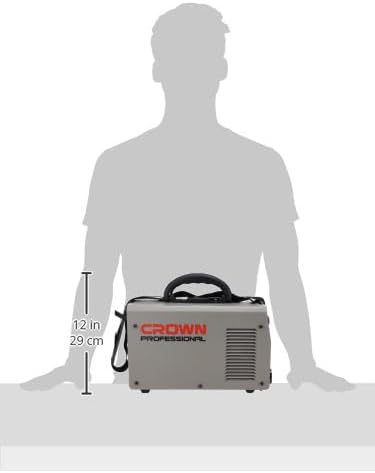
Figure 7.1: Size comparison of the Crown CT33100 welding machine, illustrating its compact form factor relative to a person.
8. Garansi jeung Rojongan
For warranty information, technical support, or service inquiries regarding your Crown CT33100 Digital Inverter Welding Machine, please contact the retailer or the manufacturer directly. Keep your purchase receipt as proof of purchase.
You can visit the official Crown store for more information: Crown Official Store


