Bubuka
This manual provides detailed instructions for the safe and effective operation of your BAOFENG UV-82 High Power Ham Radio. Please read this manual thoroughly before using the device to ensure proper functionality and to prevent damage.
Naon dina Box
Saatos ngabongkar bungkusan, mangga pariksa yén sadaya barang anu didaptarkeun di handap aya sareng dina kaayaan anu saé:
- 1 x BAOFENG UV-82 Radio
- Baterai 1 x 2800 mAh
- 1 x Dual Band Standard Antenna
- 1 x Dual PTT Earpiece
- 1 x Charger and Adapter
- 1 x Tali pigeulang
- 1 x Sabuk Klip
- 1 x Manual Pamaké
Produk Leuwihview
The BAOFENG UV-82 is a dual-band FM transceiver designed for reliable two-way communication. It features a robust design and intuitive controls.
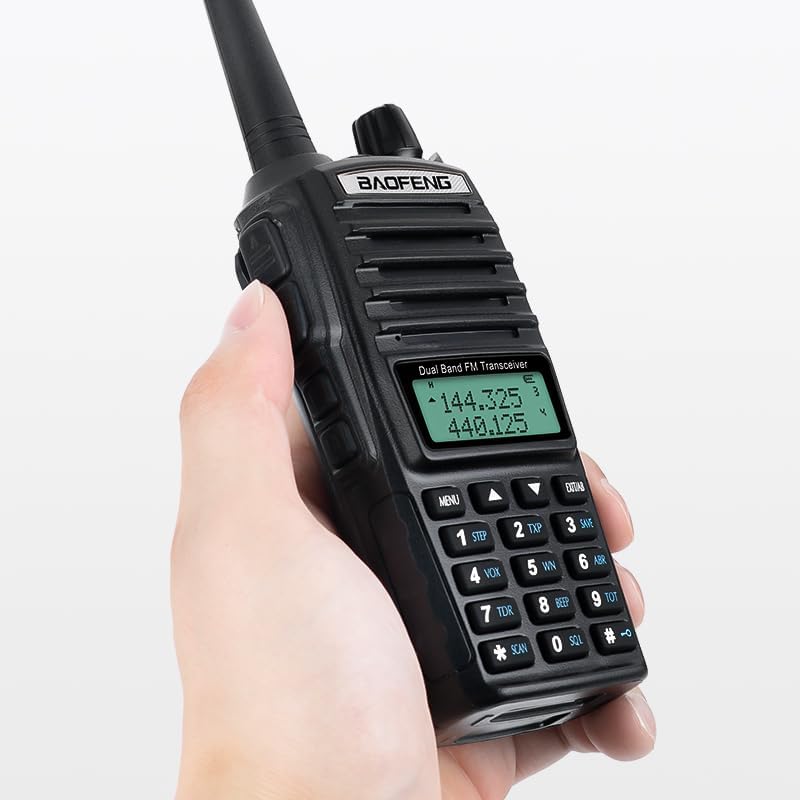
Figure 1: BAOFENG UV-82 radio held in hand, showing its compact size and ergonomic design.

Figure 2: Key features of the BAOFENG UV-82, highlighting the LED flashlight, dual PTT button, earphone jack, and large LCD display for easy navigation.
Komponén konci:
- Dual PTT Button: Allows selection between two frequencies for transmission without changing channels.
- Senter LED: Integrated light for illumination in low-light conditions.
- Jack Earphone: For connecting the included earpiece or other compatible audio accessories.
- Layar LCD ageung: Provides clear visibility of frequencies, channels, and menu options.
- Papan tombol: For manual frequency input and menu navigation.
- Tombol Volume/Kakuatan: Ngatur hurung/pareumna daya sareng volume audio.
- Panyambung anteneu: For attaching the dual-band antenna.
Disetél
1. Pamasangan Batré sareng Ngecas:
The BAOFENG UV-82 comes with a 2800mAh Lithium Polymer battery. Ensure the battery is fully charged before first use.
- Sejajarkeun batréna jeung alur di tukang radio terus geser kana tempatna nepi ka ngaklik pageuh.
- Connect the charger adapter to a power outlet and place the radio (with battery installed) into the charging cradle.
- The charging indicator light will show the charging status. A full charge typically takes several hours.

Figure 3: The 2800mAh battery, providing extended operational time for the radio.
2. Antenna Attachment:
Carefully screw the dual-band antenna clockwise onto the antenna connector at the top of the radio until it is finger-tight. Do not overtighten.
3. Earpiece Connection:
Insert the dual PTT earpiece into the earphone jack on the side of the radio. Ensure it is fully seated for proper audio and microphone function.
Parentah Operasi
1. Power On/Off and Volume:
Rotate the volume/power knob clockwise to turn the radio on. Continue rotating to increase the volume. Rotate counter-clockwise to decrease volume and turn off the radio.
2. Frékuénsi sareng Pamilihan Saluran:
Use the keypad to directly input frequencies or navigate through programmed channels. The up/down arrow buttons can also be used to scroll through frequencies or channels.
3. Dual PTT Function:
The UV-82 features a unique dual PTT button. This allows you to transmit on either the upper or lower displayed frequency without manually switching between them. Press the upper part of the PTT button to transmit on the upper frequency, and the lower part to transmit on the lower frequency.

Figure 4: The dual PTT button, enabling quick transmission on two different frequencies.
4. VOX Function (Voice Operated Exchange):
The VOX function allows for hands-free transmission. When activated, the radio will automatically transmit when it detects your voice. Adjust the VOX sensitivity in the menu to suit your environment.

Figure 5: Hands-free communication using the VOX function.
5. Scanning Function:
The radio can scan for active frequencies or channels. Refer to the detailed menu instructions in the full user manual for activating and configuring scanning modes (e.g., Busy Channel Lock-Out - BCLO).

Figure 6: The radio's scanning capability for active channels.
6. Senter LED:
Press the dedicated flashlight button to turn the LED light on. Press again to activate strobe mode, and a third time to turn it off.

Figure 7: Flashlight modes: constant and strobe.
7. Alarm Function:
The radio includes an alarm function for emergency situations. Consult the full user manual for specific instructions on how to activate and deactivate the alarm.

Figure 8: Activating the SOS alarm sound in an emergency.
8. Pemrograman:
The radio supports programming via CHIRP software or manufacturer software on a computer. A programming cable (not included) is required for this method. Manual programming is also possible directly through the radio's keypad and menu system.
Pangropéa
- beberesih: Ngagunakeun lemes, damp lawon pikeun ngabersihkeun bagian luar radio. Entong nganggo bahan kimia anu kasar atanapi pembersih anu abrasif.
- Perawatan batré: To prolong battery life, avoid overcharging and fully discharging the battery regularly. Store the radio and battery in a cool, dry place.
- Tahan cai: The radio is water-resistant, but not waterproof. Avoid submerging it in water. Ensure the earphone jack cover is securely closed when not in use.
Pamérésan masalah
| Masalah | Mungkin Cukang lantaranana | Solusi |
|---|---|---|
| Radio teu hurung. | Batré lemah atawa teu dipasang bener. | Cas batréna atanapi pasang deui kalayan pageuh. |
| Teu tiasa ngirim atanapi nampi. | Frékuénsi/saluran salah, anteneu teu nyambung, atanapi di luar jangkauan. | Verify frequency/channel settings, ensure antenna is attached, or move closer to the other radio/repeater. |
| Kualitas audio goréng. | Low signal strength, earpiece/microphone issue, or volume too low/high. | Adjust volume, check earpiece connection, or move to an area with better signal. |
spésifikasi
- Jumlah modél: BAOFENG UV-82
- Rentang Frékuénsi: VHF/UHF (Dual Band)
- Jumlah Saluran: 128
- Batré: 1 Lithium Polymer battery (2800mAh, 7.4 Volts)
- Beurat barang: 1.08 pon
- Ukuran produk: 8 x 2 x 10 inci
- Jangkauan Ngobrol Maksimum: Up to 10 Kilometers (approximately 6.2 miles, actual range varies with terrain and conditions)
- Tingkat tahan cai: Tahan cai
- Fitur husus: Portabel
- ID FCC: 2AJGM-UV82

Figure 9: Back of the BAOFENG UV-82 radio, displaying the FCC ID and battery information.
Émbaran Kasalametan penting
Operation of this radio may require a license depending on the frequencies used and your location. Users are responsible for complying with all applicable regulations and obtaining necessary licenses (e.g., Amateur Radio License from the FCC in the United States) for transmission. Listening to frequencies generally does not require a license.
Always ensure the antenna is properly connected before transmitting to prevent damage to the radio.
Garansi sareng Rojongan
For warranty information, technical support, or service inquiries, please refer to the contact details provided with your product packaging or visit the official BAOFENG websitus. Simpen resi pameseran anjeun salaku bukti pameseran pikeun klaim garansi.