ALFAJR CW-15 Automatic Islamic Azan Prayer Clock User Manual
Model: CW-15 | Brand: ALFAJR
Bubuka
This manual provides comprehensive instructions for setting up and operating your ALFAJR CW-15 Automatic Islamic Azan Prayer Clock. Designed for both wall mounting and table placement, this digital clock automatically calculates and plays the Azan five times a day based on your set location. Please read this manual carefully to ensure proper use and to fully utilize all features of your new clock.
Automatic Azan time adjustment after initial city/time setup.
Gregorian and Hijri calendar display.
Témbongkeun suhu dina Celsius atanapi Fahrenheit.
Daylight Saving Time (DST) option.
English and Arabic display languages.
Wall-mountable or table-standing design.
Dimensions: Approximately 9 inches (width) x 8.5 inches (height).
Powered by 4 AA batteries (included) or USB-C (cable not included).
Guide Setup
1. Pamasangan batré
The ALFAJR CW-15 clock operates on 4 AA batteries. These are included in your package.
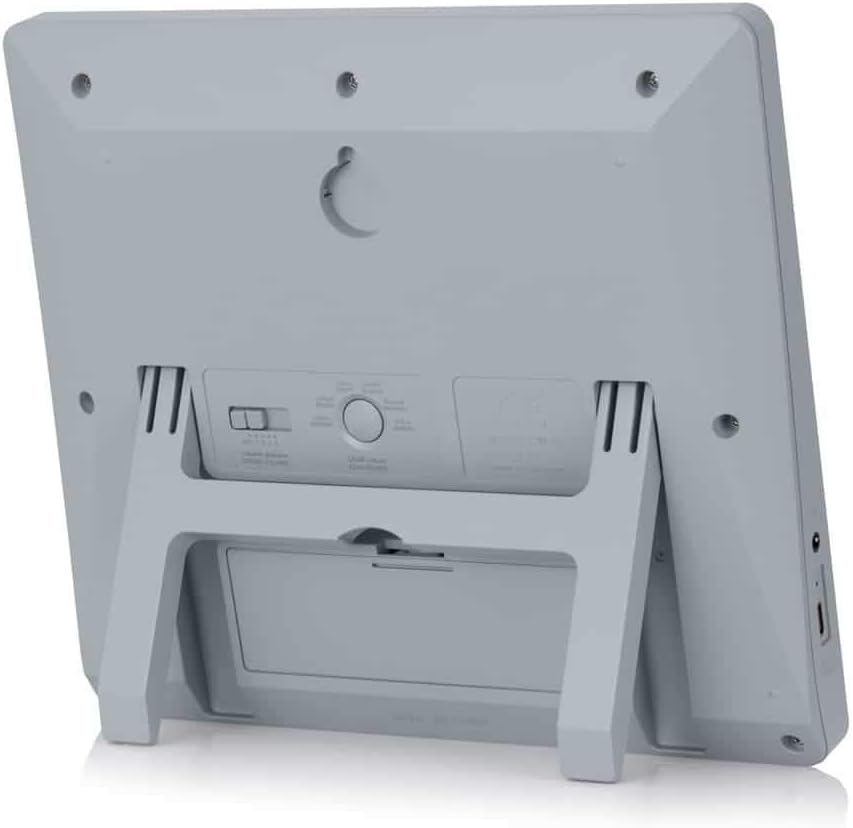
Panggihan kompartemen batré dina tonggong jam.
Buka panutup kompartemen batré.
Pasangkeun 4 batré AA, pastikeun polaritasna (+ sareng -) leres.
Tutup panutup kompartemen batré aman.
Alternatively, the clock can be powered via a USB-C cable (not included) connected to a compatible power adapter.
2. Initial Power On and Display Overview
Upon inserting batteries or connecting USB-C power, the clock will power on. The display will show the current time, date, and temperature. Familiarize yourself with the buttons on the side/back of the clock: UP, SET, jeung TURUN.
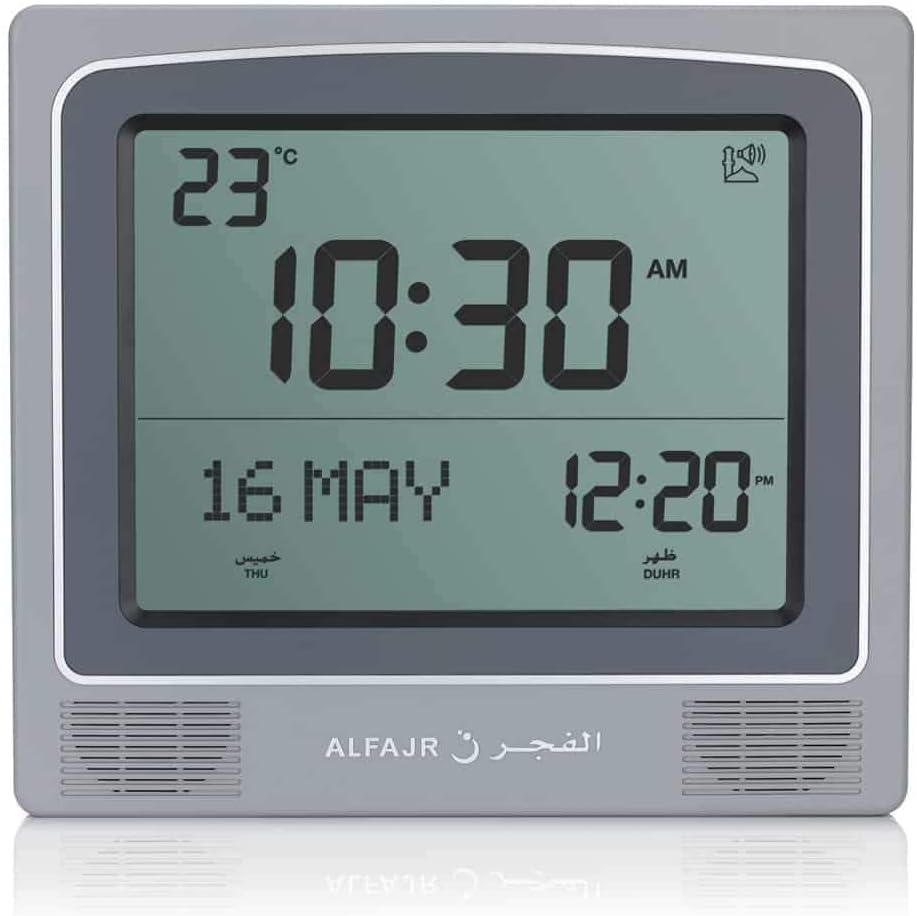
Gambar 1: Hareupeun view of the ALFAJR CW-15 clock, showing the digital display with time, date, and temperature. The speaker grilles are visible at the bottom.
Gambar 2: Hareupeun view of the ALFAJR CW-15 clock, similar to Figure 1, but with the ALFAJR brand logo visible at the bottom center.
3. Nyetel Waktos sareng Tanggal
Pencét jeung tahan tombol SET tombol salila kurang leuwih 3 detik nepi ka tampilan waktu mimiti kedip-kedip.
Ngagunakeun éta UP jeung TURUN tombol pikeun nyaluyukeun jam. Pencét SET kanggo mastikeun sareng ngalih ka menit.
Atur menit nganggo UP jeung TURUN, teras pencét SET.
Teraskeun prosés ieu pikeun nyetél taun, bulan, sareng dinten.
After setting the date, press SET pikeun kaluar tina modeu setelan waktos/tanggal.
4. Setting Location (City or Coordinates)
Accurate Azan times depend on correct location settings. You can select a pre-programmed city or enter latitude/longitude.
Pencét éta SET button once (short press) to enter the main menu.
Paké UP or TURUN to navigate to the "CITY" or "LOCATION" setting.
Pencét SET to enter the location setting.
Option A: Select Pre-programmed City: Paké UP or TURUN to scroll through the list of cities. Once your city is displayed, press SET pikeun mastikeun.
Option B: Enter Latitude/Longitude: If your city is not listed, select the option to enter coordinates. Use UP jeung TURUN to adjust the values for latitude, longitude, and time zone offset (GMT). Press SET sanggeus unggal nilai.
After confirming your location, the clock will automatically calculate the Azan times.
5. Azan Calculation Method
The clock supports various Azan calculation methods. Consult local Islamic authorities for the recommended method in your region.
From the main menu (short press SET), navigate to "CALC. METHOD".
Pencét SET asup.
Paké UP or TURUN to select the desired calculation method (e.g., Muslim World League, Umm Al-Qura, Egyptian General Authority of Survey, etc.).
Pencét SET pikeun mastikeun.
6. Daylight Saving Time (DST)
If your region observes Daylight Saving Time, enable this feature.
From the main menu, navigate to "DST".
Pencét SET.
Paké UP or TURUN to toggle between "ON" and "OFF".
Pencét SET pikeun mastikeun.
7. Unit Suhu
You can choose to display temperature in Celsius or Fahrenheit.
From the main menu, navigate to "TEMP UNIT".
Pencét SET.
Paké UP or TURUN to select "C" (Celsius) or "F" (Fahrenheit).
Pencét SET pikeun mastikeun.
8. Kalender Pintonan
The clock can display either the Gregorian or Hijri calendar.
From the main menu, navigate to "CALENDAR".
Pencét SET.
Paké UP or TURUN to select "GREGORIAN" or "HIJRI".
Pencét SET pikeun mastikeun.
Parentah Operasi
1. Adjusting Azan Volume
The clock features adjustable Azan volume. The volume buttons are typically located on the side or back of the unit.
During an Azan, press the UP or TURUN tombol pikeun ningkatkeun atanapi ngirangan volume.
Alternatively, some models may have a dedicated volume switch or buttons on the back. Refer to the physical clock for exact button placement.
2. Changing Azan Reciter
You can select from five different Azan reciters.
From the main menu (short press SET), navigate to "AZAN VOICE" or "RECITER".
Pencét SET asup.
Paké UP or TURUN to cycle through the available reciters (Makkah, Madina, Egypt, AlQuds, Riyadh).
Pencét SET pikeun mastikeun pilihan Anjeun.
3. Daily Alarms
The clock includes daily alarm functions in addition to the Azan. These can be set for specific times.
From the main menu, navigate to "DAILY ALARM".
Pencét SET.
Paké UP or TURUN to set the desired alarm time (hour and minute).
Pencét SET to confirm and enable the alarm.
To disable, navigate back to "DAILY ALARM" and set the time to "OFF" or a similar option.
4. Modeu tampilan
The clock typically cycles through different display information or allows manual switching.
The default display shows time, date, and temperature.
Pencét pondok UP or TURUN buttons outside of menu mode may cycle through additional information like next prayer time or Qibla direction (if available on this model).
Pilihan Pamasangan
The ALFAJR CW-15 clock is designed for versatile placement, either on a wall or a flat surface.
1. Pamasangan Tembok
To mount the clock on a wall:
Locate the keyhole slot on the back of the clock.
Pilih lokasi anu cocog dina témbok.
Install a screw (not included) into the wall, leaving a small portion protruding. Ensure the screw head fits into the keyhole slot.
Carefully hang the clock onto the screw, ensuring it is securely seated.
Gambar 3: Tukangeun view of the ALFAJR CW-15 clock, highlighting the keyhole for wall mounting and the battery compartment.
2. Table Placement
For table or desk placement:
Locate the integrated stand on the back of the clock.
Pull out the stand until it locks into position.
Place the clock on a flat, stable surface.
Gambar 4: Sisi view of the ALFAJR CW-15 clock, showing the integrated kickstand extended for stable table placement.
Pangropéa
1. beberesih
To maintain the appearance and functionality of your clock:
Lap beungeut jam ku lawon anu lemes sareng garing.
Ulah make cleaners abrasive, pangleyur, atawa sprays kimiawi, sabab ieu bisa ngaruksak tampilan atawa casing.
Avoid getting moisture into the clock's openings.
2. Ngagantian batré
When the display dims or the clock functions become erratic, it's time to replace the batteries.
Buka kompartemen batré dina tonggong jam.
Leupaskeun batré AA heubeul.
Insert four new AA batteries, observing correct polarity.
Tutup kompartemen batré.
You may need to re-enter the time and location settings after battery replacement.
Pamérésan masalah
Masalah
Mungkin Cukang lantaranana
Solusi
Clock does not power on.
Batteries are dead or incorrectly inserted. No USB-C power.
Check battery polarity. Replace with new batteries. Ensure USB-C cable (if used) is connected and power source is active.
Verify city, latitude, longitude, and GMT offset. Select the correct Azan calculation method for your region. Check DST setting.
Azan sound is too low or too high.
Setélan volume perlu disaluyukeun.
Adjust the volume using the dedicated buttons or through the menu.
Tampilanna taram atawa kedip-kedip.
Daya batre lemah.
Ganti sadaya 4 batré AA ku anu énggal.
Clock resets unexpectedly.
Intermittent power loss or very low batteries.
Ensure batteries are fresh and securely seated. If using USB-C, check the connection and power source stability.
spésifikasi
model: CW-15
merek: ALFAJR
Jenis tampilan: Digital
warna: kulawu
Bahan: palastik
Ukuran produk: 8.5 "(W) x 9" (H)
Beurat barang: 3 ons
Sumber Daya: 4 AA batteries (included) or USB-C (cable not included)
Tipe Pamasangan: témbok Gunung / Table Stand
Fitur husus: Automatic Azan, Multiple Azan Reciters, Gregorian/Hijri Calendar, Temperature Display, Daylight Saving Time
Basa: Inggris, Arab
Garansi sareng Rojongan
Garansi kawates
The ALFAJR CW-15 Azan Clock comes with a limited warranty. Please refer to the warranty card included in your original packaging for specific terms, conditions, and duration. This warranty typically covers manufacturing defects under normal use.
Rojongan Palanggan
For technical assistance, troubleshooting not covered in this manual, or warranty claims, please contact ALFAJR customer support through their official website or the retailer from whom you purchased the product. Please have your model number (CW-15) and purchase date available when contacting support.
Dokumén Patali - CW-15
S&A CW-5000/5200 Industrial Chiller Manual pamaké Manual pamaké pikeun S&A CW-5000 jeung CW-5200 séri chillers industri ku GUANGZHOU TEYU ELECTROMECHANICAL CO., LTD., ngawengku instalasi, operasi, spésifikasi, jeung ngungkulan.
CW-5202 Runtuyan Industrial Refrigeration Chiller Manual Pamaké User manual for the CW-5202 Series Industrial Refrigeration Chiller, providing detailed information on safety, installation, operation, adjustment, troubleshooting, and technical specifications for industrial cooling applications.
CW-5202 Runtuyan Industrial Refrigeration Chiller Manual Pamaké Manual pamaké ieu nyadiakeun parentah lengkep pikeun CW-5202 Series Industrial Refrigeration Chiller, ngawengku instalasi, operasi, precautions kaamanan, ngungkulan, sarta spésifikasi teknis pikeun kinerja optimal.
Thermafiber Impasse System: Curtain Tembok Perimeter Seuneu Containment Manggihan Thermafiber Impasse System, a dipaténkeun curtain témbok perimeter solusi ngawadahan seuneu ku Owens Corning. Sistim ieu streamlines instalasi, ngaronjatkeun daya tahan seuneu, sarta nawarkeun kinerja akustik unggulan.