1. Bubuka
This user manual provides essential information for the safe and efficient operation of your Redmi Smart LED TV X55. Please read this manual thoroughly before using the product and retain it for future reference.
The Redmi Smart LED TV X55 offers a 55-inch 4K Ultra HD display, powered by Android TV, and features advanced audio and visual technologies for an immersive entertainment experience.
2. Émbaran Kasalametan penting
Salawasna turutan pancegahan kaamanan dasar nalika nganggo produk ieu pikeun ngirangan résiko seuneu, kejutan listrik, sareng tatu.
- Ulah ngalaan TV ka hujan atawa beueus.
- Ulah muka TV casing; ngarujuk sadaya jasa ka tanaga anu mumpuni.
- Pastikeun ventilasi ditangtoskeun sabudeureun TV.
- Use only the power cord and accessories supplied by the manufacturer.
- Jauhkeun TV tina sinar panonpoé langsung, sumber panas, sareng médan magnét anu kuat.
- Bersihkeun TV ku lawon anu lemes sareng garing. Entong nganggo pembersih cair atanapi aerosol.
3. Eusi Paket
Saatos ngabongkar bungkusan, pariksa yén sadaya barang anu didaptarkeun di handap aya sareng dina kaayaan anu saé:
- 1 x Redmi Smart LED TV X55
- 2 x Table Stand Bases
- 1 x Kadali Jauh
- 4 x Sekrup pikeun rakitan stand
- 1 x Manual Pamaké (dokumén ieu)
- 1 x Kabel Daya
4. Produk Langkungview
The Redmi Smart LED TV X55 is designed to deliver a premium viewing and audio experience. Below are its key features and components.
4.1. Visual Features
Experience stunning clarity and vibrant colors with the 55-inch 4K LED panel. Advanced technologies enhance your viewing:
- 4K LED Panel: Delivers ultra-high-definition resolution for sharp images.
- Dolby Visi & HDR10: Provides superior contrast, brightness, and color depth.
- HLG (Hibrida Log-Gamma): Supports broadcast HDR content.
- Reality Flow & Vivid Picture Engine: Enhances motion smoothness and picture quality.
- MEMC (Estimasi Gerak, Pampasan Gerak): Reduces motion blur for fast-paced scenes.

Gambar 1: Hareupeun view of the Redmi Smart LED TV X55.

Gambar 2: Leuwihview of key visual features including Dolby Vision, 4K HDR, and Vivid Picture Engine.
4.2. Fitur Audio
Immerse yourself in rich, powerful sound with the integrated audio system:
- 30W Output Speakers: Delivers clear and robust sound.
- Dolby Audio: Provides enhanced sound quality for movies and music.
- DTS Virtual:X: Creates a multi-dimensional audio experience.
- Dolby Atmos Pass-through via eARC: Allows for advanced audio formats to be sent to compatible sound systems.
- DTS-HD: High-definition audio decoding for a cinematic sound.
4.3. Smart Features & Performance
The Redmi Smart LED TV X55 runs on Android TV 10, offering a user-friendly interface and access to a vast ecosystem of apps.
- Android TV 10: Provides a smooth and intuitive smart TV experience.
- PatchWall 4 with IMDb Integration: A curated content platform with smart recommendations and IMDb ratings.
- Prosesor Quad Core: Ensures seamless performance and quick app loading.
- RAM 2GB + Panyimpenan 16GB: Ample memory and storage for apps and system operations.
- Built-in Wi-Fi (2x2 Dual Band) & Chromecast: Easy wireless connectivity and content casting from mobile devices.
- Ok Google: Voice control for searching content, controlling smart home devices, and more.
- Modeu Latensi Lemah Otomatis (ALLM): Optimizes setélan pikeun kaulinan, ngurangan input lag.
- Miracast: Wireless display mirroring from compatible devices.
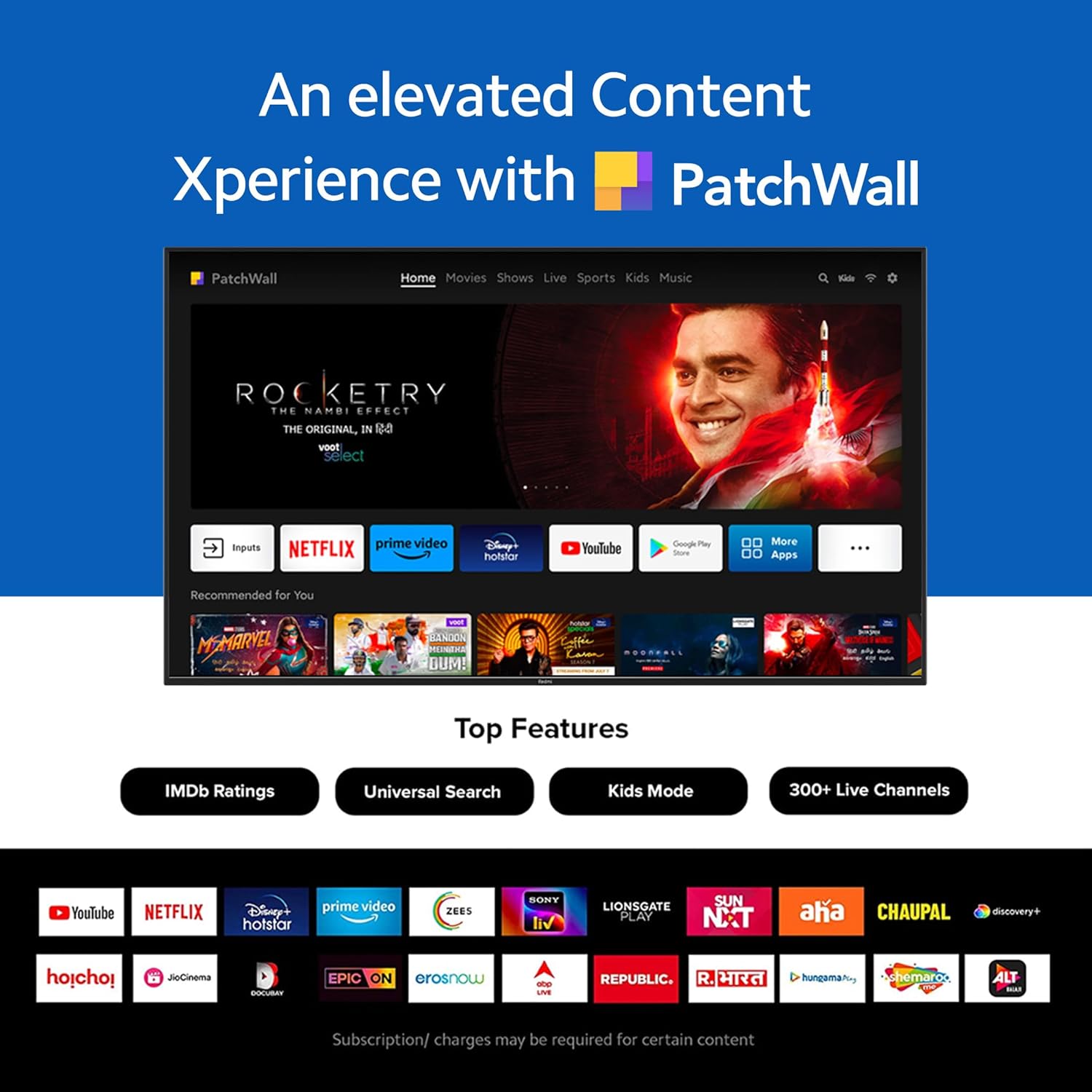
Figure 3: The PatchWall interface displaying various streaming apps and content.

Figure 4: Details on the TV's performance, including 2GB RAM, 16GB Storage, and Quad-core A55 processor.

Figure 5: Android TV 10 interface with Google Play, Ok Google, and Chromecast built-in.
4.4. Konektipitas
The TV offers multiple connectivity options for various devices:
- HDMI2.1: Multiple ports for high-definition audio and video input, supporting eARC.
- USB 2.0: Pikeun nyambungkeun alat panyimpenan éksternal.
- Ethernet: Sambungan jaringan kabel.
- Port optik: kaluaran audio digital.
- Port Audio 3.5mm: Pikeun headphone atanapi speaker éksternal.
- Bluetooth 5.0 with BLE: Wireless connectivity for audio devices and accessories.

Gambar 6: Tukangeun view of the Redmi Smart TV X55 highlighting various input/output ports.

Figure 7: Close-up of the TV's ports, including HDMI 2.1, USB 2.0, Ethernet, Optical, and Headphone Jack.
5. Setup Guide
5.1. Instalasi fisik
Your Redmi Smart LED TV X55 can be installed on a table stand or wall-mounted.
- Pamasangan Stand Méja: Attach the two provided table stand bases to the bottom of the TV using the included screws. Ensure the TV is placed on a stable, flat surface.
- Pamasangan Wall Mount: For wall mounting, use a compatible VESA wall mount kit (sold separately). Follow the instructions provided with the wall mount kit and ensure professional installation for safety.

Figure 8: Dimensions of the Redmi Smart TV X55 for planning installation.
5.2. Daya Awal Hurung sareng Sambungan Jaringan
- Sambungkeun kabel listrik ka TV sareng stopkontak.
- Pencét tombol daya dina kadali jauh atanapi TV.
- Follow the on-screen instructions to select your language, country, and connect to your Wi-Fi network or plug in an Ethernet cable.
- Sign in with your Google account to access Android TV features and the Play Store.
5.3. Setting Up Alexa Control
You can control your Redmi TV hands-free with Alexa devices. Follow these steps to set up Alexa:
Video 1: Instructions on how to set up Alexa control for your Redmi Smart TV.
To enable advanced settings for Alexa control, refer to the following video guide:
Video 2: Guide to enabling advanced settings on Redmi TV for Alexa control.
6. Parentah Operasi
6.1. Kadali jauh
The sleek remote control provides quick access to essential functions:
- Hudang gancang: Hurungkeun TV dina waktu kurang ti 5 detik.
- Bisu gancang: Double-tap the volume down button to mute.
- Setélan gancang: Pencét lila tombol PatchWall pikeun asup ka menu setelan gancang.

Figure 9: The sleek remote control for the Redmi Smart TV X55, highlighting quick access features.
6.2. Navigating the Smart TV Interface
Use the remote's directional pad and OK button to navigate through the Android TV and PatchWall interfaces. Access apps, settings, and content recommendations easily.
6.3. Using Voice Control
Press the dedicated voice assistant button on your remote and speak commands to control your TV, search for content, or interact with connected smart home devices via Ok Google or Alexa.
6.4. App Usage and Casting
The TV supports popular streaming services like Prime Video, Netflix, Disney+ Hotstar, YouTube, and Apple TV. You can also cast content from your mobile devices using Chromecast built-in or Miracast.
7. Pangropéa
- beberesih: Gently wipe the screen and TV body with a soft, dry, lint-free cloth. Do not use abrasive cleaners or solvents.
- Apdet parangkat lunak: Ensure your TV's software is up to date for optimal performance and security. Navigate to Settings > Device Preferences > About > System update to check for updates.
- Manajemén kakuatan: Cabut colokan TV salila badai kilat atawa lamun teu dipaké pikeun période nambahan.
8. Cara ngungkulan
If you encounter issues with your Redmi Smart LED TV X55, refer to the following common problems and solutions:
| Masalah | Solusi anu mungkin |
|---|---|
| Taya kakuatan | Check if the power cable is securely connected and the power outlet is working. Try a different outlet. |
| Henteu aya gambar, tapi aya sora | Ensure the correct input source is selected. Check HDMI cable connections. |
| Henteu aya sora, tapi aya gambar | Check volume levels and mute status. Verify audio output settings (e.g., internal speakers, external soundbar). |
| Kadali jauh teu jalan | Replace batteries. Ensure no obstructions between the remote and the TV. Re-pair the remote if necessary. |
| Masalah sambungan jaringan | Restart your router and modem. Check Wi-Fi password. Try connecting via Ethernet. |
9. Spésifikasi
Detailed technical specifications for the Redmi Smart LED TV X55:
| Fitur | Spésifikasi |
|---|---|
| merek | Redmi |
| Ngaran modél | X55 |
| Ukuran layar | 55 inci |
| Téknologi tampilan | LED-LCD |
| Resolusi | 3840 x 2160 piksel (4K) |
| Refresh Laju | 60 Hz |
| Sistem operasi | Android TV 10 |
| Prosesor | Quad Core A55 |
| Ram | 2 GB |
| Panyimpenan | 16 GB |
| Kaluaran Audio | 30 Watt |
| Téhnologi konektipitas | HDMI, USB, Wi-Fi (2x2 Dual Band), Ethernet, Bluetooth 5.0 |
| Palabuhan HDMI | 3 (HDMI 2.1, eARC compatible) |
| palabuhan USB | 2 (USB 2.0) |
| Viewdina Angle | 178 darajat |
| Rasio Aspék | 16:9 |
| Item Beurat | 15 kg300g |
| Tipe Pamasangan | Wall Mount; Table Mount |
10. Garansi jeung Rojongan
Your Redmi Smart LED TV X55 comes with a standard brand warranty. For specific warranty terms, duration, and service procedures, please refer to the warranty card included in your package or visit the official Redmi support websitus.

Figure 10: Information regarding Mi Extended Warranty, offering benefits like zero documentation, genuine spare parts, cashless repairs, authorized service centers, and on-site support.
For installation services, Amazon will coordinate with the brand within 48 hours of delivery. Scheduled delivery options are available in select cities. Installation charges may apply.


